
AMASE AUDIO Android 14, 4Cores, (3+32GB)
Amaseaudio Android 14 Car Stereo User Manual
Model: Android 14, 4Cores, (3+32GB)
Увод
This manual provides detailed instructions for the installation, operation, and maintenance of your Amaseaudio Android 14 Car Stereo. Please read this manual thoroughly before using the product to ensure proper function and safety.
Производ је завршенview и компатибилност
The Amaseaudio Android 14 Car Stereo is designed to enhance your in-car entertainment and navigation experience. It features a 9-inch display, Quad-Core processor, DSP+, Wireless Apple Carplay, and Android Auto support.
Компатибилни модели:
- BMW E53 X5 (1999-2006)
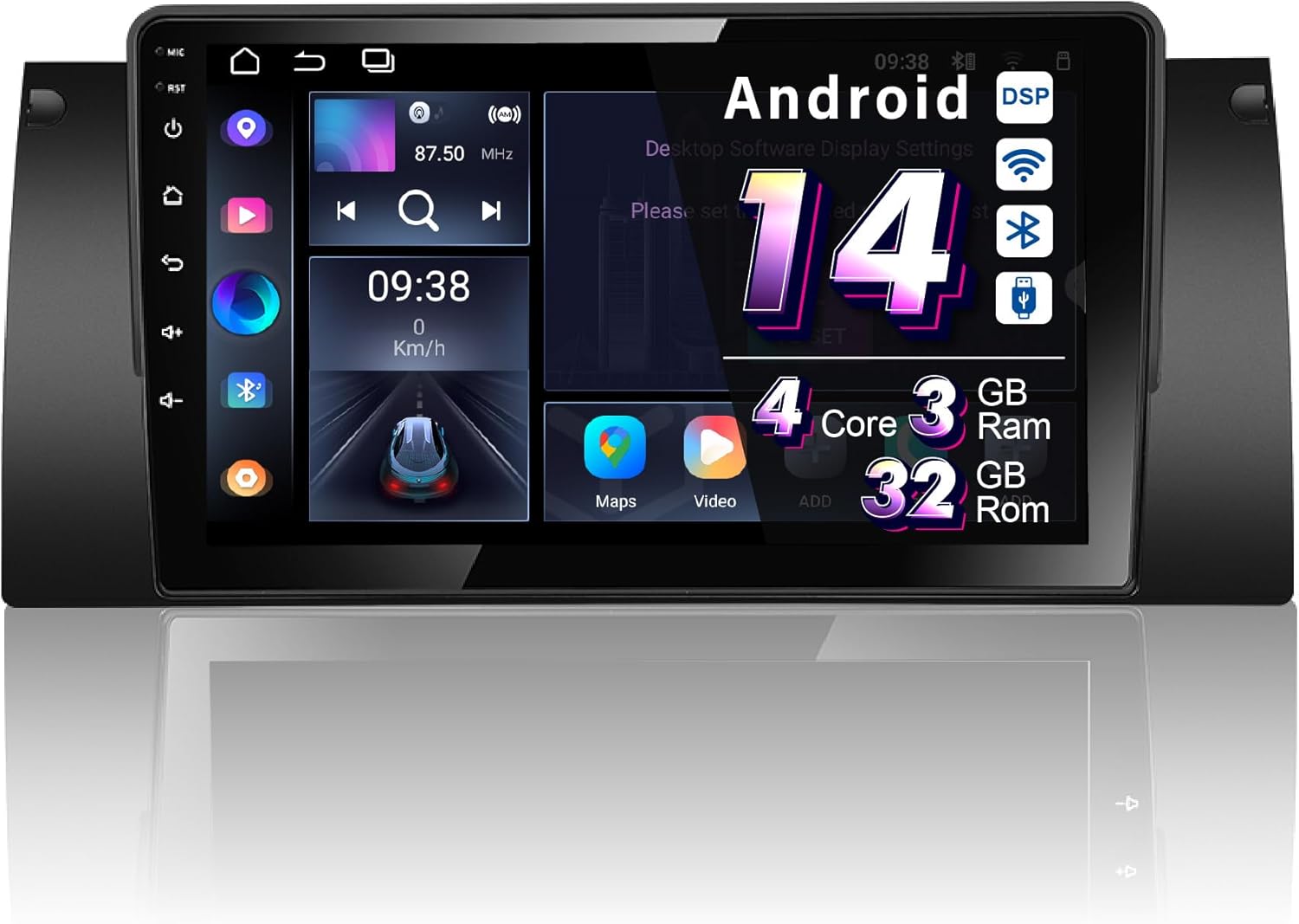
Figure 1: Amaseaudio Android 14 Car Stereo main unit, showcasinг његов елегантан дизајн и велики екран.
Кључне карактеристике
- Оперативни систем: Android 14.0 with Quad-Core processor, 3GB RAM, and 32GB ROM.
- Бежична повезаност: Built-in Wireless Apple Carplay and Android Auto, Bluetooth 5.0, 2.4GHz WiFi, and 4G support.
- Audio Enhancements: Integrated DSP (Digital Sound Processor) for superior audio quality.
- Навигација: Built-in Google Maps for GPS navigation.
- мултимедија: Supports 1080p video playback, split-screen functionality.
- Проширивост: Supports OBDII and rear camera (devices not included).

Слика 2: Завршеноview of key features including Android 14, Wireless Carplay, DSP+, WiFi, 4G, and Bluetooth 5, highlighting the system's core capabilities.
Подешавање и инсталација
Proper installation is crucial for the optimal performance of your car stereo. It is recommended to have the installation performed by a qualified professional.
Провера пре инсталације:
- Ensure your vehicle is a BMW E53 X5 (1999-2006).
- Verify all included accessories are present (refer to the "Accessories" section).
- Искључите акумулатор возила пре почетка инсталације.
Кораци инсталације:
- Remove the original car stereo unit from your BMW E53 X5 dashboard.
- Connect the provided wiring harness to the car stereo and the vehicle's existing wiring. Ensure all connections are secure.
- Connect the GPS antenna, WiFi antenna, and any other external accessories (e.g., rear camera, external microphone).
- Carefully slide the new Amaseaudio car stereo into the dashboard opening until it clicks into place.
- Поново повежите батерију возила и тестирајте функционалност уређаја.
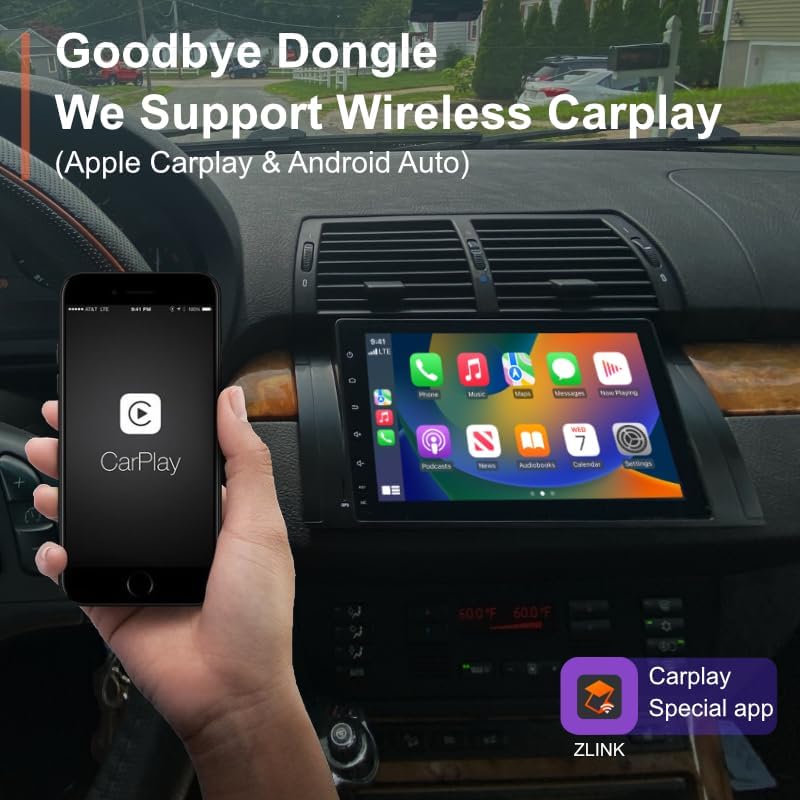
Figure 3: Visual comparison of the BMW E53 X5 dashboard before and after the Amaseaudio car stereo installation, showing the integrated fit.
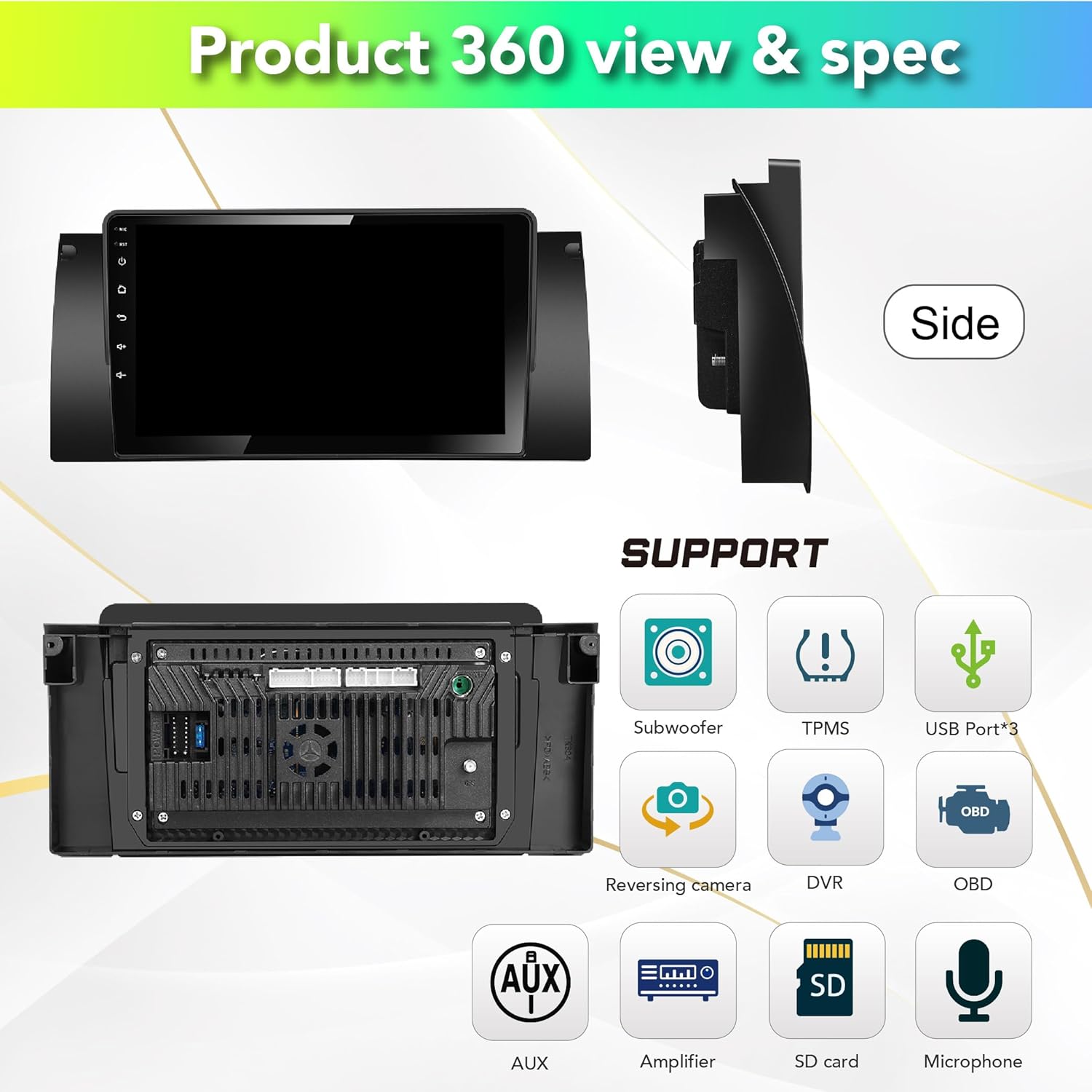
Слика 4: Задња страна view of the car stereo showing various connection ports for subwoofer, TPMS, USB, reversing camera, DVR, OBD, AUX, amplifier, SD card, and microphone.
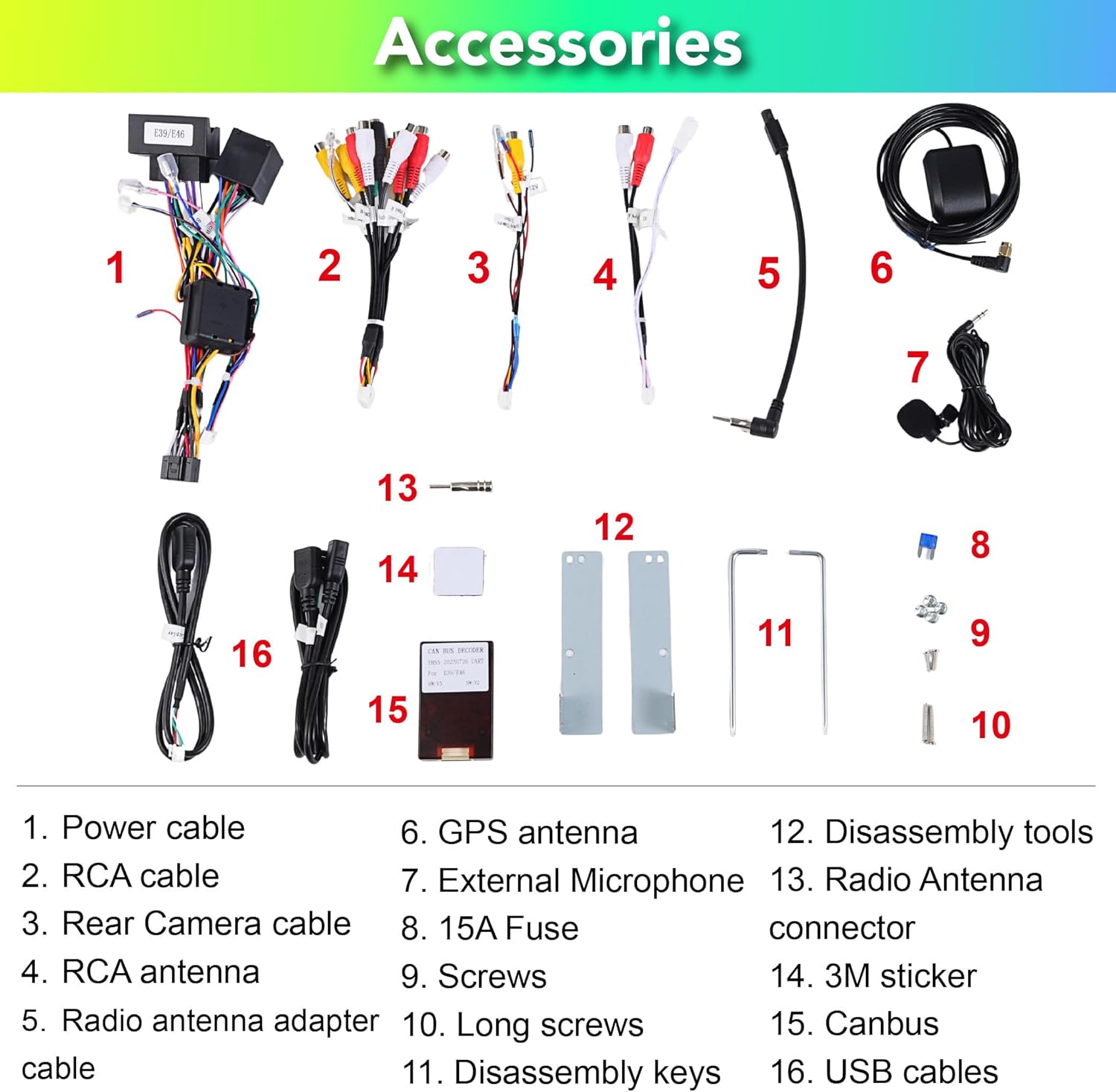
Figure 5: List of included accessories: Power cable, RCA cable, Rear Camera cable, RCA antenna, Radio antenna adapter cable, GPS antenna, External Microphone, 15A Fuse, Screws, Long screws, Disassembly keys, Disassembly tools, Radio Antenna connector, 3M sticker, Canbus, USB cables.

Figure 6: Detailed pin definitions for the 18PIN power supply socket and the 60PIN multi-functional socket, including definitions for AUX video input, audio outputs, USB, and other connections.
Упутство за употребу
System Interface and Navigation:
Upon startup, the unit will display the main Android interface. You can customize themes and button colors. Navigate through applications using the touchscreen.

Слика 7: Прamples of different user interface themes and a selection of pre-installed and downloadable applications like Google Maps, Netflix, and Play Store.
Бежични Apple Carplay и Android Auto:
The unit comes with a built-in Carplay app. Connect your iPhone or Android phone wirelessly via Bluetooth to access navigation, music, messages, and more directly on the stereo screen.

Figure 8: Demonstration of wireless Apple Carplay and Android Auto, showing a smartphone connected to the car stereo display for seamless integration.
Digital Sound Processor (DSP+):
Utilize the built-in DSP for advanced audio adjustments. This includes a 15-band graphic equalizer, preset EQ modes, special sound effects (Equiloudness, Surround system enhancement), and time correction.

Figure 9: Screenshots of the DSP interface, illustrating the 15-band equalizer, special effect adjustments, and time correction settings for optimizing audio output.
Connectivity (4G, WiFi, Bluetooth):
- ВиФи: Connect to available Wi-Fi networks (2.4GHz supported) to access online content and download apps.
- Блуетоотх КСНУМКС: Pair your smartphone for hands-free calling, music streaming, and contact synchronization.
- 4Г: Insert a 4G SIM card (not included) for mobile data connectivity.
ГПС навигација:
The unit comes with built-in Google Maps. Ensure a stable internet connection for real-time traffic updates and accurate navigation.
Остале функције:
- Подели екран: Покрените две апликације истовремено на екрану.
- Подршка за задњу камеру: Connect an aftermarket rear camera for parking assistance (camera not included).
- OBDII подршка: Connect an OBDII scanner (not included) to monitor vehicle diagnostics.
- ФМ/АМ радио: Укључите се у своје омиљене радио станице.
Одржавање
To ensure the longevity and optimal performance of your Amaseaudio car stereo, follow these maintenance guidelines:
- Чишћење: Користите меку, суву крпу за чишћење екрана и уређаја. Избегавајте абразивна средства за чишћење или раствараче.
- Ажурирања софтвера: Regularly check for and install system updates to improve performance and security. The unit supports OTA (Over-The-Air) updates.
- Услови животне средине: Избегавајте излагање уређаја екстремним температурама, директној сунчевој светлости током дужег периода или прекомерној влази.

Figure 10: Screenshot of the system update interface, indicating the current software version and the option to check for new updates to keep the system optimized.
Решавање проблема
Ако наиђете на проблеме са стерео уређајем у аутомобилу, погледајте следеће уобичајене проблеме и решења:
| Проблем | Могући узрок | Решење |
|---|---|---|
| Јединица се не укључује. | Лабав прикључак за напајање, прегорели осигурач, проблем са акумулатором возила. | Check power cables and connections. Inspect the 15A fuse. Ensure vehicle battery is charged. |
| Нема излаза звука. | Incorrect wiring, volume too low, mute enabled, speaker issues. | Verify speaker wiring. Increase volume. Check if mute is active. Test with different audio sources. |
| GPS сигнал је слаб или нетачан. | GPS антена није правилно инсталирана или је заклоњена. | Ensure GPS antenna is placed in an unobstructed location (e.g., dashboard). Check antenna connection. |
| Бежични Carplay/Android Auto се не повезује. | Bluetooth not enabled, phone not paired, app issues. | Ensure Bluetooth is on for both devices. Re-pair the phone. Restart the Carplay/Android Auto app on the unit and phone. |
Ако проблем и даље постоји након покушаја ових решења, обратите се корисничкој подршци.
Спецификације
| Феатуре | Детаљ |
|---|---|
| Број модела | Android 14, 4Cores, (3+32GB) |
| Оперативни систем | Андроид 14.0 |
| Процесор | Куад-Цоре |
| РАМ | 3ГБ |
| РОМ | 32ГБ |
| Величина екрана | 9 инча |
| Повезивање | Bluetooth 5.0, Wi-Fi (2.4GHz), 4G |
| Посебне карактеристике | DSP+, Wireless Carplay, Android Auto |
| Мап Типе | Online map (Google Maps built-in) |
| Тежина артикла | 1.87 фунти |
| Димензије пакета | 13.39 к 11.81 к 4.21 инча |
| Земља порекла | Хонг Конг |
Гаранција и подршка
Информације о гаранцији:
The Amaseaudio Android 14 Car Stereo comes with a Једна година гаранције. This warranty covers defected parts, excluding the screen. Human-caused damage is not included under this warranty.
Корисничка подршка:
For technical assistance, troubleshooting, or warranty claims, please contact Amaseaudio customer support through the retailer's platform or the official brand webсајт. Молимо вас да припремите број модела производа и детаље о куповини када контактирате подршку.