
1. Производ је готовview
The BSTUOKEY SCR02D is a compact, waterproof Mini RFID Proximity Card Reader designed for integration into access control systems. It supports 125Khz EM-ID cards and provides Wiegand 26/34 output. This reader functions solely for reading cards and requires connection to an external access control panel or door access controller, as it does not have an internal relay or user capacity.
- Материјал: ABS shell for durability.
- Инсталација: Designed for hidden installation.
- Индикатори: Features an LED working light display.
- Величина: Mini size, approximately 2cm x 2cm x 2.5cm.
- Водоотпорна оцена: ИП68 водоотпоран.
- Подршка за картице: 125Khz EM-ID cards only (does not support HID, Cobra, APCiK, etc.).
- Излаз: Supports Wiegand 26-Bit and Wiegand 34-Bit.
- Повратне информације: Built-in LED (double color) and loud speaker (buzzer).

Слика 1: Предња страна view of the BSTUOKEY SCR02D Mini RFID Proximity Card Reader, showing its compact design and card icon.

Figure 2: The compact dimensions of the RFID reader, measuring approximately 2.5cm in diameter and 2cm in depth.
2. Техничке спецификације
| Феатуре | Спецификација |
|---|---|
| Оператинг Волtage | ДЦ 12В |
| Consumed Current | 0-100мА |
| Подржане картице | TK4001, EM4100/M1 (125Khz EM-ID cards) |
| Реад Ранге | 0mm-100mm (up to 8cm, dependent on card and environment) |
| Reader Interval | Мање од 0.5С |
| Излазни формат | Wiegand 26 / Wiegand 34 (user selectable) |
| Трансмиссион Дистанце | WG26/34 standard |
| Димензије | 25 мм к 25 мм к 20 мм (0.98 к 0.98 к 0.79 инча) |
| Ватерпрооф Граде | ИП68 |
| Тежина артикла | 0.96 унци |
3. Водич за инсталацију
The SCR02D Mini RFID Proximity Card Reader is designed for hidden installation and must be connected to an access control panel or door access controller. It cannot function as a standalone unit.
3.1 Дијаграм ожичења и везе
Refer to the wiring diagram below for proper connection of the card reader to your access control system. Ensure all connections are secure and correctly matched to prevent damage to the device or system.
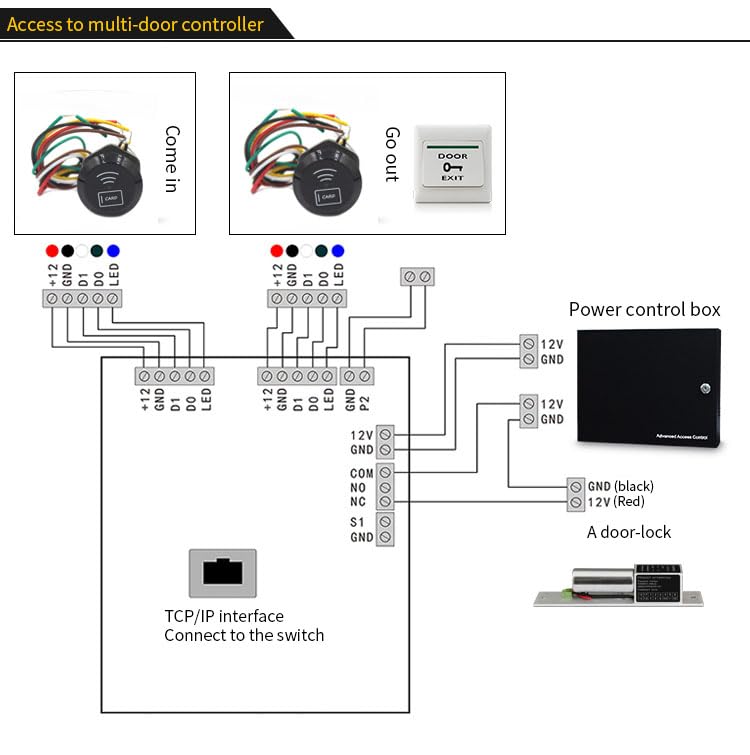
Figure 3: Line sequence chart showing wire colors and their corresponding functions for the RFID reader.
| Боја жице | Функција |
|---|---|
| Црвени | +12V (Power Input) |
| Црно | ГНД (уземљење) |
| Бела | DATA1 (Wiegand Data 1) |
| Зелена | DATA0 (Wiegand Data 0) |
| Жута | ЛЕД контрола |
| Браон | Wiegand 26/34 Selection |
Напомена: The brown wire is used to select the Wiegand output format. Consult your access control panel's documentation for specific Wiegand input requirements.
3.2 Connecting to a Multi-Door Controller
When integrating with a multi-door access control system, connect the reader's wires to the corresponding terminals on the controller. Ensure power is supplied correctly to both the reader and the controller.
Слика 4: Прample wiring for connecting the RFID reader to a multi-door access control panel, including power control box and door lock connections.
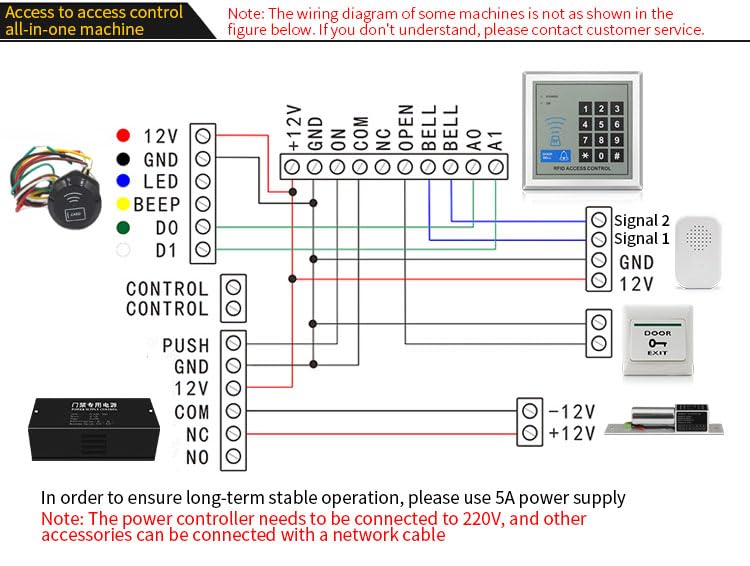
3.3 Connecting to an All-in-One Access Control Machine
For all-in-one access control machines, the wiring may vary. Always refer to the specific wiring diagram provided with your access control machine. A 5A power supply is recommended for long-term stable operation. The power controller typically connects to 220V, and other accessories can be connected via a network cable.

Слика 5: Прample wiring for connecting the RFID reader to an all-in-one access control machine, showing connections for power, data, LED, and buzzer.
4. Операција
The BSTUOKEY SCR02D reader is designed for simple operation, primarily focusing on reading 125Khz EM-ID cards and transmitting the data via Wiegand protocol.
4.1 Card Reading
- Ensure the reader is properly installed and powered.
- Present a compatible 125Khz EM-ID card or key fob within the reader's range.
- The reader's LED indicator will typically change color (e.g., from red to green) and a buzzer sound may be emitted, indicating a successful read.
- The card data will be transmitted to the connected access control panel via Wiegand 26 or Wiegand 34 output.
The typical read range for a standard EM4100 card is approximately 2cm, with a maximum range of up to 8cm depending on the card type and environmental factors.
4.2 Wiegand Output Selection
The reader supports both Wiegand 26-Bit and Wiegand 34-Bit output formats. The selection is typically made by connecting or disconnecting the brown wire, as indicated in the wiring diagram. Refer to your access control system's requirements to set the correct Wiegand format.
Video 1: Demonstration of the BSTUOKEY Mini RFID Reader, showing unboxing, Wiegand output, card reading (125kHz), read range, and waterproof testing. This video illustrates the product's features and basic functionality.
5. Одржавање
The BSTUOKEY SCR02D Mini RFID Proximity Card Reader is designed for durability and minimal maintenance.
- Водоотпорни дизајн: The reader features an IP68 waterproof rating, achieved through a glue filling process, making it suitable for outdoor and harsh environments.
- Чишћење: Clean the surface of the reader with a soft, damp cloth. Avoid using abrasive cleaners or solvents that could damage the housing.
- инспекција: Periodically inspect the wiring for any signs of wear or damage. Ensure all connections remain secure.

Figure 6: The RFID reader showing its robust construction and wired connections, highlighting its suitability for various installations.
КСНУМКС. Решавање проблема
If you encounter issues with your BSTUOKEY SCR02D Mini RFID Proximity Card Reader, refer to the following common problems and solutions:
- Reader not responding to cards:
- Провера напајања: Ensure the reader is receiving a stable DC 12V power supply.
- Компатибилност картице: Verify that you are using a 125Khz EM-ID card. This reader does not support other card types like HID, Cobra, or APCiK. Some cards marked "EM-ID" may be compatible cards, not true EM-ID, which can cause issues.
- Ожичење: Check all wiring connections (Power, GND, DATA0, DATA1, LED) for correctness and secure contact.
- Опсег читања: Ensure the card is presented within the effective read range (typically within 2-8cm).
- No data output to access control panel:
- Виеганд формат: Confirm that the reader's Wiegand output (26-Bit or 34-Bit) matches the input requirements of your access control panel. Adjust using the brown wire if necessary.
- Веза контролера: Ensure the DATA0 and DATA1 wires are correctly connected to the access control panel's Wiegand input terminals.
- Panel Functionality: Verify that the access control panel itself is powered on and functioning correctly.
- LED not lighting up or incorrect color:
- LED Wire: Check the connection of the yellow LED control wire.
- Снага: Обезбедите стабилно напајање.
If problems persist after following these steps, please contact your supplier or a qualified technician for further assistance.
7. Подршка и контакт информације
For technical support, warranty inquiries, or further assistance with your BSTUOKEY SCR02D Mini RFID Proximity Card Reader, please contact the manufacturer or your point of purchase.
- Произвођач: BSTUO
- продавац: BSTUO Access Control System
- Амазон продавница: Visit the BSTUOKEY Store on Amazon
Please have your product model number (SCR02D) and purchase details ready when contacting support.