
Увод
Хвала вам на куповиниasing the Yaheetech Height Adjustable White Art Desk. This manual provides essential information for the safe and efficient assembly, operation, and maintenance of your new art desk. Please read this manual thoroughly before use and retain it for future reference.

Image: The Yaheetech Height Adjustable White Art Desk, featuring a white tilting tabletop, black metal frame, two fabric drawers, a mesh shelf, and a black stool. An artwork is displayed on the tilted surface, and art supplies are visible on the side tray.
Безбедносне информације
Да бисте осигурали безбедан рад и спречили оштећења, придржавајте се следећих безбедносних упутстава:
- Капацитет тежине: Do not overload the tabletop beyond 220 lb (100 kg). Exceeding this limit may cause structural damage or injury.
- Скупштина: Assembly requires two people. Ensure all components are securely fastened before use.
- Стабилност: Place the desk on a flat, stable surface to prevent tipping.
- Померање стола: When moving the desk, ensure the tabletop is flat and all drawers are secured to prevent items from falling.
- Деца и кућни љубимци: Keep children and pets away from the desk during assembly and adjustment to prevent accidents.
Садржај пакета
Молимо вас да проверите да ли су све компоненте присутне пре почетка монтаже. Ако неки делови недостају или су оштећени, обратите се корисничкој подршци.
- Height Adjustable White Art Desk Frame and Tabletop Components
- столица
- Фиоке за тканине (2)
- Detachable Tabletop Side Tray
- Assembly Hardware (screws, bolts, tools if included)
- Упутство за употребу (овај документ)
Подешавање и монтажа
Assembly of the Yaheetech Art Desk is required and is recommended for two people. While specific step-by-step instructions are typically provided in a separate assembly guide, the general process involves:
- Распакивање: Пажљиво распакујте све компоненте и положите их на чисту, меку површину како бисте спречили огреботине.
- Склоп оквира: Assemble the metal frame components according to the provided diagrams, ensuring all connections are secure.
- Tabletop Attachment: Attach the main tabletop and the side slide-out tabletop to the assembled frame.
- Drawer and Accessory Installation: Install the fabric drawers into their designated slots and attach the detachable side tray and pencil ledge.
- Склапање столице: Assemble the accompanying stool.
- Коначна провера: Before use, double-check all screws and bolts to ensure they are tightened.

Image: Dimensional diagram of the art desk and stool, indicating overall width, depth, height, and specific measurements for the tabletop, drawers, and stool.

Слика: Детаљна views highlighting key features such as the retractable side desktop, anti-skid base, anti-scratch foot pads, integrated pen holder, and the adjustable lift mechanism.
Упутство за употребу
Your Yaheetech Art Desk is designed with versatility in mind. Here’s how to utilize its key features:
1. Tabletop Angle Adjustment
The main tabletop can be adjusted from 0 to 60 degrees, allowing for various activities from writing to drawing.
- За подешавање: Gently lift the front edge of the tabletop. The internal mechanism will allow you to set it to your desired angle.
- Flat Position (0°): Ideal for general desk use, laptop work, or reading.
- Slight Tilt (0-20°): Suitable for writing and comfortable reading.
- Medium Tilt (20-40°): Optimal for reading and light sketching.
- Steep Tilt (40-60°): Best for drafting, drawing, and painting, providing an ergonomic working posture.
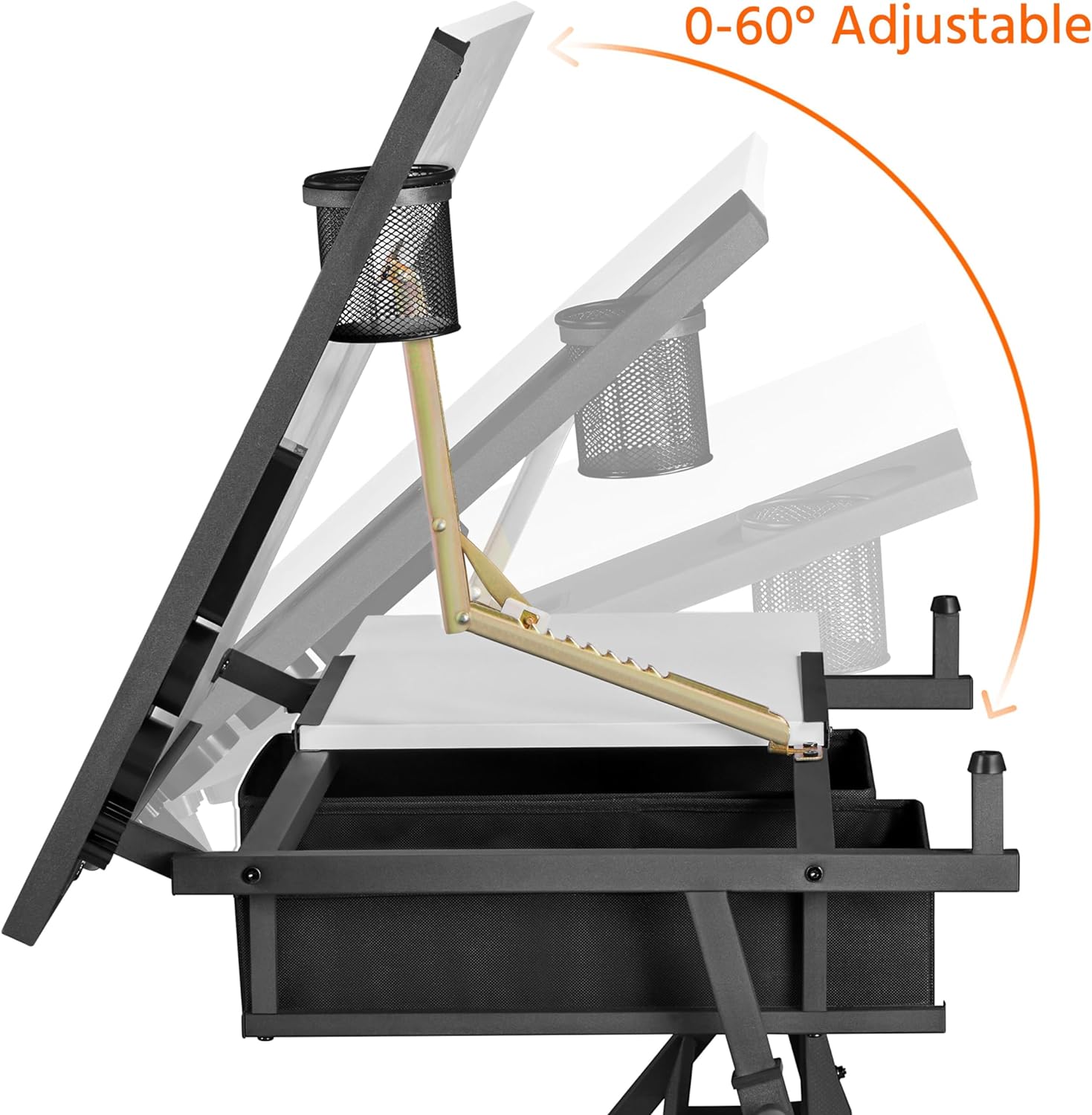
Image: Illustration demonstrating the tabletop's adjustable tilt range from 0 to 60 degrees, with a pen holder attached.

Image: Visual guide for optimal tilt angles: 0-20° for writing, 20-40° for reading, and 40-60° for drawing.
2. Подешавање висине
The desk's height can be adjusted from 27.5 inches (minimum) to 36.5 inches (maximum) to suit your preference, whether sitting or standing.
- За подешавање: Loosen the adjustment knobs on the legs, slide the desk to the desired height, and then securely tighten the knobs.
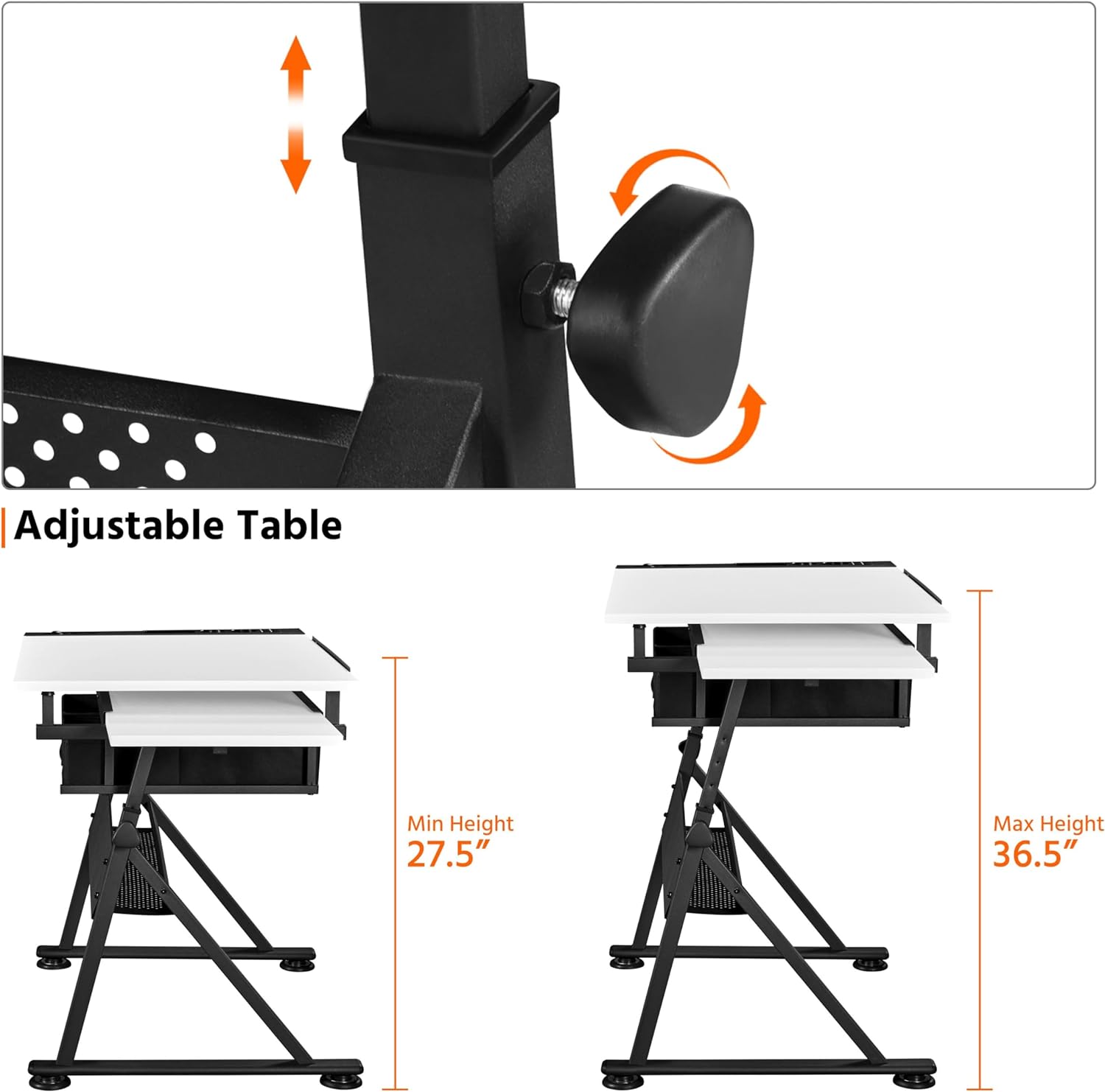
Image: Detail of the adjustable height mechanism, showing the knob and sliding leg components.

Image: A split image illustrating the desk's versatility as an art desk (tilted) and a workstation (flat), emphasizing its adjustable angle, height, and retractable tabletop.
3. Slide-out Side Top
A convenient 23.6 x 15 inch (60 x 38 cm) surface on the left side can be pulled out for additional workspace or storage.
- Да бисте продужили: Gently pull the side tabletop outwards from beneath the main tabletop.
- Употреба: Ideal for placing a laptop, tablet (for reference), palettes, or documents.
- За повлачење: Push the side tabletop back under the main tabletop when not in use to save space.

Image: A visual representation of the retractable side tabletop, indicating its ability to slide out for extra space.
4. Handy and Organized Storage
The desk includes multiple storage options to keep your workspace tidy:
- Detachable Tabletop Side Tray: Located on the right side, this tray has separate slots for various stationery items like pens, brushes, and cups.
- фиоке од тканине: Two fabric drawers beneath the tabletop provide discreet storage for supplies.
- Extra Open Shelf: A mesh shelf below the drawers offers additional space for larger items like paper rolls or paint cans.

Слика: Крупни план views of the integrated stationery organizer, the two fabric drawers with the open mesh shelf below, and the mechanism for the adjustable pencil ledge.
5. Flexible Pencil Ledge
An adjustable metal pencil ledge prevents items from rolling off when the tabletop is tilted.
- Да се ангажује: Lift the pencil ledge into the upright position. It will lock into place.
- За повлачење: Use the special adjustment fitting to loosen and lower the pencil ledge, allowing for a flat desktop surface when not needed.
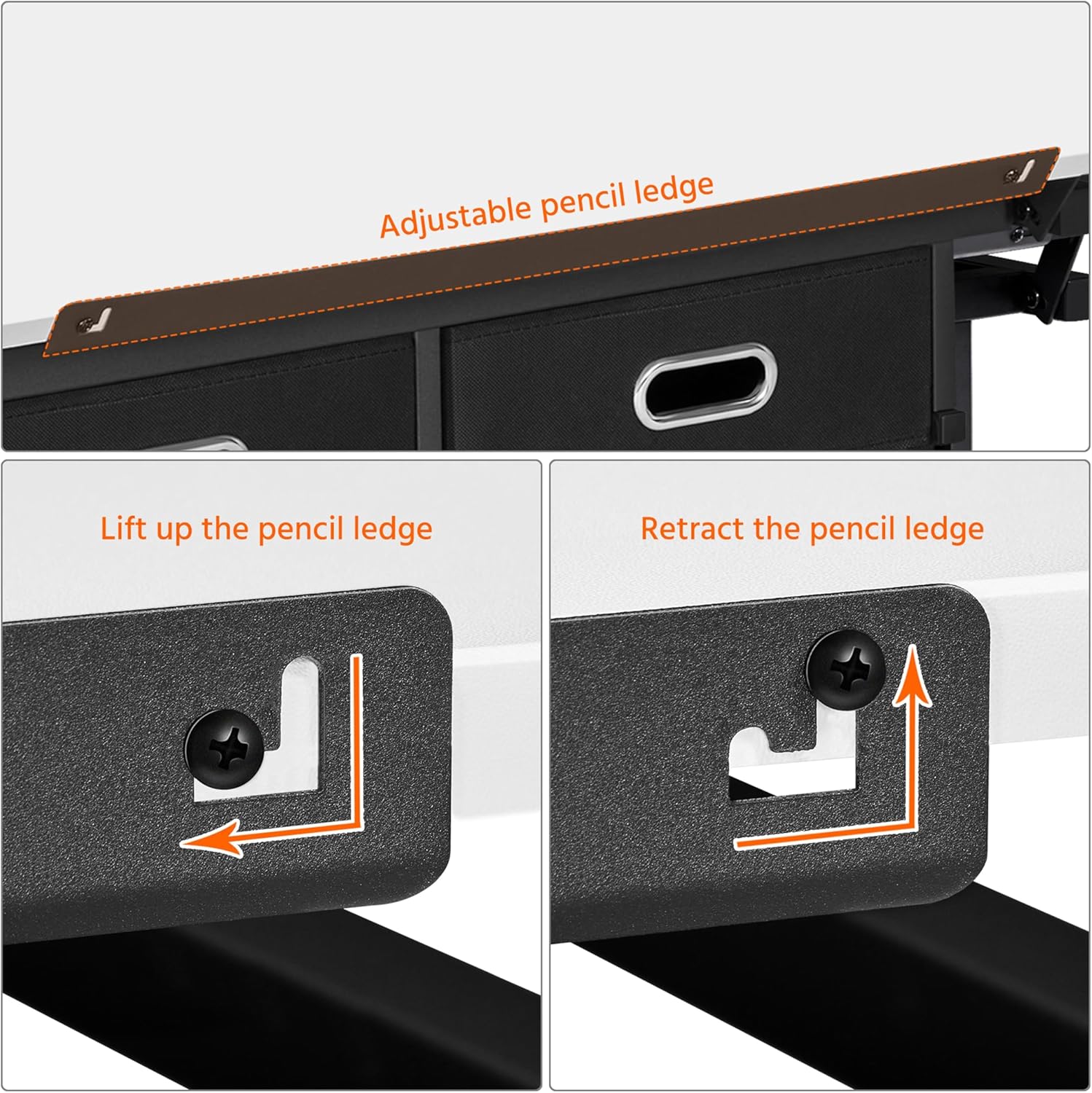
Image: Instructions showing the lifting and retracting mechanism of the adjustable pencil ledge.
Одржавање
Proper maintenance will extend the life of your art desk:
- Чишћење: Обришите површине меком, дamp крпом. Избегавајте абразивна средства за чишћење или јаке хемикалије које би могле оштетити завршну обраду.
- Просипање: Clean up spills immediately to prevent staining, especially on the MDF desktop with veneer.
- хардвер: Periodically check all screws and bolts and tighten them if necessary to maintain stability.
- Покретних делова: Ensure the tilting mechanism and height adjustment components are free of debris for smooth operation.
Решавање проблема
If you encounter any issues with your Yaheetech Art Desk, refer to the following common problems and solutions:
| Проблем | Могући узрок | Решење |
|---|---|---|
| Сто се клима или је нестабилан. | Лабав монтажни хардвер; нераван под. | Ensure all screws and bolts are tightened. Adjust the foot pads on the base to level the desk on uneven surfaces. |
| Tabletop does not tilt smoothly. | Mechanism obstructed or dirty. | Check for any debris or foreign objects obstructing the tilting mechanism. Clean the moving parts if necessary. |
| Height adjustment is difficult. | Adjustment knobs are too tight; mechanism is stiff. | Loosen the adjustment knobs sufficiently. If stiff, apply a small amount of silicone lubricant to the sliding parts. |
| Side slide-out top is stuck. | Obstruction in the sliding track. | Check the track for any debris or items blocking the movement. Ensure it is aligned correctly. |
Ако проблем и даље постоји, обратите се корисничкој подршци компаније Yaheetech за додатну помоћ.
Спецификације
Detailed specifications for the Yaheetech Height Adjustable White Art Desk:
- Назив модела: Арт Деск
- Бренд: Иахеетецх
- Боја: Бела
- Стил: Модерна
- Димензије производа (Д x Ш x В): 23.6 cm x 47.5 cm x 36.5 cm
- Тежина артикла: 51.8 фунти
- Основни материјал: Метал
- Врх Врста материјала: Wood (MDF with waterproof and scratch-proof veneer)
- Тип завршетка: Wood (Veneer)
- Посебна карактеристика: Adjustable Height, Tilting Tabletop
- Тип собе: Classroom, Home, Office
- Препоручена употреба: Drafting, Drawing, Painting, Writing, Reading, Workstation
- Укључене компоненте: Height Adjustable White Art Desk, Stool
- Препорука за максималну тежину: 220 фунти (100 кг)
- Препоручени број људи за скупштину: 2
- Број фиока: 2 (fabric)
- Број полица: 1 (open mesh shelf)
- Максимални угао нагиба: 60 степени
- Минимална висина: 27.36 инча (69.5 цм)
- Максимална висина: 36.5 инча
- Дужина дијагонале радне површине: 53.45 инча
- Потребна монтажа: Да
Гаранција и подршка
For warranty information or technical support, please contact Yaheetech customer service. You can typically find contact details on the Yaheetech official webсајту или преко продавца где сте купили производ.
For more information about Yaheetech products, visit their official store: Јахитек продавница на Амазону.