
1. Увод
The Amazon Basics Wi-Fi Smart Plug allows you to control connected appliances remotely using the Alexa app or voice commands. This smart plug is designed for indoor use with European standard (Schuko) outlets and is exclusively compatible with Alexa. It provides a convenient way to automate your home by scheduling devices and creating routines.
видео: 360 степени view of the Amazon Basics Wi-Fi Smart Plug, showcasing its compact design and European plug type. This video provides a visual overview of the product's physical appearance.
2. Безбедносне информације
- Само за унутрашњу употребу: This smart plug is designed for indoor use in dry locations. Do not use it outdoors or in damp окружења.
- Електрична оцена: Ensure that the connected appliance's power requirements do not exceed the smart plug's maximum load capacity (refer to specifications).
- уземљење: Always plug the smart plug into a grounded electrical outlet.
- Деца и кућни љубимци: Чувати ван домашаја деце и кућних љубимаца.
- Растављање: Не покушавајте да растављате или модификујете уређај. То може поништити гаранцију и представљати безбедносне ризике.
- Чишћење: Искључите уређај из струје пре чишћења. Користите суву крпу; немојте користити течна средства за чишћење.
3. Садржај пакета
- 1 x Amazon Basics Wi-Fi Smart Plug (Model: HPP-C11N-WB)
4. Карактеристике производа
- даљински управљач: Program connected appliances to turn on and off automatically, or control them remotely via the Alexa app when you are away from home.
- Компактан дизајн: The plug fits perfectly into one outlet, leaving remaining outlets and ports free. Ideal for multiple appliances such as Christmas lights, heaters, fans, lamps, kettles, coffee machines, and more.
- Customizable Routines: Schedule the smart plug to turn on and off at set times, with a voice command, or at sunrise and sunset.
- No Third-Party Apps or Hubs Required: Set up and manage connected devices directly in the Alexa app; no additional smart hubs or third-party apps are needed.
5. Подешавање
Follow these steps to set up your Amazon Basics Wi-Fi Smart Plug:
- Укључите паметни утикач: Insert the Amazon Basics Wi-Fi Smart Plug into a standard European electrical outlet. Ensure it is securely seated.
- Open the Alexa App: Download and open the Amazon Alexa app on your smartphone or tablet. Make sure your device is connected to the same 2.4 GHz Wi-Fi network that your smart plug will use.
- Откријте уређај: The Alexa app should automatically detect the new smart plug. If not, tap the 'Devices' icon, then the '+' icon, and select 'Add Device'. Choose 'Plug' and follow the on-screen instructions.
- Комплетно подешавање: Once discovered, you can name your smart plug (e.g., "Living Room Lamp") and assign it to a room. This makes it easier to control with voice commands.
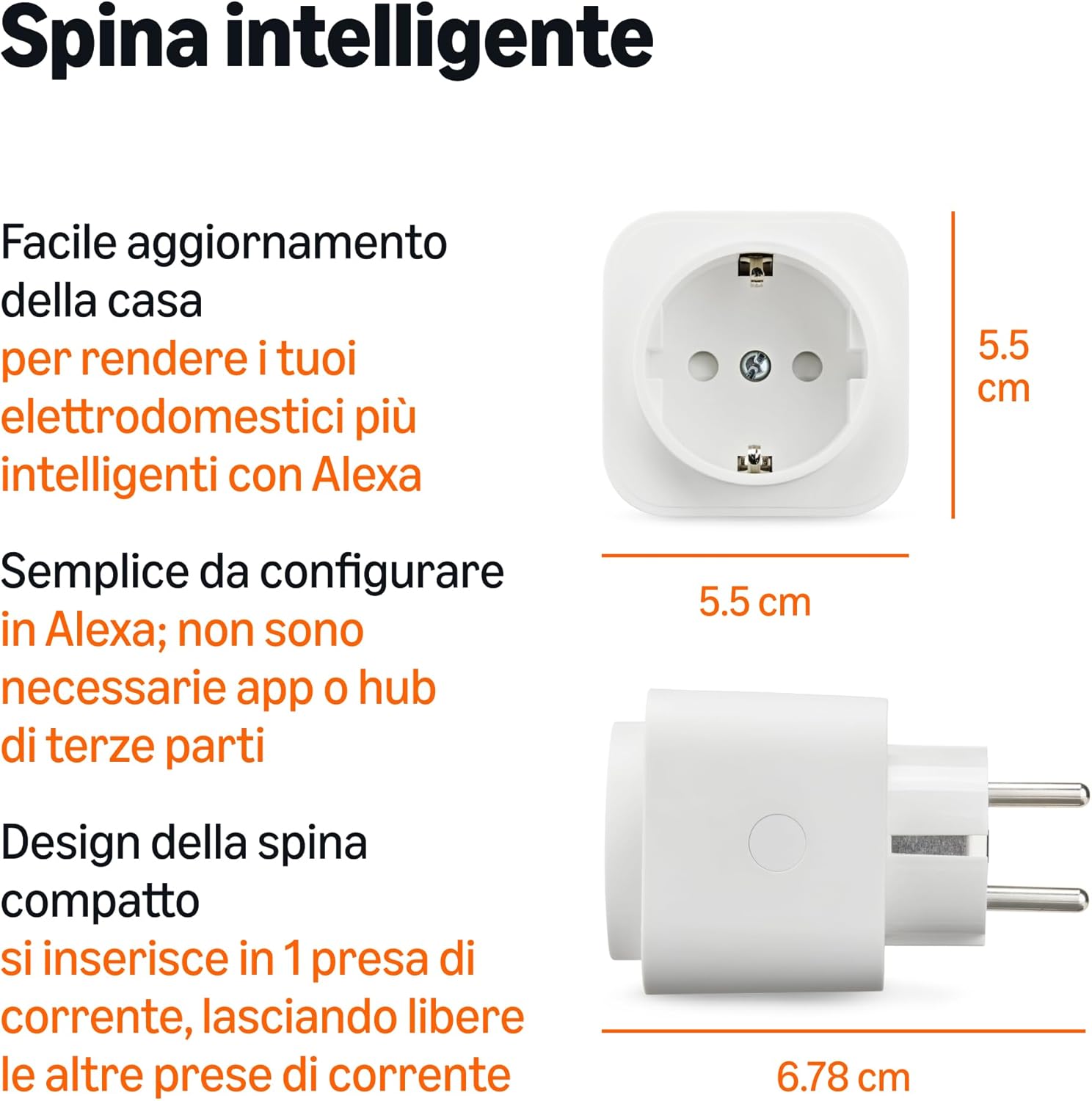
слика: The Amazon Basics Wi-Fi Smart Plug with its dimensions labeled, highlighting its compact form factor which measures 5.5 cm x 5.5 cm x 6.78 cm.
6. Упутство за употребу
Once your smart plug is set up, you can control it in several ways:
6.1. Управљање гласом
Use your Alexa-enabled device (e.g., Echo Dot, Echo Show) to control the smart plug with voice commands. Simply say:
- "Alexa, turn on [device name]."
- "Alexa, turn off [device name]."
- "Alexa, turn on the lights." (If the plug is named 'lights')

слика: A family using voice commands with Alexa to control a smart appliance, illustrating hands-free operation.
6.2. Alexa App Control
You can control your smart plug from anywhere using the Alexa app:
- Отворите апликацију Алека.
- Go to the 'Devices' tab.
- Select your smart plug from the list.
- Tap the power icon to turn it on or off.

слика: A person using the Alexa app on a smartphone to control devices remotely, emphasizing the convenience of managing appliances from any location.
6.3. Creating Routines
Automate your devices by setting up routines in the Alexa app:
- Отворите апликацију Алека.
- Go to the 'More' tab and select 'Routines'.
- Tap the '+' icon to create a new routine.
- Set a trigger (e.g., a specific time, a voice command, sunrise/sunset).
- Add an action (e.g., turn on/off your smart plug).

слика: An Amazon Echo Dot and a smart plug controlling a lamp, demonstrating how to set up routines for automatic device operation.
6.4. Компатибилни уређаји
The smart plug works with a variety of household devices:

слика: Visual representation of devices compatible with the smart plug, including lamps, coffee machines, kettles, fans, heaters, humidifiers, and festive lighting.
7. Одржавање
- Чишћење: To clean the smart plug, unplug it from the wall outlet. Use a soft, dry cloth to wipe the exterior. Do not use abrasive cleaners or immerse the device in water.
- Складиштење: When not in use for extended periods, store the smart plug in a cool, dry place away from direct sunlight and moisture.
- инспекција: Periodically inspect the smart plug for any signs of damage, such as cracks or frayed wires. If damage is found, discontinue use immediately.
КСНУМКС. Решавање проблема
If you encounter issues with your smart plug, try the following solutions:
| Проблем | Решење |
|---|---|
| Smart plug not connecting to Wi-Fi. | Ensure your Wi-Fi network is 2.4 GHz. Move the smart plug closer to your Wi-Fi router. Restart your router and try the setup process again. Check if your Wi-Fi password is correct. |
| Device not responding to Alexa commands. | Verify that your Alexa-enabled device is online and connected to the internet. Check the device name in the Alexa app and use that exact name in your voice commands. Ensure the smart plug is powered on. |
| Smart plug is offline in the Alexa app. | Unplug the smart plug from the wall outlet, wait 10 seconds, and plug it back in. Check your Wi-Fi connection. If the issue persists, try re-adding the device in the Alexa app. |
| Connected appliance is not turning on/off. | Ensure the appliance itself is switched on and functioning correctly when plugged directly into a wall outlet. Verify that the smart plug is receiving power. |
9. Спецификације
| Феатуре | Детаљ |
|---|---|
| Бранд | Амазон Басицс |
| Модел | HPP-C11N-WB |
| Боја | Бела |
| Волtage | 240 Волт |
| Материјал | Пластика |
| Тип конектора | European Standard Plug (Schuko) |
| Плуг Типе | Тип Ф |
| Цертификати | CE |
| Земља порекла | Тајланд |
| УПЦ | 840324412918 |
10. Гаранција и подршка
This Amazon Basics product is covered by a limited warranty. For detailed warranty information, please refer to the Amazon Basics warranty policy available on the Amazon website or contact Amazon customer support.
For technical support, troubleshooting assistance, or to report any issues with your smart plug, please visit the Amazon customer service portal or contact their support team directly. You can typically find support options through your Amazon account or by searching for "Amazon customer service" online.