
Увод
The DROK DC-DC Buck Converter is a high-quality power module designed for reliable power supply across a wide range of electronic devices and projects. It features excellent performance, versatility, and multiple protection functions to ensure safe and stable operation. This manual provides detailed instructions for its setup, operation, and maintenance.
Мере предострожности
- Always ensure correct wiring before applying power. Incorrect connections can damage the module or connected devices.
- Немојте прекорачити наведени улазни волуменtagе, оутпут волtage, or current limits.
- Operate the module in a well-ventilated area to prevent overheating.
- Avoid touching the module components while it is powered on, as some parts may become hot.
- Ако је излазна волtage cannot be set or there is no response when connected to the power supply, check the wiring for errors.
Карактеристике производа
- Дигитална контрола: Precise adjustment of output voltagе и струја.
- Wide Input/Output Range: Input 6-70V, Output 0-60V.
- Велика излазна снага: Up to 20A and 1200W.
- Вишеструке заштитне функције: Includes input undervoltage protection (LVP), output overvoltage protection (OVP), output overcurrent protection (OCP), overpower protection, and overtemperature protection.
- Висококвалитетна градња: Utilizes high-quality power devices and precision operational amplifiers for stable performance.
- Ефикасно одвођење топлоте: Built-in smart temperature-controlled cooling fan and external protection MOSFETs.
- ЛЦД екран: Clear display of output status, voltage, current, power, capacity, energy, and time.
- Интерфејс прилагођен кориснику: Easy parameter adjustment via buttons and encoder.
Product Components and Dimensions
Familiarize yourself with the various components of the buck converter module.

слика: Module Component Diagram. This diagram illustrates the main parts of the buck converter, including the smart temperature control fan, heat dissipation fins, input/output terminals (positive and negative), 10K NTC external temperature sensor interface, DIP switches for fixed voltage settings, button connection terminal, display connection terminal, and power switch.

слика: Product Dimensions. This image provides the physical dimensions of the main converter board (110mm x 73mm x 50mm) and the separate display unit (79mm x 43mm x 26mm).
Кључне компоненте:
- Улазни прикључци: For connecting the DC input power source (6-70V).
- Излазни прикључци: For connecting the load (0-60V).
- Прекидач: To turn the module on/off.
- Вентилатор за хлађење: Smart temperature-controlled fan for heat dissipation.
- ДИП прекидачи: Used for setting fixed output voltages when the module is used as a standalone board.
- Дугме енкодера: For adjusting parameters and navigating display modes.
- СВ дугме: For switching display parameters.
- ЛЦД екран: Приказује јачину звука у реалном временуtagе, струја, снага и други параметри.
Спецификације

слика: Product Specifications. This table details the electrical and operational characteristics of the buck converter.
| Параметар | Валуе |
|---|---|
| Улазни волtage | 6.0 В до 70 В |
| Оутпут Волtage | 0.0 В до 60 В |
| Излазна струја | 20А (Мак) |
| Излазна снага | 0W to 1200W (Max) |
| Заштита улаза | Оверволtagе Протецтион, Ундерволtagе Заштита |
| Излазна заштита | Оверволtage Protection, Overcurrent Protection, Overpower Protection, Overtemperature Protection |
| Волtage Measurement Resolution | 0.01В |
| Тренутна резолуција подешавања | 0.01А |
| Типично таласање излаза | 100мВ ВПП |
| Cooling Fan ON Condition | Current > 2A, Power > 50W, Temperature > 50°C |
| Cooling Fan OFF Condition | Current < 1.5A, Power < 45W, Temperature < 45°C |
Подешавање и инсталација
1. Ожичење
- Connect your DC input power source (6-70V) to the Input Positive (+) и Input Negative (-) терминали.
- Connect your load to the Output Positive (+) и Output Negative (-) терминали.
- Уверите се да су сви прикључци безбедни и исправни пре него што укључите напајање.
2. DIP Switch Settings for Fixed Output Voltage
The module features DIP switches for setting specific fixed output voltages when used as a standalone board. This is useful for applications requiring a constant, predefined voltage without digital adjustment.
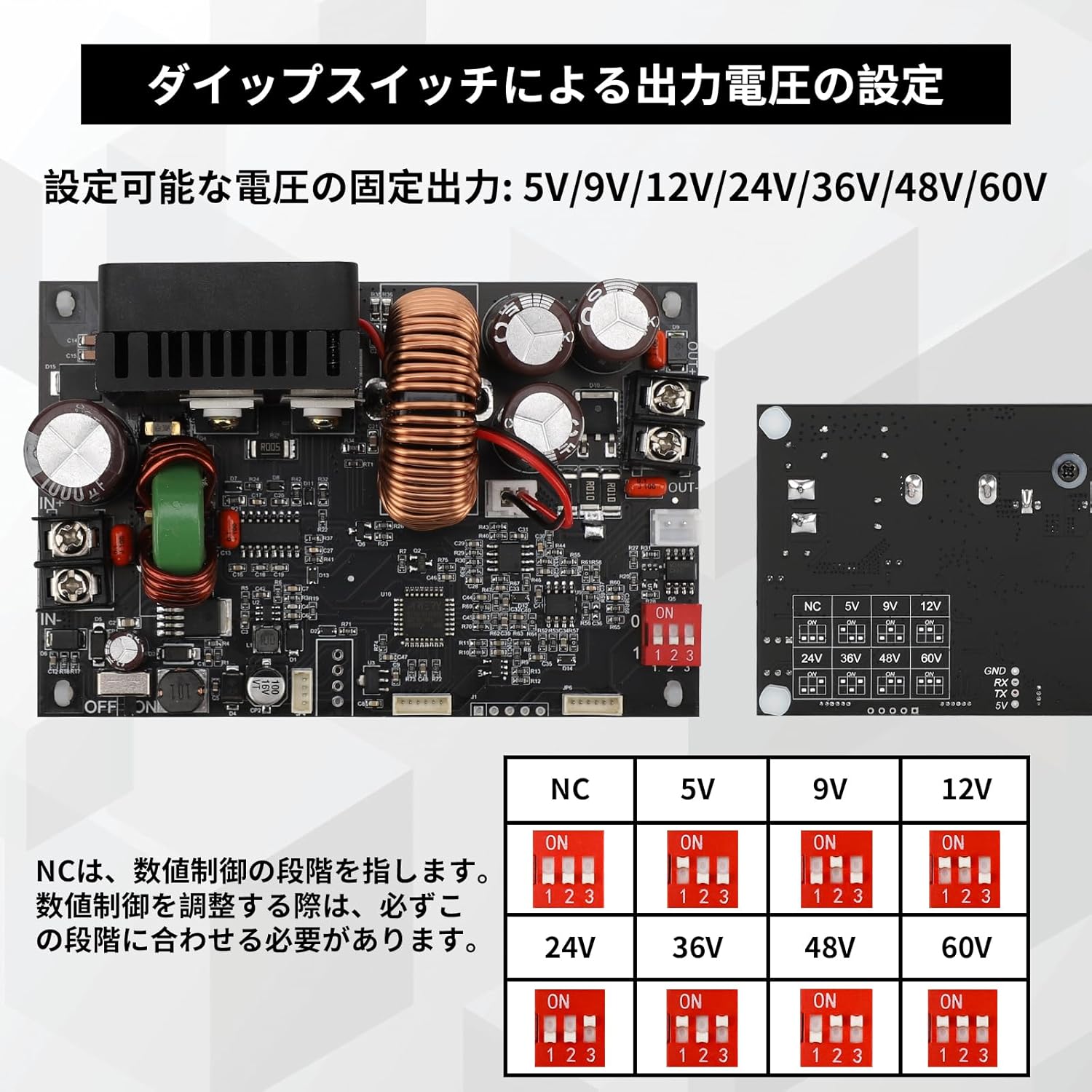
слика: DIP Switch Settings. This diagram illustrates how to configure the DIP switches to achieve fixed output voltages such as 5V, 9V, 12V, 24V, 36V, 48V, and 60V. 'NC' refers to the digital control stage, which should be matched when adjusting digital control.
Refer to the diagram above to set the desired fixed output voltage. Ensure the module is powered off before changing DIP switch settings.
Упутство за употребу
1. Укључивање/искључивање
- Toggle the power switch to turn the module ON or OFF.
2. Подешавање излазне јачинеtagе и струја
- Use the encoder button (rotary knob) to adjust the output voltage and current. Rotate clockwise to increase, counter-clockwise to decrease.
- Press the encoder button briefly to switch between adjusting voltagе и струја.
3. LCD Display Modes
The LCD provides real-time monitoring of various parameters.

слика: Multimeter Display. This image shows the LCD display in various states: when power is ON, displaying constant voltage (CV) mode with output voltage and current; when the encoder button is short-pressed, cycling through power (W), capacity (AH), energy (WH), and time (H); and when power is OFF, sequentially displaying the set voltagе и струја.
- When Power is ON: The display shows output voltage and output current. It also indicates Constant Voltage (CV) or Constant Current (CC) mode.
- Short Press Encoder Button: On the operating screen, a short press of the encoder button will cycle through displaying Power (W), Capacity (AH), Energy (WH), and Time (H).
- When Power is OFF: The display will sequentially show the previously set voltagе и тренутне вредности.
- СВ дугме: Use the SW button to switch between different display parameters or settings.
Одржавање
- Keep the module clean and free from dust. Use a soft, dry cloth for cleaning.
- Ensure proper airflow around the module, especially the cooling fan, to maintain optimal heat dissipation.
- Редовно проверавајте спојеве ожичења да ли постоје чврстоћа и знаци хабања.
- Модул чувајте на сувом и хладном месту када се не користи.
Решавање проблема
- Но Оутпут Волtage / No Response: Ако је излазна волtage cannot be set or the module does not respond when connected to power, check all wiring connections carefully. Ensure input voltage is within the specified range (6-70V). Incorrect wiring is a common cause.
- прегревање: If the module becomes excessively hot, ensure it is operating within its specified current and power limits. Verify that the cooling fan is functioning correctly and that there is adequate ventilation.
- Protection Triggered: If the module shuts down unexpectedly, one of the protection functions (OVP, OCP, OPP, OTP, LVP) may have been triggered. Check your load and input power source to ensure they are within safe operating parameters.
- Нетачна очитавања: Ако је волtage or current readings appear inaccurate, ensure proper calibration (if applicable, though this module is digitally controlled for precision). Verify your multimeter for comparison.
For persistent issues, please contact DROK customer support for assistance.
Апликације
The DROK DC-DC Buck Converter is suitable for a variety of applications due to its precise control and robust protection features.

слика: Application Scenarios. This image showcases typical environments where the buck converter can be utilized, including laboratory and research settings, electronic device repair, industrial automation and testing, and educational training.
- ДИИ пројекти: Ideal for custom power supply needs in hobbyist electronics.
- Electronics Experiments: Provides a stable and adjustable power source for testing circuits.
- Истраживање и развој: Useful in laboratory settings for various power requirements.
- Electronic Device Repair: Can be used as a versatile power source for diagnosing and repairing devices.
- Industrial Automation and Testing: Suitable for providing controlled power in industrial applications.
- Educational Training: An excellent tool for teaching power electronics concepts.
Гаранција и подршка
DROK products are designed for reliability and performance. For warranty information, technical support, or any questions regarding the operation of your DC-DC Buck Converter, please refer to the contact information provided with your purchase or visit the official DROK website. Our support team is available to assist you with any issues or inquiries.