
Увод
Thank you for choosing the Masterpro by Carlo Cracco Robot 1000 Multicooker. This advanced kitchen appliance is designed to simplify your cooking process with its versatile functions and integrated Wi-Fi connectivity. This manual provides essential information for safe operation, setup, usage, maintenance, and troubleshooting to ensure you get the most out of your device.

The Masterpro Robot 1000 multicooker with its main bowl and control panel.
Безбедносна упутства
Пажљиво прочитајте сва безбедносна упутства пре употребе уређаја. Непоштовање ових упутстава може довести до повреда или оштећења уређаја.
- Увек се уверите да је уређај постављен на стабилну, равну, површину отпорну на топлоту.
- Do not immerse the main unit in water or any other liquid. Clean with a damp само тканина.
- Keep hands and utensils away from moving blades during operation. Always use the spatula provided.
- Уверите се да су сви делови правилно састављени пре рада.
- Искључите уређај из електричне утичнице када га не користите, пре чишћења и пре склапања или расклапања делова.
- Не користите уређај са оштећеним каблом или утикачем, или ако не ради исправно или је на било који начин оштећен.
- Овај уређај је само за употребу у домаћинству. Немојте користити на отвореном.
- Будите опрезни при руковању врућим течностима или паром.
Садржај пакета
Проверите да ли су све ставке присутне у пакету:
- Masterpro Robot 1000 Main Unit
- 4.5 Liter Stainless Steel Bowl with ergonomic handle
- Preparation/Cooking Lid
- Поклопац блендера
- Internal Steamer Basket
- Steamer with Tray and Lid
- Shaft with Mixing Paddle
- Shaft with Butterfly Whisk
- Shaft with Stainless Steel Blades
- Extension Shaft with Slicing/Grating Disc
- Slicing/Grating Disc with Extension Shaft
- Спатула

Ан оверview of the Masterpro Robot 1000 multicooker and its comprehensive set of accessories, including various blades, whisks, steaming baskets, and lids.
Производ је завршенview
The Masterpro Robot 1000 is a high-tech multicooker designed for diverse culinary tasks. Key components include:
- Главна јединица: Houses the motor, heating element, and control panel.
- Посуда од нерђајућег челика: 4.5-liter capacity for large preparations.
- 7.7-inch Touch Screen Display: За интуитивну контролу и рецепт viewинг.
- Quick Control Knob: With backlit ring for easy adjustments.
- Ви-Фи повезивање: Enables integrated recipe updates and online features.
- Интегрисана скала: Accurate to 5 grams for precise ingredient measurement.
Сетуп
Пратите ове кораке за почетно подешавање:
- Raspakujte: Пажљиво уклоните све компоненте из паковања.
- чисто: Wash the stainless steel bowl, lids, and all accessories with warm soapy water before first use. Rinse thoroughly and dry.
- Пласман: Place the main unit on a clean, dry, stable, and heat-resistant surface, away from edges and heat sources.
- Прикључак за напајање: Plug the appliance into a grounded electrical outlet (220V-240V, 50-60Hz).
- Почетно укључивање: The touch screen display will illuminate. Follow any on-screen prompts for initial language selection or Wi-Fi setup.
Упутство за употребу
Ручни и аутоматски режими
The Masterpro Robot 1000 offers both manual and automatic operation modes. In manual mode, you control each setting (time, temperature, speed). In automatic mode, you can select from integrated recipes that guide you step-by-step.
Integrated Recipes and Wi-Fi
The appliance comes with over 500 integrated recipes. Connect the device to Wi-Fi to receive updates and potentially access new recipes. Each recipe provides step-by-step instructions on the 7.7-inch touch screen display.
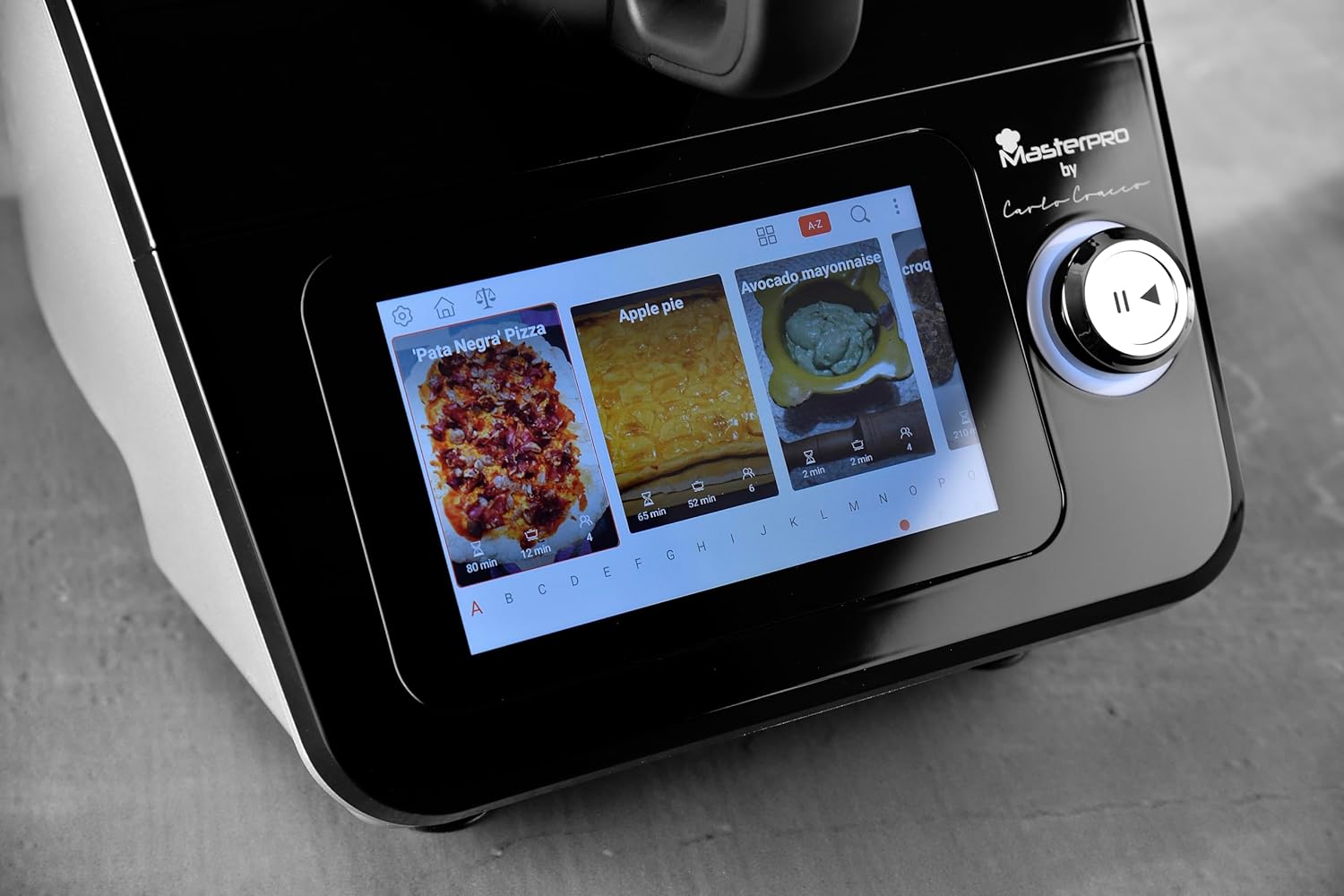
A close-up of the 7.7-inch touch screen display, illustrating the interface for selecting integrated recipes.
Основне функције
The multicooker performs a wide range of functions:
- Вагање: Use the integrated scale for precise ingredient measurement.
- мешање: Ideal for smoothies, sauces, and purees.
- Емулгатор: Create perfect mayonnaise or dressings.
- гњечење: Припремите тесто за хлеб, пицу или пецива.
- Резање/рендање: Utilize the dedicated disc and extension shaft for uniform slicing and grating of vegetables.
- Бичевање: Use the butterfly whisk for whipping cream or egg whites.
- кување: Various cooking methods, including simmering, sautéing, and stewing.
- Кување на пари: Use the internal basket or the external steamer with tray and lid for healthy steamed dishes.

The multicooker in use, demonstrating the steaming function with the steamer basket and lid in place, preparing seafood.

The multicooker demonstrating the slicing function with the dedicated accessory, processing carrots.
Temperature and Timer
Adjust the cooking temperature from 37°C to 130°C. Set the timer for up to 90 minutes. These settings are controlled via the touch screen and quick control knob.
Speed Control and Inverter Blade
The appliance features 12 speed levels. For delicate preparations like risottos, use the inverter blade function to stir gently without cutting ingredients.
Одржавање и чишћење
Regular cleaning ensures the longevity and optimal performance of your Masterpro Robot 1000.
- Искључите: Увек искључите уређај из струје пре чишћења.
- Bowl and Accessories: The stainless steel bowl, lids, and most accessories are dishwasher safe. For manual cleaning, use warm soapy water and a non-abrasive sponge.
- Главна јединица: Wipe the main unit and touch screen display with a soft, damp крпа. Не користите абразивна средства за чишћење нити потапајте уређај у воду.
- Сушење: Уверите се да су сви делови потпуно суви пре поновног састављања или складиштења.
Решавање проблема
If you encounter issues with your Masterpro Robot 1000, refer to the table below for common problems and solutions.
| Проблем | Могући узрок | Решење |
|---|---|---|
| Уређај се не укључује. | Није укључено; струја је искљученаtagе; неисправна утичница. | Проверите кабл за напајање; проверите напајање; покушајте са другом утичницом. |
| Software update fails or gets stuck. | Unstable Wi-Fi connection; corrupted download; temporary software glitch. | Ensure stable Wi-Fi connection. Restart the appliance and attempt the update again. If the problem persists, contact customer support. |
| Екран осетљив на додир не реагује или је нетачан. | Screen is dirty; temporary software issue; hardware malfunction. | Clean the screen with a soft, dry cloth. Restart the appliance. If the issue continues, contact customer support. |
| Blade inverter function not engaging. | Incorrect setting; temporary glitch. | Ensure the correct function is selected on the display. Restart the appliance. |
| Bowl capacity appears less than stated. | Misinterpretation of usable vs. total capacity; specific recipe limits. | The stated capacity of 4.5L refers to the total volume. Usable capacity for certain preparations might be slightly less to prevent overflow. Refer to recipe guidelines. |
Техничке спецификације
| Феатуре | Спецификација |
|---|---|
| Бранд | МастерПРО |
| Модел | Робот 1000 |
| Боја | Црно |
| Капацитет посуде | 4.5 литара |
| Број брзина | 12 |
| Посебне карактеристике | Adjustable speed control, Wi-Fi connectivity, Integrated recipes, Integrated scale, Inverter blade function |
| Подесива температура | 37-130°Ц |
| Тајмер Ранге | 0-90 минута |
| Сцале Аццураци | 5 грама |
| Повер | 1000 Watts (motor and heating) |
| Волtagе/Фреквенција | 220V-240V ~ 50-60HZ |
| Димензије производа | 38P x 22D x 32V cm |
Гаранција и подршка
The Masterpro by Carlo Cracco Robot 1000 Multicooker comes with a standard manufacturer's warranty. Please refer to the warranty card included in your product packaging for specific terms and conditions. For technical support, service, or spare parts, please contact your retailer or the MasterPRO customer service department. Keep your proof of purchase for warranty claims.