
1. Увод
Thank you for choosing the Cyrank Z73 Smart Watch. This manual provides essential information for setting up, operating, and maintaining your device. Please read it carefully to ensure proper use and to maximize your experience with the smart watch.

Слика 1.1: Предња страна view of the Cyrank Z73 Smart Watch, showcasing its elegant design with a floral pink watch face.
2. Садржај пакета
Молимо вас да проверите да ли су све ставке присутне у вашем пакету:
- Cyrank Z73 Smart Watch
- Data Cable (Charging Cable)
- Страп Адјустер
- Кориснички приручник (овај документ)

Image 2.1: The Cyrank Z73 Smart Watch displayed alongside its included data cable and strap adjuster tool.
3. Спецификације
Detailed technical specifications for the Cyrank Z73 Smart Watch:
| Феатуре | Спецификација |
|---|---|
| Main Control Platform | КСЦ2806 |
| Меморија | 16+128M |
| додир режим | G+F Single Touch |
| Величина екрана | 1.09 инча (2.77 цм) |
| Резолуција екрана | 240x240 пиксела |
| Диал Диаметер | Приближно 36 мм (1.4 инча) |
| Дебљина бројчаника | Приближно 11.5 мм (0.5 инча) |
| Дужина ремена | Approx. 220x16mm (8.7x0.6in) |
| Уграђена батерија | 200мАх литијумска батерија |
| Нормално време употребе | О КСНУМКС данима |
| Време приправности | О КСНУМКС данима |
| Повезивање | Bluetooth, USB, GPS (via smartphone) |
| Тежина артикла | Приближно 180г (6.3оз) |
| Димензије производа | 0.39 к 0.39 к 0.39 инча |

Image 3.1: Diagram illustrating the dimensions of the Cyrank Z73 Smart Watch, including dial diameter and thickness.

Image 3.2: Visual representation of the Cyrank Z73 Smart Watch strap length, measuring approximately 220mm (8.7 inches).
4. Подешавање
4.1. Пуњење паметног сата
Before first use, fully charge your smart watch. Connect the provided data cable to the charging port on the watch and plug the USB end into a compatible power adapter (not included) or a computer's USB port. The watch display will indicate charging status.
4.2. Инсталација апликације
To unlock the full functionality of your Cyrank Z73 Smart Watch, you need to install the companion application on your smartphone. Scan the QR code provided in the quick start guide (if available) or search for the recommended app name in your smartphone's app store (e.g., Google Play Store for Android, Apple App Store for iOS).
4.3. Упаривање са вашим паметним телефоном
The Cyrank Z73 Smart Watch utilizes Dual Bluetooth (BT) connectivity. One BT connection (Z73) is for data transmission, and the other (Z73 Audio) is for audio transmission (calls, music playback).
- Уверите се да је ваш паметни сат напуњен и укључен.
- Омогућите Блуетоотх на свом паметном телефону.
- Open the companion app on your smartphone and follow the on-screen instructions to add a new device.
- The app will search for available devices. Select 'Z73' from the list to establish the data connection.
- Once the data connection is established, go to your smartphone's Bluetooth settings and manually pair with 'Z73 Audio' for call and music functions.
- Confirm any pairing requests on both your watch and smartphone.
5. Упутство за употребу
5.1. Основна навигација
- Екран на додир: Swipe left, right, up, or down to navigate through menus and functions. Tap to select an item.
- Бочно дугме: Typically used to wake the screen, return to the home screen, or access the main menu.
5.2. Health Monitoring Functions
The smart watch offers various health tracking features:
- Multiple Exercise Modes: Track different sports activities.
- Кораци: Counts daily steps taken.
- Праћење сна: Анализира обрасце спавања.
- Откуцаји срца: Monitors heart rate throughout the day.
- GPS Running: Utilizes smartphone GPS for tracking outdoor runs.
5.3. Reminder Functions
Stay informed with timely reminders:
- Будилник: Set alarms directly on the watch or via the app.
- Седентарни подсетник: Notifies you to move after periods of inactivity.
- Подсетник за пиће: Подстиче вас да пијете воду.
- Пусх порука: Receives notifications for calls, SMS, WeChat, QQ, Messenger, and other apps.
5.4. Daily Functions
Convenient features for everyday use:
- Позиви: Упућујте и примајте позиве директно са сата.
- Контакти: Access your phone's contacts.
- Евиденција позива: View своју историју позива.
- Репродукција музике: Control music playing on your smartphone.
- Прилагођено бирање: Personalize your watch face.
- Подршка за више језика: Изаберите жељени језик.
- Снимање: Use the watch as a voice recorder.
- Контрола гласом: Interact with the watch using voice commands.
- Време: Get current weather updates.
- Калкулатор: Извршите основне прорачуне.
- Stopwatch & Countdown: Timing functions.
- Даљинска камера: Даљински управљајте камером свог паметног телефона.
- Пронађите мобилни телефон: Пронађите упарени паметни телефон.
- Подешавања: Adjust watch settings like brightness, screen time, and themes.
- Подигните зглоб да бисте осветлили екран: Аутоматски осветљава екран када подигнете зглоб.
- Не узнемиравај режим: Silence notifications.

Image 5.1: The Cyrank Z73 Smart Watch screen showing an incoming call notification, demonstrating its call answering capability.
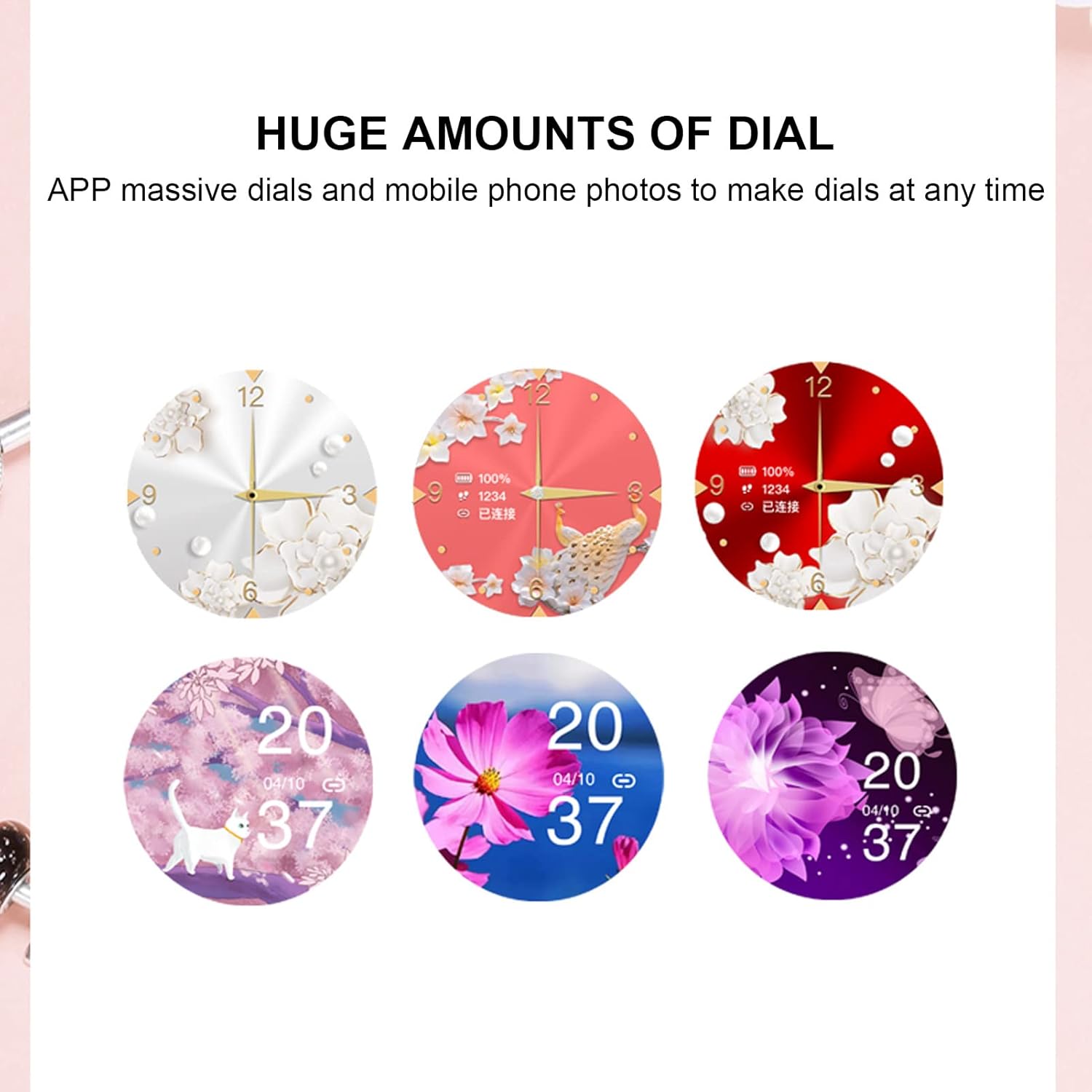
Image 5.2: A selection of diverse custom watch faces available for the Cyrank Z73 Smart Watch, allowing for personalization.
5.5. Special Purpose Functions
The Cyrank Z73 Smart Watch includes specific features for women's health:
- Feminine Functions: Prediction of menstrual period, ovulation period, ovulation day, and safe period.
6. Одржавање
To ensure the longevity and optimal performance of your smart watch, follow these maintenance guidelines:
- Чишћење: Редовно бришите екран и каиш сата меком, сувом крпом. За тврдокорну прљавштину, благо дamp Може се користити тканина, али избегавајте прекомерну влагу.
- Избегавајте екстремне температуре: Do not expose the watch to extreme heat or cold, as this can damage the battery and internal components.
- Отпорност на воду: Refer to the product specifications for water resistance ratings. Avoid submerging the watch beyond its rated depth or exposing it to hot water, steam, or chemicals.
- Пуњење: Use only the provided data cable for charging. Avoid using damaged cables or chargers.
- Складиштење: Када се сат не користи дуже време, чувајте га на хладном и сувом месту.
КСНУМКС. Решавање проблема
If you encounter issues with your Cyrank Z73 Smart Watch, try the following steps:
- Сат се не укључује: Уверите се да је сат потпуно напуњен. Повежите га са пуњачем најмање 30 минута.
- Не може се упарити са телефоном:
- Уверите се да је Bluetooth омогућен на вашем телефону и сату.
- Уверите се да је сат у домету вашег телефона.
- Рестартујте и телефон и сат.
- Обришите Bluetooth кеш меморију на телефону (ако је применљиво) и покушајте поново да упарите.
- Уверите се да је пратећа апликација инсталирана и покренута.
- Обавештења нису примљена:
- Check if the watch is properly paired and connected to the app.
- Verify notification permissions are granted to the app on your phone.
- Ensure 'Do Not Disturb' mode is not active on the watch or phone.
- Нетачни здравствени подаци: Ensure the watch is worn snugly on your wrist, but not too tight. Clean the sensor on the back of the watch.
- Кратак век трајања батерије: Смањите осветљеност екрана, онемогућите непотребне функције и осигурајте да је коришћење апликација у позадини оптимизовано на вашем телефону.
- Вратите фабричка подешавања: If issues persist, you may try restoring the watch to factory settings via the watch's menu or the companion app. Note that this will erase all data on the watch.
8. Гаранција и подршка
The Cyrank Z73 Smart Watch comes with a standard manufacturer's warranty. Please refer to the warranty card included in your package or contact your retailer for specific warranty terms and conditions. For technical support or further assistance, please reach out to Cyrank customer service through the contact information provided with your purchase or on the official Cyrank webсајту.