
FOREVER SW-320
Forever Smartwatch 3 SW-320 User Manual
Model: SW-320 | Brand: FOREVER
Увод
Thank you for choosing the Forever Smartwatch 3 SW-320. This device is designed to assist you in monitoring your daily activities, health metrics, and staying connected. This manual will guide you through the essential steps to get started and make the most of your smartwatch.

Image: The Forever Smartwatch 3 SW-320, displaying both digital and analog watch face options.
Сетуп
1. Пуњење паметног сата
Before initial use, fully charge your smartwatch. Connect the charging cable to the charging contacts on the back of the watch and to a USB power source. The watch display will indicate charging status.
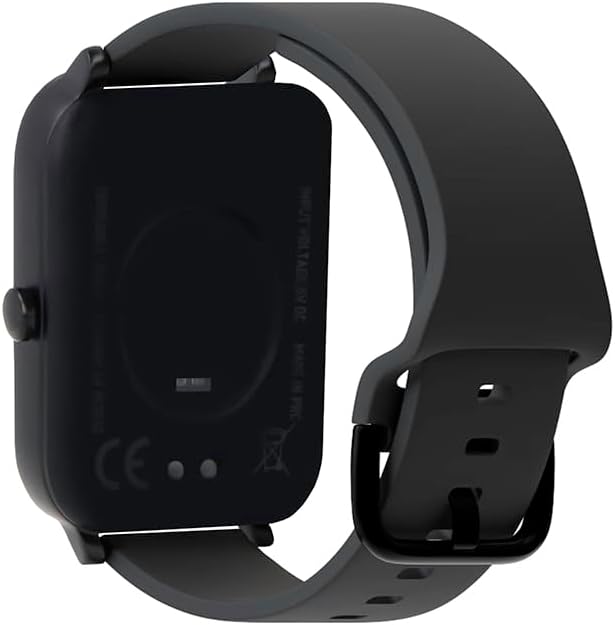
Слика: Позади view паметног сата, истичући контакте за пуњење и сензоре здравља.
2. Укључивање/искључивање
To power on, press and hold the side button until the screen lights up. To power off, navigate to the power off option in the settings menu or press and hold the side button and select "Power Off".
3. Упаривање са вашим паметним телефоном
- Download the official Forever Smartwatch application from your smartphone's app store (iOS or Android).
- Уверите се да је Блуетоотх омогућен на вашем паметном телефону.
- Open the Forever Smartwatch app and follow the on-screen instructions to search for and pair with your SW-320 smartwatch.
- Потврдите захтев за упаривање и на паметном телефону и на паметном сату.
The smartwatch is compatible with smartphones and tablets via Bluetooth connectivity.
Упутство за употребу
Основна навигација
The Forever Smartwatch 3 SW-320 features a full touchscreen interface. Swipe left, right, up, or down to navigate through menus and features. Tap to select an option or open an application.
Кључне карактеристике
- Праћење активности: Monitor steps, distance, calories burned, and active minutes.
- Мониторинг срчане фреквенције: Континуирано пратите свој пулс током целог дана.
- Педометар: Counts your steps automatically.
- Анализа сна: Tracks your sleep patterns, including deep and light sleep stagес.
- Обавештења: Примајте обавештења о позивима, порукама и обавештењима апликација директно на зглобу.
- Прилагодљиви сатови: Personalize your smartwatch with various pre-installed watch faces or upload your own images.
- Спортски режими: Access various sports modes for accurate tracking during different physical activities.
- Подсетник о хидратацији: Set reminders to drink water throughout the day.
- термометар: Measures body temperature.
- Oximeter (SpO2): Прати ниво кисеоника у крви.
- Праћење менструалног циклуса: Помаже у праћењу и предвиђању менструалних циклуса.

Image: Smartwatch screen showing real-time activity data during a workout, including heart rate and calories burned.

Image: Visual representation of key features: sports modes, thermometer, oximeter, IP68 water resistance, sleep analysis, dual strap options, and 1.7-inch display.

Image: The smartwatch showing sleep duration and quality metrics, with a person sleeping peacefully.
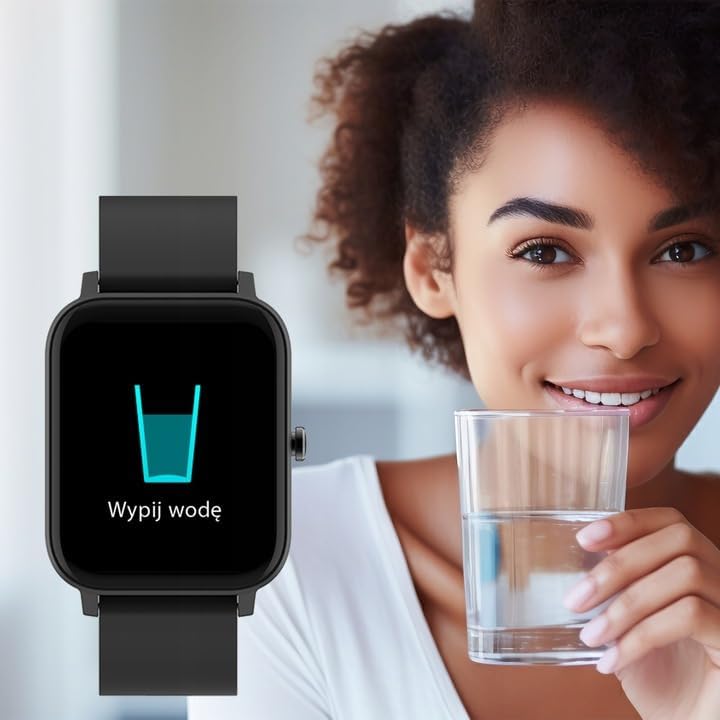
Image: Smartwatch displaying a "Drink Water" reminder, encouraging hydration.
Одржавање
Чишћење паметног сата
Regularly clean your smartwatch and strap to prevent skin irritation and maintain device functionality. Use a soft, damp крпа за брисање екрана и цasing. For the strap, follow the manufacturer's recommendations based on the material. Avoid harsh chemicals or abrasive materials.
Отпорност на воду
The Forever Smartwatch 3 SW-320 features IP68 water resistance. This means it is protected against dust and can withstand immersion in water up to 1.5 meters for up to 30 minutes. It is suitable for daily use and light water activities, but not recommended for diving, hot showers, or high-pressure water exposure.
Баттери Царе
To prolong battery life, avoid exposing the smartwatch to extreme temperatures. Charge the device fully before its first use and when the battery is low. Do not leave the battery completely drained for extended periods.
Решавање проблема
Smartwatch Not Turning On
Ensure the smartwatch is fully charged. Connect it to the charger for at least 30 minutes before attempting to power it on again.
Cannot Pair with Smartphone
- Make sure Bluetooth is enabled on your smartphone and the smartwatch.
- Ensure the smartwatch is within the Bluetooth range of your phone (typically 10 meters).
- Restart both your smartphone and smartwatch.
- Check if the Forever Smartwatch app is updated to the latest version.
- Ако је уређај претходно упарен, покушајте да га раскинете и поново упарите путем подешавања Bluetooth-а на телефону и апликације.
Нетачна очитавања здравственог стања
For accurate heart rate and activity tracking, ensure the smartwatch is worn snugly on your wrist, about one finger's width above your wrist bone. Avoid excessive movement during measurements. Environmental factors and skin conditions can affect sensor accuracy.
Обавештења се не појављују
Verify that notification permissions are granted for the Forever Smartwatch app in your smartphone's settings. Also, check the app's settings to ensure notifications are enabled for the desired applications.
Спецификације
| Бранд | ФОРЕВЕР |
| Назив модела | 3 SW-320 |
| Број модела | ГСМ169759 |
| Величина екрана | 1.7 инча |
| Резолуција екрана | 240 к 280 |
| Повезивање | Блуетоотх |
| Компатибилни уређаји | Паметни телефон, таблет |
| Посебне карактеристике | Heart Rate Monitor, Pedometer, Thermometer, Oximeter |
| Тип батерије | 1 Литијум јон |
| Просечно трајање батерије | Up to 1 Day (usage dependent) |
| Тежина | 180 г |
| Димензије | 11.5 к 9 к 7 цм |
| Отпорност на воду | ИП68 |
| Унос људског интерфејса | Тоуцхсцреен |
Note: Battery life and charging times can vary based on usage and environmental conditions. The "1 Day" for charging time in the original data is likely an error and typically refers to battery life.
Гаранција и подршка
For warranty information and technical support, please refer to the documentation included with your product or visit the official FOREVER webсајт. Сачувајте доказ о куповини за потребе гаранције.
If you encounter issues not covered in this manual, please contact FOREVER customer service for assistance.
Ask a question about this manual
Ask about setup, troubleshooting, compatibility, parts, safety, or missing instructions. Manuals+ will review the question and use this page’s manual context to help answer it.