
Увод
This manual provides instructions for the installation, operation, and maintenance of the Zyxel XMG-105HP 5-Port 2.5Gb Multi-Gigabit Unmanaged PoE++ Network Switch. This device is designed to enhance network performance with high-speed data transfer and Power over Ethernet capabilities for compatible devices.
Производ је завршенview
The Zyxel XMG-105HP is an unmanaged network switch featuring multi-gigabit ports and Power over Ethernet (PoE++) capabilities. It is designed for environments requiring high-speed network connectivity and power delivery to devices such as WiFi access points, IP cameras, and VoIP phones.
- Multi-Gigabit Performance: Equipped with 5x 2.5G ports for speeds 2.5 times faster than standard gigabit, suitable for 4K/8K streaming, NAS transfers, and gaming. Compatible with existing Cat5e cables.
- PoE++ Power Delivery: Features 4x 802.3bt PoE++ ports with a total budget of 70W, supplying up to 60W per port. Ideal for powering WiFi 6/6E access points, PTZ cameras, and IP phones via a single Ethernet cable.
- 10G Fiber Uplink: Includes an SFP+ slot for 10 Gigabit connectivity, supporting high-bandwidth applications like NAS storage and server connections.
- Zero-Configuration Setup: Unmanaged plug-and-play design with auto-negotiation for 100M/1G/2.5G speeds and auto-MDI/MDIX, simplifying installation.
- Silent Fanless Design: Metal housing with passive cooling ensures quiet operation, suitable for home and office environments. Offers 45 Gbps switching capacity and 33.5 Mpps forwarding rate.
Опис хардвера
Предња плоча
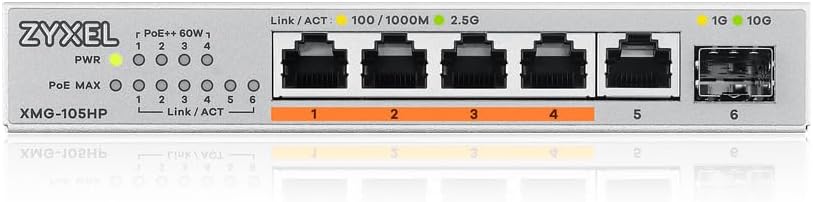
The front panel of the XMG-105HP switch features the following components:
- ПВР ЛЕД: Indicates power status. Green for power on.
- PoE++ 60W LEDs (1-4): Indicate PoE status for ports 1-4. Lit when PoE power is being supplied.
- PoE MAX LED: Означава да ли се укупни буџет PoE напајања приближава свом ограничењу.
- Link/ACT LEDs (1-5): Indicate network link and activity for ports 1-5. Green for 2.5G link, Amber for 100M/1G link. Blinking indicates activity.
- 2.5G Ports (1-5): Five 2.5 Gigabit Ethernet ports. Ports 1-4 support PoE++.
- 10G SFP+ Port (6): One 10 Gigabit SFP+ slot for fiber optic connections.
- 1G/10G SFP+ Link/ACT LEDs: Indicate link and activity for the SFP+ port. Green for 10G link, Amber for 1G link. Blinking indicates activity.
Реар Панел
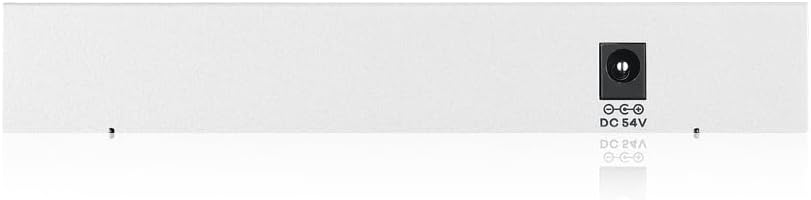
The rear panel contains the DC 54V power input port for connecting the external power adapter.
Сетуп
The Zyxel XMG-105HP is an unmanaged switch designed for plug-and-play operation. No complex configuration is required for basic network functionality.
- Распакујте прекидач: Пажљиво извадите прекидач и његову додатну опрему из паковања.
- Пласман: Place the switch on a stable, flat surface or mount it to a wall. Ensure adequate ventilation around the device.
- Прикључите напајање: Connect the provided power adapter to the DC 54V power input port on the rear panel of the switch, then plug the adapter into a power outlet. The PWR LED on the front panel should illuminate.
- Повежите мрежне уређаје:
- Connect your network devices (computers, NAS, routers, etc.) to the 2.5G Ethernet ports (1-5) using standard Ethernet cables (Cat5e or higher recommended for optimal performance).
- For PoE-powered devices (e.g., IP cameras, WiFi APs), connect them to ports 1-4. The corresponding PoE++ LED will light up when power is supplied.
- For 10G fiber connections, insert a compatible SFP+ transceiver into port 6 and connect a fiber optic cable.
- Потврдите везу: Check the Link/ACT LEDs for each connected port. A solid green or amber light indicates a successful link, and blinking indicates data activity.

Упутство за употребу
Once the switch is powered on and devices are connected, the Zyxel XMG-105HP operates automatically. It functions as a transparent bridge, forwarding data frames between connected devices based on their MAC addresses.
- Пренос података: The switch automatically detects the speed of connected devices (100Mbps, 1Gbps, or 2.5Gbps) and negotiates the optimal connection.
- PoE Operation: For devices connected to PoE++ ports (1-4), the switch automatically detects if the device is PoE-compatible and supplies power accordingly. The PoE++ LED for that port will light up. Ensure the total power consumption of all PoE devices does not exceed the 70W budget.
- Дизајн без вентилатора: The switch operates silently due to its fanless design, making it suitable for noise-sensitive environments.
Видео 1: Оверview of the Zyxel XMG105 Unmanaged Switch, highlighting its plug-and-play functionality and silent operation.
Video 2: A detailed look at the Zyxel 5-Port PoE 2.5G Multi-Gig Unmanaged Switch, showcasinг његове карактеристике и предности.
Одржавање
The Zyxel XMG-105HP switch is designed for low maintenance due to its fanless operation and robust metal casing.
- Чишћење: Periodically wipe the exterior of the switch with a soft, dry cloth to remove dust. Do not use liquid or aerosol cleaners.
- вентилација: Ensure that the ventilation holes on the sides of the switch are not obstructed to allow for proper heat dissipation.
- Ажурирања фирмвера: Као неуправљани прекидач, ажурирања фирмвера обично нису потребна нити доступна.
Решавање проблема
If you encounter issues with your Zyxel XMG-105HP switch, refer to the following common troubleshooting steps:
| Проблем | Могући узрок | Решење |
|---|---|---|
| Нема напајања (PWR LED је искључен) | Адаптер за напајање није повезан или је неисправан; утичница не ради. | Ensure the power adapter is securely connected to the switch and a working power outlet. Test the outlet with another device. |
| No Link (Link/ACT LED off) | Ethernet cable faulty or disconnected; connected device is off or faulty. | Проверите везу етернет кабла на оба краја. Покушајте са другим каблом. Уверите се да је повезани уређај укључен и да исправно функционише. |
| Мала брзина мреже | Cable quality; connected device speed limitation; network congestion. | Use Cat5e or higher cables for 2.5G speeds. Verify the connected device supports 2.5G. Reduce network traffic if possible. |
| PoE Device Not Powering On | Device not PoE compatible; total PoE budget exceeded; faulty cable. | Ensure the device is 802.3bt PoE++ compatible. Check the PoE MAX LED; if lit, reduce the number of PoE devices. Try a different Ethernet cable. |
Спецификације
| Бранд | ЦИКСЕЛ |
| Број модела | КСМГ-105ХП |
| Број портова | 5 (4x 2.5G PoE++, 1x 2.5G, 1x 10G SFP+) |
| Тип прекидача | Унманагед |
| ПоЕ стандард | 802.3 бт (ПоЕ ++) |
| Укупан ПоЕ буџет | 70В |
| Максимална снага по порту | 60 Ваттс |
| Брзина преноса података | 2.5 Gigabits Per Second (Ethernet), 10 Gigabits Per Second (SFP+) |
| Димензије производа (Д к Ш к В) | 6.3 cm x 4.33 cm x 1.02 cm |
| Материјал кућишта | Метал |
| Хлађење | Без вентилатора |
| Компатибилни уређаји | Camera, Laptop, Printer, WiFi Access Points, VoIP Phones |
Гаранција и подршка
The Zyxel XMG-105HP switch comes with a Limited Lifetime Warranty. For technical support, please contact Zyxel customer service. Refer to the official Zyxel website for the most current warranty terms and support contact information.
- Произвођач: Зикел
- гаранција: Ограничен животни век
- Подршка на мрежи: Zyxel подршка Webсајту