
FOREVER GSM169761
FOREVER Smartwatch SW-800 User Manual
Model: SW-800 (GSM169761)
Увод
This manual provides essential information for the proper use and maintenance of your FOREVER Smartwatch SW-800. Please read it thoroughly before operating the device to ensure optimal performance and longevity. The SW-800 features a 1.3-inch AMOLED display, Bluetooth connectivity, and various fitness tracking capabilities.

Image: The FOREVER Smartwatch SW-800, showcasing its versatile design with both metal and silicone strap options, and various digital watch faces.
Сетуп
1. Пуњење паметног сата
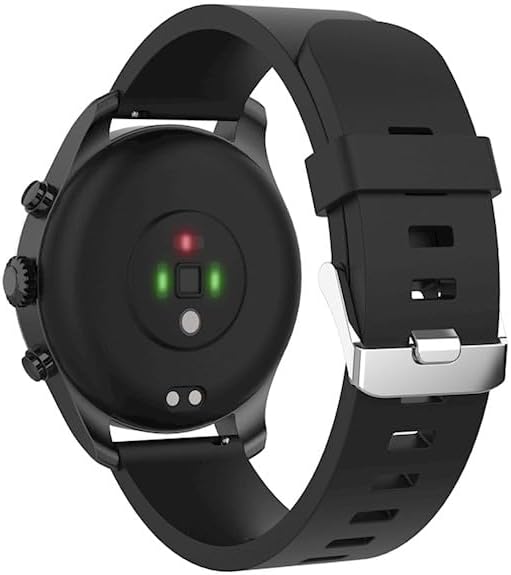
Before first use, fully charge your smartwatch. Connect the charging cable to the charging port on the back of the watch and plug the USB end into a power adapter (not included) or a computer's USB port. The watch display will indicate charging status.

Слика: Задњи део view of the smartwatch, highlighting the magnetic charging pins and the optical heart rate sensors.
2. Укључивање/искључивање
- To power on: Press and hold the side button until the FOREVER logo appears.
- To power off: Press and hold the side button, then select "Power Off" on the screen.
3. Упаривање са вашим паметним телефоном
- Download the companion application from the App Store (for iOS) or Google Play Store (for Android). Тражи "FOREVER Smartwatch" or refer to the QR code in the watch's settings.
- Уверите се да је Блуетоотх омогућен на вашем паметном телефону.
- Отворите апликацију и пратите упутства на екрану да бисте креирали налог или се пријавили.
- Select "Add Device" or "Pair Device" within the app.
- Select "SW-800" from the list of available devices.
- Потврдите захтев за упаривање и на паметном телефону и на паметном сату.

Image: A smartphone displaying the FOREVER companion app interface, with the smartwatch screen prompting the user to "Connect APP" via Bluetooth.
Управљање паметним сатом
1. Основна навигација
- екран осетљив на додир: Swipe left, right, up, or down to navigate through menus and notifications. Tap to select an item.
- Бочно дугме: Притисните да бисте се вратили на почетни екран или пробудили дисплеј. Дуго притисните за опције напајања.
2. Кључне карактеристике
- Мониторинг срчане фреквенције: The smartwatch continuously monitors your heart rate. Access the heart rate widget or app on the watch to view подаци у реалном времену и историјски трендови.
- Педометар: Прати ваше дневне кораке, пређену удаљеност и потрошене калорије.
- Спортски режими: The SW-800 supports 14 different sports modes, including running, cycling, and walking. Select a mode before starting an activity to track specific metrics.
- Праћење спавања: Monitors your sleep patterns, including deep sleep, light sleep, and wake times.
- Праћење кисеоника у крви (СпО2): Измерите ниво засићености крви кисеоником.
- Праћење температуре: Provides body temperature readings.
- Контрола музике: Контролишите репродукцију музике на повезаном паметном телефону директно са сата.
- Обавештења: Receive call, message, and app notifications from your smartphone.

Image: A collage of watch faces illustrating the various health and fitness tracking features, including heart rate, step count, calorie burn, sleep analysis, body temperature, and blood oxygen levels.

Image: The smartwatch displaying a graph of body temperature measurements over time, indicating current and historical readings.

Image: The smartwatch screen showing a blood oxygen saturation (SpO2) reading of 97%, along with a trend graph.

Image: The smartwatch worn by a runner, actively tracking fitness metrics during an outdoor exercise session.
Одржавање
1. Чишћење
Regularly clean your smartwatch and strap to prevent skin irritation and maintain device functionality. Use a soft, lint-free cloth. If necessary, slightly dampИсперите крпу водом. Избегавајте употребу јаких хемикалија или абразивних материјала.
2. Отпорност на воду (IP68)
The SW-800 is rated IP68, meaning it is resistant to dust and can withstand immersion in water up to 1.5 meters for up to 30 minutes. It is suitable for daily use, such as hand washing or light rain. However, it is not recommended for swimming, diving, or high-pressure water activities.
3. Брига о батерији
- Избегавајте често потпуно пражњење батерије.
- Не излажите уређај екстремним температурама.
- Користите само приложени кабл за пуњење.
Решавање проблема
1. Сат се не укључује
- Уверите се да је сат потпуно напуњен. Повежите га са пуњачем најмање 30 минута.
- Покушајте да притиснете и држите бочно дугме 10-15 секунди да бисте поново покренули рачунар.
2. Проблеми са повезивањем (Bluetooth)
- Уверите се да је Bluetooth омогућен и на вашем паметном сату и на паметном телефону.
- Уверите се да је паметни сат унутар Блутут домета вашег телефона.
- Поново покрените и паметни сат и паметни телефон.
- Unpair the device from your phone's Bluetooth settings and re-pair it through the companion app.
3. Нетачна очитавања здравственог стања
- Уверите се да сат чврсто приања на зглоб, али не превише стегнут.
- Очистите сензоре на задњој страни сата.
- Избегавајте прекомерно кретање током мерења.
- Note that these devices are not medical instruments and readings are for reference only.
4. App Not Syncing Data
- Проверите интернет везу на свом паметном телефону.
- Ensure the companion app has all necessary permissions enabled in your phone's settings.
- Close and reopen the app, or restart your phone.
Спецификације
| Назив модела | SW-800 (GSM169761) |
| Дисплаи | 1.3-инчни AMOLED, 360 x 360 пиксела |
| Повезивање | Блуетоотх |
| Отпорност на воду | ИП68 |
| Сензори | Heart Rate Monitor, Pedometer, SpO2, Temperature |
| Тип батерије | Литхиум Ион |
| Компатибилни уређаји | Смартпхоне |
| Унос људског интерфејса | Дугмад, екран осетљив на додир |
| Димензије (пакет) | 11.2 к 9.2 к 7.1 цм |
| Тежина (пакет) | 240 г |
Слика: Детаљна view of the smartwatch, emphasizing its 1.3-inch display with 360x360 pixel resolution, and the sleek design of the metal band.
Гаранција и подршка
Your FOREVER Smartwatch SW-800 comes with a standard manufacturer's warranty. Please refer to the warranty card included in your product packaging for specific terms and conditions, including the warranty period and coverage details.
For technical support, troubleshooting assistance, or warranty claims, please contact FOREVER customer service. Contact information can typically be found on the official FOREVER webсајту или на паковању производа.
Ask a question about this manual
Ask about setup, troubleshooting, compatibility, parts, safety, or missing instructions. Manuals+ will review the question and use this page’s manual context to help answer it.