
1. Увод
This manual provides detailed instructions for the installation, operation, and maintenance of your EVTSCAN Digital Thermoregulator. This device is designed to precisely control heating equipment, such as wall-mounted boilers and gas boilers, ensuring a stable and energy-efficient temperature environment. Please read this manual thoroughly before installation and use to ensure proper function and safety.
2. Безбедносне информације
Always observe the following safety precautions to prevent damage to the device or personal injury:
- Уверите се да је напајање искључено пре инсталације или одржавања.
- Инсталацију треба да обави квалификовани стручњак ако нисте сигурни у вези са електричним ожичењем.
- Не излажите уређај води или прекомерној влажности.
- Use only the specified battery type (2 AA batteries) and ensure correct polarity.
- Држите уређај даље од запаљивих материјала.
3. Производ је готовview
The EVTSCAN Digital Thermoregulator features a clear LCD display for easy monitoring and a simple interface for temperature control. Its compact design allows for discreet integration into your living space.

Слика 3.1: Предња страна view of the Digital Thermoregulator. The LCD screen displays current settings and room temperature, with a rotary knob below for adjustments.
Кључне компоненте:
- ЛЦД екран: Shows set temperature, room temperature, time, and operational icons.
- Control Knob/Button: Користи се за навигацију кроз меније и подешавање подешавања.
- Одељак за батерије: Located on the rear or side for 2 AA batteries.
- Терминали за ожичење: For connection to the heating system.
4. Спецификације
| Феатуре | Спецификација |
|---|---|
| Модел | EVTSCANok0g9ct2zq |
| Повер Моде | 2 АА батерије (нису укључене) |
| Screen Accuracy | 0.5 ℃ |
| Сонда Сенсор | НТЦ (10к) 1% |
| Капацитет контакта | Greater than 30-230 V DC working voltage, lower current. Reference: 5 A 30 V (HF relay) or 2 A 30 V (NEC relay) |
| Опсег приказа температуре | 1 до 40 ℃ |
| Default Temperature Adjustment Range | 5 до 35 ℃ |
| Опсег радне температуре | 0 до 50 ℃ |
| Руннинг Програм | Set once a week |
| Излаз | Преклопни релеј |
| Материјал | Polikarbonat otporan na plamen |
| Тежина | 170 г |
5. Подешавање и инсталација
The EVTSCAN Digital Thermoregulator is designed for simple installation. Follow these steps carefully:
5.1. Распакивање и преглед
Пажљиво извадите све компоненте из паковања. Проверите да ли су све ставке наведене у садржају паковања присутне и да нису оштећене.
- 1 Digital Temperature Controller
- 2 Сцревс
5.2. Инсталација батерије
The device requires 2 AA batteries for operation. These are not included in the package.
- Locate the battery compartment on the back of the thermoregulator.
- Отворите поклопац одељка за батерије.
- Уметните 2 АА батерије, водећи рачуна о исправном поларитету (+/-).
- Добро затворите поклопац одељка за батерије.

Слика 5.1: Под углом view of the thermoregulator, illustrating its compact size and potential location for battery access or mounting points.
5.3. Монтажа и ожичење
The thermoregulator is designed for wall mounting. Ensure the power to your heating system is turned off before proceeding with wiring.
- Изаберите одговарајуће место на унутрашњем зиду, даље од директне сунчеве светлости, промаје или извора топлоте који би могли утицати на очитавања температуре.
- Mount the backplate (if detachable) to the wall using the provided screws.
- Connect the thermoregulator to your boiler or heating system according to the wiring diagram provided with your boiler and the thermoregulator's terminal markings. This typically involves connecting the switching relay output to the boiler's control input.
- Secure the thermoregulator onto the mounted backplate.
Напомена: For wiring, consult a qualified electrician if you are unfamiliar with electrical installations.
6. Упутство за употребу
The EVTSCAN Digital Thermoregulator uses a microcomputer control technology to maintain your desired temperature efficiently.
6.1. Укључивање и почетни приказ
Once batteries are installed, the LCD display will illuminate, showing the current room temperature, set temperature, and time.
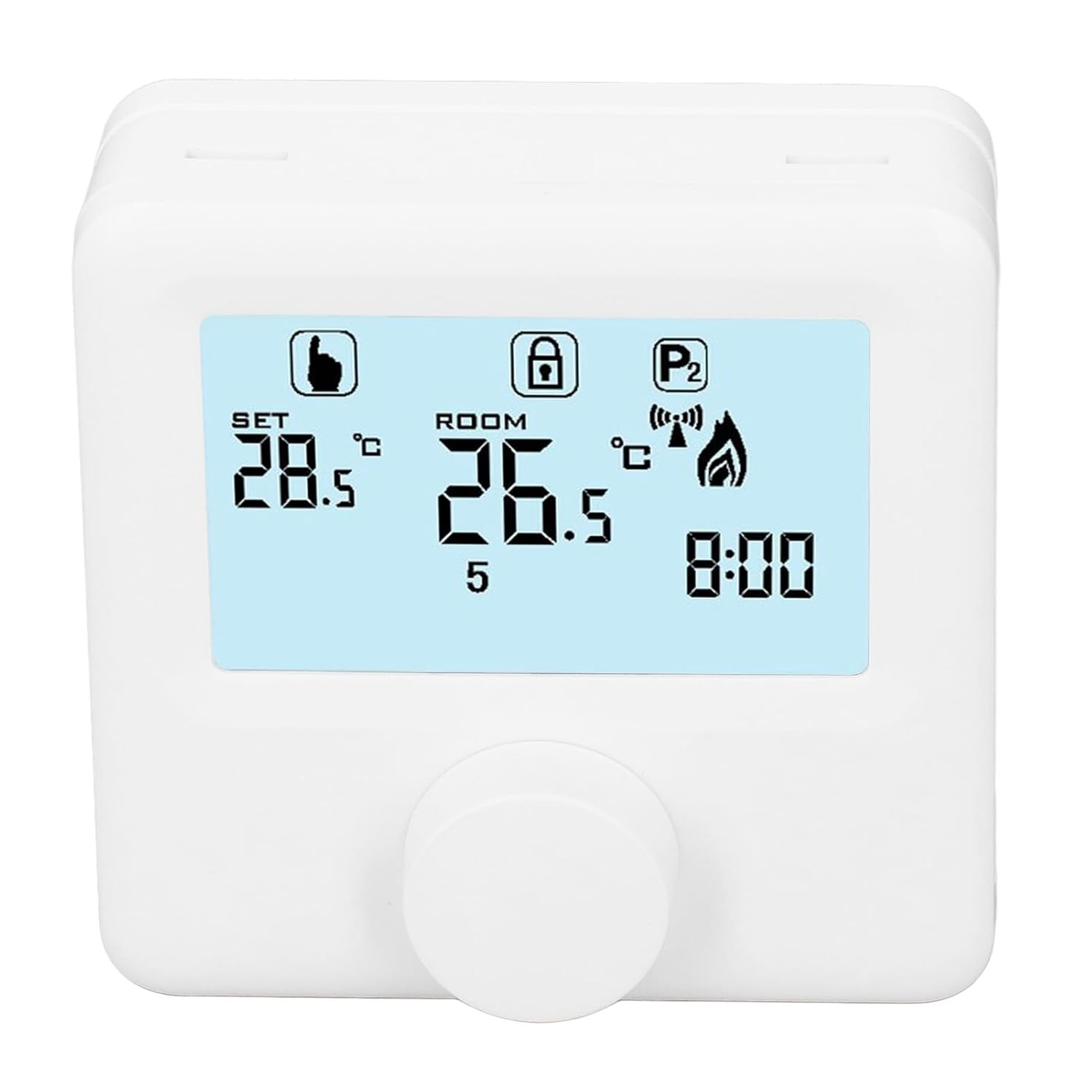
Слика 6.1: Детаљно view of the LCD display. It shows the set temperature (SET), room temperature (ROOM), a lock icon, a program icon (P2), a signal icon, a flame icon indicating heating, and the current time.
6.2. Подешавање температуре
Да бисте подесили жељену температуру:
- Rotate the control knob to increase or decrease the set temperature. The "SET" value on the display will change accordingly.
- The device will automatically activate or deactivate the heating system to maintain the set temperature within the range of 1 to 40 ℃. The default adjustment range is 5 to 35 ℃.
6.3. Недељни распоред програма
The thermoregulator supports a weekly programming schedule. This allows you to set different temperatures for various times of the day across the week.
- Press and hold the control knob (or a designated button, if available) to enter programming mode.
- Use the control knob to navigate through days of the week and time slots.
- Adjust the desired temperature for each programmed period.
- Confirm your settings to save the weekly program. The device will then operate according to this schedule.
6.4. Understanding Display Icons
- КОМПЛЕТ: Indicates the target temperature you have set.
- СОБА: Displays the current ambient room temperature.
- Икона пламена: Светли када је систем грејања активан.
- Икона закључавања: May indicate a keypad lock feature to prevent accidental changes.
- P1/P2 Icon: Indicates the current program mode (e.g., P1 for comfort, P2 for economy, or specific weekly program segments).
- Икона сигнала: May indicate wireless communication status if applicable.
7. Одржавање
Regular maintenance ensures the longevity and optimal performance of your thermoregulator.
- Чишћење: Обришите уређај меком, сувом крпом. Не користите абразивна средства за чишћење или раствараче.
- Замена батерије: Replace batteries when the low battery indicator appears on the display. Always replace both batteries simultaneously with new AA batteries.
- Област сензора: Ensure the temperature sensor area (usually a small vent on the device) is free from dust and obstructions for accurate readings.
КСНУМКС. Решавање проблема
If you encounter issues with your EVTSCAN Digital Thermoregulator, refer to the following common problems and solutions:
- Екран је празан:
- Check if batteries are correctly installed.
- Замените старе батерије новим.
- Систем грејања не реагује:
- Ensure the thermoregulator is powered on and the flame icon is displayed when heating is expected.
- Verify wiring connections to the boiler are secure and correct.
- Check the boiler's power supply and status.
- Уверите се да је подешена температура виша од тренутне температуре у просторији.
- Нетачна очитавања температуре:
- Ensure the device is not exposed to direct sunlight, drafts, or heat sources.
- Clean any dust or debris from the sensor area.
- Cannot change settings:
- Check if the lock icon is displayed. If so, refer to the operating instructions to unlock the keypad.
Ако проблем и даље постоји, контактирајте корисничку подршку.
9. Гаранција и подршка
Specific warranty information for this product is not provided in the available data. Please refer to the product packaging or the retailer's webсајт за детаље о гаранцији.
For technical support or further assistance, please contact EVTSCAN customer service through their official channels or the retailer from whom you purchased the product.
You can visit the EVTSCAN store on Amazon for more information: EVTSCAN Store