
1. Увод
The Sygonix SY-5044422 Digital Timer Switch is designed for easy programming and operation, helping to manage power consumption for various appliances. This device features 20 ON/OFF programs, 3 random settings, and a countdown function, with switching intervals as short as 1 minute. Programs can be set for specific days, combinations of days, or daily. Its IP44 splash-proof rating allows for outdoor use, and an integrated battery retains settings during power outages. The timer supports a maximum switching capacity of 1800 W and includes enhanced touch protection.
2. Безбедносна упутства
- Пажљиво прочитајте сва упутства пре употребе.
- This device is rated IP44, making it splash-proof for outdoor use. However, do not immerse it in water or expose it to direct jets of water.
- Ensure the total load of connected appliances does not exceed 1800 W.
- Do not open the device housing. Repairs should only be performed by qualified personnel.
- Keep out of reach of children. The device features enhanced touch protection.
- Always unplug the timer from the power outlet before cleaning.
3. Садржај пакета
- Sygonix SY-5044422 Digital Timer Switch
- Упутство за употребу
- Информације о гаранцији
4. Производ је готовview
Familiarize yourself with the components and controls of your digital timer switch.
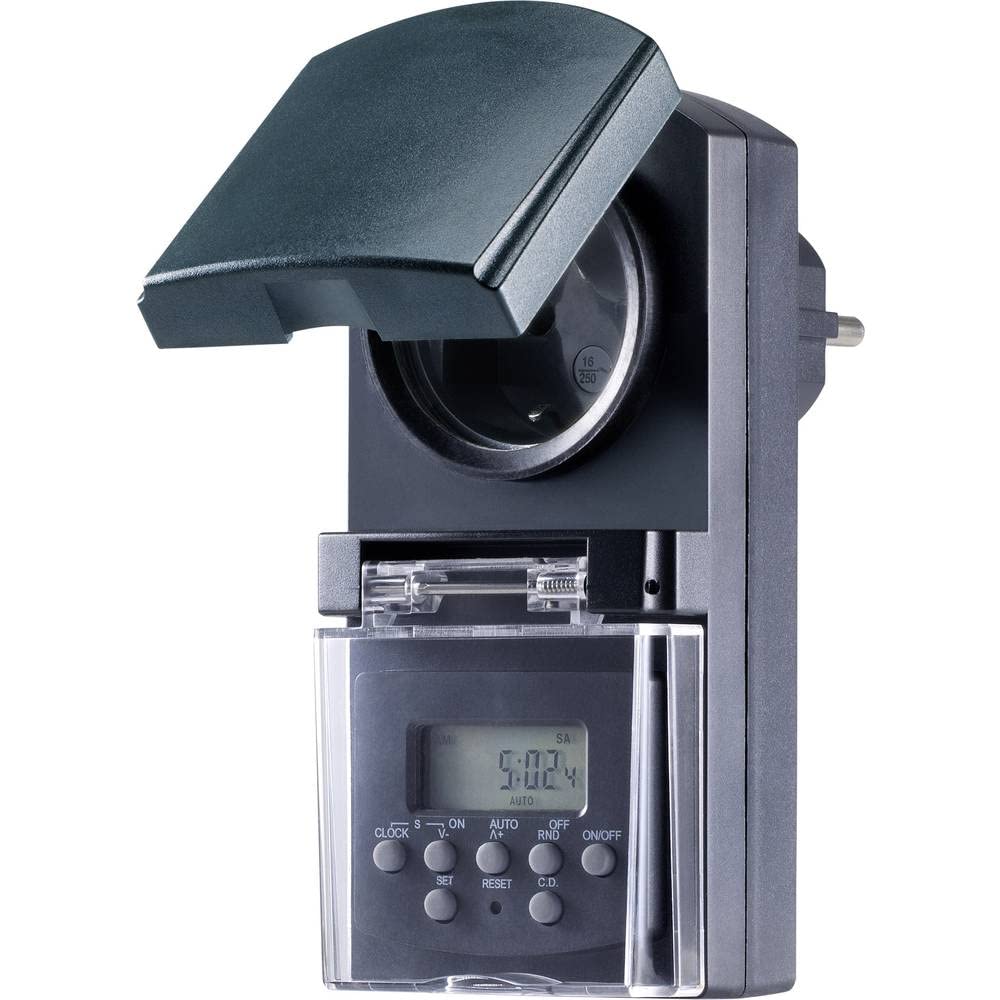
Слика 1: Фронт view of the Sygonix SY-5044422 Digital Timer Switch. This image displays the LCD screen, which shows the current time and day, along with various control buttons including CLOCK, ON/OFF, SET, RESET, AUTO/A+, OFF/RND, and C.D. (Countdown).

Слика 2: Фронт view of the timer with the protective cover opened, showing the integrated power socket. The display and control buttons are visible below the socket.
Контролна дугмад:
- САТ: Користи се за подешавање тренутног времена и дана.
- УКЉУЧЕНО/ИСКЉУЧЕНО: Manually switches the timer output ON or OFF.
- КОМПЛЕТ: Enters programming mode and confirms settings.
- РЕСЕТОВАТИ: Clears all settings and resets the timer to factory defaults.
- AUTO/A+: Cycles through automatic mode, program settings, and adjusts values.
- OFF/RND: Activates or deactivates the Random function.
- C.D. (Countdown): Activates or deactivates the Countdown function.
5. Подешавање
5.1 Почетно пуњење
Before first use, plug the timer into a power outlet for approximately 30 minutes to charge the internal battery. This ensures the display is active and settings are retained during power outagили када је искључен из струје.
5.2 Подешавање тренутног времена и дана
- Притисните и држите ЦЛОЦК дугме.
- Док држи ЦЛОЦК, притисните AUTO/A+ repeatedly to set the current day (MO, TU, WE, TH, FR, SA, SU).
- Док држи ЦЛОЦК, притисните СЕТ repeatedly to set the current hour.
- Док држи ЦЛОЦК, притисните OFF/RND repeatedly to set the current minute.
- Отпустите ЦЛОЦК дугме да бисте сачували подешавања.
5.3 Summer Time Adjustment
The timer supports a summer time function. To activate or deactivate:
- Притисните и држите ЦЛОЦК дугме и ОН/ОФФ button simultaneously for 3 seconds. The display will show "SUMMER" or "WINTER" to indicate the mode.
6. Упутство за употребу
6.1 Programming ON/OFF Times (Weekly Program)
The timer allows for up to 20 ON/OFF programs. Each program can be set for specific days or combinations of days.
- Притисните тастер СЕТ button once to enter program mode. The display will show "1 ON".
- Притисните AUTO/A+ to select the desired day(s) for the program (e.g., MO, TU, WE, TH, FR, SA, SU, MO-FR, SA-SU, MO-SA, etc.).
- Притисните СЕТ to confirm the day selection.
- Притисните AUTO/A+ да бисте подесили жељени сат укључивања.
- Притисните OFF/RND да бисте подесили жељени минут укључивања.
- Притисните СЕТ again. The display will now show "1 OFF".
- Repeat steps 2-5 to set the OFF time for the same program.
- Наставите да притискате СЕТ to cycle through all 20 ON/OFF programs. To exit program mode at any time, press the ЦЛОЦК дугме.
Напомена: After programming, ensure the timer is in АУТО mode for the programs to execute. Press ОН/ОФФ repeatedly until "AUTO" is displayed.
6.2 Countdown Function
The countdown function allows you to switch the connected appliance ON or OFF after a set duration.
- Притисните тастер ЦД button once. The display will show "CD ON" or "CD OFF".
- Притисните AUTO/A+ to set the desired countdown hour.
- Притисните OFF/RND to set the desired countdown minute.
- Притисните ЦД поново да бисте започели одбројавање. На екрану ће се приказати преостало време.
- To cancel the countdown, press ЦД још једном.
6.3 Random Function (Presence Simulation)
The random function simulates presence by randomly switching the connected appliance ON and OFF within a set time window, deterring potential intruders.
- Ensure the timer is in АУТО режим.
- Притисните тастер OFF/RND button. The display will show "RND" to indicate the random function is active.
- The timer will now randomly switch the output ON and OFF for short periods within the programmed ON/OFF times.
- To deactivate the random function, press OFF/RND again. "RND" will disappear from the display.
6.4 Manual ON/OFF Override
You can manually override the programmed settings at any time.
- Притисните тастер ОН/ОФФ button repeatedly to cycle through "ON", "OFF", and "AUTO" modes.
- "ON" means the output is continuously ON.
- "OFF" means the output is continuously OFF.
- "AUTO" means the timer will follow the programmed settings.
7. Одржавање
- Before cleaning, always unplug the timer from the power outlet.
- Обришите уређај меком, сувом крпом. Не користите абразивна средства за чишћење или раствараче.
- Уверите се да течности не улазе у уређај.
КСНУМКС. Решавање проблема
| Проблем | Могући узрок | Решење |
|---|---|---|
| Екран је празан или замагљен. | Унутрашња батерија је празна. | Plug the timer into a live power outlet for at least 30 minutes to charge the battery. |
| Програми се не извршавају. | Тајмер није у АУТОМАТСКОМ режиму. | Притисните тастер ОН/ОФФ button repeatedly until "AUTO" is displayed. |
| Incorrect time or day displayed. | Time/day was not set correctly or reset. | Refer to Section 5.2 "Setting Current Time and Day" to re-set. |
| All settings lost after power outage. | Internal battery not charged or faulty. | Ensure the timer is regularly plugged in to keep the internal battery charged. If the issue persists, contact support. |
9. Спецификације
| Број модела: | СИ-5044422 |
| Max. Switching Capacity: | 1800 В |
| Класа заштите: | ИП44 (отпоран на прскање) |
| Тип приказа: | Дигитал |
| Програми: | 20 програма за укључивање/искључивање |
| Minimum Switching Interval: | 1 минут |
| Посебне карактеристике: | Countdown function, Random function (presence simulation), Summer time, Integrated battery for settings retention, Enhanced touch protection. |
| Димензије производа: | 14 к 10 к 6 цм |
| Произвођач: | Сигоник |
| Земља порекла: | Кина |
10. Гаранција и подршка
This product comes with a minimum 2-year warranty from the date of purchase. In case of any issues or defects, please contact your retailer or Sygonix customer support for assistance. Keep your proof of purchase for warranty claims.