
Увод
This manual provides detailed instructions for the installation, operation, and maintenance of your TVT TD 2104-TS-CL 4 Channel Digital Video Recorder (DVR). This DVR supports TVI, CVI, and AHD video inputs, offering versatile compatibility with various surveillance cameras. It features H.264 compression for efficient storage and network transmission, an intuitive Graphical User Interface (GUI), and comprehensive recording and playback options. Please read this manual thoroughly before using the device to ensure proper setup and functionality.
Шта је у кутији
Пажљиво распакујте садржај и уверите се да су сви предмети присутни:
- TVT TD 2104-TS-CL 4 Channel DVR Unit
- Повер Адаптер
- УСБ миш
- SATA Cable (for internal hard drive connection)
- Кориснички приручник (овај документ)
Сетуп
1. Физичке везе
Before powering on the DVR, make all necessary physical connections.
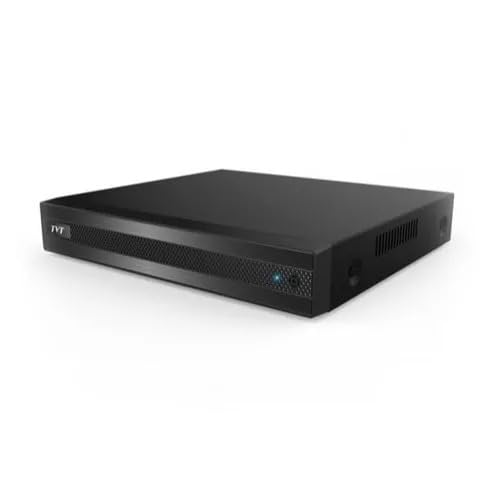
Слика: Предња и задња страна view of the TVT TD 2104-TS-CL 4 Channel DVR, showing various ports for video input, audio, network, USB, and power.
- Инсталација чврстог диска (опционо): If you plan to record video, install a compatible SATA hard drive inside the DVR chassis using the provided SATA cable. Refer to the DVR's internal diagram for proper connection.
- Везе камере: Connect your TVI, CVI, or AHD surveillance cameras to the BNC video input ports on the rear panel of the DVR. Ensure secure connections for each channel.
- Веза монитора: Connect a monitor to the HDMI output port on the DVR's rear panel. This will display the DVR's interface and live video feeds.
- Повезивање са мишем: Plug the USB mouse into one of the USB ports on the DVR. The mouse is essential for navigating the Graphical User Interface (GUI).
- Мрежна конекција: For remote access and network features, connect an Ethernet cable from your router or network switch to the LAN port on the DVR.
- Прикључак за напајање: Connect the provided power adapter to the DVR's power input port, then plug the adapter into a suitable power outlet.
2. Почетно укључивање и конфигурација
Once all connections are made, the DVR will power on automatically. Follow the on-screen prompts for initial setup, which typically includes setting the date/time, creating an administrator password, and configuring network settings.
Упутство за употребу
1. Режими снимања
The DVR supports multiple recording modes:
- Ручно снимање: Start and stop recording manually.
- Снимање са тајмером: Schedule recording periods based on specific times and days.
- Снимање детекције покрета: The DVR records automatically when motion is detected in the camera's view. Configure motion detection zones and sensitivity in the settings.
2. Репродукција и претрага
То реview снимљено фооtage:
- Access the playback menu via the GUI.
- Истовремена репродукција: The DVR supports 4, 8, or 16 channel simultaneous playback depending on the model variant.
- Опције претраге: Utilize search functions such as time slice, specific time, event (manual, motion), and tag search to quickly locate desired footage.
3. Резервна копија података
Backup recorded data to external storage:
- УСБ резервна копија: Connect a USB flash drive to a USB port on the DVR and follow the on-screen instructions to export selected footage.
- Мрежна резервна копија: Utilize the network connection to back up data to a remote server or network-attached storage (NAS).
4. Remote Access and Surveillance
The DVR offers robust remote access capabilities:
- Web Browser (IE): Access the DVR interface via Internet Explorer using its IP address.
- CMS (Central Management Software): Use the provided CMS software for comprehensive management of multiple DVRs.
- Mobile Device Surveillance: Download the official mobile application for iOS and Android devices. Scan the QR code provided by the DVR for easy setup.
- Мрежни протоколи: Supports DHCP, DDNS, PPPoE, and NAT functions for seamless network integration.
- Dual Stream Technology: Enables high-definition local storage while providing efficient remote network transmission for mobile surveillance.
5. ПТЗ контрола
If your system includes PTZ (Pan-Tilt-Zoom) cameras, the DVR supports:
- ПТЗ унапред подешавања: Configure up to 255 preset positions for quick camera movement.
- Auto Cruise: Set up to 8 cruise paths for automated camera patrolling.
6. Управљање корисницима
Manage user accounts and permissions:
- Authorization Management: Create multiple user accounts with varying access levels.
- Пријавите се поновоview: Приступите системским евиденцијама за реview device status and user activities.
Одржавање
- Редовно чишћење: Keep the DVR unit clean and free from dust. Use a soft, dry cloth. Do not use liquid cleaners.
- вентилација: Ensure the DVR is placed in a well-ventilated area to prevent overheating. Do not block ventilation openings.
- Ажурирања фирмвера: Periodically check the TVT official website for firmware updates. Updating firmware can improve performance and add new features. Follow update instructions carefully.
- Здравље чврстог диска: Monitor the health of the installed hard drive through the DVR's system settings. Replace the hard drive if errors are detected to prevent data loss.
- Сигурност лозинке: Regularly change your administrator password and ensure it is strong and unique.
Решавање проблема
If you encounter issues with your DVR, refer to the following common problems and solutions:
- Нема видео излаза на монитору:
- Check HDMI cable connection to both DVR and monitor.
- Уверите се да је монитор укључен и подешен на исправан улазни извор.
- Нема слике са камере:
- Проверите напајање камере.
- Check BNC cable connections from camera to DVR.
- Ensure camera type (TVI/CVI/AHD) is compatible and correctly configured in DVR settings.
- Нема мрежне везе:
- Check Ethernet cable connection to DVR and router.
- Verify router is functioning correctly.
- Check DVR network settings (IP address, gateway, DNS) for correct configuration.
- Не може се снимати:
- Ensure a hard drive is installed and properly initialized.
- Check hard drive status in DVR settings; replace if faulty.
- Verify recording schedule or motion detection settings are correctly configured.
- Даљински приступ не ради:
- Confirm network connection is active.
- Check port forwarding settings on your router if required.
- Ensure DDNS service is updated if using a dynamic IP address.
- Verify mobile app or CMS settings are correct.
Ако проблеми и даље постоје, контактирајте техничку подршку.
Спецификације
| Феатуре | Спецификација |
|---|---|
| Број модела | TD 2104-TS-CL (Base Model 2104) |
| Видео улаз | 4 Channel TVI / CVI / AHD |
| Резолуција снимања | 1080P lite / 720P / WD1 |
| IPC Support (4 CH DVRs) | 1 / 1 CH IPC 1080P / 960P / 720P recording |
| Видео Цомпрессион | Х.264 Хигх Проfile |
| Видео Оутпут | ХДМИ 1080П |
| Технологија повезивања | Етхернет, ХДМИ, УСБ |
| Мрежни протоколи | DHCP, DDNS, PPPoE |
| Складиштење | Supports 1 SATA HDD (up to specified capacity, HDD not included) |
| Уграђени медији | Adapter, MOUSE, SATA CABLE |
| Ремоте Аццесс | IE browser, CMS, Mobile App (iOS/Android) |
| ПТЗ контрола | 255 Presets, 8 Cruises |
Гаранција и подршка
For warranty information, please refer to the documentation provided at the time of purchase or visit the official TVT website. For technical support, contact your vendor or the manufacturer's support channels. Keep your purchase receipt and product serial number handy when seeking support.