
Amazon Basics DBD1336
Amazon Basics Thunderbolt4/USB4 Pro Docking Station
Model: DBD1336
Ваш свеобухватни водич за подешавање, рад и одржавање.
1. Увод
The Amazon Basics Thunderbolt4/USB4 Pro Docking Station is designed to expand the connectivity of your laptop, providing a single solution for multiple peripherals, external displays, and power delivery. This docking station is ideal for professionals and creators who require high-speed data transfer, advanced display capabilities, and efficient power management.
2. Безбедносне информације
- Ensure the docking station is placed on a stable, flat surface.
- Не излажите уређај води, влази или екстремним температурама.
- Користите само испоручени адаптер за напајање и каблове.
- Keep ventilation openings clear to prevent overheating. When fully loaded, the docking station may reach 122°F/50°C, which is normal for such products.
- Избегавајте испуштање или излагање уређаја јаким ударима.
3. Садржај пакета
Молимо вас да проверите да ли су све ставке присутне у вашем пакету:
- Прикључна станица Тхундерболт 4
- Тхундерболт 4 кабл
- Повер Адаптер
- Водич за брзо подешавање
4. Производ је готовview
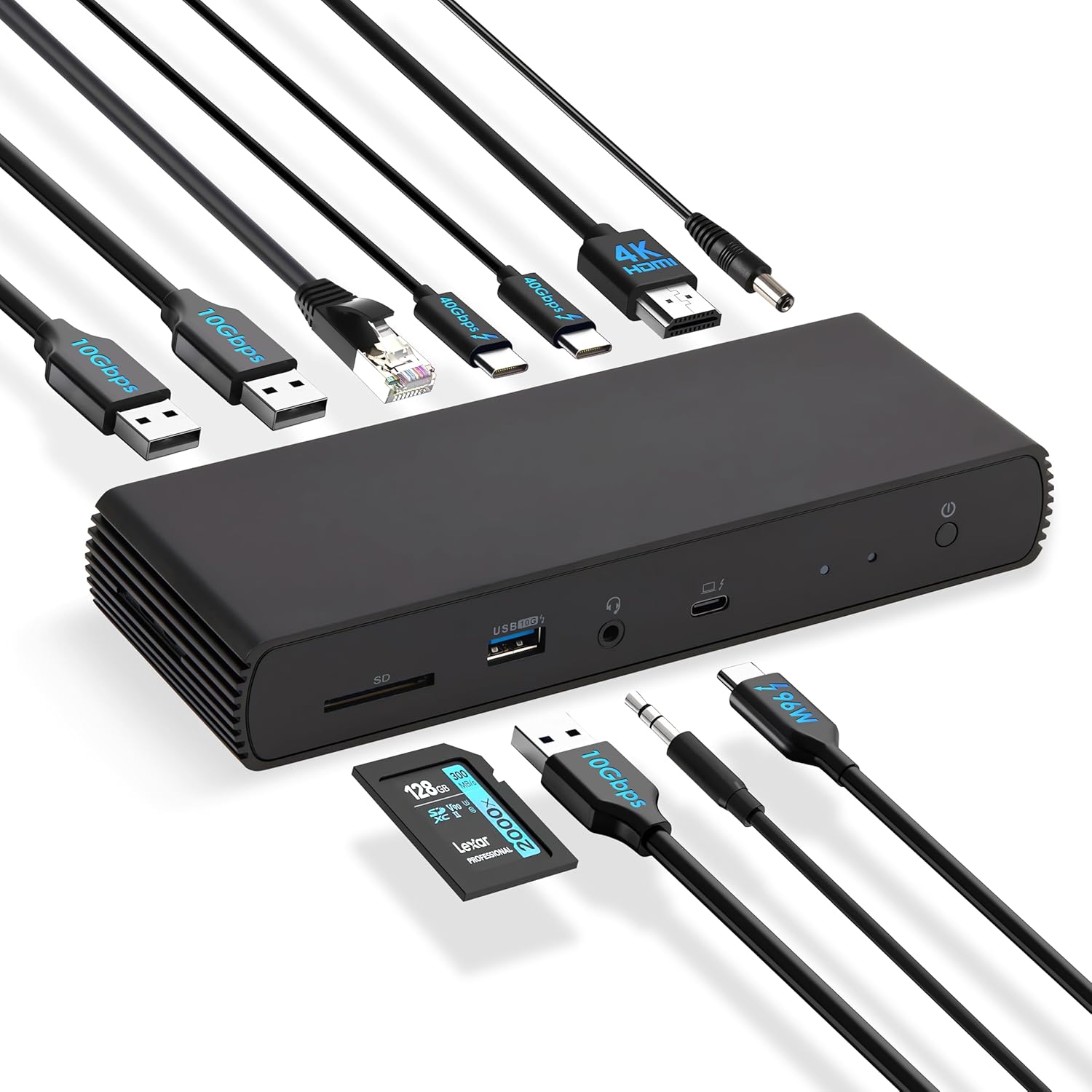
The Amazon Basics Thunderbolt4/USB4 Pro Docking Station offers a variety of ports to enhance your workstation setup.

Слика 4.1: Предњи и задњи View of the Docking Station with Port Labels. This image highlights the various input and output ports available on the docking station, including Thunderbolt 4, USB-A, HDMI, Ethernet, and the SD card slot.
Предњи портови:
- Слот за СД картицу: For high-speed data transfer from SD cards.
- USB-A 3.2 (10 Gbps): За повезивање USB-A уређаја.
- 3.5 мм аудио прикључак: За слушалице или звучнике.
- Thunderbolt 4/USB-C (To Host): The primary connection to your laptop, supporting 96W Power Delivery.
Задњи портови:
- ДЦ ИН: Power input from the provided adapter.
- HDMI 2.1 Output: Supports up to 8K@30Hz display.
- 2x Thunderbolt 4/USB-C (40Gbps, 15W max charging, 4K@60Hz display): For connecting additional Thunderbolt devices or external displays.
- Ethernet RJ45 (Up to 2.5Gbps): За брзу жичану мрежну везу.
- 2к УСБ-А 3.1: For connecting additional USB-A devices.
Слика 4.2: The docking station connected to various peripherals and a laptop, demonstrating its comprehensive connectivity options.
5. Подешавање
Follow these steps to set up your Amazon Basics Thunderbolt4/USB4 Pro Docking Station:
- Прикључите напајање: Connect the provided power adapter to the "DC IN" port on the rear of the docking station, then plug it into a wall outlet.
- Повезивање са лаптопом: Use the provided black Thunderbolt 4 cable to connect the "Thunderbolt 4/USB-C (To Host)" port on the front of the docking station to a Thunderbolt 4 port on your laptop.
- Повежите екране:
- For a single 8K@30Hz display, connect your monitor to the HDMI 2.1 port.
- For dual 4K@60Hz displays, connect your monitors to the two Thunderbolt 4 USB-C ports on the rear.
- Напомена: Verify your laptop's Thunderbolt ports support dual 4K@60Hz output. Ensure your graphics card has the latest drivers. Confirm your monitors support 4K@60Hz display. Use high-quality Thunderbolt 4 or USB4 cables for connection (not included for monitors). Avoid connecting the HDMI port first to prevent resolution downgrade due to bandwidth limitations.
- Повежите периферне уређаје: Повежите своје USB уређаје (тастатуру, миш, екстерне дискове), Ethernet кабл и аудио уређаје са одговарајућим портовима на базној станици.
- Укључено: Press the power button on the docking station. Ensure the Green Power LED and Blue Thunderbolt LED turn on.
Видео 5.1: How to Use the Amazon Basics Thunderbolt4/USB4 Pro Docking Station. This video provides a visual guide to connecting the docking station, including power, displays, and peripherals, and demonstrates its functionality.
If the laptop fails to detect the docking station, please ensure that your Thunderbolt 4 cable is firmly connected and wait for 60 seconds to complete the setup.
6. Упутство за употребу
Once set up, the docking station provides seamless integration with your laptop for various functions:
- Display Extension: Extend or mirror your laptop's display to up to two external monitors.
- Испорука струје: The docking station supports dynamic Power Delivery (PD) up to 96W to charge your connected laptop.
- Пренос података велике брзине: Utilize the Thunderbolt 4 ports for up to 40Gbps data transfer and USB-A 3.2 ports for 10Gbps data transfer.
- Мрежна повезаност: The Ethernet RJ45 port supports up to 2.5Gbps (approximately 300 Megabytes per sec) for stable and fast wired internet access.
- Аудио повезивање: Connect your headphones or speakers via the 3.5mm audio jack.

Слика 6.1: Dual 4K@60Hz Display Setup. This image illustrates a laptop connected to two external monitors, showcasing the docking station's capability to support extended desktop environments for increased productivity.

Слика 6.2: High-Speed Data Transfer. This image visually represents the rapid data transfer capabilities of the Thunderbolt 4 connection, emphasizing its efficiency for moving large fileс брзо.
7. Компатибилност
This docking station is compatible with:
- Laptops running Windows 10 OS or later which have a Thunderbolt 4 port.
- Non-M1/M2 chip MacBooks running macOS 11 (Big Sur) or later.
It is backwards compatible with Thunderbolt 3 laptops, but with limited functionality (e.g., may not support dual display).
Није компатибилно са:
- Linux or Chrome OS laptops.
- M1/M2 chip MacBooks running macOS 10.16 or earlier.

Слика 7.1: Цомпатибилити Оверview. This chart provides a quick reference for supported operating systems and laptop types, ensuring users can confirm device compatibility.
8. Одржавање
Да бисте осигурали дуготрајност и оптималне перформансе ваше прикључне станице:
- Чишћење: Use a soft, dry cloth to clean the exterior of the docking station. Do not use liquid cleaners or aerosols.
- вентилација: Ensure the docking station has adequate airflow around it. Do not cover the ventilation holes.
- Складиштење: When not in use for extended periods, store the docking station in a cool, dry place away from direct sunlight.
КСНУМКС. Решавање проблема
Ако наиђете на проблеме са базном станицом, погледајте следеће уобичајене проблеме и решења:
| Проблем | Могући узрок | Решење |
|---|---|---|
| No display output or flickering screen. | Incorrect cable connection, outdated drivers, incompatible display settings, or bandwidth limitations. | Ensure all display cables are firmly connected. Update your laptop's graphics drivers. Verify your monitors support the desired resolution (e.g., 4K@60Hz). If using dual displays, ensure your laptop's Thunderbolt ports support dual 4K@60Hz output. Avoid connecting HDMI first if using multiple displays. |
| Laptop not charging or charging slowly. | Laptop power requirements exceed 96W, or incorrect connection. | Check your laptop manufacturer's power supply specifications. If requirements exceed 96W, the docking station may activate overload protection. Ensure the provided Thunderbolt 4 cable is used and connected to the correct upstream port. |
| Docking station not detected by laptop. | Loose Thunderbolt 4 cable connection. | Ensure the Thunderbolt 4 cable is firmly connected to both the docking station and your laptop. Wait for 60 seconds for the system to recognize the device. |
| Мала брзина мреже. | Thunderbolt bandwidth shared across devices. | Thunderbolt bandwidth is shared across devices. Display resolution and LAN speed may decrease with multiple high-bandwidth connections. Disconnect other high-bandwidth devices if maximum LAN speed is critical. |
10. Спецификације
| Феатуре | Детаљ |
|---|---|
| Бранд | Амазон Басицс |
| Број модела | ДБД1336 |
| Димензије (ДкШкВ) | 7.86 к 2.95 к 1.23 инча |
| Тежина | 2.15 фунти |
| Боја | Црно |
| Хардверски интерфејс | УСБ, Тхундерболт |
| Укупно УСБ портова | 3 (USB-A) + 2 (Thunderbolt 4/USB-C) |
| Укупни ХДМИ портови | 1 (ХДМИ 2.1) |
| Повер Деливери | До 96В |
| Етхернет Спеед | 2.5Гбпс |
| Подршка за екран | Dual 4K@60Hz (via TBT4) or Single 8K@30Hz (via HDMI 2.1) |
11. Гаранција и подршка
This Amazon Basics product is covered by a limited warranty. For detailed warranty information, please refer to the Warranty (PDF) document provided with your product or visit the Amazon Basics support page.
For technical support, troubleshooting assistance, or to inquire about replacement parts, please visit the Amazon customer support website or contact their customer service directly. Have your product model number (DBD1336) and purchase information ready.
Упутство за употребу (PDF): Преузмите овде
Упутство за употребу (PDF): Преузмите овде
Гаранција (PDF): Преузмите овде
Ask a question about this manual
Ask about setup, troubleshooting, compatibility, parts, safety, or missing instructions. Manuals+ will review the question and use this page’s manual context to help answer it.