
Увод
Thank you for choosing the Hecate G3m Pro Wireless Bluetooth Gaming Mouse. This manual provides detailed instructions for setting up, operating, and maintaining your new gaming mouse. Designed for performance and versatility, the G3m Pro offers three-mode connectivity, a high-precision sensor, and a lightweight, silent design to enhance your gaming experience.
Производ је завршенview
The Hecate G3m Pro features a robust design with multiple buttons and connectivity options. Familiarize yourself with the mouse components before use.
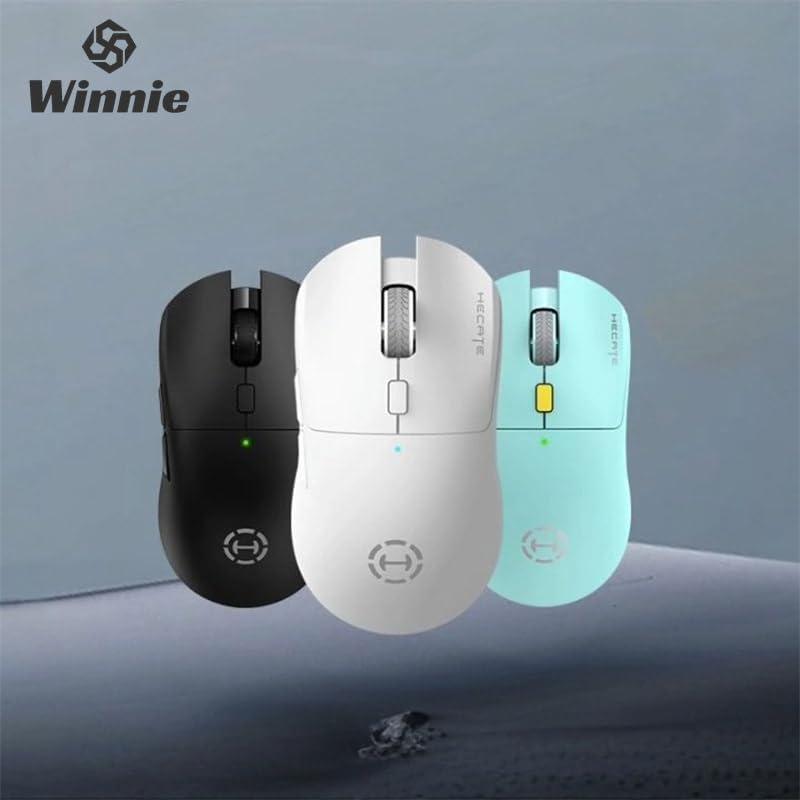
Figure 1: Hecate G3m Pro Wireless Gaming Mouse (Black)
- Леви/десни клик: Стандардне функције миша.
- Точак за померање: За функционалност скроловања и клика средњим тастером миша.
- Дугме за циклус DPI-ја: Adjusts the mouse sensitivity (DPI) on the fly.
- Бочна дугмад: Programmable for various in-game actions or navigation.
- Connectivity Mode Switch: Located on the underside, allows switching between 2.4GHz, Bluetooth, and Wired modes.
- УСБ-Ц порт: За жично повезивање и пуњење.
Сетуп
Follow these steps to set up your Hecate G3m Pro mouse.
1. Пуњење миша
Before first use, ensure the mouse is fully charged. Connect the provided USB-C cable to the mouse's USB-C port and the other end to a USB power source (e.g., computer, wall adapter). The LED indicator will show charging status.
2. Connecting via 2.4GHz Wireless (USB Dongle)
- Locate the USB 2.4GHz receiver (dongle) usually stored in a compartment on the underside of the mouse.
- Укључите УСБ пријемник у слободан УСБ порт на рачунару.
- Switch the connectivity mode selector on the mouse to the '2.4G' position.
- The mouse should automatically connect to your computer. The LED indicator may flash briefly and then become solid to indicate a successful connection.
3. Повезивање преко Блуетоотх-а
- Switch the connectivity mode selector on the mouse to the 'BT' (Bluetooth) position.
- На рачунару или уређају идите у подешавања Bluetooth-а и омогућите Bluetooth.
- The mouse LED indicator will start flashing, indicating it is in pairing mode.
- Select 'Hecate G3m Pro' from the list of available Bluetooth devices on your computer/device to pair.
- Након упаривања, ЛЕД индикатор ће почети да светли континуирано.
4. Повезивање путем жичног режима
- Connect the provided USB-C cable to the mouse's USB-C port.
- Повежите други крај USB-C кабла са доступним USB портом на рачунару.
- Switch the connectivity mode selector on the mouse to the 'Wired' position.
- Миш ће функционисати као жични миш и такође ће пунити своју интерну батерију.
Упутство за употребу
Understand the functions of your mouse for optimal use.
ДПИ Адјустмент
Press the DPI cycle button (usually located behind the scroll wheel) to cycle through different DPI settings. Each press will change the sensitivity, often indicated by a change in the LED color or a specific number of flashes. The mouse supports up to 26000 DPI.
Промена режима
Use the switch on the underside of the mouse to select your preferred connection mode: 2.4GHz, Bluetooth, or Wired. Switch modes according to your device and usage scenario.
Дугмад за прилагођавање
For advanced customization of buttons and macros, it is recommended to download the official Hecate software (if available) from the manufacturer's website. This software allows you to reassign button functions, create profiles, and fine-tune performance settings.
Одржавање
Proper maintenance ensures the longevity and performance of your mouse.
Чишћење
- Користите меку, суву крпу да обришете површину миша.
- За тврдокорну прљавштину, благо дampОбришите крпу водом или благим раствором за чишћење. Избегавајте јаке хемикалије.
- Не дозволите да течности уђу у унутрашње компоненте миша.
- Clean the optical sensor on the underside periodically with a cotton swab to ensure accurate tracking.
Баттери Царе
- Избегавајте често потпуно пражњење батерије.
- Пуните миш када индикатор батерије показује да је батерија ниска.
- Ако миш складиштите дуже време, напуните га на око 50% и чувајте га на хладном и сувом месту.
Складиштење
Store the mouse in a clean, dry environment away from extreme temperatures and direct sunlight. Keep it away from dust and moisture.
Решавање проблема
If you encounter issues with your Hecate G3m Pro mouse, refer to the following common solutions.
Миш не реагује
- Проверите батерију: Уверите се да је миш напуњен. Повежите га помоћу USB-C кабла да бисте га напунили.
- Проверите режим повезивања: Verify that the mode switch on the underside of the mouse is set to the correct mode (2.4G, BT, or Wired) for your connection type.
- 2.4ГХз веза: Уверите се да је USB пријемник безбедно прикључен у исправан USB порт. Покушајте са другим USB портом.
- Блуетоотх веза: Re-pair the mouse with your device. Go to Bluetooth settings, remove the mouse, and then add it again. Ensure your device's Bluetooth is enabled.
- Жична веза: Уверите се да је USB-C кабл безбедно повезан и са мишем и са рачунаром. Покушајте са другим USB портом или каблом.
Inconsistent Tracking or Cursor Movement
- Очистите сензор: Очистите оптички сензор на доњој страни миша.
- Подлога за миш: Use the mouse on a clean, uniform surface or a high-quality mouse pad. Avoid reflective or glass surfaces.
- ДПИ подешавање: Adjust the DPI setting using the DPI cycle button to find a comfortable sensitivity.
Дугмад не раде
- Софтверско ометање: If using custom software, try resetting button assignments to default.
- Тестирајте на другом уређају: Connect the mouse to another computer to determine if the issue is with the mouse or the original device's settings.
Спецификације
Detailed technical specifications for the Hecate G3m Pro Wireless Bluetooth Gaming Mouse.
| Феатуре | Опис |
|---|---|
| Модел | G3m Pro |
| Бранд | Hecate |
| Технологија повезивања | 2.4GHz Wireless, Bluetooth, Wired (USB-C) |
| Откривање покрета | Optical (Paw3395 Sensor) |
| ДПИ (тачке по инчу) | До 26000 ДПИ |
| Убрзање | 50Г |
| IPS (инчи у секунди) | 600 |
| Број дугмади | 6 |
| Број ваљака | 1 (Scroll Wheel) |
| Оријентација руке | Амбидектроус |
| Посебна карактеристика | Lightweight (Approx. 63g) |
| Повер Типе | Пуњива батерија |
| Препоручена употреба | Гаминг |
| Компатибилни уређаји | Personal Computer, Laptop, Game Console |
| Оперативни системи | Линукс, Виндоус XP (и новије верзије) |
Гаранција и подршка
Your Hecate G3m Pro Wireless Bluetooth Gaming Mouse comes with a warranty and dedicated support.
Информације о гаранцији
All products are covered by a 12-месечна гаранција од датума куповине. Ова гаранција покрива производне недостатке и проблеме настале нормалном употребом.
Корисничка подршка
If you encounter any problems with your product, such as defective or incorrect items, please do not hesitate to contact us. We are committed to providing prompt assistance and will respond to your inquiries within 24 hours. Please refer to your purchase documentation for specific contact details or visit the official Hecate support webсајту.