
hosabely SK80
hosabely SK80 Audio Interface User Manual
Модел: СК80
1. Увод
Thank you for choosing the hosabely SK80 Audio Interface. This device is designed to enhance your audio experience for live streaming, podcasting, recording, and gaming. It features 48V phantom power, noise reduction, customizable sound pads, and various audio effects. Please read this manual carefully to understand the product's functions and ensure proper operation.

Слика 1: Предња страна view of the hosabely SK80 Audio Interface.
2. Садржај пакета
Проверите да ли су све ставке присутне у вашем пакету:
- 1 x hosabely SK80 Live Sound Card (Audio Interface)
- 1 к УСБ кабл за пуњење
- 2 x audio kabla
- 1 x Упутство за употребу на енглеском језику (овај документ)
Note: Microphone is not included. The device is not compatible with USB microphones.
3. Производ је готовview
3.1. Распоред контролне табле

Слика 2: Детаљно view of the SK80 Audio Interface control panel.
The SK80 features a comprehensive control panel with various knobs and buttons for audio adjustment and effect activation. Key areas include:
- Microphone Volume Controls: Separate knobs for high, middle, and low frequencies, plus overall microphone volume.
- Tone Volume & Recording Controls: Adjust tone and recording levels.
- Line Volume & Instrumental Volume: Controls for line input and instrument input.
- Sound Effects Pads: Buttons for various live sound effects and customizable pads.
- Reverb & Voice Changer Controls: Knobs and buttons for reverb modes and voice modulation.
- Дугме за фантомско напајање од 48 В: Activates phantom power for condenser microphones.
- Дугме за смањење шума: Engages the noise reduction feature.
- Bluetooth (BT) On/Off: Toggles Bluetooth connectivity.
3.2. Портови за повезивање
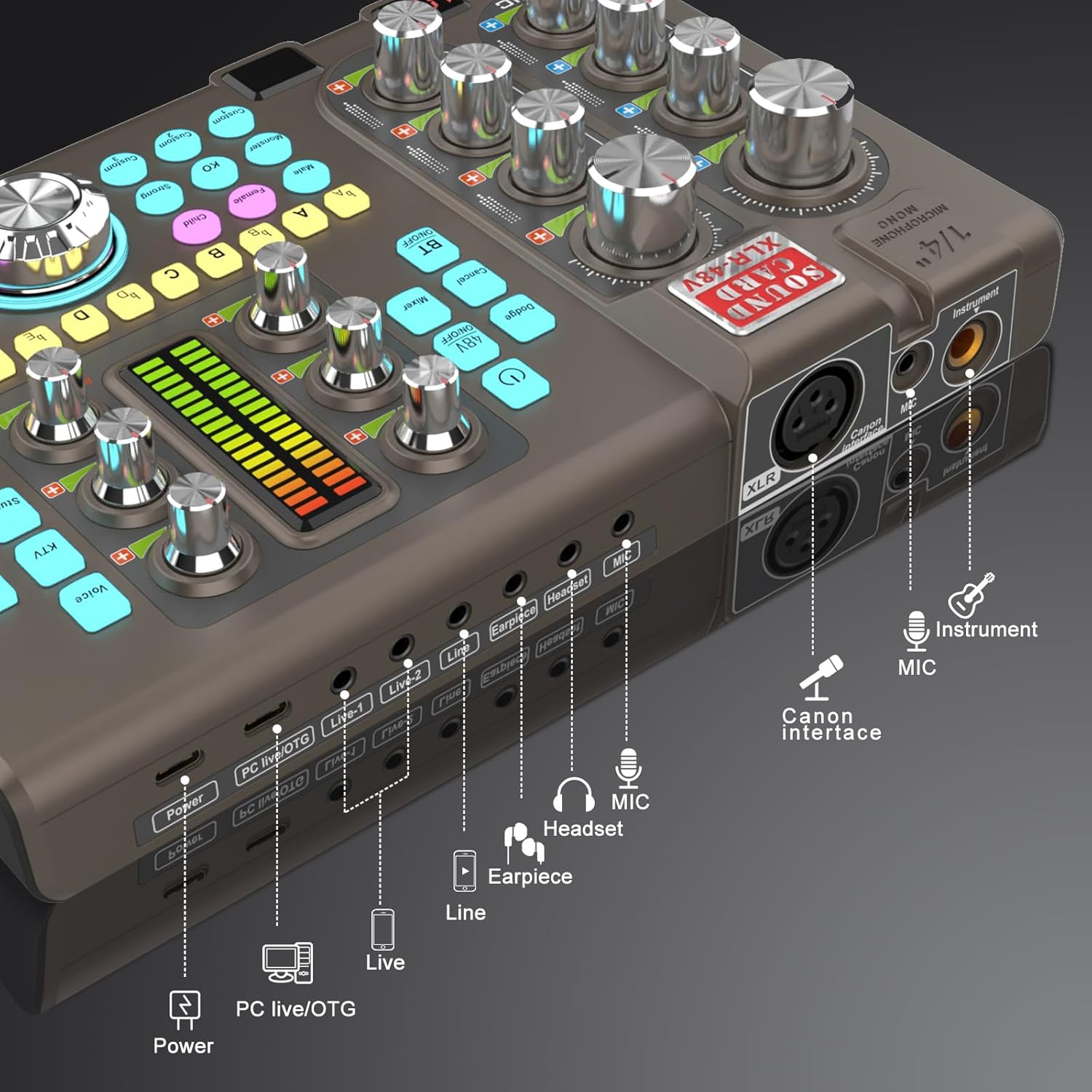
Figure 3: Labeled input and output ports on the SK80 Audio Interface.
The rear panel provides essential connection points:
- Напајање: USB-C for power supply.
- PC Live/OTG Port: USB-C for connection to a computer or OTG-compatible smartphone/tablet.
- Live 1, Live 2, Line-1, Line-2 Ports: 3.5mm audio output ports for connecting to streaming devices or other audio equipment.
- Earpiece Port: 3.5mm output for monitoring audio with an earpiece.
- Порт за слушалице: 3.5mm output for connecting a headset.
- Микрофонски порт: 3.5 мм улаз за микрофон.
- XLR-48V Interface: XLR input for condenser microphones requiring 48V phantom power.
- Instrument Port: 1/4" (6.35mm) input for connecting instruments like guitars.
4. Подешавање
4.1. Укључивање уређаја
- Connect the USB Charging Cable to the Повер port on the SK80 and to a USB power adapter (not included) or a computer USB port.
- Press and hold the power button on the control panel to turn on the device.
4.2. Повезивање микрофона

Figure 4: XLR-48V and Instrument input ports.
- For Condenser Microphones (requiring 48V Phantom Power): Connect your XLR microphone cable to the XLR-48V Interface port. Press the 48В ОН/ОФФ button on the control panel to activate phantom power. (Note: 48V is off by default to conserve battery. A light indicator will confirm activation.)
- For Dynamic Microphones or Microphones with 3.5mm Jack: Повежите микрофон са МИЦ порт помоћу 3.5 мм аудио кабла.
4.3. Повезивање инструмената
Повежите свој инструмент (нпр. гитару) са Инструмент port using a 1/4" (6.35mm) cable.
4.4. Connecting to a Computer or Smartphone
- Преко УСБ-а: Use the USB Charging Cable to connect the PC Live/OTG port to your computer. The device will be recognized as an audio input/output device.
- Преко Блуетоотх-а: Притисните тастер БТ ОН/ОФФ button on the control panel. On your smartphone or tablet, search for and connect to the SK80 via Bluetooth settings.
4.5. Connecting Monitoring Devices
- Повежите слушалице на Слушалице port for monitoring your audio.
- Connect an earpiece to the Еарпиеце port for discreet monitoring.
5. Упутство за употребу
5.1. Подешавање нивоа звука

Figure 5: Audio adjustment knobs.
- Користите МИЦ ВОЛ knobs (High, Middle, Low) to fine-tune your microphone's equalization.
- Подесите Tone Vol knob for overall microphone tone.
- Control the output level with the Снимање дугме.
- Подесите Лине Вол for line input sources and Instrumental Vol for connected instruments.
- Тхе Монитор Вол knob controls the volume of your monitoring headphones/earpiece.
5.2. Using Reverb Effects
The SK80 offers 6 reverb modes: VOICE, KTV, STUDIO, CONCERT, CORRECT, and MC. Select your desired mode using the dedicated buttons. Adjust the reverb depth and width using the corresponding knobs.
5.3. Customizing Sound Pads

Figure 6: Customizable sound pads.
The SK80 features 3 customizable sound pads. Each pad can record up to 30 seconds of audio. To record:
- Притисните и држите једну од Цустом buttons (Custom 1, 2, or 3) until it starts blinking.
- Record your desired audio (e.g., from a microphone, connected device, or Bluetooth input).
- Притисните исто Цустом button again to stop recording. The button will stop blinking.
- Притисните тастер Цустом button once to play the recorded sound. You can adjust the volume of each pad.
5.4. Voice Changer Functions
Transform your voice using the Воице Цхангер feature. Select from Male, Female, Child, or Monster voices. Adjust the ПРОМЕНА ГЛАСА knob to modify the pitch and create various vocal effects.
5.5. Смањење буке

Figure 7: Noise reduction display.
Активирајте Смањење буке button to minimize environmental background noise. The device features a 15-level noise reduction system. The display shows the current noise reduction level.
5.6. Live Sound Effects
The SK80 includes 11 dynamic live sound effects (e.g., Dodge, Muffled, Play In, Laughter, Kiss, Gunfire). Press the corresponding buttons to trigger these effects during your live stream or recording. Each effect typically lasts for approximately 4 seconds.
6. Одржавање
- Одржавајте уређај чистим брисањем меком, сувом крпом. Избегавајте употребу течних средстава за чишћење или растварача.
- Уређај чувајте на хладном и сувом месту, даље од директне сунчеве светлости и екстремних температура.
- Избегавајте испуштање или излагање уређаја јаким ударима.
- The built-in 3000mAh battery provides approximately 3-5 hours of operation. Recharge the device when the battery indicator is low.
КСНУМКС. Решавање проблема
- Нема излаза звука:
- Check all cable connections (microphone, headphones, output to PC/streaming device).
- Ensure volume knobs (MIC VOL, Recording, Monitor Vol) are turned up.
- Verify that the correct audio input/output device is selected on your computer or streaming software.
- Микрофон не ради:
- Ако користите кондензаторски микрофон, уверите се да је активирано фантомско напајање од 48 V.
- Проверите интегритет кабла микрофона.
- Confirm the microphone is properly connected to the correct input port (XLR or 3.5mm MIC).
- Static or Noise in Audio:
- Activate the Noise Reduction feature.
- Проверите да ли су каблови лабави.
- Уверите се да у близини нема јаких извора електромагнетних сметњи.
- Adjust input gain levels to avoid clipping.
- Проблеми са Блуетоотх везом:
- Ensure the BT ON/OFF button is activated.
- Make sure the SK80 is discoverable and within range of your device.
- Покушајте да раскинете упаривање и поново упарите уређај.
8. Спецификације
| Број модела ставке | СК80 |
| Бранд | hosabely |
| Технологија повезивања | Блуетоотх, УСБ |
| Број канала | 4 |
| Тежина артикла | 1.67 фунте (0.76 кг) |
| Димензије пакета | 12.28 к 7.56 к 2.36 инча |
| Тип батерије | Литијум полимер (3000мАх) |
| Компатибилни уређаји | Smartphone, PC, Guitar |
| Подршка за оперативни систем | Линукс, Виндоус, мацОС |
| Подржани софтвер | Ableton Live, FL Studio, Pro Tools, Logic Pro, Cubase (and others) |
9. Гаранција и подршка
For any questions or issues regarding your hosabely SK80 Audio Interface, please refer to the seller's contact information provided at the point of purchase. Please retain your proof of purchase for warranty claims.
Ask a question about this manual
Ask about setup, troubleshooting, compatibility, parts, safety, or missing instructions. Manuals+ will review the question and use this page’s manual context to help answer it.