
1. Увод
This manual provides detailed instructions for the installation, operation, and maintenance of your darkFlash DRX70 ATX Mid-Tower Gaming PC Case. Please read this manual thoroughly before beginning assembly to ensure proper setup and safe usage. Retain this manual for future reference.
2. Безбедносне информације
- Always disconnect power from all components before installation or maintenance.
- Пажљиво рукујте са каљеним стакленим плочама како бисте спречили ломљење.
- Избегавајте излагање кућишта екстремним температурама или влажности.
- Држите мале делове и шрафове даље од деце.
- Ensure proper grounding for all electrical components.
3. Садржај пакета
Проверите да ли су све компоненте присутне у вашем пакету:
- darkFlash DRX70 ATX Mid-Tower PC Case
- 3 x 120mm Fixed RGB Fans (pre-installed in front)
- Кутија са додатном опремом (садржи завртње, одстојнике, кабловске везице итд.)
- Упутство за употребу
4. Производ је готовview
The darkFlash DRX70 is an ATX mid-tower case designed for optimal airflow and component visibility. It features a magnetic mesh front panel for enhanced air intake and a tempered glass side panel to showcase your build.
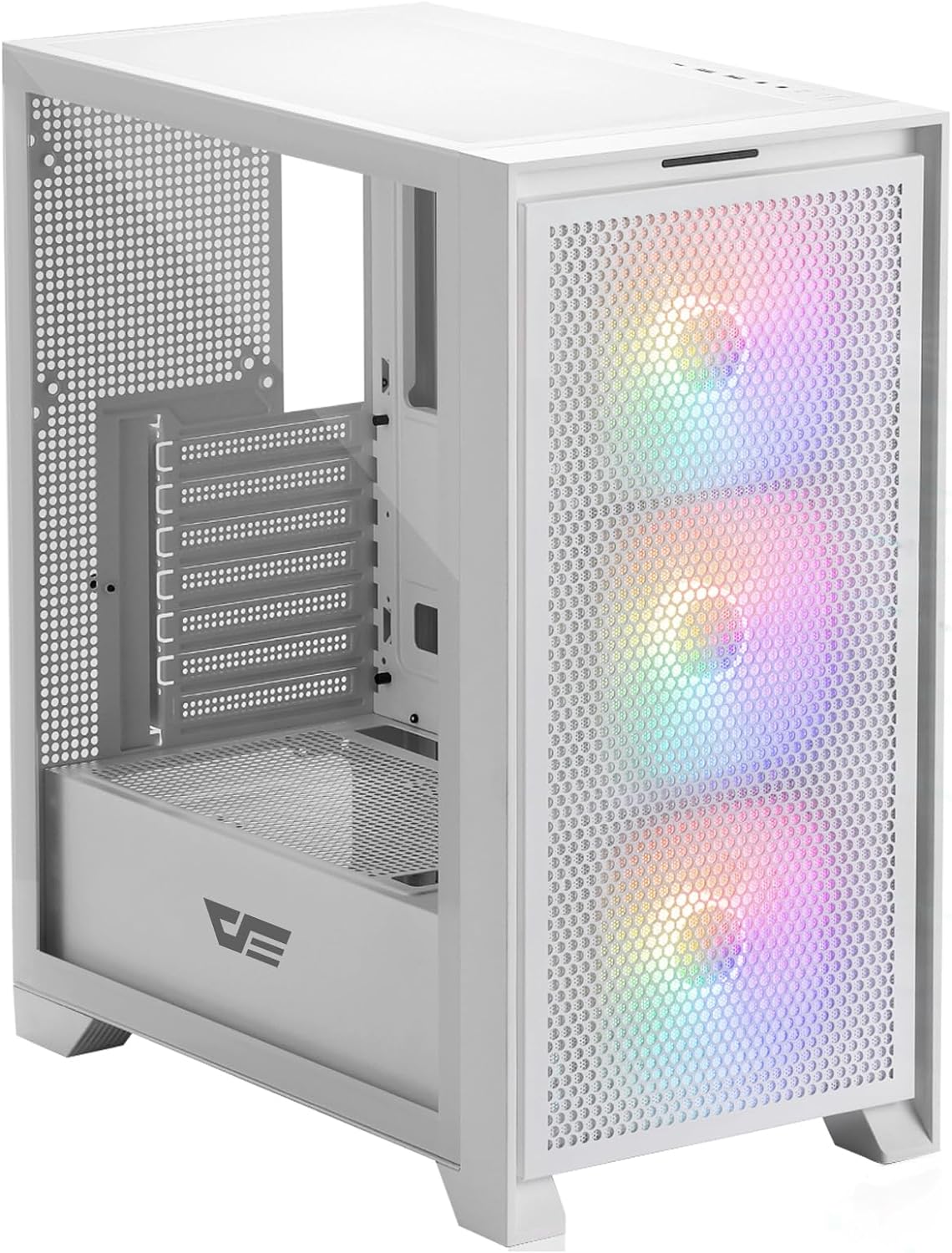
Слика 4.1: Предња страна view of the darkFlash DRX70 PC case with pre-installed RGB fans.
Кључне карактеристике:
- Magnetic Mesh Front Panel: Optimizes air intake and is easily removable for cleaning.
- Бочна плоча од каљеног стакла: Пружа јасан view унутрашњих компоненти.
- Pre-installed 3x120mm Fixed RGB Fans: Enhances cooling and adds aesthetic lighting. Note: Lighting is fixed, not addressable.
- Филтери за прашину: Magnetic dust filters on top and bottom for easy maintenance.
- Anti-slip Bottom Structure: Обезбеђује стабилност на различитим површинама.
- USB 3.0 Ready: Convenient front I/O panel connectivity.
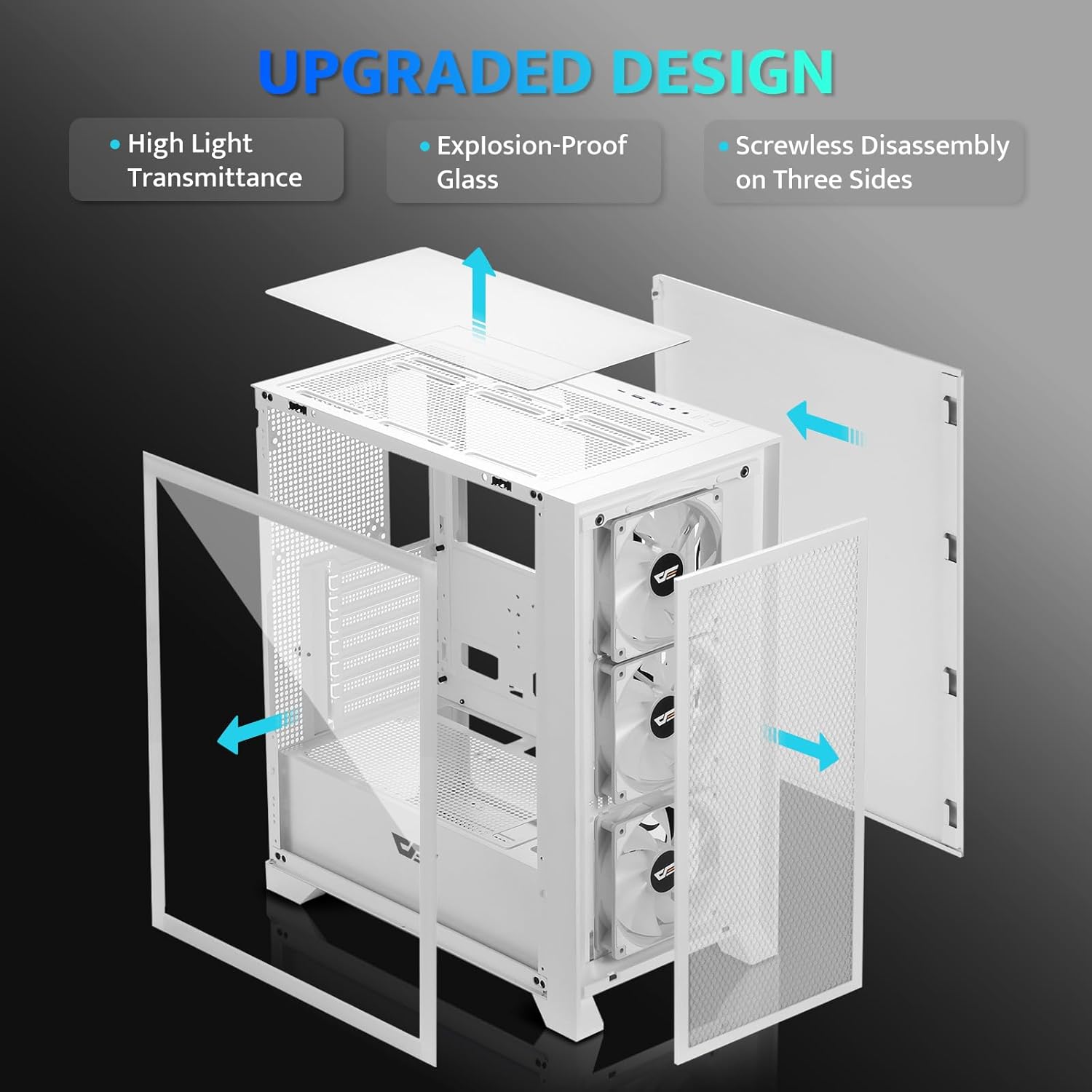
Слика 4.2: Експлодирао view illustrating the removable panels for easy access and assembly.

Figure 4.3: Detail of the magnetic mesh front panel, designed for optimal airflow and easy removal.

Figure 4.4: Airflow channels within the DRX70 case, demonstrating efficient cooling paths.

Figure 4.5: The top I/O panel featuring USB 3.0, USB 2.0, HD Audio jacks, Reset, and Power buttons.
5. Подешавање и инсталација
Follow these general steps for assembling your PC within the DRX70 case. Refer to your individual component manuals for specific installation details.
5.1 Припрема случаја
- Поставите кућиште на стабилну, равну површину.
- Remove the tempered glass side panel by unscrewing the thumb screws and carefully sliding it off.
- Remove the magnetic mesh front panel by gently pulling it away from the chassis.
- Remove the rear side panel by unscrewing the thumb screws and sliding it back.
5.2 Инсталација компоненти
- матична плоча: Install the necessary standoffs for your motherboard form factor (ATX, M-ATX, ITX). Carefully place the motherboard into the case and secure it with screws.
- Јединица за напајање (ПСУ): Install the PSU into its designated compartment at the bottom rear of the case. Secure it with screws from the rear.
- Дискови за складиштење: Install 2.5" SSDs or 3.5" HDDs into the drive bays. The case supports 1x 2.5" SSD and 2x 2.5"/3.5" HDDs.
- Графичка картица (GPU): Install your graphics card into the appropriate PCIe slot on the motherboard and secure it. The case supports GPUs up to 350mm in length.
- Хлађење: The case comes with 3x 120mm fixed RGB fans pre-installed in the front. Additional fans or a 280mm radiator can be installed as per the specifications.
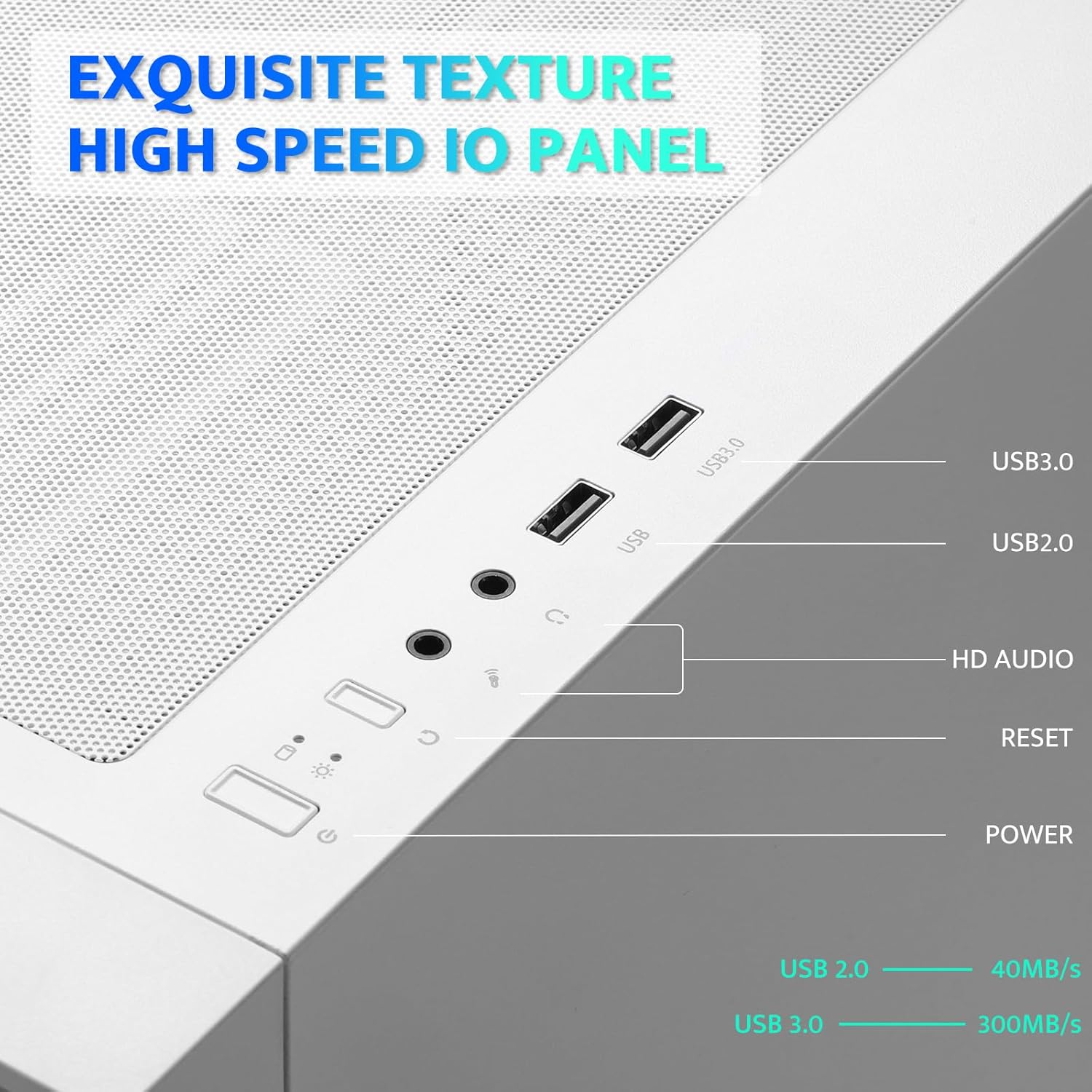
Figure 5.1: Internal layout with maximum component dimensions for CPU cooler, GPU, PSU, and radiator support.
5.3 Управљање кабловима
Utilize the cable routing cutouts and tie-down points behind the motherboard tray to manage cables. This improves airflow and aesthetics. The DRX70 is designed to simplify cable management by allowing most connectors to be routed to the rear of the motherboard.

Figure 5.2: Illustration of cable management optimization, showing how cables can be concealed behind the motherboard tray.
6. Упутство за употребу
Када су све компоненте инсталиране и повезане, можете укључити систем.
6.1 Укључивање/искључивање
- Притисните тастер Повер button on the top I/O panel to turn on your PC.
- To turn off, use the operating system's shutdown function or press and hold the Повер button for several seconds.
6.2 Front I/O Panel Functions
- УСБ 3.0 порт: За брзи пренос података са компатибилним уређајима.
- УСБ 2.0 порт: За стандардне УСБ уређаје.
- HD аудио прикључци: За повезивање слушалица и микрофона.
- Дугме за ресетовање: Да поново покренете систем.
6.3 Рад вентилатора
The pre-installed 120mm fans provide cooling and feature fixed RGB lighting. These fans operate continuously when the system is powered on. The RGB lighting pattern is not user-addressable.
7. Одржавање
Редовно одржавање помаже у обезбеђивању оптималних перформанси и дугог века трајања компоненти вашег рачунара.
7.1 Чишћење филтера за прашину
The DRX70 case includes magnetic dust filters on the front and top panels, and a panel dust filter at the bottom. These should be cleaned periodically to prevent dust buildup and maintain airflow.
- Gently pull the magnetic dust filters off the chassis.
- Use a soft brush or compressed air to remove accumulated dust.
- Reattach the filters.

Figure 7.1: Magnetic dust filter for easy removal and cleaning.
7.2 Генерално чишћење
Обришите спољашњост кућишта меком,amp cloth. Avoid using harsh chemicals or abrasive materials that could damage the finish or tempered glass.
КСНУМКС. Решавање проблема
If you encounter issues with your PC case, consider the following common solutions:
- Нема напајања: Ensure the PSU is properly connected to the wall outlet and the power switch on the PSU is in the 'ON' position. Verify all internal power cables (24-pin ATX, CPU, GPU) are securely connected. Check front panel power button connections to the motherboard.
- Вентилатори се не окрећу: Confirm that the fan power cables are correctly connected to the motherboard or fan controller.
- УСБ портови не раде: Check that the USB headers from the front I/O panel are correctly plugged into the motherboard.
- Audio Jacks Not Working: Ensure the HD Audio cable from the front I/O panel is correctly connected to the motherboard's audio header.
For persistent issues, consult the manuals for your individual PC components or seek professional assistance.
9. Спецификације
| Феатуре | Спецификација |
|---|---|
| Назив модела | DRX70M ATX Computer Case |
| Бранд | darkFlash |
| Тип случаја | Мид Товер |
| Компатибилност матичне плоче | АТКС, М-АТКС, ИТКС |
| Димензије (ДкШкВ) | 15 к 9 к 18.1 инча (381 к 228.6 к 459.7 мм) |
| Тежина артикла | 11.6 фунте (5.26 кг) |
| Материјал | Метал, пластика, каљено стакло |
| Унапред инсталирани вентилатори | 3 x 120mm Fixed RGB Fans (Front) |
| Максимална подршка за вентилаторе | До 8 вентилатора |
| Подршка радијатора | Up to 280mm (Top), 120mm (Rear) |
| Максимална висина ЦПУ хладњака | 180мм |
| Максимална дужина ГПУ-а | 350мм |
| Стораге Баис | 1x 2.5" SSD, 2x 2.5"/3.5" HDD |
| Предњи И / О портови | 1x USB 3.0, 1x USB 2.0, HD Audio, Power, Reset |
10. Гаранција и подршка
darkFlash provides a 1-year assurance for computer cases. This warranty covers manufacturing defects and ensures product quality. For warranty claims or technical support, please contact darkFlash customer service through their official webсајт или продавницу где је производ купљен.
Молимо вас да сачувате доказ о куповини ради потврде гаранције.