
Увод
Хвала вам на куповиниasing the 7artisans AF 50mm F1.8 Full Frame Lens. This manual provides essential information for the safe and effective use of your new lens. Please read it thoroughly before use and keep it for future reference.
This 50mm F1.8 lens is designed for Sony E-Mount full-frame cameras, offering a large aperture, fast autofocus, and support for advanced features like face and eye recognition. Its versatile focal length makes it suitable for a wide range of photographic applications, from portraits to street photography.
Безбедносне информације
- Do not look at the sun or bright light sources through the lens, as this may cause permanent vision impairment.
- Keep the lens away from direct sunlight when not in use to prevent fire hazards or damage to internal components.
- Avoid exposing the lens to extreme temperatures, high humidity, or dust.
- Do not attempt to disassemble or repair the lens yourself. Contact authorized service personnel for assistance.
- Чувати ван домашаја деце.
Садржај пакета
Проверите да ли су све ставке присутне у вашем пакету:
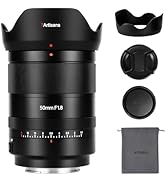
- 7artisans AF 50mm F1.8 Full Frame Lens
- Предњи поклопац објектива
- Поклопац задњег сочива
- Сјенило
- Торбица за сочиво
- Упутство за употребу (овај документ)

Image: The 7artisans AF 50mm F1.8 lens shown with its included accessories: front and rear lens caps, lens hood, and a soft pouch.
Производ је завршенview
The 7artisans AF 50mm F1.8 lens features a robust metal construction with a sleek black finish. Key components include:
- Прстен за фокусирање: For manual focusing.
- Прстен бленде: Allows switching between automatic and manual aperture control.
- АФ/РФ прекидач: Пребацује се између режима аутоматског фокусирања и ручног фокусирања.
- Монтажа сочива: Компатибилан са Sony E-Mount објективима.
- УСБ-Ц порт: За ажурирања фирмвера.
Слика: Крупни план view of the lens barrel, highlighting the AF/MF switch for mode selection.

Слика: Детаљна view of the lens mount, showing the electronic contacts and the integrated USB-C port for firmware updates.
Сетуп
- Причвршћивање сочива:
- Align the white dot on the lens barrel with the white dot on your camera's lens mount.
- Пажљиво уметните објектив у носач камере.
- Окрените сочиво у смеру казаљке на сату док не кликне на своје место, што указује да је сигурно закључано.
- Уклањање сочива:
- Press and hold the lens release button on your camera body.
- Rotate the lens counter-clockwise until it detaches from the camera mount.
- Причврстите предњи и задњи поклопац објектива да бисте заштитили елементе објектива.
- Причвршћивање сјенила:
- Поравнајте сенило објектива са предњим делом објектива.
- Twist the hood clockwise until it locks securely.
- The lens hood helps reduce flare and provides physical protection to the front element.

Image: The 7artisans AF 50mm F1.8 lens securely mounted on a Sony mirrorless camera, viewед са стране.
Руковање објективом
1. Focus Mode Selection (AF/MF)
Use the AF/MF switch on the lens barrel to select your desired focus mode:
- АФ (аутофокус): The camera will automatically focus on the subject. This lens features a high-speed STM stepping motor for quick and accurate autofocus performance.
- МФ (ручно фокусирање): You can manually adjust the focus by rotating the focus ring on the lens.
Слика: Детаљна view of the AF/MF switch, allowing users to toggle between autofocus and manual focus modes.
2. Контрола отвора бленде
The lens features an aperture ring that can be switched between automatic and manual control:
- Automatic Aperture: Set the aperture ring to the 'A' position. The camera will control the aperture settings.
- Manual Aperture: Rotate the aperture ring to select your desired F-stop (F1.8 to F16). This provides precise control over depth of field and exposure.
The large F1.8 aperture allows for excellent low-light performance and the creation of beautiful background blur (bokeh).
3. Face/Eye Recognition Support
This lens supports your camera's face and eye recognition functions. When enabled on your camera, the lens will automatically set accurate focusing points and exposure for human faces or eyes, ensuring sharp portraits.

Image: A photograph illustrating the camera's eye recognition feature actively focusing on a subject's eye.
4. Ажурирања фирмвера
The integrated USB-C port allows for easy firmware updates. Connect the lens to your computer using a USB-C cable and follow the instructions provided on the 7artisans official website to update the firmware. This ensures optimal performance and compatibility with future camera models.
Слика: Детаљна view of the lens mount, showing the electronic contacts and the integrated USB-C port for firmware updates.
Одржавање
- Чишћење: Use a soft, lint-free cloth to clean the lens barrel. For lens elements, use a lens brush to remove dust, then gently wipe with a lens cleaning cloth and lens cleaning solution.
- Складиштење: When not in use, store the lens with both caps attached in a cool, dry place away from direct sunlight and moisture. Consider using a desiccant to prevent mold growth.
- Руковање: Avoid dropping or subjecting the lens to strong impacts, as this can damage internal optical elements.
Решавање проблема
1. Lens not focusing:
- Ensure the AF/MF switch is set to the desired mode (AF for autofocus).
- Check camera settings to ensure autofocus is enabled and the correct focus area is selected.
- Clean the lens contacts on both the lens and camera body.
2. Images are blurry:
- Verify that the lens is properly focused.
- Check shutter speed to avoid camera shake, especially in low light.
- Ensure the lens elements are clean and free from smudges or dust.
3. Lens not recognized by camera:
- Уклоните и поново причврстите сочиво, водећи рачуна да се сигурно учврсти на своје место.
- Очистите електронске контакте на објективу и кућишту фотоапарата чистом, сувом крпом.
- Check for available firmware updates for both the lens and your camera.
Спецификације
| Феатуре | Детаљ |
|---|---|
| Бранд | 7 занатлија |
| Број модела | AF5018EB |
| Фоцал Ленгтх | 50мм |
| Максимални отвор бленде | Ф1.8 |
| Минимални отвор бленде | Ф16 |
| Ленс Типе | Стандардни главни објектив |
| Компатибилни носачи | Sony E-Mount |
| Оптицал Струцтуре | 11 елемената у 9 група |
| Диапхрагм Бладес | 11 комада |
| Угао од View | D:46.8°, H:39.6°, V:27.0° |
| Најмања удаљеност фокусирања | 0.5M - ∞ |
| Величина филтера | 58мм |
| Тежина артикла | 1.78 фунти (приближно 807 г) |
| Димензије производа | 40.94 к 28.35 к 28.35 инча |
Гаранција и подршка
For warranty information, technical support, or service inquiries, please visit the official 7artisans webсајт или контактирајте овлашћеног продавца. Сачувајте доказ о куповини за потребе гаранције.
For the latest firmware updates and additional resources, please visit: 7artisans Official Store
Званични видео снимци производа
Watch these official videos for more information on the 7artisans AF 50mm F1.8 lens:
7artisans AF50mm F1.8
Видео: Званична видео презентација производаasing the features and capabilities of the 7artisans AF 50mm F1.8 lens.
7artisans AutoFocus 50mm F1.8
Video: Another official product video demonstrating the autofocus performance and image quality of the 7artisans 50mm F1.8 lens.