
1. Производ је готовview
The Keyscaper Star Wars Darth Vader Wireless Mouse is designed for comfort and precision, featuring a distinctive Darth Vader color block design. This wireless mouse connects via a USB nano-receiver and is powered by two AAA batteries. It offers laser-optical precision and an auto-sleep function to maximize battery life.

Figure 1: Keyscaper Star Wars Darth Vader Wireless Mouse
Кључне карактеристике:
- Officially licensed Star Wars product.
- Easy plug & play functionality via included USB nano-receiver.
- Laser-optical precision for accurate and responsive tracking.
- Auto-sleep feature to conserve battery power.
- Durable full-color printed logo.
2. Упутства за подешавање
2.1 Шта је у кутији
- Keyscaper Star Wars Darth Vader Wireless Mouse
- УСБ нано-пријемник
- 2 AAA batteries (pre-installed or included separately)
2.2 Инсталација батерије
- Пронађите поклопац одељка за батерију на доњој страни миша.
- Пажљиво померите или подигните поклопац да бисте отворили одељак.
- Уметните две ААА батерије, водећи рачуна о исправном поларитету (+/-) као што је назначено унутар одељка.
- Вратите поклопац одељка за батерију док не кликне чврсто на своје место.

Figure 2: Mouse components and battery installation
2.3 Connecting the USB Nano-Receiver
- Locate the USB nano-receiver, typically stored within a slot in the battery compartment for convenience.
- Remove the nano-receiver from its storage slot.
- Plug the USB nano-receiver into an available USB-A port on your computer or laptop.
- Ваш рачунар би требало аутоматски да детектује и инсталира потребне драјвере. Ово може потрајати неколико тренутака.

Figure 3: USB nano-receiver storage
2.4 Укључивање/искључивање
- On the underside of the mouse, locate the ON/OFF switch.
- Slide the switch to the "ON" position to activate the mouse.
- To conserve battery life when not in use, slide the switch to the "OFF" position.
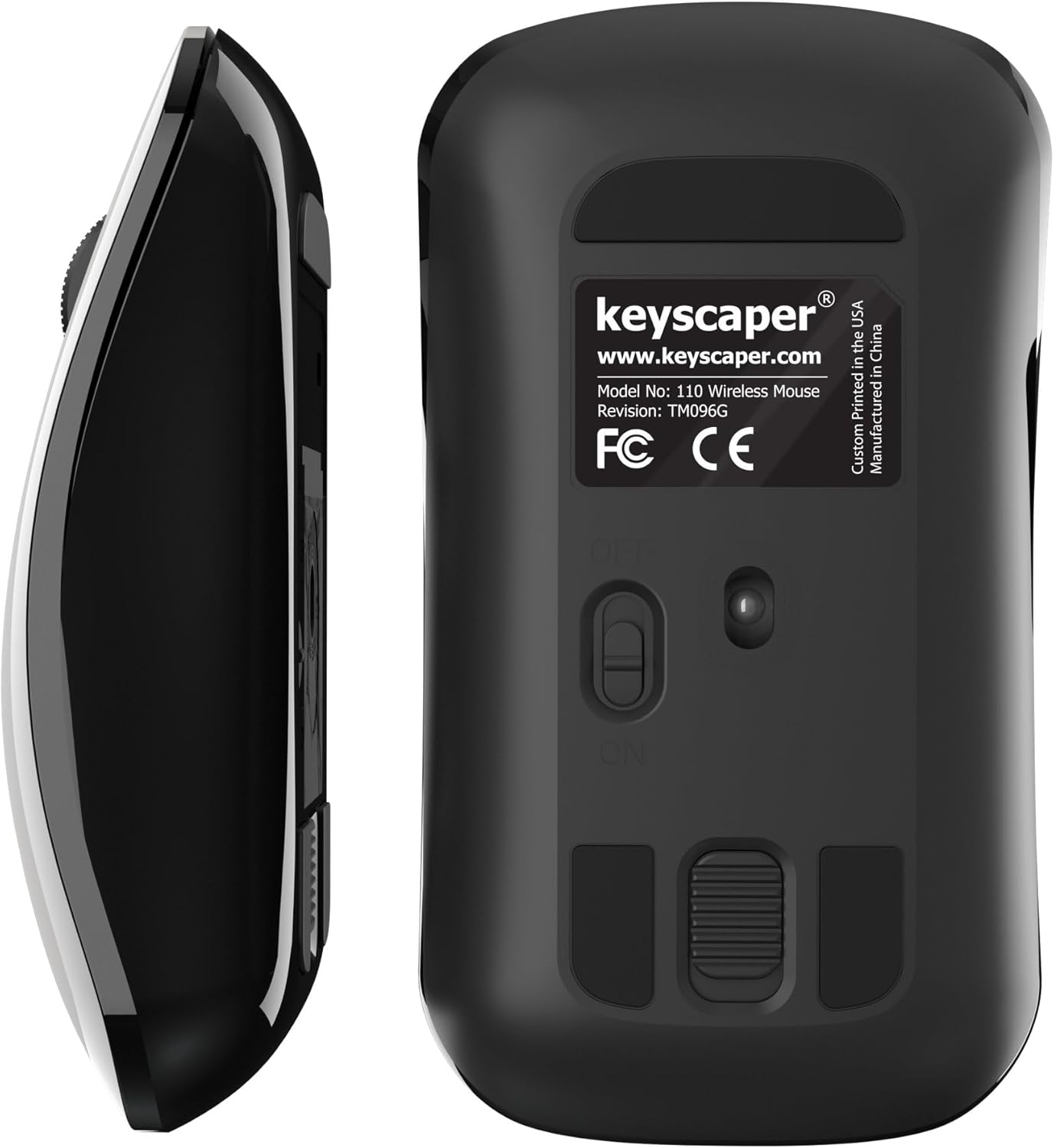
Figure 4: Underside of the mouse
3. Упутство за употребу
3.1 Основна употреба
- Леви клик: Press the left button for primary actions (selecting, opening).
- Десни клик: Press the right button for secondary actions (context menus).
- Точак за померање: Окрените точак горе или доле да бисте се кретали кроз документе или web странице. Притисните точкић за скроловање за функцију клика средњим тастером миша (нпр. отварање линкова у новим картицама).
3.2 Функција аутоматског спавања
The mouse is equipped with an auto-sleep feature. If inactive for a period, it will enter a low-power sleep mode to save battery. To wake the mouse, simply move it or click any button.
4. Одржавање
4.1 Замена батерије
When the mouse performance degrades or it stops responding, it's time to replace the AAA batteries. Follow the steps in Section 2.2 for battery installation.
4.2 Чишћење
Да бисте одржали оптималне перформансе, периодично чистите миш:
- Ensure the mouse is turned OFF.
- Лагано користите меку крпу која не оставља длачице дampводом или благим раствором за чишћење да бисте обрисали спољашњост.
- Избегавајте улазак влаге у било какве отворе.
- Use a dry cotton swab to gently clean the optical sensor on the underside.
КСНУМКС. Решавање проблема
5.1 Миш не реагује
- Уверите се да је миш укључен.
- Проверите батерије. Замените их ако су празне или ниске.
- Verify that the USB nano-receiver is securely plugged into a working USB-A port on your computer. Try a different USB port if necessary.
- Move the mouse closer to the USB nano-receiver to rule out range issues.
- Поново покрените рачунар.
5.2 Неправилно кретање курсора
- Clean the optical sensor on the underside of the mouse (refer to Section 4.2).
- Ensure you are using the mouse on a suitable surface. Highly reflective or uneven surfaces may cause issues. A mouse pad is recommended for best performance.
6. Спецификације
- Број модела: 110ВЛ
- Димензије производа: 2 к 1 к 0.1 инча
- Тежина артикла: 4 унци
- Технологија повезивања: Radio Frequency (via USB nano-receiver)
- Технологија детекције покрета: Оптицал
- батерије: 2 ААА батерија (укључено)
- Боја: Darth Vader (Color Block)
- Произвођач: Dongguan Togran Electronic Technology Co, Ltd.
7. Гаранција и подршка
For warranty information or technical support, please refer to the official Keyscaper webсајт или контактирајте њихову корисничку службу. Сачувајте рачун за куповину за потребе гаранције.
This product is designed and printed by Keyscaper in Tualatin, Oregon, USA, and manufactured by Dongguan Togran Electronic Technology Co, Ltd.