
typecase KB206129
typecase Keyboard Case for iPad Pro 12.9 (6th, 5th, 4th, 3rd Gen) Instruction Manual
Модел: КБ206129
Увод
This manual provides detailed instructions for the setup, operation, maintenance, and troubleshooting of your typecase Keyboard Case for iPad Pro 12.9. Please read this manual thoroughly before using the product to ensure optimal performance and longevity.
The typecase Keyboard Case is designed to enhance your iPad Pro 12.9 experience, offering a versatile keyboard with a trackpad and backlit keys. It is compatible with iPad Pro 12.9-inch (6th, 5th, 4th, 3rd Generation) models.
Садржај пакета
- 1 x typecase Keyboard Case (for iPad Pro 12.9 6th/5th/4th/3rd Gen)
- КСНУМКС к УСБ-Ц кабл за пуњење
- 1 к Упутство за употребу
Сетуп
1. Пуњење тастатуре
Before initial use, fully charge the keyboard. Connect the provided USB-C charging cable to the charging port on the side of the keyboard and to a USB power adapter (not included). The charging indicator light will show the charging status.
- Charging Port Location: Typically on the right side of the keyboard.
- Трајање батерије: The keyboard features a built-in rechargeable lithium polymer battery. Battery level can be checked on your iPad (like other connected Bluetooth devices) or via a shortcut key (Fn + Spacebar, if available, to show 1/3, 2/3, 3/3 battery life).
2. Attaching Your iPad Pro
The keyboard case features a magnetic attachment system. Align your iPad Pro 12.9 with the magnetic panel on the case. The magnets will securely hold the iPad in place.
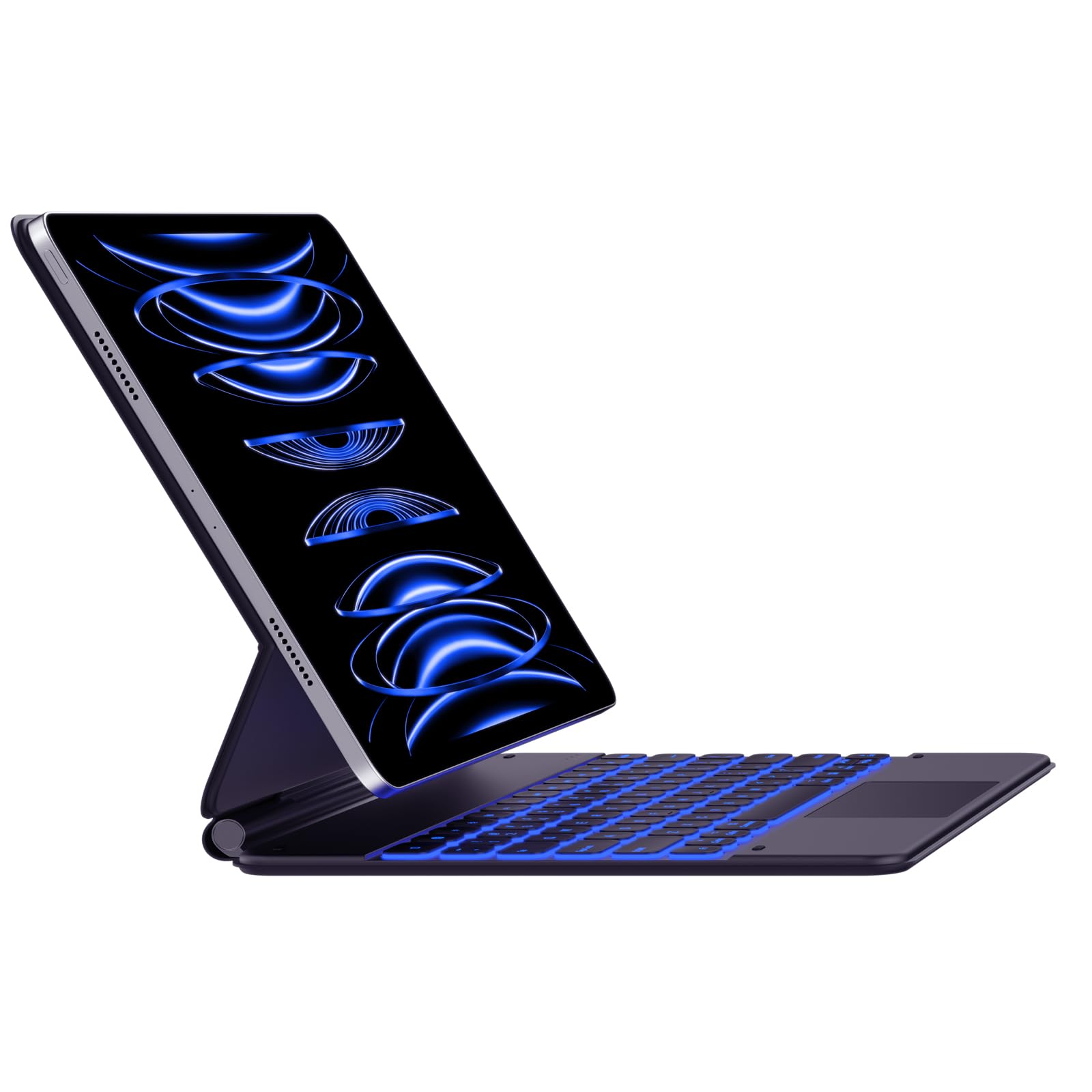
Image: The typecase Keyboard Case with an iPad Pro magnetically attached, displaying blue backlit keys and a vibrant screen.
- Ensure the camera cutout on the case aligns with your iPad's camera.
- The magnetic connection is designed to be strong, but always handle with care.
3. Pairing with Your iPad (Bluetooth Connection)
- Укључено: Пронађите прекидач за напајање са стране тастатуре и померите га у положај „УКЉУЧЕНО“.
- Активирајте режим упаривања: Притисните и држите Повежите се button (or a similar Bluetooth pairing key, often indicated by a Bluetooth icon) on the keyboard. The Bluetooth indicator light will start blinking, indicating it's in pairing mode.
- On Your iPad: Иди на Подешавања > Блуетоотх.
- Изаберите уређај: In the Bluetooth devices list, you should see "typecase Keyboard" or a similar name. Tap on it to connect.
- Потврда: Once paired, the Bluetooth indicator light on the keyboard will stop blinking and remain solid (or turn off), and your iPad will show the keyboard as "Connected."
Note: The keyboard will automatically attempt to reconnect to the last paired device when powered on. If connection issues occur, repeat the pairing steps.
Упутство за употребу
Распоред тастатуре и функционални тастери
The keyboard features a standard QWERTY layout with an additional row of function keys at the top for quick access to iPad features.
- Escape (Esc): Functions as a Home button.
- Brightness Keys: Подесите осветљеност екрана на iPad-у.
- Keyboard Backlight Keys: Adjust backlight color and brightness.
- Тастери за контролу медија: Репродукција/пауза, претходна нумера, следећа нумера.
- Тастери за јачину звука: Искључивање звука, Смањивање звука, Појачавање звука.
- Lock Key: Закључава екран iPad-а.
- Globe Key: Used for switching between keyboard languages or emoji keyboard (functionality may vary based on iPadOS settings).
Контрола позадинског осветљења
The keyboard offers 11 backlight colors and 3 levels of brightness. Use the dedicated backlight keys (often marked with a light bulb icon or similar) in the function row to cycle through colors and adjust brightness.
- Press the backlight key once to change color.
- Press the brightness key (often combined with backlight key or separate) to cycle through brightness levels.
Употреба тракпеда
The integrated trackpad supports multi-touch gestures, similar to a laptop trackpad. Ensure your iPadOS is updated to support trackpad functionality.
| Гест | Акција |
|---|---|
| Додир једним прстом | Click, select item. |
| Two Fingers Swipe | Померање горе/доле/лево/десно. |
| Штипање два прста | Увећање/умањивање. |
| Три прста превуците нагоре | Go to Home Screen. |
| Три прста Превуците лево/десно | Пребацивање између отворених апликација. |
Note: Trackpad precision and responsiveness are optimized for general use. For specific settings or advanced gestures, refer to your iPad's accessibility settings.
Функција аутоматског спавања
The keyboard case is designed with an auto-sleep feature to conserve battery. If inactive for a period, the keyboard will enter sleep mode. Press any key to wake it up and reconnect to your iPad.
Одржавање
- Чишћење: Користите меку, дamp, lint-free cloth to clean the keyboard and case. Avoid harsh chemicals or abrasive materials.
- Складиштење: When not in use, close the case to protect both the iPad and the keyboard. Store in a cool, dry place away from direct sunlight.
- Одржавање батерије: Да бисте продужили век трајања батерије, избегавајте често потпуно пражњење тастатуре. Редовно је пуните, чак и ако није потпуно испражњена.
- Magnetic Clasp: Ensure the magnetic clasp is free from debris to maintain a secure closure.
Решавање проблема
- Тастатура се не повезује:
- Уверите се да је тастатура укључена и напуњена.
- Проверите да ли је Bluetooth омогућен на вашем iPad-у.
- Forget the device in your iPad's Bluetooth settings and re-pair it.
- Поново покрените и тастатуру и ваш iPad.
- Тастери не реагују:
- Проверите да ли је тастатура повезана путем Блутут-а.
- Ensure the keyboard is not in sleep mode.
- Проверите да ли има физичких препрека испод тастера.
- Проблеми са тракпадом:
- Потврдите да је тастатура повезана.
- Check iPadOS settings for trackpad functionality.
- Очистите површину додирне табле.
- iPad Slipping from Magnetic Mount:
- Ensure the iPad is correctly aligned with the magnetic panel.
- Check for any debris between the iPad and the magnetic surface.
- Avoid excessive force or sudden movements that could dislodge the iPad.
Спецификације
| Феатуре | Детаљ |
|---|---|
| Број модела | КБ206129 |
| Компатибилност | iPad Pro 12.9-inch (6th, 5th, 4th, 3rd Gen) |
| Повезивање | Блуетоотх |
| Тип батерије | Литијум полимер (укључен) |
| Порт за пуњење | УСБ-Ц |
| Позадинско осветљење | 11 Colors, 3 Brightness Levels (RGB support) |
| Посебне карактеристике | Backlit, Lightweight, Integrated Trackpad, Magnetic Clasp |
| Материјал | Акрилонитрил бутадиен стирен |
| Тежина артикла | 1.13 килограма |
| Димензије пакета | 30.48 к 25.4 к 3.56 цм |
Гаранција и подршка
Your typecase Keyboard Case is covered by a limited warranty against manufacturing defects. For specific warranty terms and conditions, please refer to the documentation included with your purchase or visit the official typecase webсајту.
For technical support, troubleshooting assistance, or warranty claims, please contact typecase customer service through their official support channels. Contact information can typically be found on the product packaging or the brand's webсајту.
Повезани документи - КБ206129
 |
Typecase Edge Magic Style тастатура за iPad Pro 12.9 инча - корисничко упутство Свеобухватно корисничко упутство за Typecase Edge Magic Style тастатуру, са детаљним описом подешавања, функција и употребе за iPad Pro 12.9 инча (6., 5., 4. и 3. генерације) са тракпадом и позадинским осветљењем тастера. |
 |
typecase Touch футрола са тастатуром и тракпедом за iPad Pro 11 - корисничко упутство Упутство за употребу за футролу са тастатуром typecase Touch за iPad Pro од 11 инча (модел KB201T-110). Откријте функције попут мултитач тракпеда, ротације од 360° и прилагодљивог позадинског осветљења. Ова танка и лагана футрола је дизајнирана за iPad Pro од 11 инча (2021), iPad Air 5. генерације и iPad Air 4. генерације, доступна у пацифичко плавој и љубичастој боји. |
 |
Typecase Flexbook Touch корисничко упутство Упутство за употребу за футролу са тастатуром Typecase Flexbook Touch, са детаљним описом подешавања, компатибилности, функција, решавања проблема и спецификација производа за iPad уређаје. |
 |
Typecase TOUCH корисничко упутство за iPad Mini 6. генерације Упутство за употребу за футролу са тастатуром Typecase TOUCH, које садржи упутства за подешавање, мапе пречица, функције тачпеда, водиче за инсталацију, савете за решавање проблема и спецификације производа за компатибилност са iPad Mini 6. генерације. |
 |
Typecase TOUCH кориснички приручник: Футрола са тастатуром за iPad Свеобухватно корисничко упутство за футролу са тастатуром Typecase TOUCH, детаљно подешавање, функције тачпеда, пречице, пуњење и решавање проблема за компатибилне моделе iPad-а. |
 |
Упутство за коришћење Typecase Touch-а за iPad Pro 12.9 - Подешавање, функције и решавање проблема Свеобухватно корисничко упутство за футролу са тастатуром Typecase Touch компатибилну са iPad Pro 12.9. Сазнајте више о подешавању, компатибилности, функцијама тачпеда, пречицама, инсталацији, батерији, пуњењу и решавању проблема. |
Ask a question about this manual
Ask about setup, troubleshooting, compatibility, parts, safety, or missing instructions. Manuals+ will review the question and use this page’s manual context to help answer it.