
Primevolve PF11R
Primevolve PF11R Portable USB Rechargeable Fan User Manual
Модел: ПФ11Р
Производ је завршенview
The Primevolve PF11R is a versatile, battery-powered portable fan designed for both desk and floor use. It features an adjustable height, four speed settings, and a long-lasting 7200 mAh rechargeable battery. Its compact, foldable design makes it ideal for various environments, and it comes with a convenient remote control for ease of use.
Кључне карактеристике
- Батерија великог капацитета: Equipped with a 7200 mAh battery, providing 6 to 21 hours of operation depending on the speed setting. Fully charges in approximately 5 hours.
- УСБ напајање: Compatible with various USB power sources (5V/2A) including PCs, laptops, power banks, AC adapters, and car chargers.
- Лако се чисти: The fan grille and blades are removable for regular cleaning, ensuring optimal airflow and hygiene.
- даљински управљач: Includes a remote for convenient power on/off and speed adjustment from a distance.
- Подесива висина и склопиви дизајн: Transforms from a compact 7cm folded unit to a 36cm desk fan or a 100cm floor fan.
- Тих рад: Operates at a low noise level of 30-40dB.
Подешавање и монтажа
Unfolding and Adjusting Height
The PF11R fan is designed for easy setup. To unfold, gently pull the fan head upwards from the base. The telescopic rod allows for height adjustment. Extend it to your desired height for desk or floor use. Ensure the fan head is securely locked in position after adjustment.

This image displays the Primevolve PF11R fan's versatility, showing it in its compact folded state, as a medium-height desk fan, and extended to its full height as a floor fan. The included remote control is also visible.

This image highlights the fan's adjustable height feature, showing it can be used compactly at 7cm, as a desk fan at 36cm, or as a floor fan at 100cm.
Упутства за пуњење
Before first use, fully charge the fan. Connect the included USB cable to the fan's charging port and to a compatible 5V/2A USB power source. The charging indicator light will show the charging status. A full charge takes approximately 5 hours.

The image shows the fan's USB charging port and lists various compatible charging methods such as laptops, power banks, car chargers, and wall adapters. A 5ft USB cable is also depicted.
Упутство за употребу
Укључивање/искључивање и контрола брзине
To turn the fan on or off, press the power button on the fan's base or on the remote control. To adjust the wind speed, press the speed button on the fan's base or the corresponding buttons on the remote control. The fan offers four speed settings: Low, Medium, Natural, and High.

A visual guide illustrating the four fan speed modes: Low, Medium, Natural, and High, along with their respective battery runtimes ranging from 6 to 21 hours on a full charge.

The fan is shown operating on a desk next to a person, emphasizing its quiet operation with a noise level of 30-40dB and its four available wind modes.
Adjusting Fan Angle and Stability
The fan head can be manually tilted to direct airflow. The base is equipped with anti-slip silicone pads for stability on various surfaces. Ensure the fan is placed on a flat, stable surface during operation.
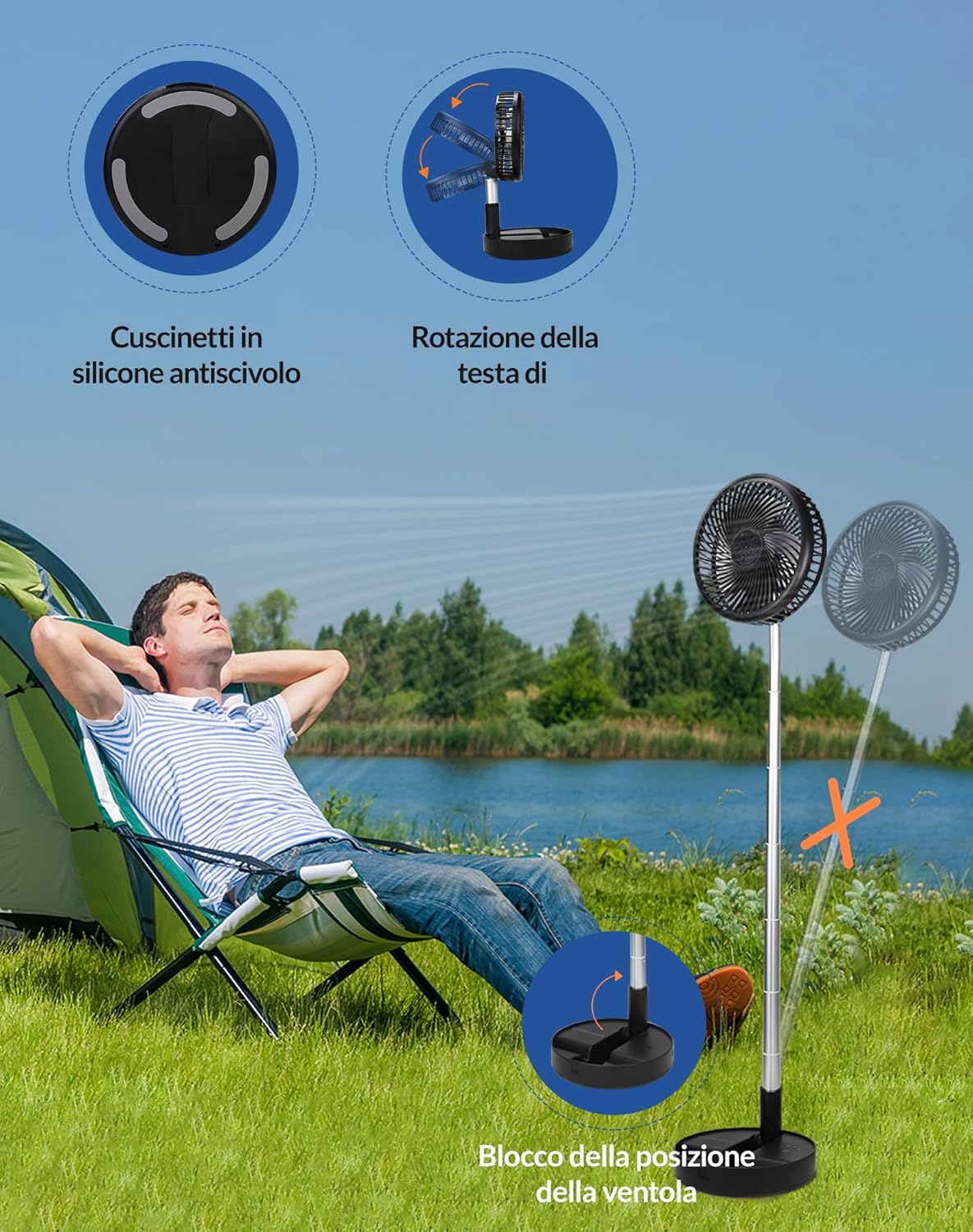
This image details the fan's base features, including anti-slip silicone pads for stability, the ability for the fan head to rotate, and a mechanism to lock the fan's position.
Одржавање и чишћење
Regular cleaning of your Primevolve PF11R fan will help maintain optimal performance and airflow. The front grille is detachable for easy access to the fan blades.
Cleaning the Fan Grille and Blades
- Ensure the fan is turned off and unplugged from any power source.
- Gently twist the front grille counter-clockwise to unlock and remove it.
- Wipe the fan blades and the inside of the grille with a soft, damp cloth. Do not use abrasive cleaners or immerse the fan in water.
- Оставите да се сви делови потпуно осуше пре поновног састављања.
- Align the grille and twist clockwise to lock it back into place.

A clear visual guide demonstrating the fan's detachable front cover, which can be twisted counter-clockwise for easy removal and cleaning of the blades.
Техничке спецификације
| Феатуре | Спецификација |
|---|---|
| Бранд | Примеволве |
| Број модела | ПФ11Р |
| Боја | Црно |
| Димензије производа (Д к Ш к В) | 23 к 11 к 23 цм |
| Тежина артикла | 1.11 килограма |
| Повер | 3.47 Ваттс |
| Волtage | 5 Волтс |
| Материјал | Пластика |
| Број брзина | 4 |
| Ниво буке | 40 дБ |
| Карактеристике | Foldable, Portable, Remote Control |
| Тип батерије | 1 литијумска метална батерија (укључена) |
| Извор напајања | Баттери Поверед |
| Препоручена употреба | Вентилација |
| Тип монтаже | Флоор Моунт |
Решавање проблема
If you encounter any issues with your Primevolve PF11R fan, please refer to the following common problems and solutions:
- Вентилатор се не укључује:
- Ensure the battery is charged. Connect the fan to a power source and allow it to charge for at least 30 minutes.
- Check if the power button on the fan or remote control is pressed correctly.
- Verify that the USB cable and power adapter are functioning correctly.
- Слаб проток ваздуха:
- Повећајте подешавање брзине вентилатора.
- Clean the fan grille and blades as described in the Maintenance section. Dust buildup can restrict airflow.
- Ensure the fan is not obstructed by objects.
- Fan makes unusual noise:
- Check for any foreign objects caught in the fan blades or grille.
- Уверите се да је вентилатор постављен на равну и стабилну површину.
- Clean the fan blades to remove any debris that might cause imbalance.
- Даљински управљач не ради:
- Уверите се да нема препрека између даљинског управљача и вентилатора.
- Проверите да ли је потребно заменити батерију даљинског управљача.
Гаранција и подршка
Primevolve products are manufactured with high-quality standards. For specific warranty information and customer support, please refer to the documentation included with your purchase or contact Primevolve customer service through the retailer's platform or the official brand webсајт. Молимо вас да сачувате доказ о куповини за евентуалне рекламације по гаранцији.
Ask a question about this manual
Ask about setup, troubleshooting, compatibility, parts, safety, or missing instructions. Manuals+ will review the question and use this page’s manual context to help answer it.