
Увод
Thank you for choosing the Vieta Pro Karaoke Party Microphone. This device combines a high-quality microphone with an integrated speaker, designed for an engaging karaoke experience. It features True Wireless technology, allowing two microphones to connect to a single device, and offers various sound modes and connectivity options.
Садржај пакета
- Vieta Pro Karaoke Party Microphone with Integrated Speaker
- Кабл за пуњење (USB-C)
- Упутство за употребу

Image: The retail box of the Vieta Pro Karaoke Party Microphone, showing the product and its features.
Производ је завршенview
Familiarize yourself with the main components and controls of your Vieta Pro Karaoke Party Microphone.

Слика: Фронт view of the Vieta Pro Karaoke Party Microphone, highlighting the control buttons for power, volume, mode, and Bluetooth.
Контроле и портови:
- Дугме за напајање: Press and hold to turn on/off. Short press to switch modes.
- Дугмад за јачину звука (+/-): Подесите јачину звучника.
- Дугме за режим (М): Cycle through sound effects or modes.
- Блуетоотх дугме: Покрените Bluetooth упаривање.
- УСБ-Ц порт: За пуњење уређаја.
- 3.5mm Audio Jack (Input): Connect external audio sources.
- 3.5mm Audio Jack (Output): Повежите слушалице или спољне звучнике.
- Дугме Лигхт Моде: Change or turn off LED lighting effects.
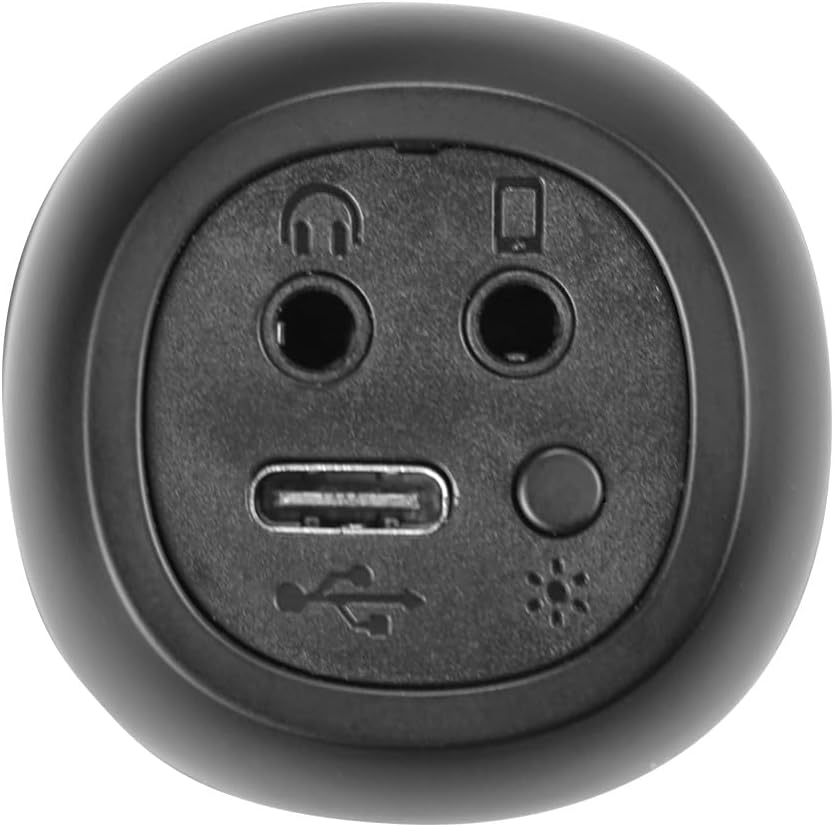
Слика: Крупни план view of the bottom of the microphone, showing the USB-C charging port, 3.5mm audio input/output jacks, and the light mode button.
Подешавање и повезивање
1. Пуњење микрофона
Before first use, fully charge the microphone. Connect the provided USB-C cable to the microphone's USB-C port and the other end to a USB power adapter (not included) or a computer's USB port. The battery indicator light will show charging status.
2. Укључивање/искључивање
Притисните и држите Дугме за напајање for approximately 3 seconds to turn the microphone on or off. A sound prompt will indicate the power status.
3. Блуетоотх упаривање
- Turn on the microphone. It will automatically enter Bluetooth pairing mode, indicated by a flashing Bluetooth light.
- На паметном телефону, таблету или рачунару омогућите Блутут и потражите доступне уређаје.
- Select "Vieta Pro Karaoke Party" from the list of devices.
- Once connected, a sound prompt will confirm successful pairing, and the Bluetooth light will stop flashing.
4. True Wireless Connection (Connecting Two Microphones)
To use two Vieta Pro Karaoke Party microphones simultaneously with one device:
- Ensure both microphones are powered on and not connected to any other Bluetooth device.
- On one microphone (this will be the primary), double-press the Блуетоотх дугме. It will enter True Wireless pairing mode.
- The primary microphone will search for the second microphone. Once connected, a sound prompt will confirm the True Wireless connection.
- Now, connect the primary microphone to your device via Bluetooth as described in step 3. Both microphones will now output audio from your device.

Image: Two individuals holding and using Vieta Pro Karaoke Party Microphones, demonstrating the True Wireless feature.
5. Жична веза (AUX)
Connect an external audio source (e.g., MP3 player) to the microphone using a 3.5mm audio cable (not included) plugged into the 3.5mm audio input jack.
Упутство за употребу
1. Подешавање јачине звука
Користите Волуме + и Волуме - buttons on the microphone to adjust the speaker output volume. You can also control the volume from your connected device.
2. Changing Sound Modes/Effects
Притисните тастер Дугме за режим (М) repeatedly to cycle through the four available sound configuration modes or voice effects. Experiment to find your preferred sound.
3. Voice Reduction Feature
This feature allows you to reduce the vocal track of a song, making it easier to sing along. To activate or deactivate this feature, refer to the specific instructions in the full manual or experiment with the Дугме за режим (М) or a dedicated button if present (not explicitly detailed in provided data, but mentioned as a feature).
4. Снимање
The microphone supports one-touch recording. Connect the microphone to a compatible recording device (e.g., smartphone with a recording app) via Bluetooth or the 3.5mm output jack. Press the dedicated Дугме за снимање (if available, or refer to the full manual for specific button assignment) to start and stop recording.
5. ЛЕД светлосни ефекти
Притисните тастер Дугме за светлосни режим (located near the ports at the bottom) to change the LED lighting patterns or turn them off.

Image: Close-up of the Vieta Pro Karaoke Party Microphone's speaker grille, showing the integrated LED lighting effects.
Одржавање
- Чишћење: Use a soft, dry cloth to clean the microphone's surface. Do not use abrasive cleaners or solvents.
- Складиштење: Чувајте микрофон на хладном и сувом месту, даље од директне сунчеве светлости и екстремних температура.
- Одржавање батерије: Да бисте продужили век трајања батерије, избегавајте често потпуно пражњење батерије. Редовно пуните уређај, чак и ако га не користите дуже време.
- Изложеност води: Овај уређај није водоотпоран. Избегавајте излагање води или високој влажности.
Решавање проблема
| Проблем | Могући узрок | Решење |
|---|---|---|
| Нема струје | Батерија је празна. | Напуните микрофон помоћу УСБ-Ц кабла. |
| Повезивање преко Блуетоотх-а није могуће | Bluetooth is off on the device; microphone is already connected to another device; microphone is out of range. | Ensure Bluetooth is enabled on your device. Disconnect from other devices. Move microphone closer to your device (within 10 meters). Restart both devices. |
| Нема излаза звука | Volume is too low; microphone is muted; incorrect input source. | Increase volume on both the microphone and your connected device. Check if the microphone is in the correct operating mode. |
| True Wireless connection fails | One or both microphones are already paired; microphones are too far apart. | Ensure both microphones are unpaired from other devices. Place them close to each other during True Wireless pairing. Follow True Wireless pairing steps carefully. |
Спецификације
| Феатуре | Детаљ |
|---|---|
| Назив модела | Караоке журка |
| Бранд | Виета Про |
| Технологија повезивања | True Wireless, Bluetooth |
| Тип конектора | УСБ-Ц, 3.5 мм прикључак |
| Излазна снага | 18 В |
| Трајање батерије | До 10 сати |
| Тип батерије | 1 литијум-јонска (укључена) |
| Фреквенцијски опсег | 50 до 15,000 Хз |
| Импеданса | 600 Охмс |
| Полар Паттерн | Једносмерно |
| Компатибилни уређаји | Лични рачунар, паметни телефон |
| Посебне карактеристике | Volume Control, 1-Touch Recording, Lighting Modes, Battery Indicator, Radio |
| Тежина | 337 грама |
| Материјал | Пластика |
Гаранција и подршка
For warranty information and technical support, please contact the manufacturer, FRAMASON AUDIO SA, or your local retailer. Keep your proof of purchase for any warranty claims.
Manufacturer: FRAMASON AUDIO SA