
GHUST MR23GA
Instruction Manual for GHUST MR23GA Replacement Magic Voice Remote Control
Модел: MR23GA
1. Производ је готовview
This manual provides essential information for the operation and maintenance of your GHUST MR23GA Replacement Magic Voice Remote Control. This remote is designed as a replacement for various LG Smart TV models, offering convenient control without complex setup.

Image 1.1: The GHUST MR23GA Replacement Magic Voice Remote Control.
Кључне карактеристике:
- Директна замена: Functions as a direct replacement for original LG Magic Remote models.
- Није потребно програмирање: Спремно за употребу одмах након вађења из кутије, након уметања батерије.
- Издржљива конструкција: Made of high-quality ABS material for enhanced durability.
- Компактан дизајн: Small and ergonomic for comfortable grip.
- Voice Search Capability: Supports voice commands for easier navigation (functionality may vary based on TV model and original remote features).
- Наменски тастери за пречице: Брз приступ популарним стриминг сервисима као што су Netflix и Prime Video.
2. Подешавање и инсталација
The MR23GA remote control is designed for immediate use with compatible LG Smart TVs. No complex programming or pairing procedures are required.
2.1. Инсталација батерије
- Пронађите поклопац одељка за батерије на задњој страни даљинског управљача.
- Померите поклопац надоле или притисните резу да бисте отворили одељак.
- Insert two (2) AAA batteries (not included) into the compartment, ensuring the positive (+) and negative (-) terminals align correctly with the indicators inside.
- Затворите поклопац одељка за батерију тако што ћете га вратити на место док не кликне чврсто.

Image 2.1: The remote control is designed for ease of use with no setup or programming required after battery installation.
Once batteries are installed, the remote is ready to operate your compatible LG Smart TV.
3. Упутство за употребу
This section details the basic functions and operation of your MR23GA remote control.
3.1. Основне функције
- Дугме за укључивање (●): Притисните за укључивање или искључивање телевизора.
- Дугмад са бројевима (0-9): Use to directly input channel numbers.
- Појачавање/утишавање (+/-): Adjust the TV's volume level.
- Channel Up/Down (▲/▼): Промените ТВ канале.
- Mute Button (🔇): Mute or unmute the TV's audio.
- Навигациона тастатура (горе, доле, лево, десно, ОК): Крећите се кроз меније и бирајте опције.
- Back Button (↶): Вратите се на претходни екран или мени.
- Home Button (🏠): Access the TV's Smart Home dashboard.

Image 3.1: The compact size and ergonomic design make the remote easy to hold and operate.
3.2. Управљање гласом
Притисните и држите Дугме за микрофон to activate voice control. Speak clearly into the remote to issue commands or search for content. Release the button when finished speaking. Note that voice control functionality may depend on your specific LG TV model and its original features.
3.3. Dedicated Shortcut Buttons
The remote features dedicated buttons for quick access to popular streaming applications:
- Нетфлик дугме: Directly launch the Netflix application.
- Дугме за главни видео: Directly launch the Amazon Prime Video application.
- Дизни+ дугме: Directly launch the Disney+ application.
- LG Channels Button: Directly launch the LG Channels application.
- Sling Button: Directly launch the Sling TV application.
- Алекса дугме: Activate Alexa voice assistant (functionality depends on TV model).

Image 3.2: Dedicated shortcut buttons provide quick access to your favorite applications.
3.4. Компатибилност
This replacement remote control is compatible with a wide range of LG Smart TV models, including but not limited to:
- LG OLED Series: OLED42C3AUA, OLED42C3PUA, OLED48C3PUA, OLED55C3PUA, OLED65C3AUA, OLED77C3PUA, OLED83C3PUA, OLED55G3PUA, OLED65G3PUA, OLED77G3PUA, OLED83G3PUA, OLED55B3PUA, OLED65B3PUA, OLED77B3PUA
- LG QNED Series: 43QNED75URA, 50QNED75URA, 55QNED75URA, 65QNED75URA, 75QNED75URA, 50QNED80URA, 55QNED80URA, 65QNED80URA, 75QNED80URA, 86QNED80URA
- LG UR9000 Series: 43UR9000PUA, 50UR9000PUA, 55UR9000PUA, 65UR9000PUA, 75UR9000PUA
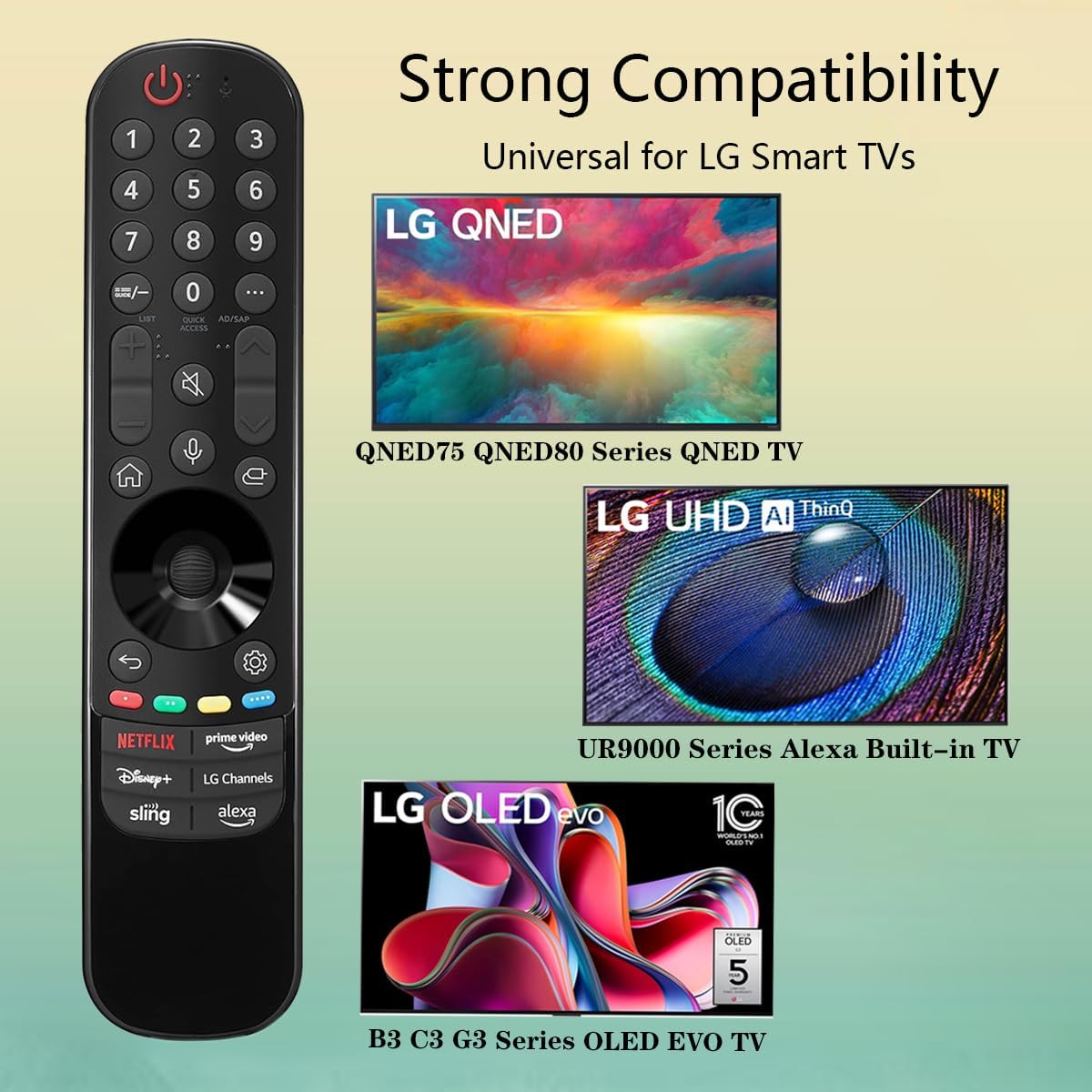
Image 3.3: The remote offers strong compatibility with various LG Smart TV series.
4. Одржавање
Proper care and maintenance will extend the lifespan of your remote control.
4.1. Чишћење
- Користите меку, суву крпу да обришете површину даљинског управљача.
- За тврдокорну прљавштину, благо дampОчистите крпу водом или благим, неабразивним средством за чишћење. Не прскајте средство за чишћење директно на даљински управљач.
- Избегавајте употребу јаких хемикалија, растварача или абразивних средстава за чишћење, јер могу оштетити завршну обраду даљинског управљача или унутрашње компоненте.
4.2. Брига о батерији
- Replace batteries when the remote's responsiveness decreases or it stops functioning.
- Увек замените обе батерије истовремено новим батеријама истог типа (ААА).
- Ако даљински управљач неће бити коришћен дуже време (нпр. месец дана или дуже), извадите батерије како бисте спречили цурење и потенцијално оштећење даљинског управљача.
- Истрошене батерије одложите у складу са локалним прописима.
КСНУМКС. Решавање проблема
Ако наиђете на проблеме са даљинским управљачем, погледајте следеће уобичајене проблеме и решења:
| Проблем | Могући узрок | Решење |
|---|---|---|
| Даљински управљач не реагује. | Празне или неправилно уметнуте батерије. | Замените батерије новим ААА батеријама, водећи рачуна о исправном поларитету (+/-). |
| Даљински управљач ради повремено. | Low battery power; obstruction between remote and TV; infrared sensor blocked on TV. | Replace batteries. Ensure a clear line of sight to the TV's infrared sensor. Remove any obstructions. |
| Voice control or pointer not working. | This replacement remote may not support all advanced features of the original LG Magic Remote, or your TV model does not fully support these features with a replacement remote. | Verify your TV model's compatibility with replacement remotes for advanced features. Basic functions should still operate. |
| Dedicated app buttons (e.g., Alexa, LG Channels) not working. | Functionality depends on TV model and specific app integration. | Some app buttons may not be universally compatible or require specific TV software versions. Verify if other buttons work. |
Ако проблем и даље постоји након што сте испробали ова решења, обратите се корисничкој подршци.
6. Спецификације
- Број модела: МР23ГА
- Бренд: ДУХ
- Димензије производа: 7.3 к 1.6 к 1.2 инча
- Тежина артикла: 2.29 унци
- Извор напајања: 2 к ААА батерије (нису укључене)
- Боја: Црно
- Материјал: Висококвалитетни АБС
- Компатибилни уређаји: LG Smart Televisions (specific models listed in Section 3.4)
- Посебна карактеристика: Voice Search (functionality may vary)
7. Гаранција и подршка
GHUST is committed to providing high-quality products and excellent customer service.
7.1. Сервис након продаје
If you have any questions regarding the quality or functionality of your GHUST MR23GA remote control, please do not hesitate to contact our customer support team. We are dedicated to resolving any issues promptly and ensuring your satisfaction.
For support, please refer to the contact information provided with your purchase or on the official GHUST product page.
Ask a question about this manual
Ask about setup, troubleshooting, compatibility, parts, safety, or missing instructions. Manuals+ will review the question and use this page’s manual context to help answer it.