
1. Увод
Thank you for choosing the WORKPRO 7.2V Cordless Rotary Tool. This manual provides essential information for the safe and effective operation, maintenance, and troubleshooting of your tool. Please read it thoroughly before use and retain it for future reference.
The WORKPRO 7.2V Cordless Rotary Tool is a versatile and compact device designed for various DIY and craft projects. Its lightweight design and variable speed settings make it suitable for tasks such as sanding, engraving, cutting, drilling, grinding, and polishing.

Figure 1: WORKPRO 7.2V Cordless Rotary Tool with included accessories and storage bag.
2. Безбедносне информације
Увек се придржавајте основних мера предострожности како бисте смањили ризик од пожара, струјног удара и повреда приликом рада са електричним алатима.
- Прочитајте сва упутства: Упознајте се са радом алата и безбедносним упутствима.
- Носите заштиту за очи: Увек носите заштитне наочаре или заштитне наочаре са бочним штитницима.
- Обезбедите радни комад: Увек клamp или на други начин осигурајте радни предмет како бисте спречили померање током рада.
- Одржавајте чисто радно подручје: Затрпана подручја изазивају несреће.
- Избегавајте опасна окружења: Немојте користити електричне алате у дamp или влажне локације, или их изложите киши. Нека радни простор буде добро осветљен.
- Држите децу подаље: Сви посетиоци треба да буду на безбедној удаљености од радног простора.
- Обуците се правилно: Do not wear loose clothing or jewelry. They can be caught in moving parts. Non-skid footwear is recommended. Wear protective hair covering to contain long hair.
- Користите прави алат: Немојте присиљавати алат или додатак да обављају посао за који нису дизајнирани.
- Искључите напајање: Disconnect the tool from its power source before making adjustments, changing accessories, or storing it.
- Не претерујте: У сваком тренутку одржавајте правилан положај и равнотежу.
- Пажљиво одржавајте алате: Одржавајте алате оштрим и чистим за боље и безбедније перформансе. Пратите упутства за подмазивање и замену прибора.
- Проверите да ли има оштећених делова: Пре даље употребе алата, треба пажљиво проверити штитник или други део који је оштећен да би се утврдило да ли ће исправно функционисати и обављати своју функцију.
- Do Not Operate While Charging: For safety reasons, do not use the tool while it is being charged.
3. Производ је готовview
The WORKPRO 7.2V Cordless Rotary Tool is designed for precision work. Understanding its components is key to effective operation.
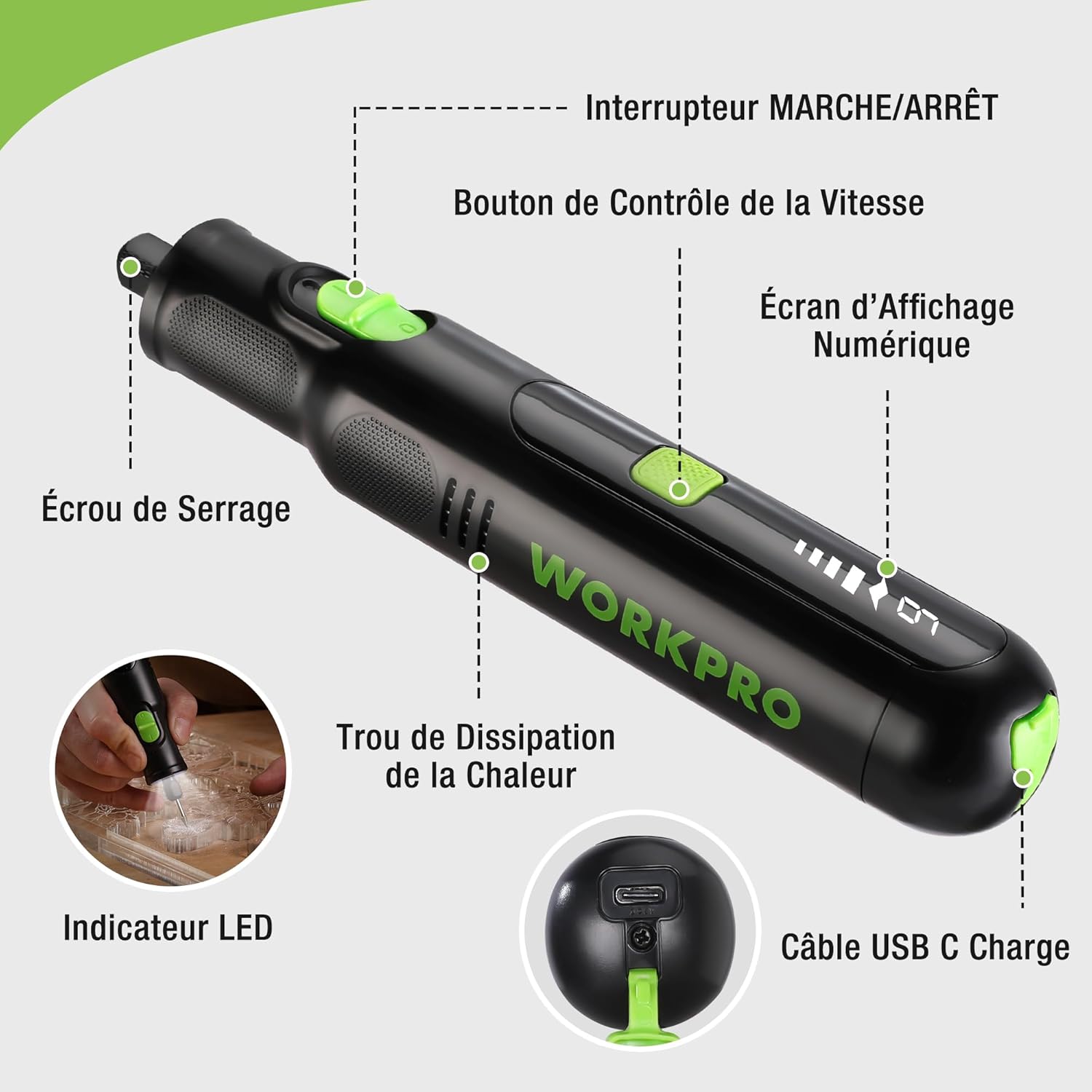
Figure 2: Key components of the rotary tool.
Компоненте:
- ОН/ОФФ прекидач: Активира и деактивира алат.
- Дугме за контролу брзине: Adjusts the rotational speed of the tool.
- Дигитални екран: Shows the current speed setting.
- Collet Nut: Secures the accessory bits in place.
- Рупа за дисипацију топлоте: Ensures proper cooling of the motor during operation.
- ЛЕД индикатор: Обезбеђује осветљење радног простора.
- УСБ-Ц прикључак за пуњење: За пуњење унутрашње батерије.
Укључена додатна опрема:
Your WORKPRO rotary tool comes with 117 diverse accessories, enabling a wide range of applications. These include:

Слика 3: Завршеноview of the 117 included accessories.
- Брушење/Оштрење: Grinding stones and wheels for material shaping and sharpening.
- Резбарење: Diamond bits for detailed carving and engraving.
- Полирање: Wool felt wheels, felt wheels, screw mandrels, and metal brushes for achieving smooth, shiny finishes.
- глодање: Milling bits for precise material removal.
- Сечење: Cutting discs and saw blades for various cutting tasks, along with a cutting disc holder.
- Брушење: Sandpaper, rubber sanding drums, and sanding bands for surface preparation and finishing.
- чауре: 2.35mm and 3.2mm collets to accommodate different shank sizes.
- бушење: 2.35mm and 3.2mm drill bits for small-scale drilling.
- кључ: For securing and loosening collet nuts.
4. Подешавање
4.1 Пуњење алата
The tool is equipped with a 7.2V 1100mAh Lithium-ion rechargeable battery. Before first use, fully charge the tool.
- Connect the provided USB-C charging cable to the tool's USB-C charging port.
- Connect the other end of the USB cable to a compatible USB power source (e.g., computer, USB wall adapter).
- The digital display will indicate charging status. A full charge typically takes approximately 2 hours.
- Када се потпуно напуни, искључите кабл за пуњење.
Note: For optimal battery life, it is recommended to store the tool with the battery charged between 50% and 75%. Recharge the tool at least once every 3 to 6 months if not used regularly.

Figure 4: Charging the rotary tool via USB-C.
4.2 Инсталирање додатне опреме
The WORKPRO rotary tool features an automatic spindle lock design for easy and secure accessory changes.
- Ensure the tool is turned OFF.
- Unscrew the collet nut at the front of the tool.
- Select the appropriate collet size for your desired accessory (2.35mm or 3.2mm). Insert the collet into the tool if not already present.
- Insert the shank of the accessory bit into the center of the collet nut. Ensure the bit is fully seated.
- Hand-tighten the collet nut. For a secure fit, use the included wrench to tighten the collet nut firmly. Do not overtighten.

Figure 5: Two-step accessory replacement process.

Figure 6: Detailed installation steps for various accessories.
Note: The automatic spindle lock engages when the tool is off, allowing for accessory changes without needing to press a separate button. A slight clicking sound when the tool stops is normal due to this mechanism.
5. Упутство за употребу
5.1 Укључивање/искључивање
To turn the tool ON, slide the ON/OFF switch to the 'ON' position. To turn it OFF, slide the switch to the 'OFF' position.
5.2 Подешавање брзине
The tool features 6 variable speed settings, ranging from 5000 RPM to 30000 RPM. Press the Speed Control Button to cycle through the speeds. The current speed setting will be displayed on the digital screen.
- Speed I: 5000 RPM
- Speed II: 10000 RPM
- Speed III: 15000 RPM
- Speed IV: 20000 RPM
- Speed V: 25000 RPM
- Speed VI: 30000 RPM
Choose the appropriate speed for your task and material. Lower speeds are generally suitable for polishing, delicate work, and softer materials, while higher speeds are for cutting, grinding, and harder materials.

Figure 7: Variable speed settings and powerful motor.
5.3 Интегрисано ЛЕД светло
The tool includes an integrated LED light that illuminates the work area, improving visibility in dimly lit spaces and for detailed tasks.

Figure 8: Using the LED light for precision engraving.
5.4 Апликације
The WORKPRO rotary tool is highly versatile and can be used for:
- Сечење: Use appropriate cutting discs for various materials.
- Резбарење/Гравирање: Utilize diamond bits for intricate designs on wood, plastic, or soft metals.
- Полирање: Apply felt wheels and polishing compounds to restore shine to surfaces.
- Брушење: Use sanding bands and drums for smoothing rough edges or preparing surfaces.
- бушење: Employ small drill bits for precision holes.

Слика 9: Прamples of versatile applications.
6. Одржавање
6.1 Чишћење
- Увек искључите алат из било ког извора напајања пре чишћења.
- Користите меку, дamp крпом обришите спољашњост алата. Не користите јаке хемикалије или абразивна средства за чишћење.
- Use a small brush or compressed air to clear dust and debris from the heat dissipation holes and around the collet area.
6.2 Нега и складиштење батерије
- To prolong battery life, avoid completely discharging the battery regularly.
- For long-term storage, ensure the battery is charged to approximately 50-75%. Recharge the tool every 3 to 6 months to prevent deep discharge and maintain battery health.
- Алат чувајте на хладном и сувом месту, даље од директне сунчеве светлости и екстремних температура.
6.3 Одељак за складиштење додатне опреме
Keep all accessories organized in the provided storage bag or a suitable container to prevent loss and damage.
КСНУМКС. Решавање проблема
Овај одељак се бави уобичајеним проблемима на које можете наићи са својим ротационим алатом WORKPRO.
| Проблем | Могући узрок | Решење |
|---|---|---|
| Алат се не укључује. | Батерија је испражњена. | Charge the tool fully using the USB-C cable. |
| Алат се неочекивано зауставља током употребе. | Батерија је празна или је алат преоптерећен. | Recharge the battery. Reduce pressure on the tool or use a lower speed setting for the task. |
| Clicking sound when turning off. | Normal operation of the automatic spindle lock. | This is a normal function and does not indicate a fault. |
| Accessory bit is loose or wobbles. | Навртка стезне чауре није довољно затегнута или је величина стезне чауре погрешна. | Ensure the correct collet size is used for the accessory. Tighten the collet nut firmly with the included wrench. |
| Reduced performance or short runtime. | Battery degradation or improper charging/storage. | Ensure proper charging and storage practices are followed (refer to Section 6.2). If the issue persists, the battery may need replacement. |
8. Спецификације
Below are the technical specifications for the WORKPRO 7.2V Cordless Rotary Tool (Model W123024A).
| Феатуре | Спецификација |
|---|---|
| Бранд | ВОРКПРО |
| Број модела | В123024А |
| Волtage | 7.2 Волтс |
| Тип батерије | Литијум-јонски (1 укључен) |
| Капацитет батерије | 1100 мАх |
| Максимална брзина ротације | 30000 РПМ |
| Променљиве брзине | 6 (5000-30000 обртаја у минути) |
| Време пуњења | Прибл. 2 сата |
| Runtime (Max Speed) | Прибл. 45 минута |
| Тежина | 227 грама |
| Димензије (Д к Ш к В) | 25.2 к 16.8 к 5.5 цм |
| Посебна карактеристика | Cordless, Integrated LED Light, Automatic Spindle Lock |
| Укључене компоненте | 117 Прибор |
| Произвођач | Hang Zhou Great Star Industrial Co.,LTD |
9. Гаранција и подршка
For warranty information, please refer to the documentation provided at the time of purchase or contact your retailer. WORKPRO is committed to providing quality products and customer satisfaction.
If you encounter any issues or have questions regarding your WORKPRO 7.2V Cordless Rotary Tool, please contact the seller or WORKPRO customer support through their official website or contact channels. Please have your model number (W123024A) and purchase details ready when seeking support.