
Увод
This manual provides detailed instructions for the setup, operation, and maintenance of your Rapoo M300G Silent Wireless Mouse. Please read this guide thoroughly to ensure proper use and to maximize the performance of your device. The Rapoo M300G offers versatile connectivity options, silent clicking, and adjustable DPI settings for an optimized user experience.
Садржај пакета
Проверите да ли су све ставке присутне у пакету:
- Rapoo M300G Wireless Mouse x 1
- АА батерија к 1
- USB Receiver x 1 (typically stored inside the mouse)
- Упутство за производ к 1
Производ је завршенview
Familiarize yourself with the components of your Rapoo M300G mouse:

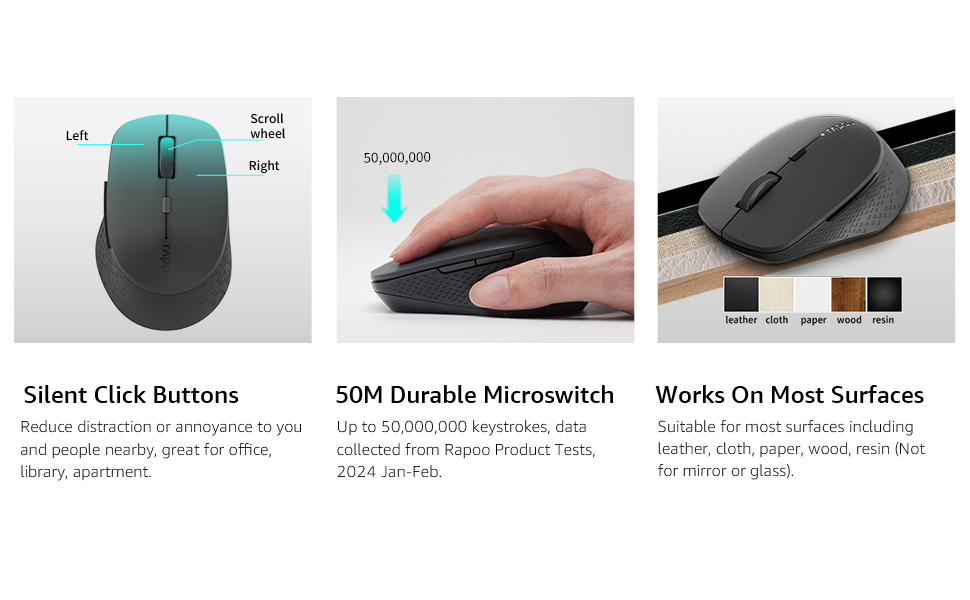
- Лево дугме: Стандардна функција клика.
- Десно дугме: Стандардна функција десног клика.
- Точак за померање: For scrolling through documents and web странице. Такође се може притиснути за функцију клика средњим тастером миша.
- Дугме за прекидач DPI-ја: Подешава осетљивост миша (DPI).
- Дугме за напред: Навигација напред у web претраживачи или file истраживачи.
- Дугме за назад: Навигација уназад web претраживачи или file истраживачи.
- Multi-function Button Switch (Underside): Used to switch between 2.4GHz and Bluetooth modes, and for Bluetooth pairing.
Сетуп
1. Инсталација батерије
The Rapoo M300G mouse requires one AA battery (included).
- Пронађите поклопац одељка за батерију на доњој страни миша.
- Отворите поклопац.
- Insert the AA battery, ensuring the positive (+) and negative (-) terminals align correctly with the markings inside the compartment.
- Добро затворите поклопац одељка за батерије.

2. Бежична веза од 2.4 GHz
To connect via the 2.4GHz USB receiver:
- Извадите УСБ пријемник из његовог слота за складиштење унутар одељка за батерију миша.
- Укључите УСБ пријемник у слободан УСБ порт на рачунару.
- Укључите миш помоћу прекидача за напајање на доњој страни.
- Set the multi-function button switch on the underside of the mouse to the 2.4G mode (indicated by a small icon).
- Ваш рачунар би требало аутоматски да детектује и инсталира потребне драјвере. Миш је спреман за употребу.
3. Блуетоотх веза
The Rapoo M300G supports Bluetooth 5.0 and 4.0. To connect via Bluetooth:
- Укључите миш помоћу прекидача за напајање на доњој страни.
- Set the multi-function button switch on the underside of the mouse to the Bluetooth mode (indicated by a Bluetooth icon).
- Press and hold the multi-function button switch for 3-5 seconds until the indicator light on the mouse starts blinking, indicating it is in pairing mode.
- На рачунару или уређају отворите подешавања за Bluetooth и потражите нове уређаје.
- Select "Rapoo M300G" from the list of available devices to pair.
- Once paired, the indicator light on the mouse will stop blinking and remain solid for a few seconds, then turn off. The mouse is now connected.

Операција
1. Подешавање DPI-ја
The Rapoo M300G features 5 adjustable DPI levels: 800, 1000, 1200, 1600, and 2400. To change the DPI:
- Притисните тастер Дугме за ДПИ прекидач located behind the scroll wheel.
- Each press cycles through the available DPI settings. The mouse cursor speed will change accordingly.

2. Multi-Device Switching
The M300G supports connection to two devices simultaneously (one via 2.4GHz, one via Bluetooth). To switch between connected devices:
- Кратко притисните Multi-function Button Switch on the underside of the mouse.
- The mouse will switch between the 2.4GHz connection and the Bluetooth connection.

3. Компатибилност површине
The advanced optical tracking technology allows the Rapoo M300G to operate effectively on various surfaces without a mouse pad, including leather, cloth, paper, wood, and resin. Performance may vary on glass or mirrored surfaces.

Одржавање
- Чишћење: Користите меку, суву крпу за чишћење миша. Избегавајте употребу јаких хемикалија или абразивних материјала.
- Замена батерије: Replace the AA battery when the mouse performance degrades or the indicator light signals low power.
- Складиштење: When not in use for extended periods, turn off the mouse to conserve battery life. Store the USB receiver in its dedicated slot to prevent loss.

Решавање проблема
| Проблем | Могући узрок | Решење |
|---|---|---|
| Миш не реагује | Low battery; Mouse turned off; Incorrect connection mode; USB receiver not connected (2.4GHz); Bluetooth not paired (Bluetooth). | Replace battery; Turn on mouse; Switch to correct mode (2.4G or BT); Plug in USB receiver; Re-pair Bluetooth. |
| Померање курсора је нестално | Прљав оптички сензор; Неодговарајућа површина; Слаба батерија. | Clean optical sensor; Use on a suitable surface or mouse pad; Replace battery. |
| Не могу да прелазим између уређаја | Incorrect button press; Device not properly paired. | Ensure a brief press of the multi-function button; Verify both devices are correctly paired/connected. |
| Side buttons not working (Mac OS) | Limited Mac OS compatibility for side buttons. | This is a known limitation. Side buttons may not function on Mac OS. |
Спецификације
- Модел: М300Г
- Повезивање: Bluetooth 5.0, Bluetooth 4.0, 2.4GHz Wireless
- ДПИ подешавања: 800, 1000, 1200, 1600, 2400 (Adjustable)
- Дугмад: 6 (лево, десно, точкић за скроловање, DPI прекидач, напред, назад)
- Снага: 1 к АА батерија
- Трајање батерије: Up to 12 months (under normal conditions)
- Димензије: 4.09 к 2.57 к 0.04 инча (103.91 к 65.43 к 37.29 мм)
- Тежина: 2.46 ounces (70g approx.)
- Компатибилност: Windows, Mac OS, Linux, iOS, Android, Chrome OS
Гаранција и подршка
Your Rapoo M300G Silent Wireless Mouse comes with a Једна година гаранције од датума куповине. Поред тога, 30-day return and refund or replacement policy is offered. For technical support or warranty claims, please refer to the contact information provided on the Rapoo official webсајт или канале за подршку вашег продавца.