
RAINPOINT ITV105
RAINPOINT Digital Sprinkler Timer
Model: ITV105 - User Manual
Увод
Thank you for choosing the RAINPOINT Digital Sprinkler Timer, Model ITV105. This programmable 1-outlet automatic hose water timer is designed to provide convenient and precise control over your watering schedule, ensuring optimal moisture levels for your lawn and garden. This manual provides detailed instructions for setup, operation, maintenance, and troubleshooting to help you get the most out of your new device.
Производ је завршенview и кључне карактеристике
The RAINPOINT ITV105 Sprinkler Timer is engineered for durability and ease of use, offering a reliable solution for automated garden irrigation.
- Стандардна компатибилност: Features a 3/4" inlet and outlet thread, compatible with most standard garden hoses.
- Отпорност на временске услове: IP54 waterproof rating and heavy-duty weather-resistant ABS housing ensure durability for outdoor use.
- Прилагодљиво програмирање: Easy-to-use interface allows customization of start time, watering frequency, and duration for automated irrigation.
- Built-in Filter: Includes a built-in metal filter to improve water quality and protect plants from debris.
- Спречавање цурења: Upgraded strong and durable ABS material and water inlet thread, paired with Teflon tape and rubber washer to prevent water leakage.
- Велики ЛЦД екран: Displays detailed information such as watering time, frequency, power, and battery life for easy readability.
- Обавештење о ниској батерији: Powered by 2 AAA batteries (not included), with a low battery notification and automatic valve shut-off to prevent water waste.
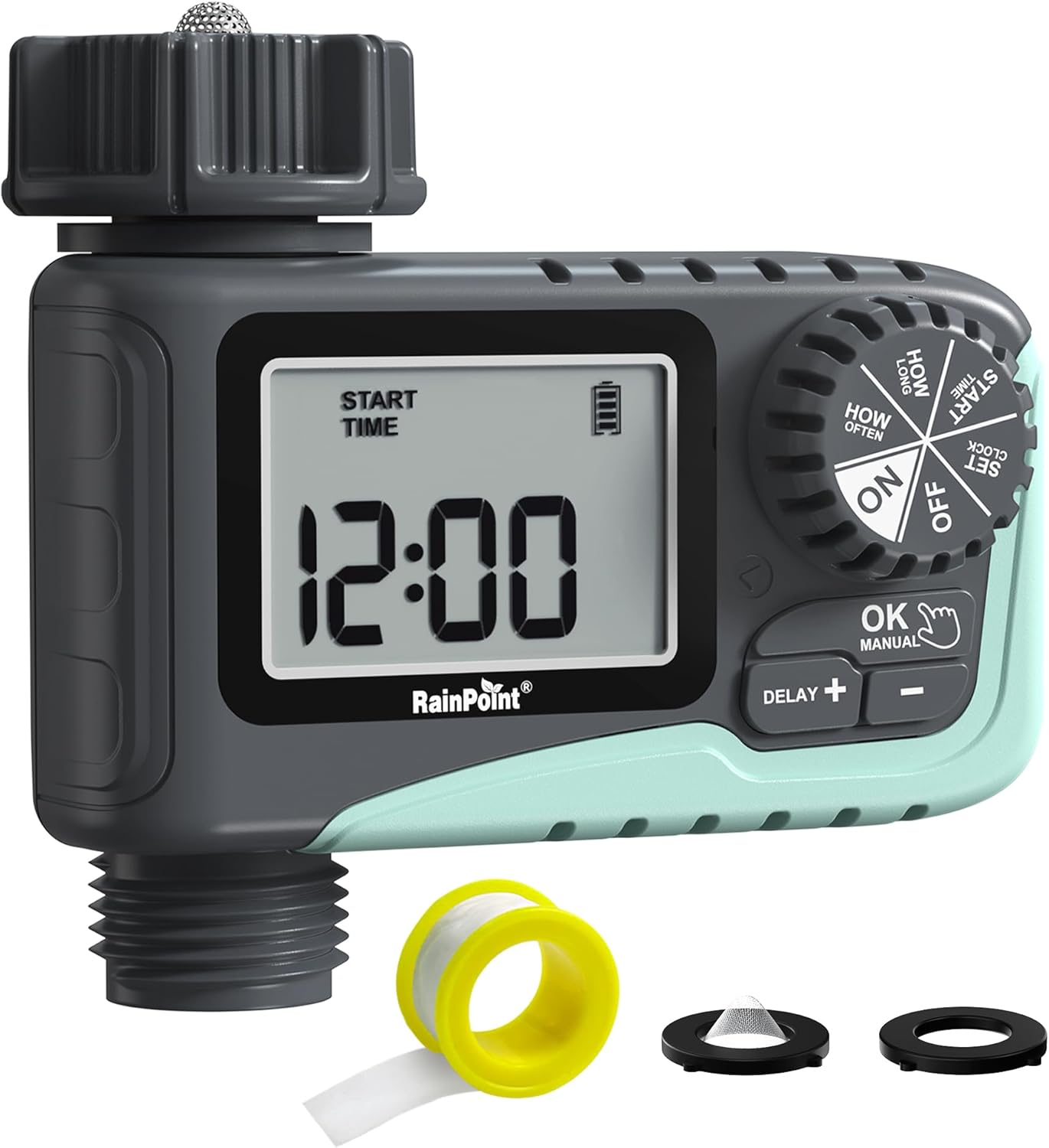
Слика 1: Предња страна view of the RAINPOINT Digital Sprinkler Timer (ITV105) showing the large LCD screen, control dial, and buttons.
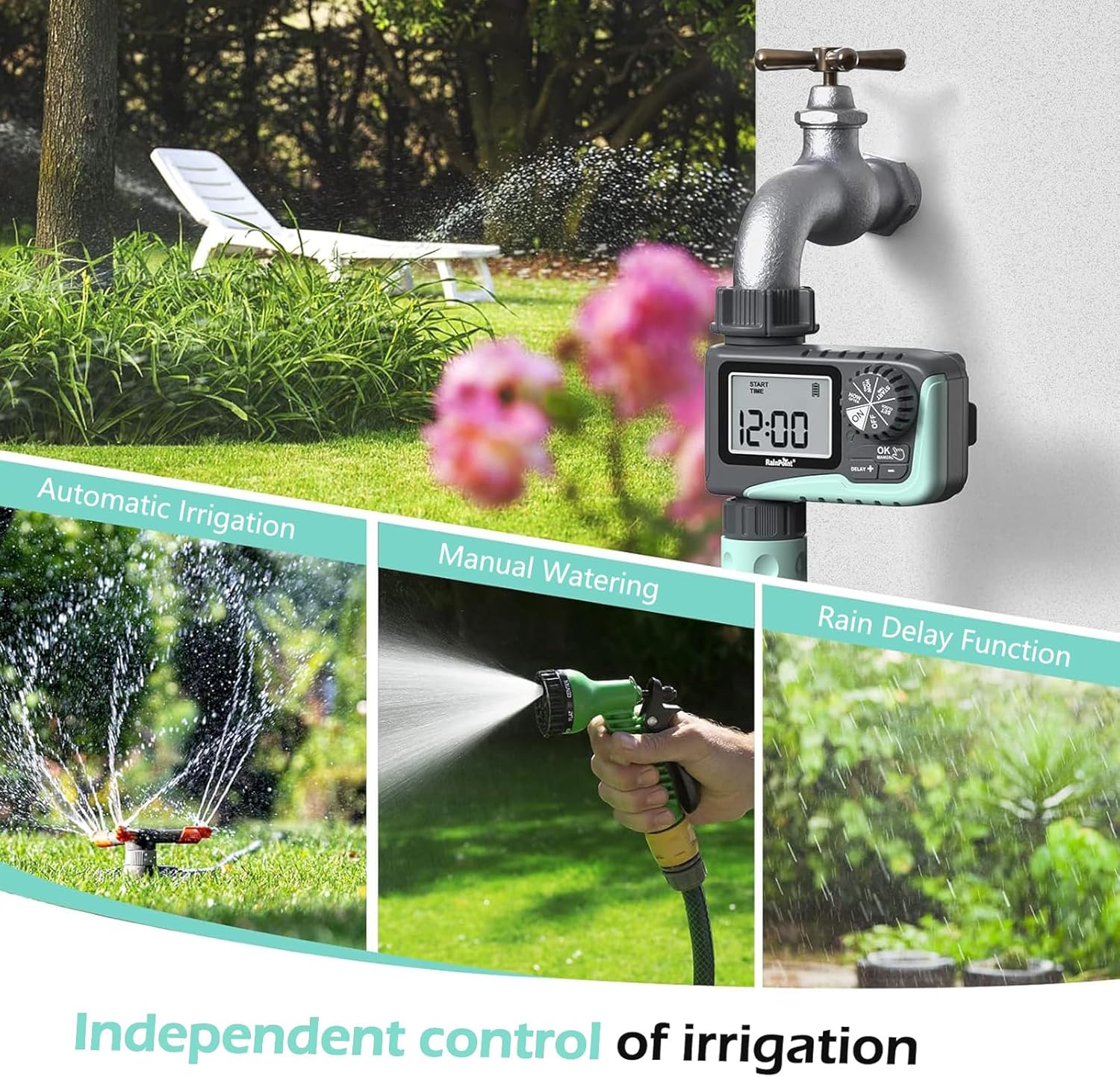
Figure 2: Illustration of the timer's three main functions: automatic irrigation, manual watering, and rain delay.
Садржај пакета
Молимо вас да проверите садржај пакета након отварања како бисте били сигурни да су сви састојци присутни:
- 1 x RAINPOINT Digital Sprinkler Timer (ITV105)
- 1 x Упутство за употребу (овај документ)
- 1 к тефлонска трака
- 1 x Rubber washer
- 1 x Spare filter
Подешавање и инсталација
Follow these steps to properly set up your sprinkler timer:
- Инсталирајте батерије:
Locate the battery compartment on the back of the timer. Insert 2 new AAA (1.5V) alkaline batteries, ensuring correct polarity. Close the battery compartment securely. The LCD screen will power on.
- Припремите славину:
Ensure your outdoor hose faucet is clean and free of debris. If necessary, apply the included Teflon tape to the faucet threads for a watertight seal.
- Attach Timer to Faucet:
Screw the timer's inlet (top connector) onto your 3/4" outdoor hose faucet. Hand-tighten firmly. Ensure the rubber washer is properly seated inside the timer's inlet to prevent leaks. The timer features a 360° rotating connector for easy positioning.
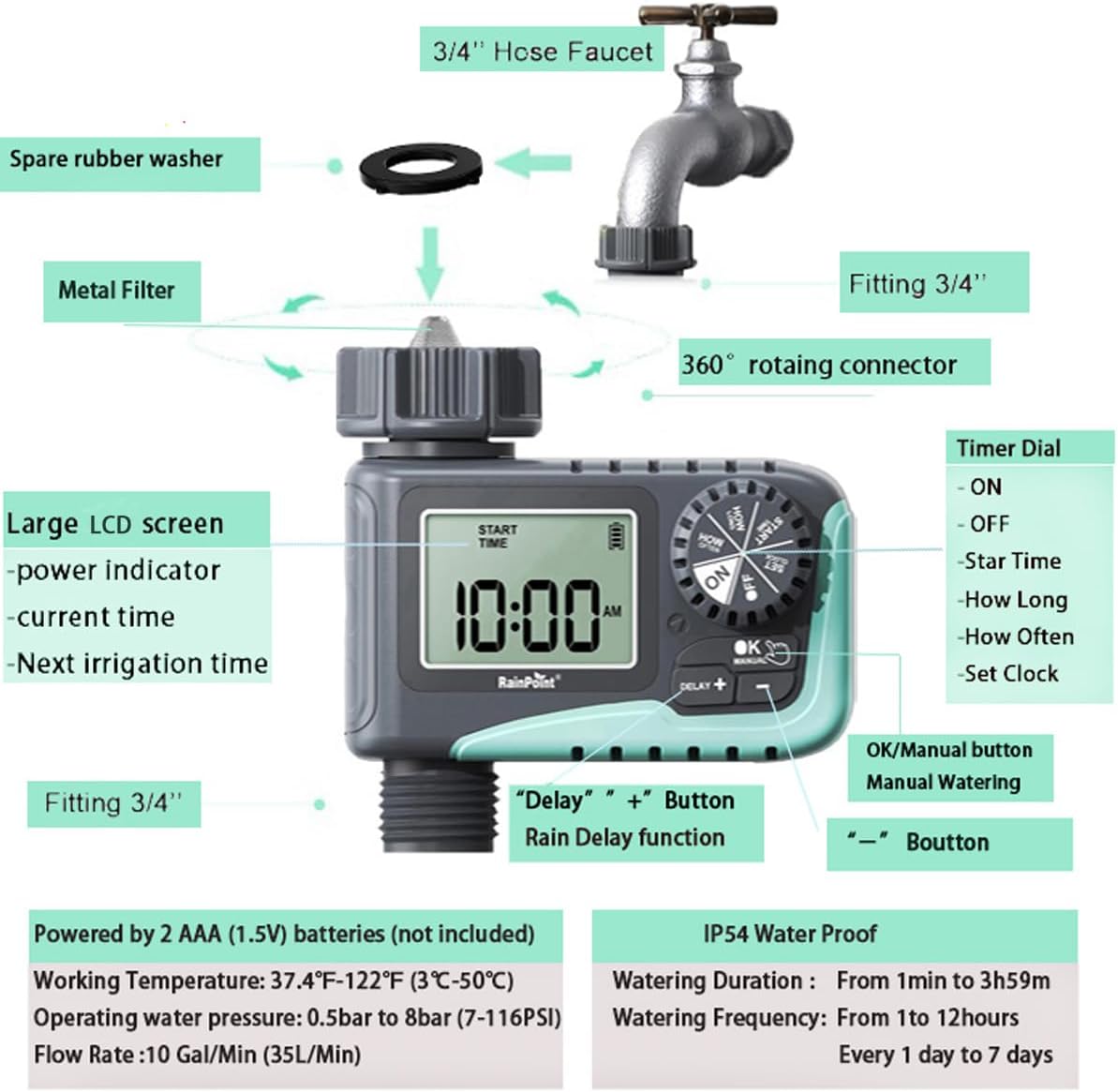
Figure 3: Diagram illustrating the components of the sprinkler timer, including the 3/4" hose faucet connection, metal filter, and LCD screen.
- Повежите црево:
Attach your garden hose to the timer's outlet (bottom connector). Hand-tighten securely. Ensure a proper washer is in place at the hose connection point.
- Open Faucet:
Fully open your outdoor hose faucet. The timer is designed to withstand water pressure from 0.5 bar to 8 bar (7-116 PSI). The timer will control the water flow, not the faucet.
Упутство за употребу
The RAINPOINT ITV105 timer features a large dial and intuitive buttons for easy programming.
Положаји контролних точкића:
- НА: Activates the timer for automatic watering.
- ВАН: Deactivates the timer, stopping all watering.
- ПОДЕШИТЕ САТ: Подесите тренутно време.
- ПОЧЕТНО ВРЕМЕ: Подесите жељено време почетка циклуса заливања.
- КОЛИКО ДУГО: Set the duration of each watering cycle.
- КОЛИКО ЧЕСТО: Set the frequency of watering cycles.
Дугмад:
- OK/MANUAL: Confirms settings or initiates manual watering.
- DELAY +: Increases values during setting or activates/adjusts rain delay.
- -: Смањује вредности током подешавања.
Setting the Current Time (SET CLOCK):
- Окрените точкић на СЕТ ЦЛОЦК.
- Користите + и - дугмад за подешавање сата. Притисните OK потврдити.
- Користите + и - дугмад за подешавање минута. Притисните OK потврдити.
- Окрените точкић на ON to save the time and return to normal operation.
Setting Automatic Watering Program:
This timer allows you to set a start time, duration, and frequency for automated watering.
- Set Start Time (START TIME):
Окрените точкић на ВРЕМЕ ПОЧЕТКА. Користите + и - to set the desired watering start hour and minute. Press OK да бисте потврдили свако подешавање.
- Set Watering Duration (HOW LONG):
Окрените точкић на КОЛИКО ДУГО. Користите + и - to set the watering duration from 1 minute to 3 hours and 59 minutes. Press OK потврдити.

Figure 4: Screen showing settings for "HOW OFTEN" (frequency) and "HOW LONG" (duration) for automatic watering.
- Set Watering Frequency (HOW OFTEN):
Окрените точкић на КОЛИКО ЧЕСТО. Користите + и - to set the frequency:
- Every 1 hour to 12 hours.
- Every 1 day to 7 days.
Притисните OK потврдити.
- Активирај програм:
Окрените точкић на ON. The timer will now operate according to your programmed schedule.
Ручно заливање:
To water immediately without affecting your programmed schedule:
- Ensure the dial is in the ON положај.
- Притисните тастер ОК/МАНУАЛ button. The display will show the default manual watering duration (e.g., 10 minutes).
- Користите + и - buttons to adjust the manual watering duration from 1 minute to 8 hours.
- Притисните OK again to start manual watering. The timer will count down the set duration.
- To stop manual watering early, press ОК/МАНУАЛ опет.

Figure 5: Display showing the manual watering duration setting, adjustable from 1 minute to 8 hours.
Функција одлагања кише:
The rain delay function allows you to pause your watering schedule for a set period due to rain or other reasons, preventing overwatering.
- Ensure the dial is in the ON положај.
- Притисните тастер DELAY + button. The display will show a default delay time (e.g., 24H).
- Притисните DELAY + repeatedly to cycle through delay options (e.g., 24H, 48H, 72H).
- Once you select the desired delay, the timer will enter rain delay mode. The display will show the remaining delay time.
- After the delay period ends, the timer will automatically resume its programmed watering schedule.
- To cancel the rain delay, press the DELAY + button until the delay time disappears, or rotate the dial to OFF and then back to ON.

Figure 6: The timer displaying the rain delay countdown, highlighting its IP54 waterproof rating.
Одржавање
Proper maintenance ensures the longevity and optimal performance of your RAINPOINT Sprinkler Timer.
- Очисти филтер: Periodically check and clean the metal filter located at the timer's inlet. Remove the timer from the faucet, unscrew the filter, rinse it under running water to remove any debris, and reinsert it.
- Замена батерије: When the low battery indicator appears on the LCD screen, replace the 2 AAA batteries promptly. Always use new alkaline batteries.
- Зимљење: Before the first frost, remove the timer from the faucet and store it indoors in a dry, frost-free location. Remove the batteries before storage.
- Проверите да ли има цурења: Regularly inspect all connections (faucet to timer, timer to hose) for any signs of leakage. Ensure all connections are hand-tightened and that rubber washers are properly seated.

Figure 7: Visual representation of the built-in metal filter and durable plastic material designed for anti-leakage and longer service life.
Решавање проблема
If you encounter issues with your RAINPOINT Sprinkler Timer, refer to the following common problems and solutions:
| Проблем | Могући узрок | Решење |
|---|---|---|
| Timer not turning on / LCD blank. | Мртве или неправилно инсталиране батерије. | Replace with 2 new AAA alkaline batteries, ensuring correct polarity. |
| Нема протока воде. |
|
|
| Цурење воде из прикључака. |
|
|
| Тајмер не прати распоред. |
|
|
Спецификације
| Феатуре | Спецификација |
|---|---|
| Модел | ИТВ105 |
| Димензије производа | КСНУМКС к КСНУМКС к КСНУМКС цм (КСНУМКС к КСНУМКС к КСНУМКС инча) |
| Материјал | акрилонитрил бутадиен стирен (АБС) |
| Watering Duration (Automatic) | 1 минута до 3 сати 59 минута |
| Watering Frequency (Automatic) | Every 1 hour to 12 hours, or every 1 day to 7 days |
| Watering Duration (Manual) | 1 minute to 8 hours (Default: 10 minutes) |
| Мак Флов Рате | 10 Gal/Min (35 L/Min) |
| Опсег притиска воде | 0.5 бара до 8 бара (7-116 PSI) |
| Радна температура | 3 ℃ -50 ℃ (37.4 ℉ -122 ℉) |
| Извор напајања | 2 x AAA (1.5V) batteries (not included) |
| Водоотпорна оцена | ИП54 |
Гаранција и подршка
RAINPOINT products are manufactured to high-quality standards. For specific warranty details, please refer to the warranty card included with your product or visit the official RAINPOINT website. If you encounter any issues or have questions not covered in this manual, please contact RAINPOINT customer support through their official webсајт или продавницу где сте купили производ.
За више информација и подршке, можете посетити RAINPOINT Store on Amazon.
Ask a question about this manual
Ask about setup, troubleshooting, compatibility, parts, safety, or missing instructions. Manuals+ will review the question and use this page’s manual context to help answer it.