
1. Увод
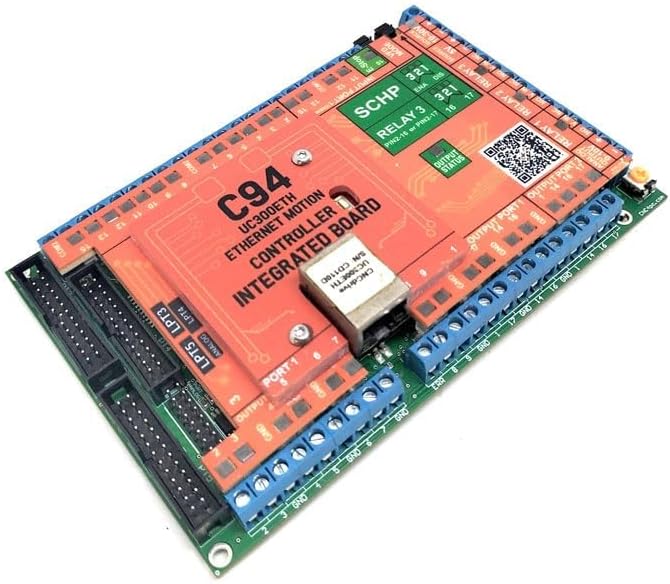
The CNC4PC C94 + UC300ETH is a high-speed motion controller designed for precision CNC applications. It utilizes an Ethernet connection to provide true real-time functions, ensuring reliable and accurate control. This integrated board supports popular CNC software such as Mach3/4 and UCCNC, offering flexibility for various setups. Its robust design allows for seamless connection with a wide range of components including steppers, VFDs, limit switches, home switches, probes, and more.
2. Кључне карактеристике
- Integrated UC300ETH Motion Controller for reliable performance.
- Emulates 5 Parallel Ports for extensive connectivity.
- Features 3 Expansion Ports for connecting additional breakout or relay boards.
- Includes Two Analog Inputs and Two Analog Outputs for versatile control.
- Built-in PWM-Based Speed Control for precise spindle management.
- Two Built-in Electromechanical Relays with NO (Normally Open) and NC (Normally Closed) positions for spindle control.
- Incorporates a Safety Charge Pump for enhanced operational safety.
- Optoisolated inputs operating at 5-24VDC for robust signal isolation.
- Powered by a single 24VDC supply, generating isolated voltage for spindle control and +5VDC for TTL logic circuits.
- Driver Fault Detection for system monitoring and protection.
3. Подешавање и везе
Proper setup and connection are crucial for the optimal performance of your C94 + UC300ETH controller. Ensure all connections are secure and follow the wiring diagrams carefully. The board is designed for clean and simple connections to various CNC components.

As shown in Figure 2, the C94 + UC300ETH can interface with a wide array of peripherals:
- Гранични прекидачи: Connect to the designated input ports for axis travel limits.
- сонда: For automatic tool length measurement or surface mapping.
- Е-Стоп: Essential safety feature for immediate system shutdown.
- Plasma Torch Height Control and Touch Sensor: For plasma cutting applications.
- Electric Contactor: For controlling high-power devices.
- VFD Spindle Inverter: For variable frequency drive control of the spindle motor.
- Solid State Relay with Mist: For coolant or mist control.
- Stack Lights Tower: For visual status indication.
- Ласерски модул: For laser engraving or cutting.
- Корачни мотор: Connect your stepper drivers to the output ports.
- Pendant and Pendant Interface Card: For manual control and jogging.
- Breakout Boards and Relay Boards: Utilize expansion ports for additional I/O.
Refer to the detailed port labels on the board for specific wiring. The board features clearly marked input and output ports, relay connections, and power inputs.

4. Упутство за употребу
The C94 + UC300ETH controller is compatible with Mach3/4 and UCCNC software. Once the hardware is correctly installed and powered, you will need to configure your chosen CNC software to communicate with the UC300ETH controller via Ethernet. This typically involves selecting the UC300ETH plugin within the software's configuration settings.
Follow the software-specific documentation for detailed instructions on driver installation, port mapping, motor tuning, and general operation. The controller provides the necessary hardware interface for the software to send commands to your CNC machine's motors and peripherals.

5. Одржавање
The C94 + UC300ETH is designed for durability and reliability. To ensure its longevity and optimal performance, consider the following maintenance guidelines:
- Одржавати уредним одржавати чистим: Regularly clean the board and its surroundings to prevent dust and debris accumulation, which can lead to overheating or short circuits. Use compressed air or a soft brush.
- Контрола животне средине: Operate the controller in a dry, well-ventilated environment, free from excessive humidity, extreme temperatures, and corrosive substances.
- Управљање кабловима: Ensure all cables are neatly routed and secured to prevent accidental disconnections or damage.
- Напајање: Use a stable and correctly rated 24VDC power supply to avoid voltage fluctuations that could harm the board.
КСНУМКС. Решавање проблема
If you encounter issues with your C94 + UC300ETH controller, consider the following basic troubleshooting steps:
- Нема напајања/ЛЕД диоде искључене: Check the 24VDC power supply connection and ensure it is providing the correct voltage.
- Нема комуникације: Verify the Ethernet cable connection. Ensure your PC's network settings are correctly configured for the UC300ETH (e.g., static IP if required by the software). Check if the UC300ETH plugin is enabled in your CNC software.
- Мотор се не покреће: Confirm that your stepper drivers are powered and correctly wired to the C94. Check motor tuning settings in your CNC software.
- Input/Output Issues: Verify wiring for limit switches, probes, relays, etc. Ensure input signals are within the 5-24VDC range.
- Софтверске грешке: Consult the documentation for Mach3/4 or UCCNC for specific error codes and solutions.
For more complex issues, it is recommended to consult the manufacturer's support resources or community forums.
7. Техничке спецификације
| Феатуре | Спецификација |
|---|---|
| Модел | C94 + UC300ETH |
| Произвођач | ЦНЦ4ПЦ |
| Повезивање | Етхернет |
| Повер Инпут | 24 волти (ДЦ) |
| Улазни волtage (Optoisolated) | 5-24ВДЦ |
| Emulated Parallel Ports | 5 |
| Портови за проширење | 3 |
| Аналогни улази | 2 |
| Аналогни излази | 2 |
| Релеји | 2 (Electromechanical, NO/NC) |
| Контрола вретена | PWM-Based |
| Сафети Феатуре | Charge Pump, Driver Fault Detection |
| Укључене компоненте | C94 Multifunction Board and UC300ETH Ethernet Motion Controller |
| Материјал | Бакар |
| Боја | Оранге |
| УПЦ | 697937598221 |
8. Гаранција и подршка
This product is covered by the standard manufacturer's warranty. Please refer to the warranty information provided at the time of purchase or contact CNC4PC directly for specific details regarding warranty terms and conditions.
For technical support, additional documentation, or to inquire about specific applications, please visit the official CNC4PC website or their support channels. You can find more information and resources related to the C94 controller on their blog: CNC4PC C94 Blog.