
Codnida YM-MWM553+MWZ553C-EU
Codnida беби монитор YM-MWM553+MWZ553C-EU Упутство за употребу
Свеобухватни водич за подешавање, рад и одржавање
1. Увод
This manual provides detailed instructions for the safe and effective use of your Codnida Baby Monitor, Model YM-MWM553+MWZ553C-EU. Please read this manual thoroughly before operating the device and retain it for future reference. This baby monitor is designed to provide secure and reliable surveillance of your child, offering features such as a 5.5-inch 2K HD display, PTZ camera control, two-way audio, and environmental monitoring.
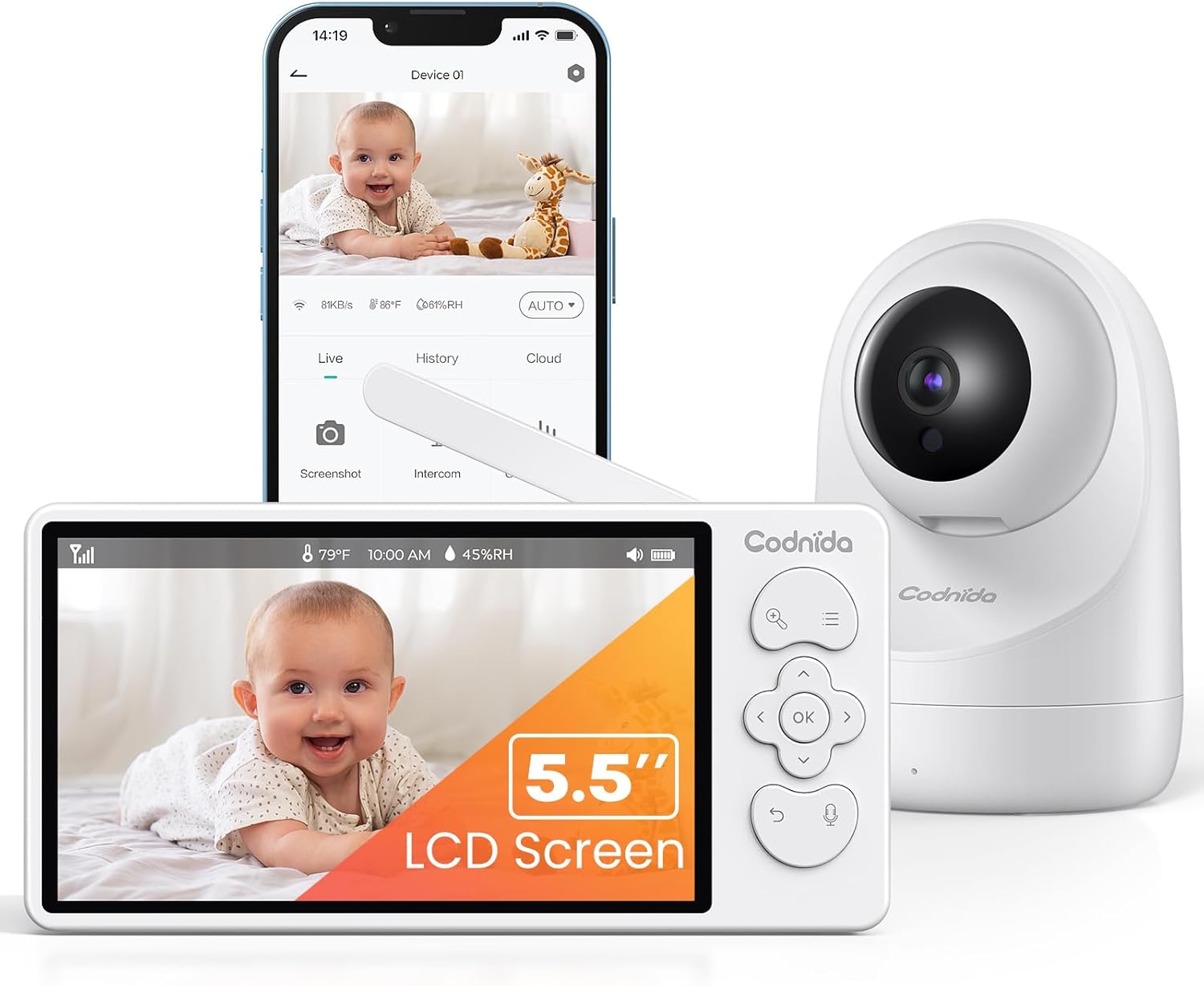
Image 1.1: Codnida Baby Monitor system, showing the monitor, camera, and smartphone interface.
2. Садржај пакета
Проверите да ли су све ставке присутне у пакету:
- Беби монитор (родитељска јединица)
- Baby Camera (Baby Unit)
- Power Adapters (2x, for monitor and camera)
- USB Charging Cables (2x)
- Wall Mount Kit (screws and anchors)
- Кориснички приручник (овај документ)

Image 2.1: All components included in the Codnida Baby Monitor package.
3. Производ је готовview
3.1 Родитељска јединица (монитор)
The parent unit features a 5.5-inch LCD screen for live video feed, control buttons for camera functions, and a built-in microphone and speaker for two-way audio communication.
- ЛЦД екран: 5.5-inch 2K HD display.
- Контролна дугмад: Navigation, OK, Menu, Talk, Zoom.
- Антена: За бежични пренос сигнала.
- микрофон: За двосмерни аудио.
- говорник: For listening to your baby and lullabies.
- Напајање: USB-C for charging.
- батерија: Интегрисана пуњива батерија од 4000 mAh.
3.2 Јединица за бебу (камера)
The baby unit is equipped with a 3MP 2K HD camera, infrared LEDs for night vision, and a temperature/humidity sensor.
- Објектив камере: 3MP 2K HD resolution.
- Инфрацрвене ЛЕД диоде: For clear night vision up to 8 meters.
- микрофон: To detect baby's sounds.
- говорник: To play lullabies and enable two-way audio.
- Temperature/Humidity Sensor: Monitors room environment.
- Напајање: USB-C for continuous power.
- Рупа за монтажу: За зидну монтажу.
4. Подешавање
4.1 Пуњење родитељске јединице
Before first use, fully charge the parent unit for approximately 8 hours. Connect the provided USB charging cable to the parent unit's power port and the power adapter to an electrical outlet. The battery indicator on the screen will show charging status.

Image 4.1: Charging the parent unit and expected battery life.
4.2 Напајање јединице за бебе
The baby unit requires continuous power. Connect the provided USB charging cable to the baby unit's power port and the power adapter to an electrical outlet. Ensure the cable is placed safely away from the baby's reach.
4.3 Постављање камере
Поставите бебину јединицу (камеру) на место које пружа јасан view of your baby. Ensure it is at least 1 meter (3 feet) away from the baby's crib to prevent any entanglement hazards with the power cord. The camera can be placed on a flat surface or mounted to a wall using the provided kit.
- За оптимално viewing, position the camera to capture the entire crib area.
- Избегавајте постављање камере у близини извора топлоте или директне сунчеве светлости.
- Ensure the camera is within the monitor's transmission range (up to 700 meters in open areas).
4.4 Почетно повезивање
The Codnida Baby Monitor uses FHSS technology for a secure, direct connection without requiring Wi-Fi or an app for basic operation. Simply power on both the parent unit and the baby unit. They should automatically connect. If they do not connect, refer to the troubleshooting section for pairing instructions.

Image 4.2: Secure FHSS connection between monitor and camera.
5. Упутство за употребу
5.1 Укључивање/искључивање
- Родитељска јединица: Press and hold the power button until the screen turns on/off.
- Јединица за бебе: The baby unit powers on automatically when connected to power.
5.2 Уживо View and VOX Mode
The monitor defaults to live view, continuously displaying video from the camera. To conserve battery, you can activate VOX (Voice Operated eXchange) mode.
- ВОКС режим: In VOX mode, the monitor screen remains black. It will automatically light up and display video when sound or motion is detected in the baby's room.
- To activate/deactivate VOX mode, navigate through the menu settings on the parent unit.

Image 5.1: VOX mode for power saving and automatic activation.
5.3 Контрола камере (PTZ и зумирање)
The camera offers Pan, Tilt, and Digital Zoom (PTZ) functions, allowing you to adjust the viewдаљински угао.
- Пан/Тилт: Use the directional buttons on the parent unit to move the camera lens horizontally (350 degrees) and vertically (90 degrees).
- Дигитални зум: Press the zoom button to activate 2x or 4x digital zoom for a closer view ваше бебе.
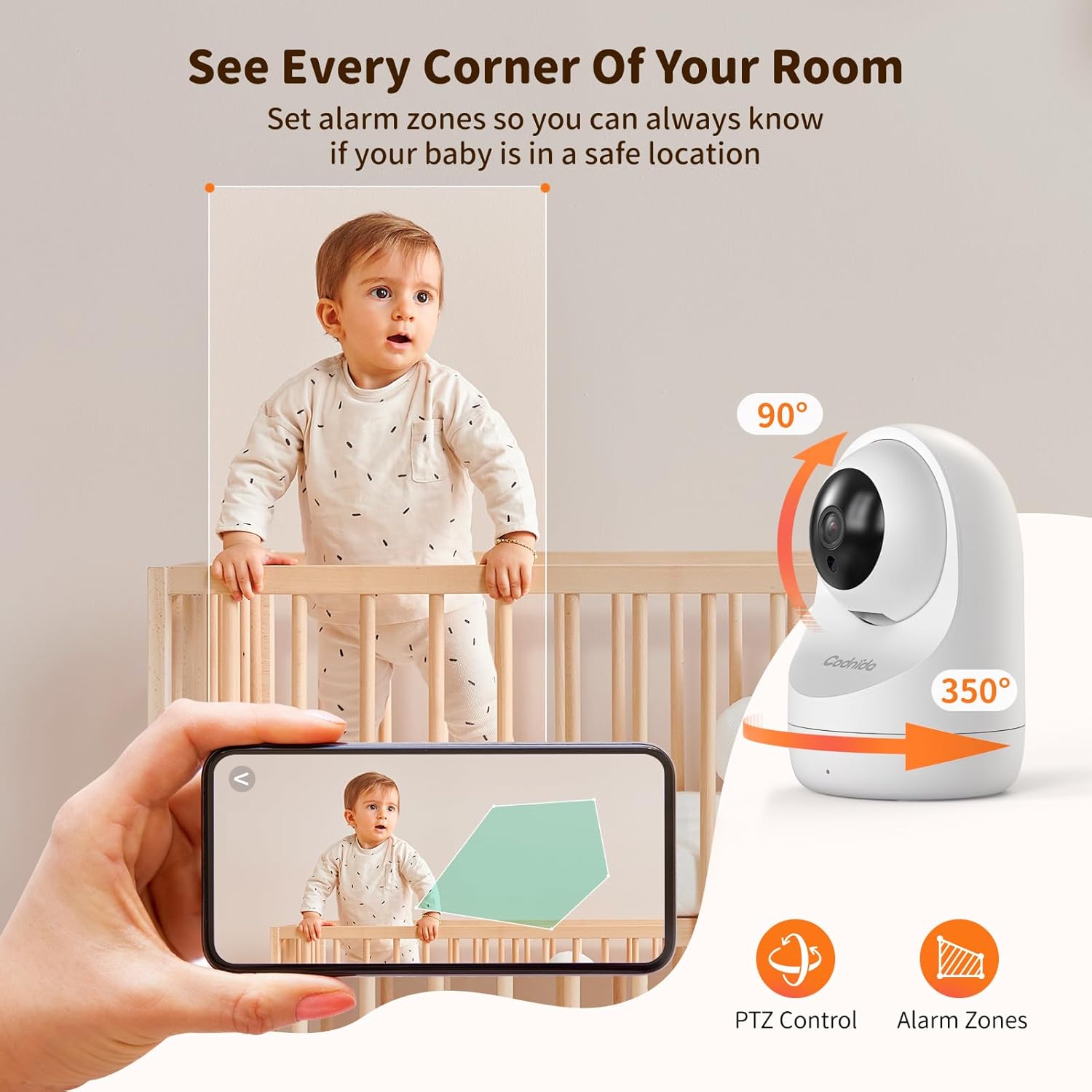
Image 5.2: PTZ control and alarm zone setup.
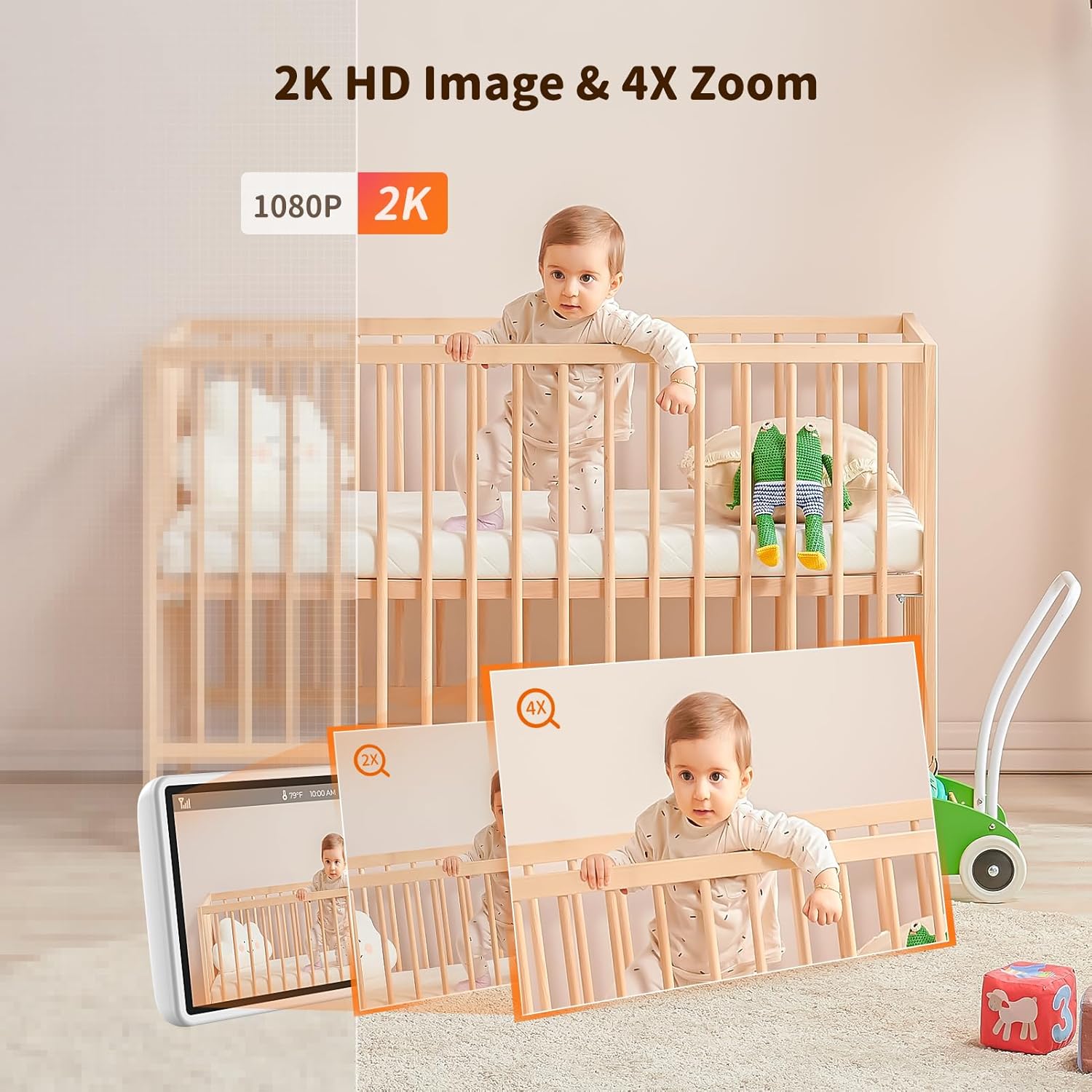
Image 5.3: 2K HD image quality and 4x digital zoom.
5.4 Two-Way Audio and Lullabies
Communicate with your baby or play soothing lullabies directly from the parent unit.
- Двосмерни аудио: Press and hold the 'Talk' button on the parent unit to speak to your baby through the camera's speaker. Release the button to listen.
- Успаванке: Access the menu to select and play built-in lullabies. You can adjust the volume and set a timer for playback.

Image 5.4: Two-way audio communication.

Image 5.5: Night vision and lullaby function.
5.5 Функције праћења
- Праћење температуре и влажности: The baby unit continuously monitors the room's temperature and humidity. These readings are displayed on the parent unit. You can set alert thresholds in the menu.
- Подсетник за храњење: Set up feeding reminders through the parent unit's menu to help maintain a consistent feeding schedule.
- Alarm Zones: Дефинишите одређене области унутар камере view as alarm zones. The monitor will alert you if motion is detected within these zones.

Image 5.6: Temperature and humidity detection.

Image 5.7: Feeding reminder function.
5.6 Recording to SD Card
The Codnida Baby Monitor supports Micro SD cards (FAT32 format, up to 256GB) for video recording. Insert the Micro SD card into the designated slot on the parent unit. You can initiate recording manually or set it to record automatically upon motion/sound detection via the menu settings.
6. Одржавање
6.1 Чишћење
To clean the monitor and camera units, use a soft, dry cloth. Do not use abrasive cleaners or solvents. For the camera lens, use a lens cleaning cloth to avoid scratches.
6.2 Одржавање батерије
- Avoid fully discharging the parent unit's battery frequently.
- Charge the parent unit regularly to maintain battery health.
- Уређај чувајте на хладном и сувом месту ако се не користи дуже време.
КСНУМКС. Решавање проблема
If you encounter issues with your Codnida Baby Monitor, please refer to the following common solutions:
| Проблем | Могући узрок | Решење |
|---|---|---|
| Нема слике/звука на монитору | Units not powered on, out of range, or not paired. | Ensure both units are powered. Move units closer. Re-pair units via menu settings (refer to manual for specific steps). |
| Лош квалитет слике | Low light, dirty lens, interference. | Ensure adequate lighting. Clean camera lens. Move units away from other electronic devices. |
| Monitor loses connection frequently | Out of range, signal interference, obstacles. | Move units closer. Reduce obstacles (walls, furniture). Avoid placing near thick walls or metal structures. |
| Батерија се брзо празни | Continuous live view, high brightness, aging battery. | Activate VOX mode. Reduce screen brightness. Ensure full charge before use. |
| Temperature/Humidity readings incorrect | Sensor obstruction, extreme environmental conditions. | Ensure sensor is not covered. Allow time for sensor to adjust to room conditions. |
8. Спецификације
| Феатуре | Детаљ |
|---|---|
| Број модела | YM-MWM553+MWZ553C-EU |
| Величина екрана | 5.5 инча |
| Видео Ресолутион | 2K HD (1296p) |
| Резолуција камере | 3 мегапиксела |
| Бежична технологија | ФХСС (спектар ширења фреквенцијским скакањем) |
| Распон преноса | До 700 метара (отворена површина) |
| Ноћни вид | До 8 метара |
| Угао померања/нагиба | Пан 350 °, нагиб 90 ° |
| Дигитални зум | 4x |
| Батерија родитељске јединице | 4000mAh Lithium-ion (1 AAA included for internal components) |
| Подршка за складиштење | Micro SD card up to 256GB (FAT32 format) |
| Посебне карактеристике | Two-Way Audio, Motion Detector, VOX Mode, Temperature/Humidity Sensor, Lullabies, Feeding Reminder |
| Материјал | Пластика |
| Димензије (Д к Ш к В) | 10 к 5 к 5 цм |
| Тежина | 860 грама |
9. Гаранција и подршка
Codnida offers a 1 година гаранције for this product and a Политика поврата од 30 дана. For any questions regarding your baby monitor or other Codnida products, please contact customer support through your Amazon account:
- Navigate to "Your account"
- Select "Your orders"
- Locate your Codnida Baby Monitor order
- Click on "Ask a question"
Our support team will assist you with any inquiries or issues you may have.