
Увод
This manual provides detailed instructions for the installation, operation, and maintenance of the IXITAB STC-3008, STC-3018, and STC-3028 series of digital temperature and humidity controllers. These devices are designed for precise control in various applications, including aquariums, terrariums, incubators, and industrial temperature/humidity control systems.
Варијанте производа
- STC-3008: Dual Digital Temperature Controller with two temperature probes.
- STC-3018: Dual Digital Temperature Controller with two temperature probes.
- STC-3028: Digital Temperature and Humidity Controller with one combined temperature and humidity sensor.
Кључне карактеристике
- Dual display for simultaneous monitoring of two temperatures or temperature and humidity.
- Two independent relay outputs for controlling heating/cooling or humidification/dehumidification devices.
- Wide range of power supply options (AC 110V/220V, DC 12V/24V) depending on the model.
- High precision sensors for accurate readings.
- User-friendly interface for setting parameters.
Мере предострожности
To ensure safe operation and prevent damage to the device, please observe the following precautions:
- Always disconnect power before performing any wiring or maintenance.
- Уверите се да је напајање волtage matches the requirements of your specific controller model.
- Strictly distinguish the interface of the relay, sensor, and power connections to avoid short circuits or damage.
- Уверите се да су све везе ожичења безбедне и правилно изоловане.
- Keep the sensor and power wires separate and maintain a proper distance to prevent interference.
- Не излажите уређај води или прекомерној влази.
 Слика: Врх view of the STC-3018 controller showing the display, buttons, and a label with wiring instructions and safety notes. The label indicates power supply options (110-220VAC, 12V, 24V) and relay outputs (10A/220VAC). A temperature probe is connected to the device.
Производ је завршенview
Компоненте
- Main Controller Unit (with digital displays and control buttons)
- Temperature Sensor (for STC-3008/3018 models)
- Temperature and Humidity Sensor (for STC-3028 model)
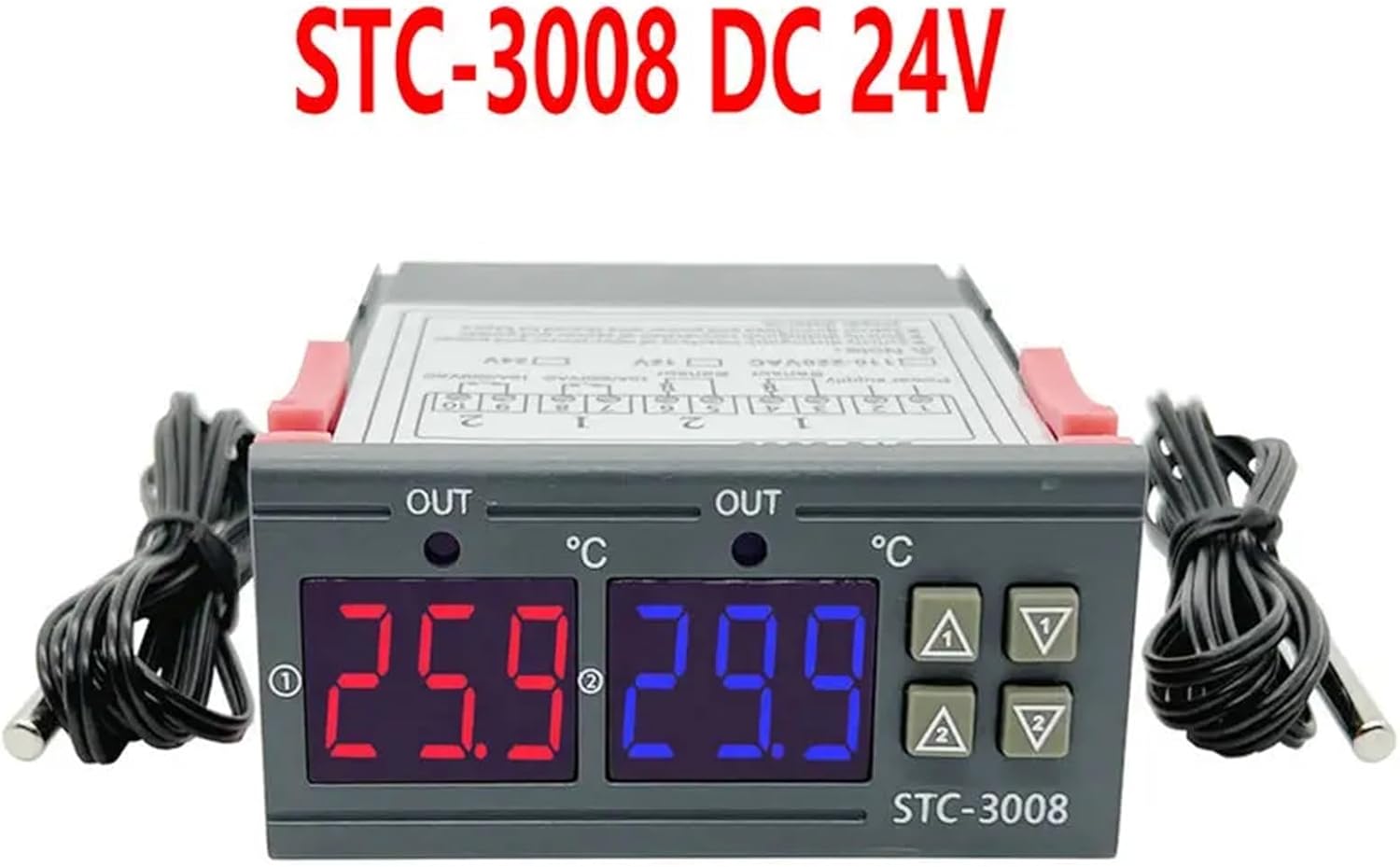 Слика: Фронт view of the STC-3008 DC 24V model, featuring two digital displays (red and blue) showing temperature readings, and two connected temperature probes. The model name "STC-3008" is visible on the front panel.
 Image: A collage showing three different models: STC-3018 (top left), STC-3008 (top right and bottom left), and STC-3028 (bottom right). Each model is shown with its respective sensor, highlighting the visual differences and sensor types (temperature probe for 3008/3018, combined temperature/humidity sensor for 3028).
 Слика: Крупни план view of the STC-3028 model, showcasing its dual digital display for temperature and humidity, along with the connected combined temperature and humidity sensor.
Спецификације
| Параметар | Валуе |
|---|---|
| Модел | STC-3008, STC-3018, STC-3028 |
| Повер Суппли | AC 110V/220V, DC 12V/24V (model dependent) |
| Опсег мерења температуре | -50°Ц до 110°Ц (-58°Ф до 230°Ф) |
| Humidity Measurement Range (STC-3028) | 0% РХ до 99% РХ |
| Капацитет излазног релеја | 10А/220ВАЦ |
| Тип сензора | NTC sensor (temperature), integrated sensor (humidity for STC-3028) |
| Димензије | Approx. 1.18 x 0.79 x 0.39 inches (main unit) |
| Тежина артикла | Прибл. 1.76 унци |
| Земља порекла | Кина |
Инсталација и ожичење
Важно: Ensure power is disconnected before performing any wiring to prevent electric shock or damage to the device.
Дијаграм ожичења
 Image: Detailed wiring diagram for the STC-3018 model. It illustrates connections for power supply (110V/AC220V, 12V, 24V), two sensor inputs, and two relay outputs (10A/220VAC). Examples of connected loads like a refrigerator, fan, and water heater are shown.
Кораци ожичења
- Напајање: Connect the appropriate power supply (AC 110V/220V or DC 12V/24V) to terminals 1 and 2. Verify that the voltage matches your specific controller model.
- Сензори: Connect the temperature sensors to terminals 3 and 4, and 5 and 6 (for STC-3008/3018). For the STC-3028, connect the combined temperature/humidity sensor to its designated terminals.
- Излазни релеји: Connect your heating/cooling or humidification/dehumidification devices to terminals 7 and 8 (Relay 1) and 9 and 10 (Relay 2). These are dry contacts, meaning they act as switches, and your load will require its own power source.
- Монтажа: The controller is designed for panel mounting. Insert the unit into a suitable cutout and secure it using the integrated clips on the sides.
Упутство за употребу
Функције дугмета
- Подесите дугме: Користи се за улазак у режим подешавања параметара и потврђивање избора.
- Дугме горе (▲): Increases values, navigates through menu options.
- Дугме надоле (▼): Decreases values, navigates through menu options.
- Rst Button: Кратак притисак на view current settings; long press (3 seconds) to reset to factory default settings.
Temperature/Humidity Setting
 Image: A visual guide demonstrating the temperature and humidity setting process on the STC-3028 model. It shows how to set starting and stopping values for both temperature (heating/cooling) and humidity (humidification/dehumidification) using the control buttons.
- Setting Starting Temperature/Humidity: Дуго притисните Горе (▲) button for 3 seconds. The starting value on the display will flash. Use the Горе (▲) or Доле (▼) buttons to adjust to your desired starting value. Press the Сет дугме за потврду и излаз.
- Setting Stopping Temperature/Humidity: Дуго притисните Доле (▼) button for 3 seconds. The stopping value on the display will flash. Use the Горе (▲) or Доле (▼) buttons to adjust to your desired stopping value. Press the Сет дугме за потврду и излаз.
- Вратите на фабричка подешавања: Дуго притисните Рст button for 3 seconds until the display shows "888" or similar indication of reset.
The controller will automatically activate or deactivate the connected relays based on the set starting and stopping values to maintain the desired temperature or humidity range. For temperature control, if the starting temperature is lower than the stopping temperature, it operates in heating mode. If the starting temperature is higher than the stopping temperature, it operates in cooling mode. Similar logic applies to humidity control for humidification/dehumidification.
Одржавање
Proper maintenance ensures the longevity and accuracy of your controller:
- Одржавајте уређај чистим и без прашине и прљавштине. Користите меку, суву крпу за чишћење.
- Обезбедите одговарајућу вентилацију око уређаја како бисте спречили прегревање.
- Периодично проверавајте све спојеве ожичења како бисте били сигурни да су безбедни и без корозије.
- Avoid exposing the unit or sensors to extreme temperatures, high humidity, or corrosive environments outside their specified operating ranges.
- Do not attempt to disassemble the unit beyond what is described in this manual.
Решавање проблема
If you encounter issues with your controller, refer to the table below for common problems and solutions:
| Проблем | Могући узрок | Решење |
|---|---|---|
| Displej ne radi | No power, incorrect wiring, faulty unit. | Check power supply connections. Verify wiring against the diagram. If problem persists, contact support. |
| Релеј се не пребацује | Incorrect temperature/humidity settings, faulty relay, load issue. | Review your set starting and stopping values. Check the wiring to the load device. Test the load device independently. |
| Нетачна очитавања | Sensor damaged, sensor not properly placed, environmental interference. | Inspect sensor for physical damage. Ensure sensor is in the correct environment and not obstructed. Avoid placing sensor near heat sources or drafts. |
| "LLL" or "HHH" on display | Sensor open circuit (LLL) or short circuit (HHH). | Check sensor connection for looseness or damage. Replace sensor if it appears faulty. |
| Display shows "--- " | Sensor not connected or faulty. | Ensure sensor is securely connected. Replace sensor if necessary. |
Гаранција и подршка
For warranty information or technical support regarding your IXITAB STC-3008, STC-3018, or STC-3028 controller, please refer to the documentation provided with your product at the time of purchase or contact IXITAB customer service through the platform where you purchased the item.
When contacting support, please be prepared to provide your product model number (STC-3008, STC-3018, or STC-3028) and details of your purchase.