
1. Увод
Thank you for choosing the OSCAL PowerMax 3600 Portable Power Station and PM200 Solar Panel. This manual provides essential information for the safe and efficient operation, setup, and maintenance of your device. Please read this manual thoroughly before use and retain it for future reference.
Мере предострожности
- Немојте растављати, поправљати или модификовати јединицу.
- Држите уређај даље од ватре, воде и екстремних температура.
- Обезбедите одговарајућу вентилацију током употребе и пуњења.
- Избегавајте испуштање или излагање уређаја јаким ударцима.
- Чувати ван домашаја деце и кућних љубимаца.
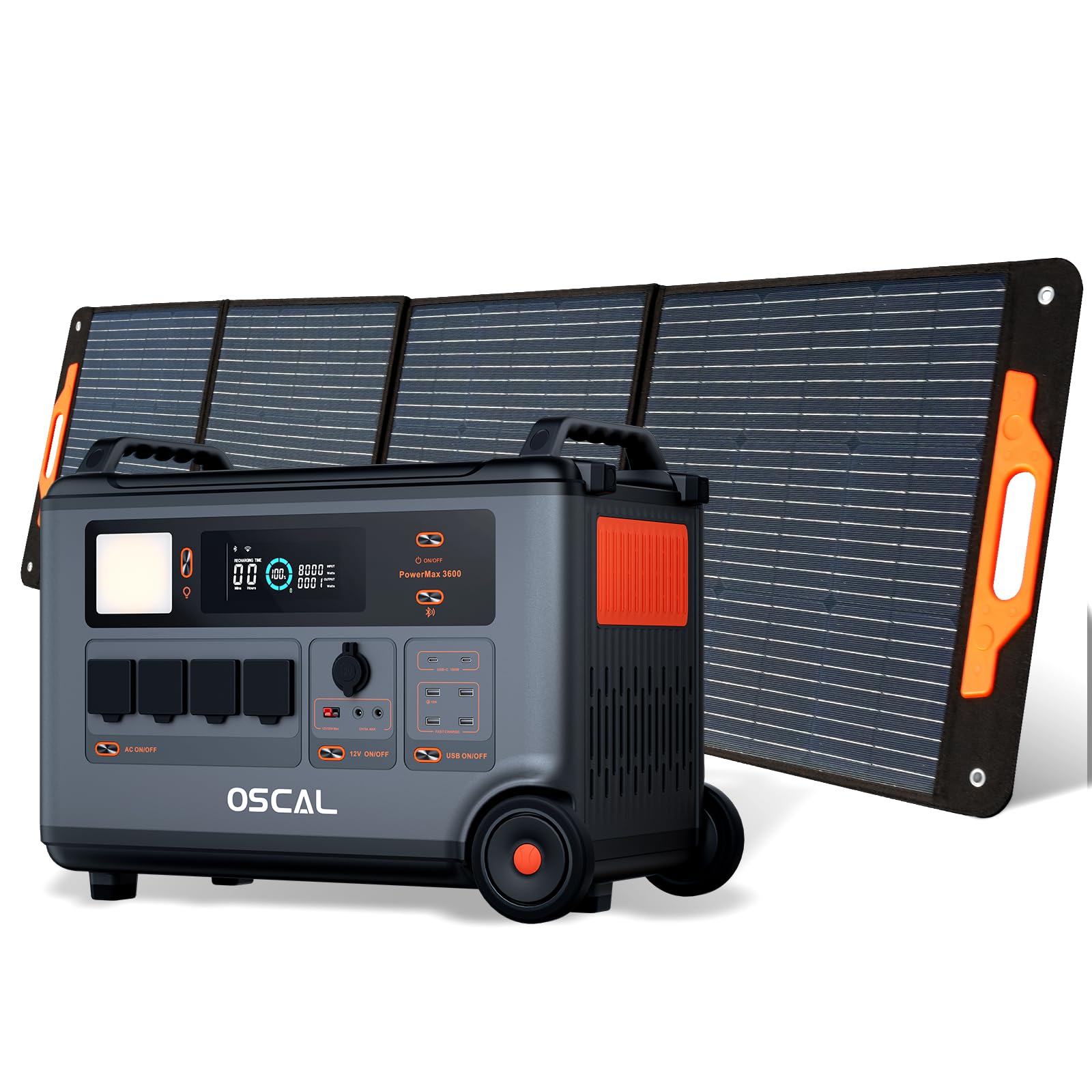
2. Производ је готовview
The OSCAL PowerMax 3600 is a high-capacity portable power station designed for various applications, from outdoor adventures to emergency home backup. It features a robust LiFePO4 battery and multiple output ports.
Кључне карактеристике:
- Велики капацитет: 3600 Wh base capacity, expandable up to 57,600 Wh with additional batteries.
- Снажан излаз: 6000 W peak output, capable of powering most household appliances.
- LiFePO4 батерија: Safe, stable, and durable with over 3500 charge cycles (to 80% capacity).
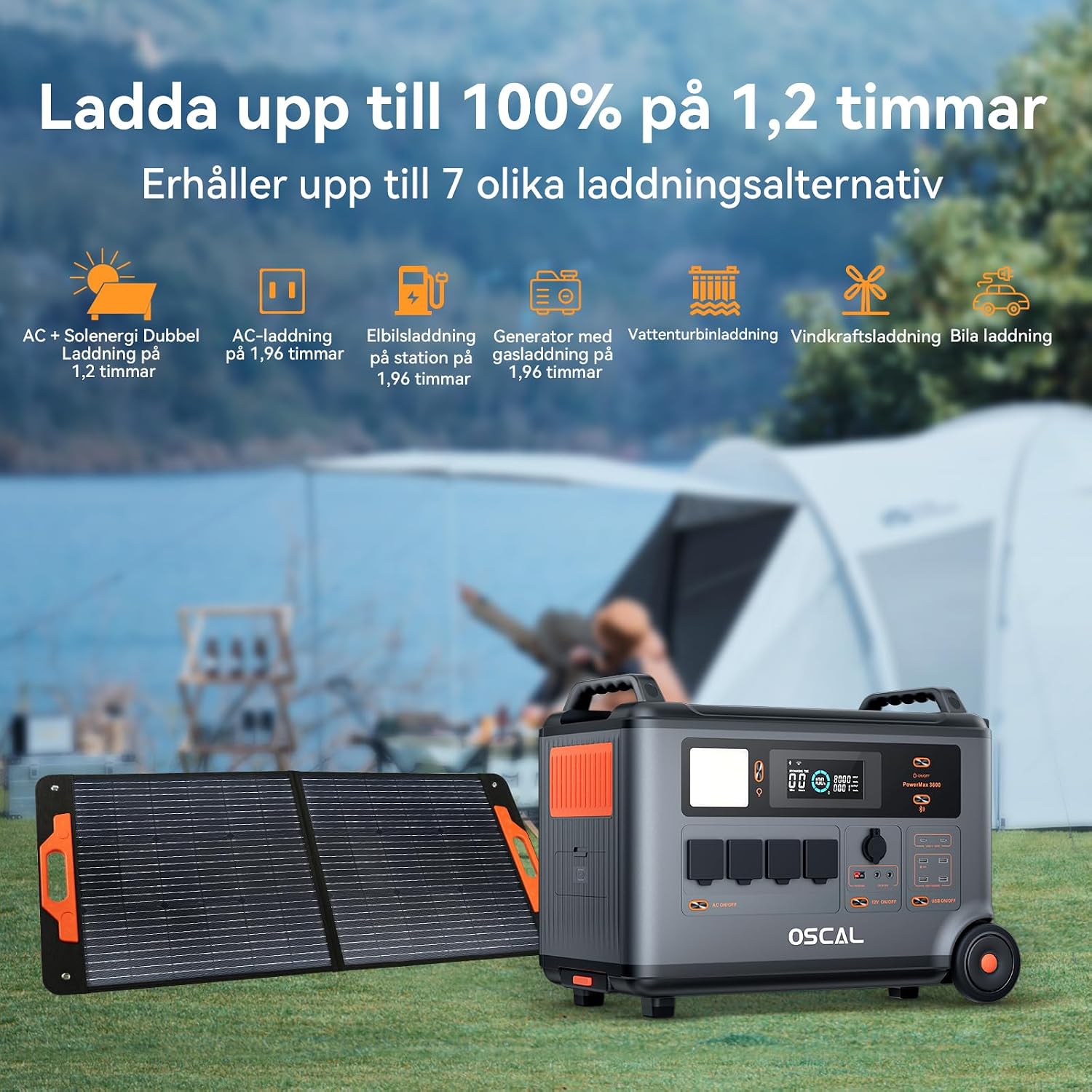
- Брзо пуњење: Fully charged in 1.2 hours with dual AC and solar input.
- Непрекидно напајање (UPS): Automatic switchover in 5-8 ms during power outagес.
- Смарт Цонтрол: Monitor and control via the OSCAL smartphone application (Wi-Fi/Bluetooth).
- Издржљив дизајн: Splash-proof, dust-proof, 0.8M vertical drop protection, UV-resistant, and UL94V-0 fire rating.

3. Подешавање
3.1 Распакивање и почетни преглед
Carefully remove all components from the packaging. Verify that all items listed in the 'What you will get' section are present and undamaged. If any items are missing or damaged, contact customer support immediately.
3.2 Почетно пуњење
Before first use, fully charge the PowerMax 3600. Connect the AC charging cable to the unit's AC input port and then to a standard wall outlet. The display will indicate the charging status. A full charge typically takes 1.2 hours with combined AC and solar input, or 1.96 hours with AC only.
3.3 Connecting the PM200 Solar Panel
To charge using solar power, unfold the PM200 solar panel and position it in direct sunlight. Connect the MC4 to Anderson cable (or other compatible cable) from the solar panel to the PowerMax 3600's solar input port. The unit will automatically detect the solar input and begin charging.

4. Упутство за употребу
4.1 Укључивање/искључивање
Притисните и држите главно дугме за напајање неколико секунди да бисте укључили или искључили уређај. Екран ће се осветлити након активирања.
4.2 Коришћење АЦ излаза
Press the AC power button to activate the AC outlets. Plug your devices into the available AC ports. The PowerMax 3600 provides a pure sine wave output, suitable for sensitive electronics. The unit has 4 AC outlets.
4.3 Using DC Outputs (USB-A, USB-C, 12V)
Press the DC power button to activate the DC outputs. Connect your USB-powered devices to the 4 USB-A ports or 2 USB-C ports (100W each). The 12V car port and other DC outputs are also available for compatible devices.

4.4 Разумевање екрана
The integrated display shows real-time information including battery level, input/output wattage, remaining run time, and active ports. Refer to the on-screen icons for specific indicators.
4.5 Функција непрекидног напајања (UPS)
When connected to an AC wall outlet and powering devices, the PowerMax 3600 acts as a UPS. In the event of a power outage, it automatically switches to battery power within 5 to 8 milliseconds, ensuring continuous operation for connected devices like computers or medical equipment (e.g., CPAP machines).

4.6 Smart Remote Control (OSCAL App)
Download the OSCAL application from your smartphone's app store. Pair the PowerMax 3600 via Wi-Fi or Bluetooth to monitor battery status, control outputs, and perform firmware updates remotely.

5. Методе пуњења
The PowerMax 3600 supports multiple charging methods to ensure you always have power.
- АЦ зидна утичница: Connect the included AC charging cable to a standard wall outlet.
- Соларно пуњење: Use the PM200 solar panel or other compatible solar panels via the MC4 input.
- Пуњење аутомобила: Charge from your vehicle's 12V cigarette lighter port using the included car charging cable.
- ЕВ станица за пуњење: The unit can be charged at an electric vehicle charging station (up to 2200W input).
- Генератор: Connect to a gasoline generator for charging (up to 2200W input).
- Оловно-киселинска батерија: Supports charging from lead-acid batteries for emergency situations.


6. Одржавање
6.1 Одржавање батерије
The PowerMax 3600 uses LiFePO4 batteries, known for their longevity. To maximize battery lifespan:
- Избегавајте често потпуно пражњење батерије.
- Уређај чувајте са нивоом напуњености између 50% и 80% ако се не користи дуже време.
- Recharge the unit every 3-6 months during storage to prevent deep discharge.

6.2 Чишћење
Use a dry, soft cloth to clean the exterior of the unit. Do not use abrasive cleaners or solvents. Ensure all ports are free from dust and debris.
6.3 Складиштење
Store the PowerMax 3600 in a cool, dry place, away from direct sunlight and extreme temperatures. Ensure the unit is turned off during storage.
КСНУМКС. Решавање проблема
Ако наиђете на проблеме са вашим PowerMax 3600, погледајте следеће уобичајене проблеме и решења:
| Проблем | Могући узрок | Решење |
|---|---|---|
| Јединица се не укључује | Battery is completely discharged; Power button not pressed long enough. | Charge the unit using AC power; Press and hold the power button for 3-5 seconds. |
| No output from AC/DC ports | AC/DC output not activated; Device draws too much power; Overload protection triggered. | Press the respective AC/DC button; Check device wattage; Restart the unit and reduce load. |
| Соларно пуњење не ради | Insufficient sunlight; Incorrect panel connection; Damaged solar panel/cable. | Ensure direct sunlight; Verify cable connections; Test with another solar panel/cable if possible. |
| Проблеми са везом апликације | Bluetooth/Wi-Fi off; Unit too far from phone; App not updated. | Ensure Bluetooth/Wi-Fi is on; Move phone closer to unit; Update the OSCAL app. |
Ако проблем и даље постоји, обратите се корисничкој подршци OSCAL-а.
8. Спецификације
| Феатуре | Детаљ |
|---|---|
| Бранд | ОСЦАЛ |
| Број модела | BP3600-PM3600 (PowerMax 3600) |
| Тип батерије | ЛиФеПО4 |
| Капацитет | 3600 Wh (expandable up to 57,600 Wh) |
| Излазна снага наизменичне струје | 3600 W (Rated), 6000 W (Peak) |
| Укупан број утичница | 4 |
| УСБ-А излази | 4 |
| УСБ-Ц излази | 2 (100 W each) |
| Улазни волtage | 12 Volts (DC input for car/solar) |
| Фреквенција | 60 Хз |
| Време пуњења (AC + Solar) | 1.2 сата (до 100%) |
| Charging Time (AC only) | 1.96 сата (до 100%) |
| Време пребацивања УПС-а | 5-8 мс |
| Животни век | 3500+ циклуса (до 80% капацитета) |
| Димензије (Д к Ш к В) | 48 цм к 44 цм к 35 цм |
| Тежина | 44.45 килограма |
| Материјал | АБС |
| Посебне карактеристике | Extra-long battery life, Energy efficient, BMS protection (over-voltagе, под-волtage, over-current, over-charge, low/high temperature, short-circuit) |
9. Гаранција и подршка
9.1 Информације о гаранцији
OSCAL PowerMax 3600 долази са Двогодишња гаранција произвођачаОва гаранција покрива недостатке у материјалу и изради при нормалној употреби. Молимо вас да сачувате доказ о куповини за потребе подношења захтева за гаранцију.
9.2 Укључене компоненте
Пакет укључује:
- PowerMax 3600 Portable Charging Station
- PM200 Portable Solar Panel
- Кабл за пуњење наизменичном струјом
- Кабл за пуњење аутомобила
- Solar Charging Cable (MC4 to Anderson, MC4 to 7909, 6530, XT60, 5521)
- Упутство за употребу
- Гарантни лист
9.3 Корисничка подршка
For technical assistance, warranty claims, or any questions regarding your OSCAL PowerMax 3600, please refer to the contact information provided on your warranty card or visit the official OSCAL website. 24-hour after-sales support is available.