
Увод
The Keychron Q6 Max is a full-size, wireless custom mechanical keyboard designed for versatility and performance. This barebone knob version features a full-metal body, multi-mode connectivity (2.4 GHz, Bluetooth, and Type-C wired), QMK/VIA programmability, and a hot-swappable design. It is compatible with macOS, Windows, and Linux operating systems.
This manual provides detailed instructions to help you set up, operate, and maintain your Keychron Q6 Max keyboard.

Image: Keychron Q6 Max keyboard highlighting its key features.
Садржај пакета
Verify that all items are present in your Keychron Q6 Max package:
- Keyboard Kit (Without Keycaps & Switches):
- 1к алуминијумско кућиште
- 1x PCB (Printed Circuit Board)
- 1к ПЦ плоча
- 1к пена која апсорбује звук
- 1к ИКСПЕ пена
- 1к ПЕТ филм
- 1к доњи јастучић од латекса
- 1к акустична пена за доње кућиште
- 1к доња ПЕТ фолија
- 16к заптивки (12 инсталираних и 4 у кутији)
- 8 сета к стабилизатори
- Кабл:
- 1к кабл од типа Ц до типа Ц
- 1к адаптер типа-А на тип-Ц
- 1к адаптер за проширење за пријемник
- Пријемник:
- 1к пријемник типа А 2.4 ГХз
- Алати:
- 1к тастер за извлачење и скидач прекидача
- 1к Сцревдривер
- 1к хексадецимални кључ

Image: Detailed list of included items for the Keychron Q6 Max.
Сетуп
1. Installing Switches and Keycaps
The Keychron Q6 Max is a barebone keyboard, meaning switches and keycaps are not pre-installed. You will need to purchase these separately.
- The keyboard supports 3-pin and 5-pin MX-style mechanical switches.
- Use the included switch puller to carefully insert switches into the hot-swappable sockets on the PCB. Ensure the pins align correctly to avoid bending.
- Once switches are installed, place your desired keycaps onto the switches.

Image: Keychron Q6 Max barebone keyboard, ready for switch and keycap installation.

Image: Hot-swappable socket supporting 3-pin and 5-pin mechanical switches.
2. Опције повезивања
The Keychron Q6 Max offers three connection modes: 2.4 GHz wireless, Bluetooth 5.1, and Type-C wired.
- Бежична веза од 2.4 GHz: Insert the included 2.4 GHz receiver into a USB-A port on your computer. Ensure the keyboard's mode switch (located on the back or side) is set to 2.4G.
- Блуетоотх КСНУМКС: Set the keyboard's mode switch to BT. On your computer or device, search for Bluetooth devices and select 'Keychron Q6 Max'. You can pair up to three devices.
- Type-C Wired: Connect the keyboard to your computer using the provided Type-C to Type-C cable (or Type-A to Type-C adapter). Set the keyboard's mode switch to Cable.

Image: Tri-Mode Connection options for the Keychron Q6 Max.
3. QMK/VIA Software Configuration
The Keychron Q6 Max supports QMK/VIA for advanced customization. VIA is a graphical user interface that allows you to remap keys, create macros, and adjust lighting without flashing firmware.
- Download the VIA software from the official Keychron webсајту.
- Connect your keyboard via the Type-C cable.
- Launch VIA. The software should automatically detect your keyboard.
- Use the interface to remap any key, assign macro commands, create shortcuts, or combine key functions.
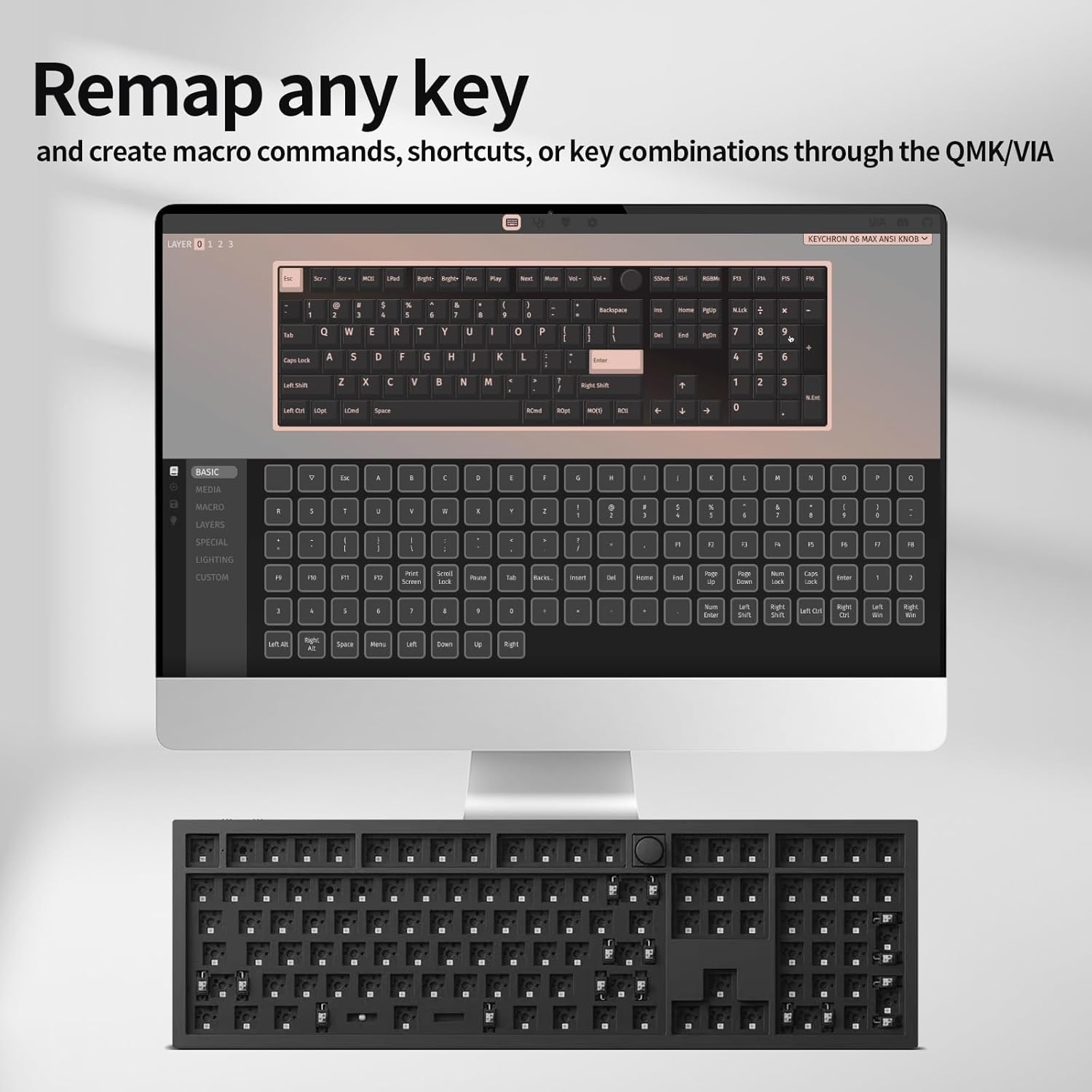
Image: VIA software interface for key remapping and customization.
Операција
1. Switching Connectivity Modes
Use the physical switch on the keyboard to toggle between 2.4 GHz, Bluetooth, and wired (Cable) modes. Ensure the switch is set to the desired mode for proper functionality.
2. Key Customization with QMK/VIA
As detailed in the setup section, the VIA software allows for extensive key customization. You can create multiple layers of keymaps, enabling different functions for the same physical keys, which is useful for various applications or operating systems.
3. РГБ позадинско осветљење
The Keychron Q6 Max features south-facing RGB backlighting. You can adjust lighting effects, colors, and brightness directly on the keyboard using key combinations (refer to the keyboard's quick start guide for specific key commands) or through the VIA software for more granular control.

Image: South-Facing RGB Backlight illumination.
4. Rotary Knob Functionality
The rotary knob typically controls media functions such as volume up/down and mute. Its functionality can also be customized via the QMK/VIA software to perform other actions.
Одржавање
1. Чишћење
- Искључите тастатуру из свих извора напајања пре чишћења.
- Користите меку крпу која не оставља длачицеampened with water or a mild cleaning solution to wipe the keyboard surface. Avoid harsh chemicals.
- For cleaning between keycaps, use compressed air to remove dust and debris.
- To deep clean, remove keycaps using the included keycap puller and clean the switches and plate area.
2. Замена прекидача
Thanks to the hot-swappable design, individual switches can be replaced without soldering. Use the switch puller to gently remove a switch and insert a new one, ensuring the pins are straight and align with the PCB sockets.
Решавање проблема
- Тастатура не реагује:
- Уверите се да је тастатура напуњена или повезана преко USB-C кабла.
- Check the mode switch (2.4G, BT, Cable) is set correctly for your connection type.
- For 2.4G, ensure the receiver is properly inserted. For Bluetooth, re-pair the device.
- Покушајте да се повежете преко USB-C кабла да бисте искључили проблеме са бежичном мрежом.
- Тастери се не региструју или се куцају двапут:
- This can sometimes be due to a faulty switch. Use the switch puller to remove the problematic switch and replace it with a new one.
- Ensure switches are fully seated in their sockets.
- Clean any debris around the switch.
- Проблеми са Блуетоотх везом:
- Ensure the keyboard is in Bluetooth mode and discoverable.
- Remove the keyboard from your device's Bluetooth list and re-pair.
- Уверите се да други уређаји не ометају Блутут сигнал.
- QMK/VIA Software Not Detecting Keyboard:
- Ensure the keyboard is connected via USB-C cable.
- Verify that the keyboard's mode switch is set to 'Cable'.
- Restart the VIA software and/or your computer.
- RGB Backlight Not Working:
- Check keyboard brightness settings using onboard controls or VIA software.
- Ensure the keyboard is not in a low-power mode.
Спецификације
| Феатуре | Детаљ |
|---|---|
| Број модела | Q6M-M1 |
| Димензије производа | 17.56 к 5.39 к 12.83 инча (44.6 к 13.7 к 32.6 цм) |
| Тежина артикла | 5.39 фунте (2.44 кг) |
| Произвођач | Кеицхрон |
| Батерије | 1 литијум-полимерска батерија (укључена) |
| Компатибилни уређаји | мацОС, Виндовс, Линук |
| Технологија повезивања | 2.4 GHz Wireless, Bluetooth 5.1, Type-C Wired |
| Посебна карактеристика | Позадинско осветљење (RGB) |
| Подршка бојама позадинског осветљења тастатуре | РГБ |
| Поллинг Рате | 1000 Hz (2.4 GHz & Wired), 90 Hz (Bluetooth) |
| Прилагођавање | QMK/VIA Programmable |
| Компатибилност прекидача | 3-pin and 5-pin MX style mechanical switches (hot-swappable) |
| Изградња | Full-metal body, Double-gasket design |

Image: Response speed comparison for 2.4G and Bluetooth modes.

Слика: Експлодирана view illustrating the internal layers and components of the keyboard.
Гаранција и подршка
Warranty information for your Keychron Q6 Max keyboard is typically provided with the product packaging or can be found on the official Keychron website. For technical support, troubleshooting assistance, or warranty claims, please refer to the manufacturer's official support channels.
Manufacturer: Keychron
For the most up-to-date support resources, visit the Keychron Official Webсајту.