
Увод
The TCNEWCL USB 2.0 Video Capture Card provides a convenient solution for converting analog video and audio signals into digital format. This device allows you to preserve old memories from sources like VHS tapes, VCRs, Hi8 camcorders, and DVD players by transferring them to your computer. It supports various video standards including NTSC, SECAM, PAL, and PAL/60, and is compatible with both Mac OS and Windows operating systems.
This manual will guide you through the installation, operation, and maintenance of your video capture card, ensuring you can effectively digitize and manage your video content.

Image: The TCNEWCL USB 2.0 Video Capture Card facilitating digital transfer of analog video to a computer running Mac OS.
Упутства за подешавање
Follow these steps to set up your TCNEWCL Video Capture Card:
- Инсталација софтвера: Insert the provided software installation CD into your computer's CD/DVD drive. If your computer does not have a CD drive, please visit the TCNEWCL support website (refer to the Support section) to download the necessary drivers and capture software. Follow the on-screen instructions to complete the installation.
- Connect the Video Capture Card to your Computer: Plug the USB 2.0 connector of the capture card into an available USB port on your desktop or laptop computer. The system should automatically detect the device.
- Identify Analog Video/Audio Sources: Locate the analog output ports on your video source device (e.g., VCR, camcorder, DVD player). These typically include:
- Composite Video (CVBS): A single yellow RCA connector for video.
- Стерео аудио: Red (right channel) and White (left channel) RCA connectors for audio.
- С-Видео: A multi-pin connector for higher quality video than composite.
- Connect Analog Cables: Connect the corresponding RCA or S-Video cables from your analog source device to the input ports on the TCNEWCL Video Capture Card. Ensure that the colors (yellow to yellow, white to white, red to red) match for correct connection.

Image: The video capture device shown alongside its quick start guide and the included software installation CD.

Слика: Детаљна view of the capture card's input and output connectors, clearly labeled for USB, CVBS, Audio (L/R), and S-Video.
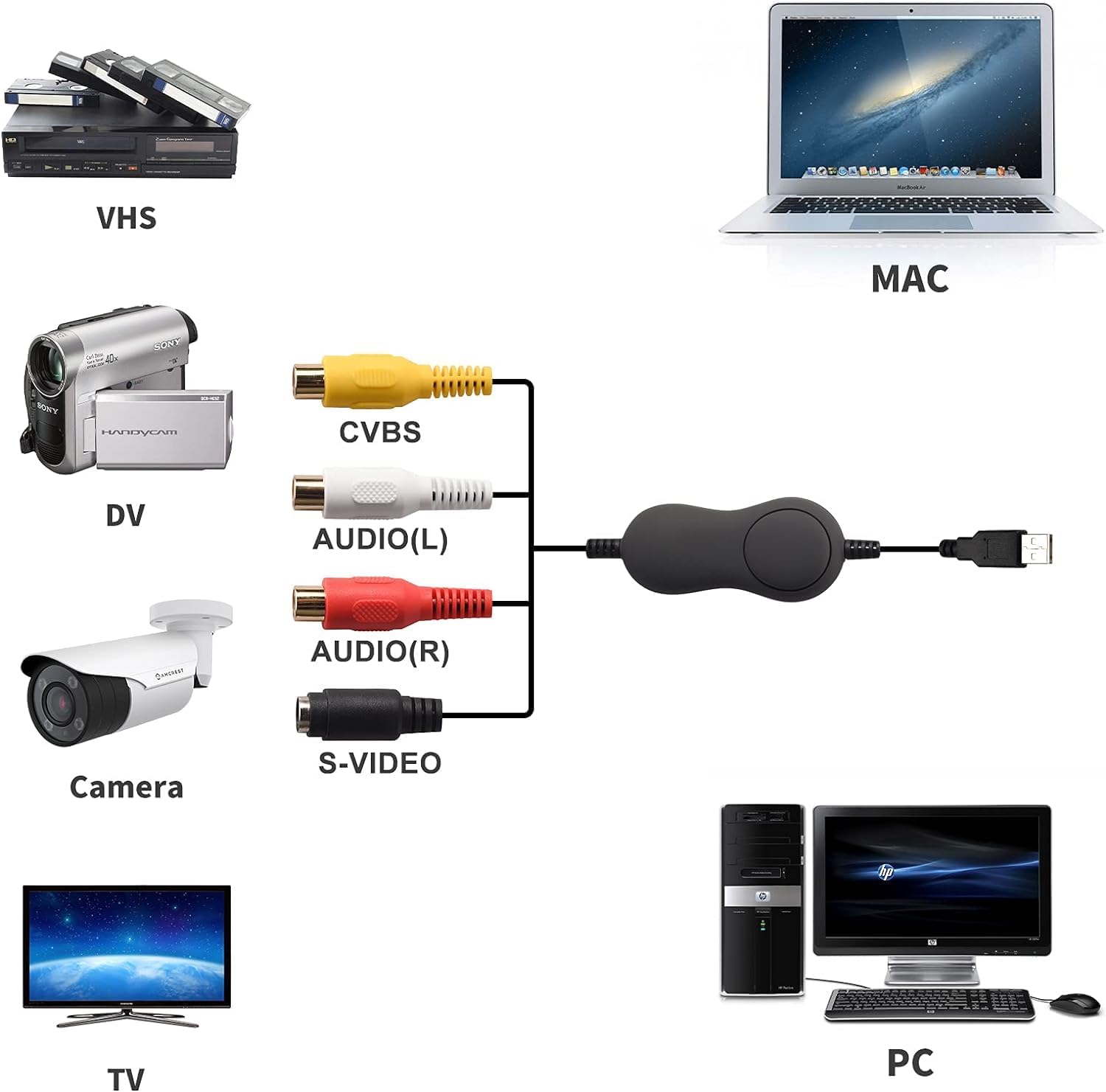
Image: Connection diagram illustrating how to link various analog devices like VHS players, DV cameras, and security cameras to a computer via the capture card.
Упутство за употребу
Once the hardware is connected and software is installed, you can begin capturing video:
- Launch the Capture Software: Open the video capture software installed on your computer. This software provides the interface for viewing, recording, and editing your analog video.
- Изаберите извор видеа: Within the software, select the TCNEWCL Video Capture Card as your input device. You may need to specify whether you are using Composite (CVBS) or S-Video input.
- Преview видео: Start playback on your analog source device (e.g., press play on your VCR). You should see the video feed appear in the capture software's preview прозор.
- Подесите подешавања: The software typically allows you to adjust video parameters such as brightness, contrast, hue, and saturation. Optimize these settings for the best possible video quality before recording.
- Започни снимање: Click the "Record" button within the software to begin digitizing your video. Ensure your analog source is playing the content you wish to capture.
- Заустави снимање: Click the "Stop" button when you have finished capturing the desired segment. The software will then save the digital video file на ваш рачунар.
- Edit and Export: Most capture software includes basic editing features. You can trim videos, add effects, and then export them to various digital formats (e.g., MP4, AVI) or burn them to DVD.

Image: The video capture card is compatible with a wide range of operating systems, including various versions of Mac OS and Windows.
Одржавање
To ensure the longevity and optimal performance of your TCNEWCL Video Capture Card, follow these simple maintenance guidelines:
- Одржавати уредним одржавати чистим: Gently wipe the device and cables with a soft, dry cloth to remove dust. Avoid using liquid cleaners or abrasive materials.
- Чувајте правилно: Када се не користи, картицу за снимање чувајте на хладном и сувом месту, даље од директне сунчеве светлости и екстремних температура.
- Пажљиво рукујте: Avoid bending or twisting the cables excessively, as this can damage internal wiring. Always grasp the plug when connecting or disconnecting.
- Ажурирања софтвера: Periodically check the TCNEWCL support website for any updated drivers or software versions to ensure compatibility and access to the latest features.
Решавање проблема
If you encounter issues while using your video capture card, refer to the following common problems and solutions:
- No Video Signal in Software:
- Ensure all cables (USB, RCA/S-Video) are securely connected.
- Verify that your analog source device (VCR, camcorder) is powered on and playing content.
- Check that the correct input source (Composite or S-Video) is selected in your capture software.
- Confirm that the capture card is selected as the video input device in your software settings.
- Try connecting the capture card to a different USB port on your computer.
- No Audio During Capture:
- Ensure the red and white RCA audio cables are correctly connected to both the source device and the capture card.
- Check the audio input settings in your capture software to ensure the correct audio source is selected and not muted.
- Verify the volume levels on your analog source device and computer.
- Лош видео квалитет:
- Adjust brightness, contrast, hue, and saturation settings within the capture software.
- Ensure you are using high-quality analog cables.
- If available, try using S-Video instead of Composite for better video clarity.
- Clean the heads of your VCR or camcorder if the source video itself appears degraded.
- Софтвер не препознаје уређај:
- Поново инсталирајте управљачке програме уређаја и софтвер за снимање.
- Поново покрените рачунар након инсталације.
- Ensure your operating system is compatible with the device (Mac OS, Windows 7/8/10).
Спецификације
| Феатуре | Детаљ |
|---|---|
| Број модела | 714684654960 |
| Интерфејс | УСБ 2.0 |
| Видео улази | Композитни видео (RCA), S-Video |
| Аудио улази | Stereo Audio (RCA L/R) |
| Подржани видео стандарди | НТСЦ, СЕЦАМ, ПАЛ, ПАЛ/60 |
| Компатибилни оперативни системи | Mac OS, Windows 7, Windows 8, Windows 10, Windows XP, Windows Vista |
| Димензије (пакет) | 6.85 к 5.67 к 1.93 инча |
| Тежина артикла | 5.3 унци (0.15 килограма) |
| Произвођач | TCNEWC L |
Информације о гаранцији
TCNEWCL products are designed for reliability and performance. For specific warranty terms and conditions applicable to your video capture card, please refer to the documentation included with your purchase or visit the official TCNEWCL website. Typically, warranty coverage addresses manufacturing defects under normal use.
Корисничка подршка
If you require further assistance, have questions not covered in this manual, or need technical support, please contact TCNEWCL customer service. You can usually find contact information, including email and phone support, on the official TCNEWCL webсајт:
Visit the TCNEWCL Store on Amazon
Молимо вас да имате при руци број модела вашег производа (714684654960) и детаље о куповини када контактирате подршку.