
Увод
This manual provides essential instructions for the proper setup, operation, and maintenance of your 3nStar PTA0157-432 All-in-One POS System. Please read this manual thoroughly before using the device to ensure optimal performance and longevity.
Безбедносне информације
Придржавајте се следећих мера предострожности како бисте спречили оштећење уређаја или повреде себе и других:
- Не излажите уређај води или прекомерној влази.
- Избегавајте постављање уређаја у близини извора топлоте или на директном сунцу.
- Користите само приложени АЦ адаптер.
- Не покушавајте сами да отворите или поправите уређај. Све сервисирање препустите квалификованом особљу.
- Обезбедите одговарајућу вентилацију око уређаја током рада.
Садржај пакета
Проверите да ли су све ставке присутне у пакету:
- 3nStar PTA0157-432 All-in-One POS System
- АЦ адаптер
- Кориснички приручник (овај документ)
Производ је завршенview
The 3nStar PTA0157-432 is a 15.6-inch All-in-One Point of Sale system designed for various business environments. It features a 10-point capacitive touchscreen, runs on Android 11, and is powered by a Quad-Core processor with 4GB RAM and 32GB storage. Integrated Wi-Fi and Bluetooth connectivity are also included.

Слика 1: Предња страна view of the 3nStar PTA0157-432 All-in-One POS System, showcasing the 15.6-inch display and integrated stand.

Figure 2: A user interacting with the 10-point capacitive touchscreen of the POS system, demonstrating its touch responsiveness.

Слика 3: Задња страна view of the 3nStar POS System, showing the ventilation slots and the sturdy integrated stand.
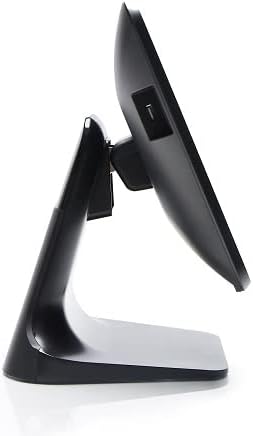
Слика 4: Бочни професионалацfile of the 3nStar POS System, highlighting its slim design and adjustable screen angle.
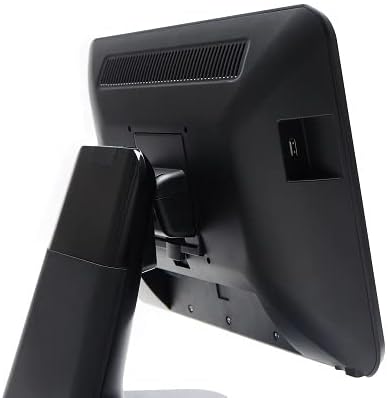
Слика 5: Задња страна view of the 3nStar POS System, illustrating the location of various connectivity ports for peripherals.
Сетуп
- Распакујте систем: Carefully remove the POS system and all accessories from the packaging.
- Position the System: Place the POS system on a stable, flat surface, ensuring adequate ventilation around the device.
- Прикључите напајање: Connect the AC adapter to the power input port on the back of the POS system, then plug the adapter into a standard electrical outlet.
- Почетно укључивање: Press the power button, usually located on the side or back of the display. The system will boot up to the Android 11 operating system.
- Почетна конфигурација: Follow the on-screen prompts to complete the initial Android setup, including language selection, Wi-Fi connection, and Google account setup (optional).
- Повежите периферне уређаје: Connect any necessary peripherals such as barcode scanners, receipt printers, or cash drawers to the available USB or other designated ports. Refer to the peripheral's manual for specific connection instructions.
Упутство за употребу
The 3nStar PTA0157-432 operates on Android 11, providing a familiar and intuitive user experience.
Основна навигација
- екран осетљив на додир: Use your fingers to tap, swipe, pinch, and zoom on the 15.6-inch capacitive display.
- Почетни екран: Access your installed applications and widgets from the main home screen.
- Фиока апликација: Swipe up from the bottom of the screen or tap the app drawer icon to view све инсталиране апликације.
- Обавештења: Превуците прстом надоле од врха екрана да бисте приступили обавештењима и брзим подешавањима.
Повезивање на Ви-Фи
- Иди на Подешавања > Мрежа и интернет > Ви-Фи.
- Укључи/искључи Wi-Fi On.
- Изаберите жељену мрежу са листе и унесите лозинку ако се то од вас затражи.
Повезивање Блуетоотх уређаја
- Иди на Подешавања > Повезани уређаји > Поставке везе > Блуетоотх.
- Укључите Блуетоотх On.
- Уверите се да је ваш Bluetooth уређај у режиму упаривања.
- Изаберите уређај са листе за упаривање.
Using POS Software
The system is designed to run various Android-compatible Point of Sale applications. Install your preferred POS software from the Google Play Store or other trusted sources. Refer to your specific POS software's documentation for detailed usage instructions.
Одржавање
Чишћење уређаја
- Екран: Користите меку крпу која не оставља длачицеampened with water or a screen cleaner specifically designed for electronic displays. Do not spray cleaner directly onto the screen.
- Тело: Обришите спољашње површине меком, сувом крпом. Избегавајте абразивна средства за чишћење или раствараче.
- вентилација: Ensure ventilation slots are free from dust and debris to prevent overheating. Use compressed air if necessary.
Ажурирања софтвера
Regularly check for and install system updates for Android 11 to ensure optimal performance, security, and compatibility. Go to Подешавања > Систем > Ажурирање система.
Управљање складиштем
Monitor the 32GB internal storage to ensure sufficient space for applications and data. Delete unnecessary files or uninstall unused applications to free up space. Go to Подешавања > Складиштење.
Решавање проблема
| Проблем | Могући узрок | Решење |
|---|---|---|
| Уређај се не укључује. | Power cable not connected properly; AC adapter malfunction. | Ensure the AC adapter is securely connected to the device and a working power outlet. Test the outlet with another device. |
| Екран осетљив на додир не реагује. | Software glitch; screen dirty; physical damage. | Restart the device. Clean the screen with a soft cloth. If the issue persists, contact support. |
| Проблеми са Wi-Fi везом. | Нетачна лозинка; ван домета; проблем са рутером. | Verify Wi-Fi password. Ensure the device is within range of the router. Restart the router and the POS system. |
| Peripheral (e.g., printer) not detected. | Incorrect connection; driver issue; peripheral not powered on. | Check physical connections. Ensure the peripheral is powered on. Install necessary drivers or apps for the peripheral. Restart the POS system. |
Спецификације
| Феатуре | Детаљ |
|---|---|
| Број модела | PTA0157-432 |
| Оперативни систем | Андроид 11 |
| Величина екрана | 15.6 инча |
| Резолуција екрана | 1920 к 1080 пиксела |
| Тоуцхсцреен | 10-тачкасти капацитивни |
| Процесор | Quad-Core (Rockchip 3568, 2 GHz) |
| РАМ | 4ГБ ЛПДДР4 |
| Складиштење | 32GB SSD (Flash Memory) |
| Графика | Интегрисана графика |
| Повезивање | Ви-Фи, Блуетоотх |
| Димензије производа (ДкШкВ) | 10 к 13 к 16 инча |
| Тежина артикла | 11 фунти |
| Боја | Црно |
Гаранција и подршка
For warranty information, technical support, or service inquiries, please refer to the official 3nStar website or contact your authorized reseller. Keep your purchase receipt as proof of purchase for warranty claims.
Online resources and frequently asked questions may be available on the manufacturer's support page: 3nStar Support