
1. Увод
Thank you for choosing the Aveek Mini Karaoke Machine V9. This portable Bluetooth speaker with wireless microphones is designed to provide an enjoyable and interactive audio experience. This manual provides detailed instructions for setup, operation, and maintenance to ensure optimal performance and longevity of your device.
2. Садржај пакета
Приликом распакивања, молимо вас да проверите да ли су укључене све доле наведене ставке:
- 1 x Aveek Mini Karaoke Speaker
- 2 к бежични микрофони
- 1 к УСБ кабл за пуњење
- 1 x Упутство за употребу (овај документ)

Image: Contents of the Aveek Mini Karaoke Machine V9 package, showing the speaker, two wireless microphones, a charging cable, and the user manual.
3. Производ је готовview
The Aveek Mini Karaoke Machine V9 combines a portable Bluetooth speaker with two wireless microphones, offering versatile entertainment options. It features vibrant LED lights, multiple voice changing effects, and broad compatibility with various audio sources.
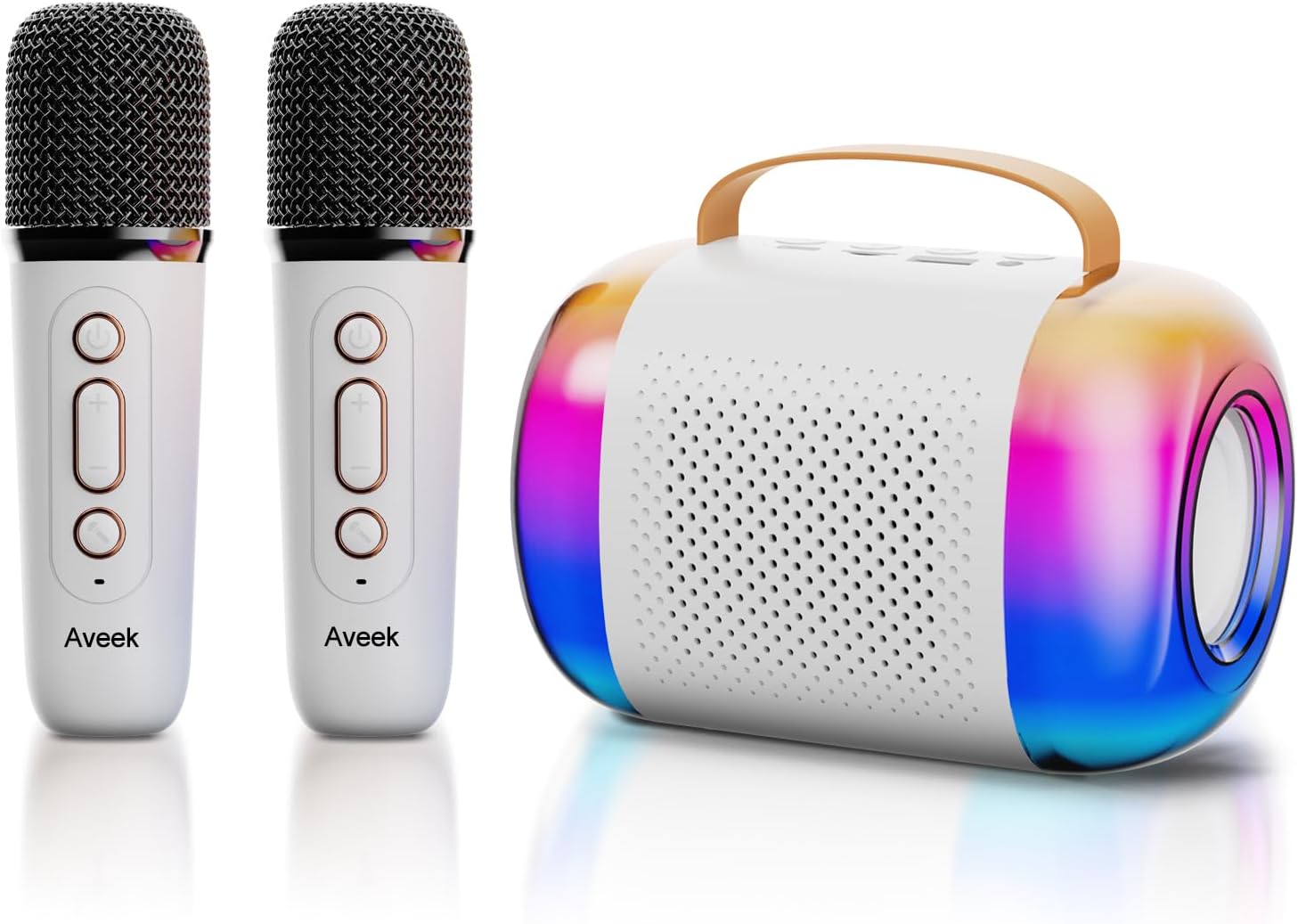
Image: The Aveek Mini Karaoke Machine V9, featuring the main speaker unit with colorful LED lights and two accompanying white wireless microphones.
Карактеристике звучника:
- Блуетоотх 5.3 повезивање: Ensures stable wireless connection up to 50 feet.
- Више опција репродукције: Supports Bluetooth, TF card, USB drive, and AUX input.
- Динамичка ЛЕД светла: 5 ambient light modes that synchronize with music rhythm.
- Преносиви дизајн: Lightweight with a convenient handle for easy transport.
- Звук високог квалитета: Equipped with 2 x 52 tweeters and a 4060 bass diaphragm for clear stereo sound.

Слика: Експлодирана view of the Aveek Mini Karaoke Machine V9 speaker, illustrating its internal audio components including tweeters and a bass diaphragm.
Карактеристике микрофона:
- Бежични рад: Provides freedom of movement during performances.
- Промена гласа: Includes 4 magic voice effects (Original, Female, Male, Baby, Monster).
- Пуњива: Built-in Lithium Polymer batteries.

Image: A visual representation of the five voice changing options available on the Aveek Mini Karaoke Machine V9, including original, female, male, baby, and monster voices.
4. Упутства за подешавање
4.1 Пуњење уређаја
The karaoke machine speaker and microphones are equipped with rechargeable Lithium Polymer batteries. Use the provided USB charging cable to charge them.
- Connect the USB charging cable to the Type-C charging port on the speaker and microphones.
- Укључите други крај USB кабла у компатибилни USB адаптер за напајање (није укључен) или USB порт рачунара.
- The indicator light will show charging status (Red for charging, Blue for Bluetooth connection).
- Време пуњења: Speaker: 3.5-4 hours; Microphones: 2.5 hours.
- Радно време: Speaker: 5-6 hours; Microphones: 3-4 hours.
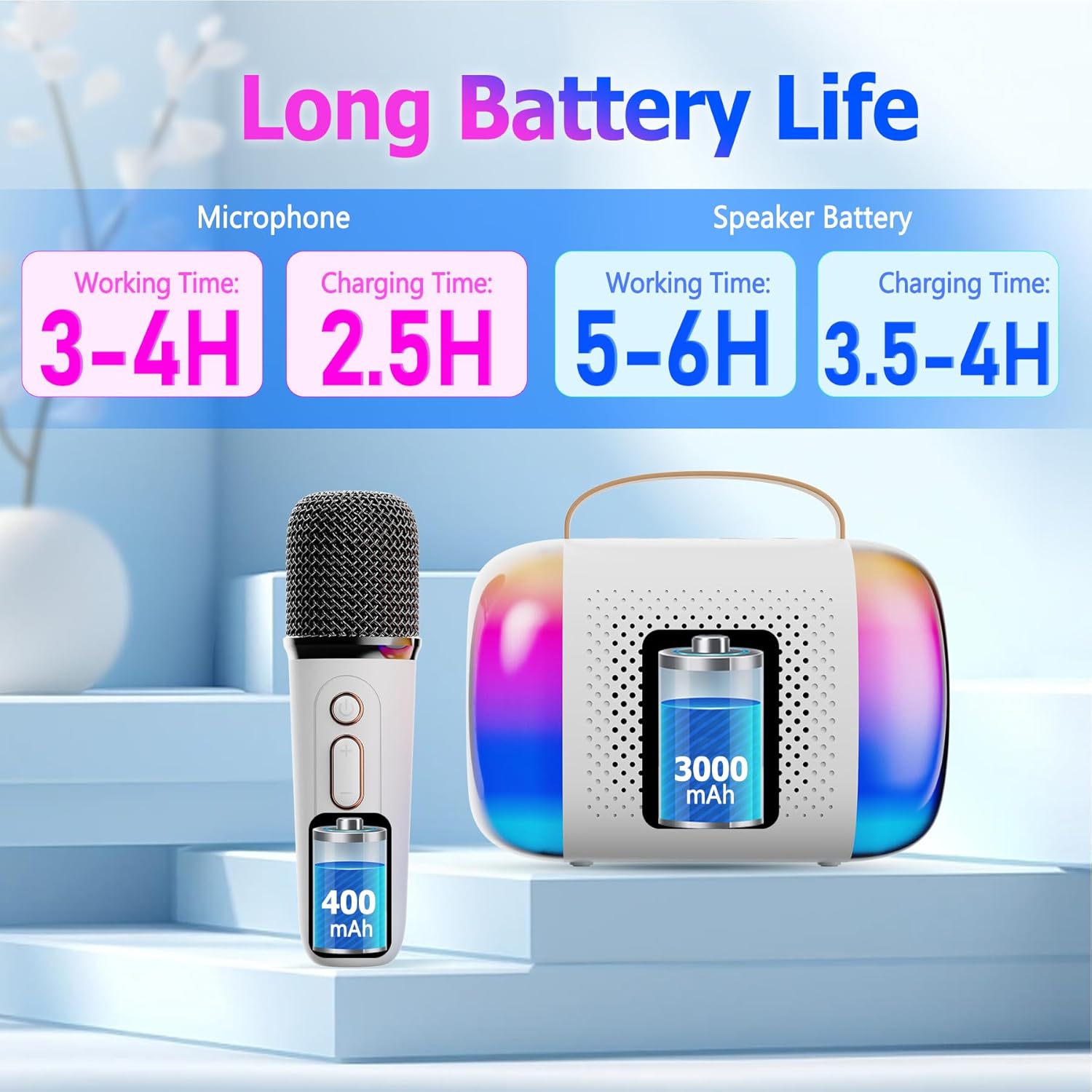
Image: A diagram illustrating the working and charging times for both the Aveek Mini Karaoke Machine V9 speaker and its wireless microphones.
4.2 Pairing Microphones with Speaker
The microphones are designed to automatically pair with the speaker when both are powered on. Ensure both devices are charged before attempting to pair.
- Power on the speaker by long pressing the Power ON/OFF Key.
- Power on each microphone by long pressing its Microphone ON/OFF button.
- The microphones should automatically connect to the speaker. A blue indicator light on the microphone signifies a successful Bluetooth connection.
4.3 Connecting to a Bluetooth Device (Phone, Tablet, PC)
To play music through the speaker, connect it to your preferred Bluetooth-enabled device.
- Ensure the karaoke speaker is powered on and in Bluetooth pairing mode (usually indicated by a flashing light).
- On your device (phone, tablet, PC), navigate to Bluetooth settings.
- Тражи available devices and select "Aveek V9" (or similar name) to connect.
- Once connected, you can play music from your device through the karaoke speaker.

Image: The Aveek Mini Karaoke Machine V9 demonstrating its Bluetooth 5.3 connectivity and various input options including USB Drive, TF Card, Bluetooth, and Headphone/AUX.
5. Упутство за употребу
5.1 контроле звучника

Image: Detailed diagram of the Aveek Mini Karaoke Machine V9 speaker, labeling its indicator light, Type-C charging port, TF card slot, USB-A drive interface, AUX 3.5mm audio input, and control buttons (-, +, Mode, Power ON/OFF).
- Power ON/OFF Key: Long press to turn on/off. Short press to play/pause music.
- Тастер режима: Double click to switch light modes. Long press to turn on/off the color lights.
- - Key: Long press for previous music. Short press to decrease volume (3 levels).
- + Кључ: Long press for next music. Short press to increase volume (3 levels).
- Светло индикатора: Red for charging, Blue for Bluetooth connection.
- Порт за пуњење типа Ц: За пуњење звучника.
- Слот за ТФ картицу: Insert a TF card for music playback.
- USB-A USB Drive Interface: Insert a USB drive for music playback.
- AUX 3.5mm Audio Input: Повежите спољне аудио уређаје преко АУКС кабла.
5.2 Контроле микрофона

Image: Detailed diagram of the Aveek Mini Karaoke Machine V9 wireless microphone, labeling its Microphone ON/OFF button, Bluetooth/Charging Indicator, Type-C Charging Port, and control buttons (Power ON/OFF, +, -).
- Микрофон УКЉУЧЕН/ИСКЉУЧЕН: Long press to turn the mic on/off. Short press to change voice mode. Double click to open/close accompaniment.
- Power ON/OFF Key: Long press to turn on/off. Short press to adjust microphone/reverberation/accompaniment. Double click playback pause.
- + Кључ: Long press to play the next music. Short press to increase volume + / reverb volume +.
- - Key: Short press to decrease reverb volume - / accompaniment volume -. Long press to play the previous music.
- Bluetooth/Charging Indicator: Blue light for Bluetooth connection, Red light for charging.
- Порт за пуњење типа Ц: За пуњење микрофона.
5.3 функција мењача гласа
The microphones feature 4 unique voice changing effects in addition to the original voice. To cycle through these modes, short press the Microphone ON/OFF button.
- Оригинал Воице
- Фемале Воице
- Мушки глас
- Баби Воице
- Монстер Воице
5.4 светлосна начина
The speaker features 5 ambient LED light modes that can be changed by double-clicking the Mode Key on the speaker. Long press the Mode Key to turn the lights on or off.
6. Одржавање
- Чишћење: Use a soft, dry cloth to clean the speaker and microphones. Do not use liquid cleaners or abrasive materials.
- Складиштење: Уређај чувајте на хладном и сувом месту, даље од директне сунчеве светлости и екстремних температура.
- Одржавање батерије: To prolong battery life, avoid fully discharging the batteries frequently. Charge the device regularly, even if not in use for extended periods.
- Изложеност води: Овај уређај није водоотпоран. Избегавајте излагање води или високој влажности.
КСНУМКС. Решавање проблема
| Проблем | Могући узрок | Решење |
|---|---|---|
| Уређај се не укључује. | Ниска батерија. | Charge the speaker/microphones fully using the provided USB cable. |
| Microphones not connecting to speaker. | Microphones are not powered on or out of range. | Ensure microphones are powered on and within 50 feet of the speaker. Re-pair if necessary. |
| Нема звука из звучника. | Volume too low, device not connected, or incorrect input mode. | Increase volume on both speaker and connected device. Verify Bluetooth/AUX/TF/USB connection. |
| Лош квалитет звука/статични шум. | Interference, low microphone battery, or distance. | Move away from other electronic devices. Charge microphones. Reduce distance between mic and speaker. |
| Voice changer not working. | Неправилно притискање дугмета. | Short press the Microphone ON/OFF button to cycle through voice modes. |
8. Спецификације
| Феатуре | Детаљ |
|---|---|
| Бранд | Авеек |
| Назив модела | V9 |
| Технологија повезивања | Bluetooth 5.3 (Speaker), VHF (Microphones) |
| Извор напајања | Напаја се батеријама (2 литијум-полимерске батерије укључене) |
| Speaker Dimensions (L x W x H) | 10.5 к 2.1 к 3.5 инча |
| Тежина артикла | 0.353 унце (приближно 10 грама) |
| Материјал | Метал, Пластика |
| Однос сигнала и шума | 96 дБ |
| Број канала | 2 |
| Посебне карактеристике | Battery Indicator Light, Voice Changer, RGB Lights |
| Компатибилни уређаји | Amplifier, Audio Interface, Audio Mixer, Karaoke Machine, Speaker (via various inputs) |
| Улазни портови | TF Card Slot, USB-A Drive Interface, AUX 3.5mm Jack |
9. Гаранција и подршка
For warranty information and customer support, please refer to the product packaging or contact Aveek customer service directly. Keep your purchase receipt for any warranty claims.