
1. Увод
The FeelTech FY3200S series is a high-performance, cost-effective function/arbitrary waveform generator that utilizes Direct Digital Synthesis (DDS) technology. It is capable of generating accurate, stable, and low-distortion signals. This dual-channel device offers independent control over each channel, making it suitable for a wide range of applications in electronics testing, education, and research.
This manual provides essential information for the safe and effective operation of your FY3200S function signal generator. Please read it thoroughly before use.

Слика 1.1: Предња страна view of the FeelTech FY3200S Digital DDS Function Signal Generator.
2. Карактеристике производа
- DDS direct digital synthesis technology generates accurate, stable, and low distortion waveforms.
- CH1 and CH2 are two perfectly symmetrical channels; parameters for each channel can be set independently.
- Arbitrary waveform memory depth of 2048*12bits with a 250MSa/s sampлинг рате.
- The bandwidth is up to 12-bit.
- Minimum signal output amplitude up to 10mVpp, with a maximum of 20Vpp.
3. Компоненте производа и прибор
The standard package for the FY3200S includes the following items:
- FY3200S Function Signal Generator Unit
- Повер Цорд
- USB-B Data Cable
- BNC-Clip Cables (2)
- BNC-BNC Cable
- Кориснички приручник (овај документ)
- Data CD (containing software and drivers)

Figure 3.1: FY3200S unit and standard accessories.
4. Подешавање
4.1 Прикључак за напајање
- Ensure the power switch on the front panel is in the 'OFF' position.
- Connect the provided power cord to the AC power input port on the rear panel of the device.
- Plug the other end of the power cord into a suitable AC power outlet (AC85V~AC260V).
4.2 Signal Output Connections
- Identify the CH1 (yellow) and CH2 (blue) output BNC connectors on the front panel.
- Connect the BNC-Clip cables or BNC-BNC cables to the desired output channels.
- Connect the other end of the cable to your testing equipment (e.g., oscilloscope, frequency counter).
4.3 USB комуникација података
- Locate the USB port on the rear panel (USB to TTL Series Data Communication Interface).
- Connect the provided USB-B Data Cable from the device to your computer for software control and data transfer.
- Install the necessary drivers and software from the included Data CD or the manufacturer's webсајту.
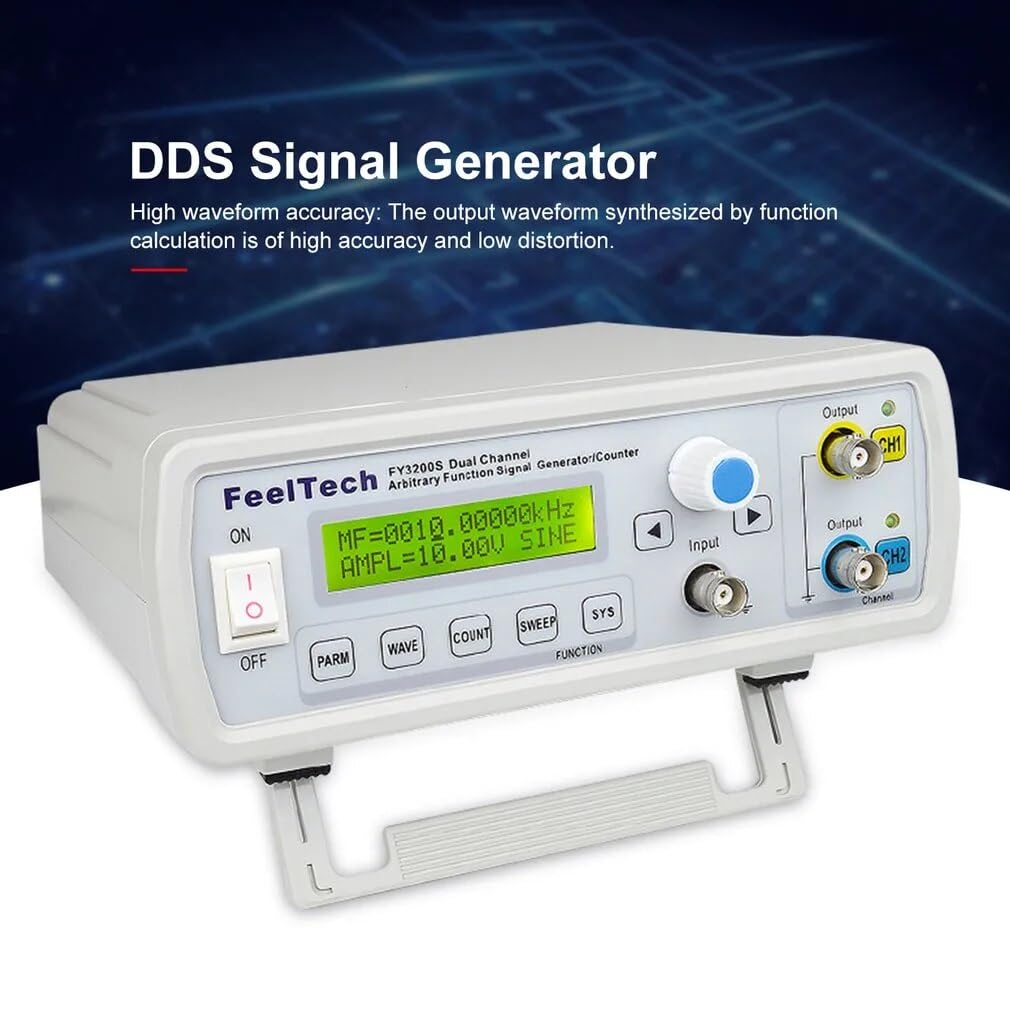
Figure 4.1: Rear panel connections including power, USB, and TTL outputs.
5. Упутство за употребу
5.1 Укључивање и основни рад
- After connecting power and outputs, switch the 'ON/OFF' toggle on the front panel to 'ON'. The LCD display will illuminate.
- The display shows current settings for frequency, amplitude, and waveform type.
- Use the rotary encoder (blue knob) to adjust values and the arrow buttons (< и >) to navigate between parameters.
5.2 Waveform Generation
- Притисните тастер ТАЛАС button to cycle through available waveform types (Sine, Square, Triangle, Arbitrary, Sawtooth, Pulse, Noise, etc.).
- Притисните тастер PARM button to select parameters such as frequency (MF), ampсветлост (AMPL), and DC offset (OFFS).
- Rotate the blue knob to change the selected parameter's value. Press the knob to confirm or switch between coarse/fine adjustment.
- The FY3200S supports dual-channel operation. Use the CH1 and CH2 buttons to select which channel's parameters you are adjusting. Each channel can operate independently.
5.3 Напредне функције
- ЦОУНТ: Use this button to access the frequency counter function, allowing you to measure external frequencies.
- СВЕЕП: Engage sweep mode for frequency or amplitude sweeps. Configure sweep parameters using the rotary encoder and arrow keys.
- СИС: Access system settings, including display contrast, key tone, and other device configurations.

Слика 5.1: Контроле и дисплеј на предњој плочи.
Видео 5.1: Оверview of the FeelTech FY3200S Digital DDS Function Signal Generator, demonstrating its features and appearance.
6. Одржавање
6.1 Општа нега
- Одржавајте уређај чистим и без прашине. Користите меку, суву крпу за чишћење. Не користите течна средства за чишћење или аеросоле.
- Избегавајте излагање уређаја екстремним температурама, влажности или директној сунчевој светлости.
- Осигурајте одговарајућу вентилацију око јединице како бисте спречили прегревање.
6.2 Безбедносне напомене
- Before using this instrument, please check if the power supply is normal to ensure the normal use and personal safety.
- This instrument must be grounded.
- Please do not change the instrument circuit arbitrarily, so as to avoid damaging equipment or endangering safety.
КСНУМКС. Решавање проблема
If you encounter issues with your FY3200S, please refer to the following common troubleshooting steps:
- Нема напајања: Ensure the power cord is securely connected to both the device and the power outlet. Check the power switch position.
- No Signal Output: Verify that the output cables are correctly connected to the CH1/CH2 BNC ports and to your receiving equipment. Check the amplitude and frequency settings on the device's display. Ensure the output is enabled.
- Incorrect Waveform: Confirm that the correct waveform type is selected using the WAVE button. Check frequency and amplitude settings for any anomalies.
- Проблеми са приказом: If the display is dim or unreadable, adjust the contrast in the SYS menu.
За сталне проблеме које ови кораци нису решили, обратите се корисничкој подршци.
8. Спецификације
The following tables detail the technical specifications of the FeelTech FY3200S series:
| Параметар | Валуе |
|---|---|
| Димензије производа | 9.84 к 7.87 к 5.91 инча |
| Тежина | 2.2 фунти |
| Број модела ставке | GT-FY3200S 6M |
| Произвођач | FeelTech/FeelElec |
| Земља порекла | Кина |
| Карактеристично | Опис/Вредност |
|---|---|
| Таласни облици | Синус, квадрат, троугао (Рamp), Произвољно, Савтоотх, Пулсе, Ноисе, итд. |
| Дужина таласног облика | 2048 поена |
| Sampлинг Рате | 250МСа / с |
| Вертикална резолуција | 12 Битс |
| Излаз Ampлитуде | ≤40Vpp (No load) |
| Излазна импеданса | 50Ω ±10% |
| Максимална излазна снага | 20В |
| ДЦ Оффсет | ±10В |
| Резолуција | 0.01Hz (10MHz) |
| Стабилност фреквенције | ±5×10³XNUMX-6 |
| Изобличење синусног таласа | ≤0.8% (reference frequency 1kHz) |
| Triangle Linearity | ≥98% (0.01Хз~10кХз) |
| Rise or Fall Time of Square Wave | ≤30нс |
| Square Wave Duty Cycle Range | 0.1%~99.9% |
| Pulse Wave Width Range | 10ns~1S |
| ТТЛ излаз | Dual-channel TTL electric level synchronize with CH1 and CH2. Phase differences are adjustable. |
| Electric Level Range | >3.3Vp-p |
| Фан-оут | >20 TTL (Load) |
| Level Rise Fall Time | ≤20нс |
| Модел | FY3200S 6M | FY3200S 12M | FY3200S 20M | FY3200S 24M | FY3200S 25M |
|---|---|---|---|---|---|
| Фреквенцијски опсег синусног таласа | 0Хз ~ 6 МХз | 0Хз ~ 12 МХз | 0Хз ~ 20 МХз | 0Хз ~ 24 МХз | 0Хз ~ 25 МХз |
| Фреквенцијски опсег квадратног таласа | 0Хз ~ 6 МХз | 0Хз ~ 6 МХз | 0Хз ~ 6 МХз | 0Хз ~ 6 МХз | 0Хз ~ 6 МХз |
| Ramp/Троугао | 0Хз ~ 6 МХз | 0Хз ~ 6 МХз | 0Хз ~ 6 МХз | 0Хз ~ 6 МХз | 0Хз ~ 6 МХз |
| Пулс | 0Хз ~ 6 МХз | 0Хз ~ 6 МХз | 0Хз ~ 6 МХз | 0Хз ~ 6 МХз | 0Хз ~ 6 МХз |
| ТТЛ/ЦМОС | 0Хз ~ 6 МХз | 0Хз ~ 6 МХз | 0Хз ~ 6 МХз | 0Хз ~ 6 МХз | 0Хз ~ 6 МХз |
| Произвољни талас | 0Хз ~ 6 МХз | 0Хз ~ 6 МХз | 0Хз ~ 6 МХз | 0Хз ~ 6 МХз | 0Хз ~ 6 МХз |

Figure 8.1: Detailed frequency ranges for various FY3200S models.
9. Гаранција и подршка
Your FeelTech FY3200S Digital DDS Function Signal Generator is covered by a manufacturer's warranty. Please refer to the warranty card included in your package for specific terms and conditions.
For technical assistance, troubleshooting beyond this manual, or warranty claims, please contact FeelTech customer support through the vendor you purchased the product from or directly via the contact information provided on the manufacturer's official webсајту.
Please have your model number (GT-FY3200S 6M) and purchase details ready when contacting support.