
1. Увод
This manual provides essential information for the safe and efficient operation of your Sharp GX-BT190 Portable Bluetooth Speaker. Please read it thoroughly before using the device and retain it for future reference.
2. Безбедносне информације
- Не излажите звучник екстремним температурама, директној сунчевој светлости или високој влажности.
- Do not disassemble, repair, or modify the speaker. This may void the warranty and pose safety risks.
- Ensure the charging port cover is securely closed when using the speaker near water to maintain its IP67 rating.
- Користите само приложени кабл за пуњење или сертификовани еквивалент.
- Чувајте звучник даље од деце и кућних љубимаца.
- Избегавајте слушање на високим нивоима јачине звука током дужег периода да бисте спречили оштећење слуха.
3. Садржај пакета
- Sharp GX-BT190 Portable Bluetooth Speaker
- УСБ кабл за пуњење
- Ланиард
- Упутство за употребу
4. Производ је готовview

Фронт view of the Sharp GX-BT190 speaker, showing the central speaker grille with the Sharp logo and the LED light ring.

Сиде view of the Sharp GX-BT190 speaker, highlighting the textured speaker grille and the integrated lanyard.
Позади view of the Sharp GX-BT190 speaker, showing the control buttons and the sealed charging port cover.
Контроле и индикатори:
- Дугме за напајање: Притисните и држите да укључите/искључите.
- Дугме за појачавање јачине звука / следећу нумеру (+): Кратак притисак за појачавање јачине звука, дуг притисак за следећу нумеру.
- Дугме за смањивање јачине звука / претходну нумеру (-): Кратак притисак за смањивање јачине звука, дуг притисак за претходну нумеру.
- Play/Pause / Call Button (►||): Short press to play/pause, answer/end calls. Long press to reject calls.
- Mode / Light Button (M): Short press to cycle through LED light modes. Long press to turn off LED lights.
- УСБ-Ц прикључак за пуњење: For charging the speaker. Ensure the rubber cover is sealed when not charging.
- ЛЕД индикатор: Приказује статус пуњења и статус упаривања путем Bluetooth-а.
5. Подешавање
5.1 Пуњење звучника
- Open the rubber cover on the back of the speaker to access the USB-C charging port.
- Connect the provided USB charging cable to the speaker's USB-C port.
- Повежите други крај USB кабла са USB адаптером за напајање (није укључен) или USB портом рачунара.
- The LED indicator will illuminate during charging and turn off once fully charged.
- Close the rubber cover securely after charging to maintain the speaker's waterproof rating.
5.2 Укључивање/искључивање
- За укључивање: Press and hold the Power button for approximately 3 seconds. You will hear an audible prompt, and the LED indicator will flash.
- За искључивање: Press and hold the Power button for approximately 3 seconds. You will hear an audible prompt, and the LED indicator will turn off.
5.3 Блуетоотх упаривање
- Ensure the speaker is powered on and the LED indicator is flashing, indicating it is in pairing mode.
- На свом мобилном уређају омогућите Блуетоотх и потражите доступне уређаје.
- Select "GX-BT190" from the list of devices.
- Once paired, the LED indicator will stop flashing and remain solid, and you will hear a confirmation tone.
- Звучник ће се аутоматски поново повезати са последњим упареним уређајем када се укључи, ако је уређај у домету и ако је Bluetooth омогућен.
5.4 Упаривање са правим бежичним стерео (TWS) системом
TWS allows you to pair two GX-BT190 speakers together for a stereo audio experience.

Two Sharp GX-BT190 speakers, one red and one blue, positioned together, illustrating the True Wireless Stereo (TWS) pairing feature.
- Ensure both GX-BT190 speakers are powered on and not connected to any Bluetooth device.
- On one of the speakers (this will be the primary speaker), double-press the Power button. The speaker will enter TWS pairing mode.
- The two speakers will automatically search for and connect to each other. You will hear a confirmation tone once TWS pairing is successful.
- Once TWS paired, connect your mobile device to the primary speaker via Bluetooth as described in section 5.3.
- To disconnect TWS, double-press the Power button on either speaker.
6. Оперативни
6.1 Репродукција звука
- Пусти/паузирај: Кратко притисните дугме Плаи/Паусе.
- Појачавање звука: Кратко притисните дугме '+'.
- Смањивање јачине звука: Кратко притисните дугме '-'.
- Следећа нумера: Дуго притисните дугме „+“.
- Претходни запис: Дуго притисните дугме '-'.
6.2 Позивање без употребе руку
- Одговори на позив: Кратко притисните дугме Репродукуј/Паузирај када зазвони долазни позив.
- Заврши позив: Кратко притисните дугме Репродукуј/Паузирај током позива.
- Одбиј позив: Дуго притисните дугме Репродукуј/Паузирај када зазвони долазни позив.
6.3 LED Mood Lights
- Short press the 'M' (Mode/Light) button to cycle through the 6 available LED mood light modes.
- Long press the 'M' button to turn off the LED lights.
6.4 Waterproof and Dustproof Usage (IP67)

The Sharp GX-BT190 speaker partially submerged in water, demonstrating its IP67 waterproof and dustproof capabilities.
The GX-BT190 speaker is rated IP67, meaning it is protected from dust ingress and can withstand immersion in water up to 1 meter for 30 minutes. To ensure this protection:
- Always ensure the rubber cover for the charging port is fully and securely sealed before exposing the speaker to water or dust.
- Немојте намерно потапати звучник дуже време или преко наведене дубине.
- Након излагања води, обришите звучник сувом меком крпом пре пуњења.
7. Одржавање
7.1 Чишћење
- Обришите звучник меком, дamp тканина.
- Не користите абразивна средства за чишћење, алкохол или хемијске раствараче.
- Ensure the speaker is dry before charging or storing.
7.2 Складиштење
- Чувајте звучник на хладном и сувом месту, даље од директне сунчеве светлости и екстремних температура.
- If storing for an extended period, charge the battery periodically (e.g., every 3 months) to maintain battery health.
КСНУМКС. Решавање проблема
| Проблем | Решење |
|---|---|
| Звучник се не укључује. | Уверите се да је батерија напуњена. Повежите звучник са извором напајања помоћу USB кабла. |
| Није могуће упаривање преко Bluetooth-а. | Ensure the speaker is in pairing mode (LED flashing). Turn off and on Bluetooth on your device. Move the speaker closer to your device. Clear previous Bluetooth connections on your device. |
| Нема звука или је јачина звука ниска. | Појачајте јачину звука и на звучнику и на повезаном уређају. Уверите се да је звучник правилно упарен. |
| Лош квалитет звука. | Move the speaker closer to your device. Ensure there are no obstructions between the speaker and your device. Try playing a different audio source. |
| Упаривање TWS-а не успева. | Ensure both speakers are GX-BT190 models and are not connected to any other Bluetooth device. Try powering both speakers off and on, then re-attempt TWS pairing. |
9. Спецификације

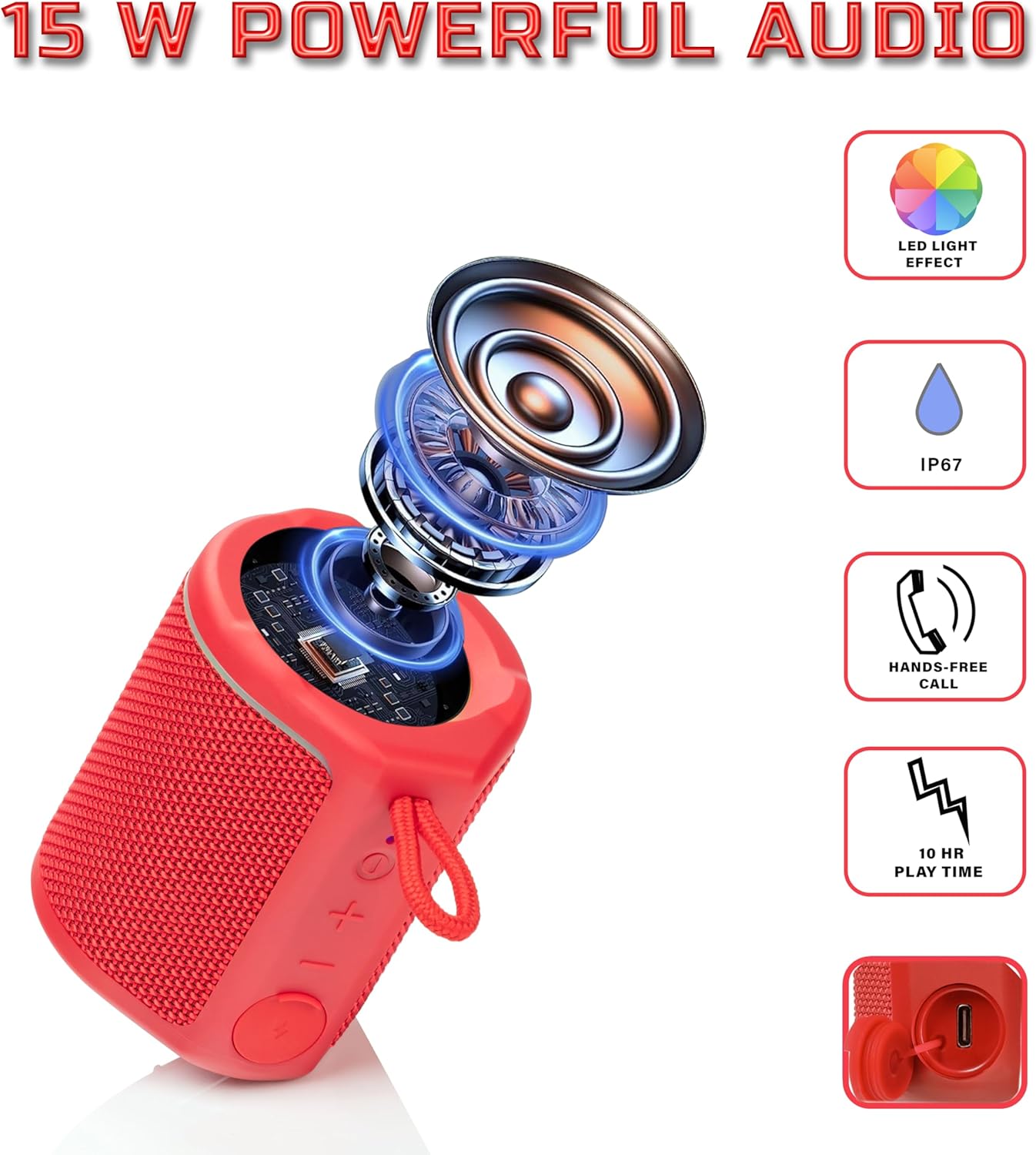
Diagram illustrating the internal components of the Sharp GX-BT190 speaker, including the speaker driver, and highlighting features like LED light effect, IP67 rating, hands-free call function, and battery life.
| Феатуре | Детаљ |
|---|---|
| Број модела | ГКС-БТ190 |
| Технологија повезивања | Блуетоотх |
| Максимална излазна снага звучника | 10 Ваттс |
| Водоотпорна оцена | ИП67 |
| Трајање батерије | До 15 сати |
| Тип батерије | 1 литијум јон (укључено) |
| Капацитет батерије | 1200 мАх |
| Димензије производа (Д x Ш x В) | 7.5 x 7.5 x 7.5 цм (приближно) |
| Тежина артикла | 226.8 г (8 унци) |
| Домет | До 33 стопа |
| Додатне карактеристике | LED Light, True Wireless Stereo (TWS), Hands-Free Calling |
10. Гаранција
The Sharp GX-BT190 Portable Bluetooth Speaker comes with a 1-Year Limited Warranty from the date of purchase. This warranty covers manufacturing defects under normal use. It does not cover damage caused by misuse, accidents, unauthorized modifications, or normal wear and tear. Please retain your proof of purchase for warranty claims.
11. Подршка
For technical assistance, warranty inquiries, or further information regarding your Sharp GX-BT190 speaker, please contact Sharp Inc. customer support:
- Контакт произвођача: Sharp Inc
- Телефон: 1-800-БЕ-СХАРП