
AUN AUN M98 Y9
AUN 4K Android TV Stick User Manual
Model: AUN M98 Y9
Brand: AUN
Увод
This user manual provides comprehensive instructions for the AUN 4K Android TV Stick (Model: M98 Y9). It covers product features, setup, operation, maintenance, and troubleshooting to ensure optimal performance and user experience. The AUN TV Stick transforms any compatible display into a smart TV, offering access to a vast array of streaming content and applications.
Шта је у кутији
Након распакивања, проверите да ли су укључене све следеће ставке:
- 1 x 4K Android TV Stick (AUN M98 Y9)
- 1 к даљински управљач
- 1 к адаптер за напајање
- 1 к кабл типа Ц
- 1 x IR Cable
- 1 x HDMI Extender Cable
- 1 к Упутство за употребу

Image: All components included in the AUN 4K Android TV Stick package, laid out for clear viewing. This includes the TV stick, its remote control, power adapter, Type-C cable, IR cable, HDMI extender cable, and the user manual.
Производ је завршенview
The AUN M98 Y9 Android TV Stick is a compact device designed to provide smart TV functionalities to any display with an HDMI input. It features a sleek design and intuitive controls.
Компоненте уређаја
- ХДМИ конектор: Plugs directly into your TV's HDMI port.
- УСБ интерфејс: За повезивање екстерних уређаја за складиштење или периферних уређаја.
- Power Hole (Type-C): За повезивање адаптера за напајање.
- Пилот Лamp: Означава статус уређаја.

Image: The AUN 4K Android TV Stick and its accompanying remote control. The stick is a compact, black rectangular device, and the remote is an ergonomic black controller with various buttons for navigation and voice control.
Ремоте Цонтрол
The included remote control allows for easy navigation and interaction with the TV Stick. It supports voice search for quick content discovery.
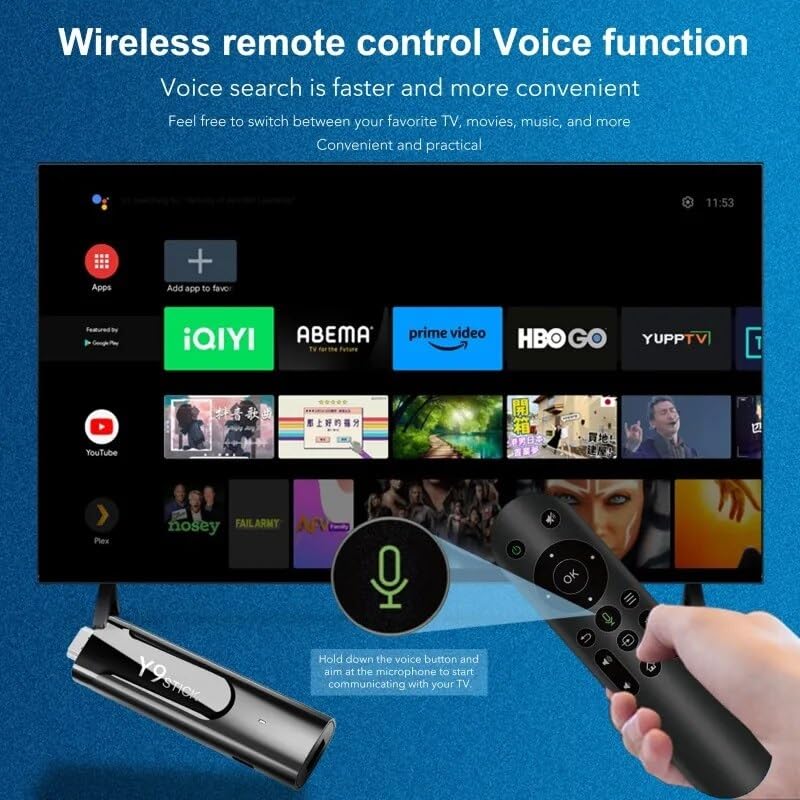
Image: A hand holding the AUN TV Stick remote control, with a visual overlay indicating the voice search button and microphone icon. The image illustrates the ease of using voice commands to interact with the TV stick's interface, which is displayed on a television screen in the background.
Водич за подешавање
Follow these steps to set up your AUN 4K Android TV Stick:
- Повежите ТВ стицк: Plug the AUN TV Stick directly into an available HDMI port on your television or projector. If space is limited, use the provided HDMI extender cable.
- Прикључите напајање: Connect the Type-C cable to the "Power Hole" on the TV Stick and the other end to the provided power adapter. Plug the power adapter into a wall outlet.
- Connect IR Cable (Optional): If the TV Stick is hidden behind the TV or in a cabinet, connect the IR cable to the TV Stick and position the IR receiver in a location where it has a clear line of sight to your remote control.
- Изаберите ХДМИ улаз: Turn on your TV or projector and select the corresponding HDMI input source to which the TV Stick is connected.
- Почетно подешавање: Follow the on-screen instructions to complete the initial setup, including language selection, Wi-Fi network connection, and Google account login.
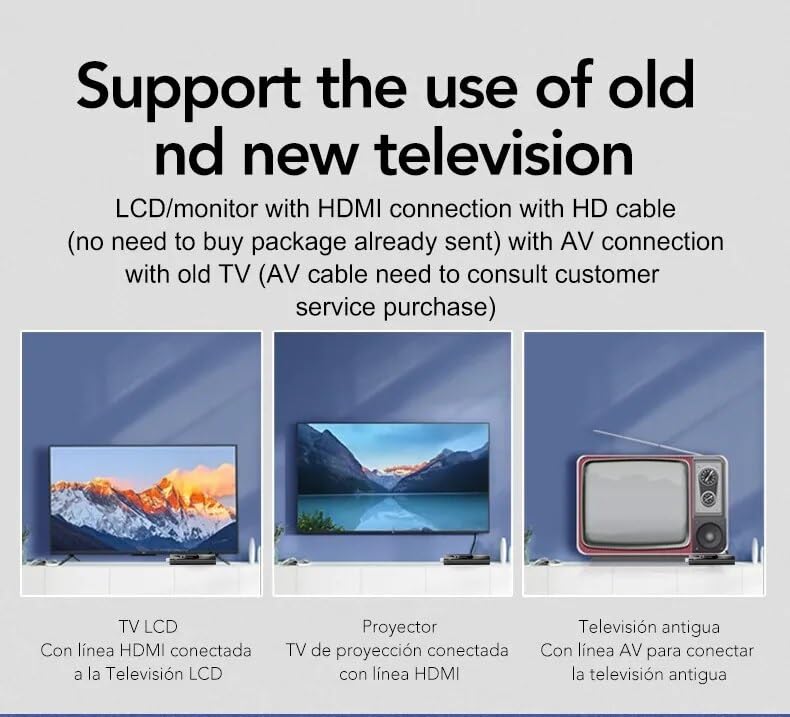
Image: This diagram illustrates the versatility of the AUN TV Stick, showing its compatibility with modern LCD TVs and projectors via HDMI, and older televisions using an AV connection (AV cable sold separately). It highlights the ease of connecting the device to various display types.
Упутство за употребу
Кретање кроз интерфејс
Use the directional pad and "OK" button on the remote control to navigate through the Android TV interface. The "Back" button returns to the previous screen, and the "Home" button takes you to the main home screen.
Повезивање на Ви-Фи
- Са почетног екрана идите на Подешавања.
- Изаберите Мрежа и Интернет.
- Изаберите жељену Wi-Fi мрежу са листе.
- Enter the Wi-Fi password using the on-screen keyboard and select Повежите се.
The AUN TV Stick supports dual-band Wi-Fi (2.4G/5G) for stable and fast wireless connectivity.

Image: This visual demonstrates the AUN TV Stick's support for both 2.4G and 5G dual-band Wi-Fi, ensuring smooth high-speed graphics and streaming. It also shows the capability to mirror content from a mobile phone to the TV screen, enhancing the viewинг искуство.
Инсталирање апликација
Access the Google Play Store from the home screen to download and install your favorite streaming apps (e.g., Netflix, Prime Video, Disney+ Hotstar) and games. A Google account is required for Play Store access.
Using Voice Search
Press the dedicated voice button on your remote control and speak into the microphone to search for content, open apps, or get information. Voice search is faster and more convenient.
Кључне карактеристике
- 4К Ултра ХД резолуција: Supports stunning 4K resolution for crisp, clear visuals and an immersive viewинг искуство.
- HDR 10+ Support: Enhanced dynamic range for vibrant colors and greater contrast.
- Сертификовано од стране Вајдвајна L1: Enables streaming of high-definition content from premium services like Netflix and Prime Video.
- Оперативни систем Андроид 13: Provides a smooth, user-friendly interface with access to a vast ecosystem of apps.
- Amlogic S905Y4 Quad A35 CPU: High-performance processor for seamless streaming and gaming.
- 2GB RAM & 16GB Storage: Sufficient memory for smooth operation and ample space for apps and media.
- Dual-Band Wi-Fi (2.4G/5G): Ensures stable and fast internet connectivity.
- Блуетоотх КСНУМКС: For connecting wireless headphones, game controllers, and other Bluetooth accessories.
- Dolby Audio & DTS Digital Support: Пружа богат, импресиван квалитет звука.
- USB & Memory Card Ports: Allows for external storage expansion and media playback.
- Мирацаст подршка: Enables screen mirroring from compatible devices.

Image: This image highlights the superior image quality of the AUN TV Stick, emphasizing its 4K Ultra HD and HDR capabilities. The vibrant colors and sharp details demonstrate the immersive visual experience provided by the device.

Image: This image emphasizes the generous memory configuration of the AUN TV Stick, featuring 2GB of DDR3 RAM and 16GB of eMMC storage. This combination ensures smooth operation and ample space for applications and media content.
Решавање проблема
If you encounter issues with your AUN 4K Android TV Stick, refer to the following common problems and solutions:
- Нема напајања/Уређај се не укључује:
- Ensure the power adapter is securely connected to the TV Stick and a working power outlet.
- Покушајте са другом утичницом.
- Нема сигнала на ТВ екрану:
- Verify the TV Stick is firmly plugged into the HDMI port.
- Проверите да ли је ваш телевизор подешен на исправан HDMI улазни извор.
- Пробајте други HDMI порт на вашем телевизору.
- If using the HDMI extender, ensure it is properly connected.
- Даљински управљач не реагује:
- Ensure there are no obstructions between the remote and the TV Stick (or IR receiver).
- Проверите да ли је потребно заменити батерије даљинског управљача.
- If using the IR cable, ensure it is properly connected and positioned.
- Проблеми са Ви-Фи везом:
- Рестартујте свој Wi-Fi рутер.
- Ensure the TV Stick is within range of your Wi-Fi router.
- Re-enter the Wi-Fi password to ensure it is correct.
- Try connecting to the 2.4GHz band if you are on 5GHz, or vice-versa.
- App Crashing/Slow Performance:
- Затворите позадинске апликације.
- Clear the cache of the problematic app via Settings > Apps.
- Restart the TV Stick by unplugging and re-plugging the power.
- Уверите се да имате довољно слободног простора за складиштење.
Спецификације
| Феатуре | Детаљ |
|---|---|
| Бранд | АУН |
| Модел | AUN M98 Y9 |
| Оперативни систем | Андроид 13 |
| Процесор | Амлогиц С905И4 Куад А35 |
| РАМ | 2 ГБ |
| Складиштење | 16 ГБ |
| Резолуција | 4K |
| Посебне карактеристике | Widevine L1, HDR 10+, AV1, Dolby Audio, DTS Digital, Miracast |
| Повезивање | 2.4G/5G Dual WiFi, Bluetooth 5 |
| Портс | USB, Memory Card, HDMI, Type-C Power |
| Компатибилни уређаји | Television, Projectors |
| Димензије производа | 8 к 3 к 2 цм |
| Тежина артикла | 300 г |

Image: This graphic illustrates the core technical specifications of the AUN TV Stick, highlighting its Amlogic S905Y4 Quad A35 CPU, OpenGL ES 3.2 GPU, H.265 video decoder supporting up to 4K@60fps, and HDMI 2.0 output for 4K@60fps display.
Одржавање
To ensure the longevity and optimal performance of your AUN 4K Android TV Stick, follow these maintenance guidelines:
- Чишћење: Користите меку, суву крпу за чишћење уређаја. Не користите течна средства за чишћење или аеросоле.
- вентилација: Уверите се да је уређај постављен у добро проветреном простору како бисте спречили прегревање. Не покривајте вентилационе отворе.
- Складиштење: Када се уређај не користи дуже време, чувајте га на хладном и сувом месту, даље од директне сунчеве светлости и екстремних температура.
- Ажурирања софтвера: Regularly check for and install system updates to ensure the device has the latest features and security patches.
Гаранција и подршка
The AUN 4K Android TV Stick comes with a 6-месечна гаранција from the date of purchase. This warranty covers manufacturing defects and malfunctions under normal use. Please retain your purchase receipt as proof of purchase.
For technical support, warranty claims, or any other inquiries, please contact Megaa Electronics using the following details:
- Емаил: support@megaaelectronics.com or мегааелецтроницс@гмаил.цом
- ВхатсАпп: 8328671337
Please provide your product model (AUN M98 Y9) and a detailed description of the issue when contacting support.
Ask a question about this manual
Ask about setup, troubleshooting, compatibility, parts, safety, or missing instructions. Manuals+ will review the question and use this page’s manual context to help answer it.