
1. Увод
Thank you for choosing EZVALO Under Cabinet and Puck Lights. This manual provides detailed instructions for the installation, operation, and maintenance of your new lighting system. Please read this manual thoroughly before use to ensure proper function and longevity of the product.
Компоненте производа
- EZVALO Under Cabinet Bar Lights
- EZVALO Puck Lights
- Ремоте Цонтрол
- Mounting Hardware (Sticker Mounting Disks, Mounting Strips)
- USB Charging Cable (3-in-1 for Puck Lights)
2. Подешавање и инсталација
2.1 Пуњење светла
Before initial use, fully charge both the bar lights and puck lights.
- Bar Lights: Connect the USB charging cable to the charging port on the bar light and a suitable USB power adapter (not included). A red light indicates charging, and a green light indicates a full charge.
- Puck Lights: Use the provided 3-in-1 USB charging cable to charge multiple puck lights simultaneously. Connect the cable to the charging port on each puck light and a USB power adapter.
Note: The bar lights feature a 1100mAh battery, offering up to 52 hours of continuous lighting or 60 days in Auto mode. Puck lights have a 2000mAh battery, lasting up to 19 hours at maximum brightness.
2.2 Инсталација
Both bar lights and puck lights offer wireless installation options.
- Магнетни додатак: The lights have built-in magnets. They can be directly attached to any magnetic metal surface.
- Монтажа лепком: For non-magnetic surfaces, use the provided mounting hardware.
- Пажљиво очистите жељену површину за постављање како бисте били сигурни да је сува и без прашине или масноће.
- Peel off the protective film from the adhesive side of the mounting strips (for bar lights) or sticker mounting disks (for puck lights).
- Firmly press the adhesive side onto the clean surface.
- Attach the light to the magnetic side of the mounting strip/disk. The lights can be easily removed for recharging or repositioning.
3. Операција
3.1 Bar Light Control Options

Опис слике: This image displays the side of an EZVALO bar light with a toggle switch labeled "ON/OFF/AUTO". Below it, a remote control is shown with buttons for ON, OFF, dimming, and timer functions. The image illustrates the physical controls and remote capabilities for the bar lights.
- Прекидач: Located on the side of the bar light.
- НА: Light remains continuously on.
- ВАН: Светло остаје искључено.
- АУТО: Activates motion sensor mode. The light will turn on automatically when motion is detected in a dark environment.
- даљински управљач:

Опис слике: This image shows a hand holding the remote control, pointing towards several EZVALO bar lights installed under kitchen cabinets. The remote has buttons for ON, OFF, timer settings (30s, 60s), and dimming. Icons for Timer, Dimming, and 16ft Distance are displayed below, indicating the remote's capabilities.
- УКЉУЧЕНО/ИСКЉУЧЕНО: Укључите или искључите светла.
- Затамњење: Подесите нивое осветљености.
- Функција тајмера: Set the lights to turn off automatically after a specified duration (e.g., 5 min, 15 min, 30 min, 45 min, 60 min). Note: Timer function is disabled in Always On mode.
3.2 Motion Sensor Function (Bar Lights & Puck Lights)
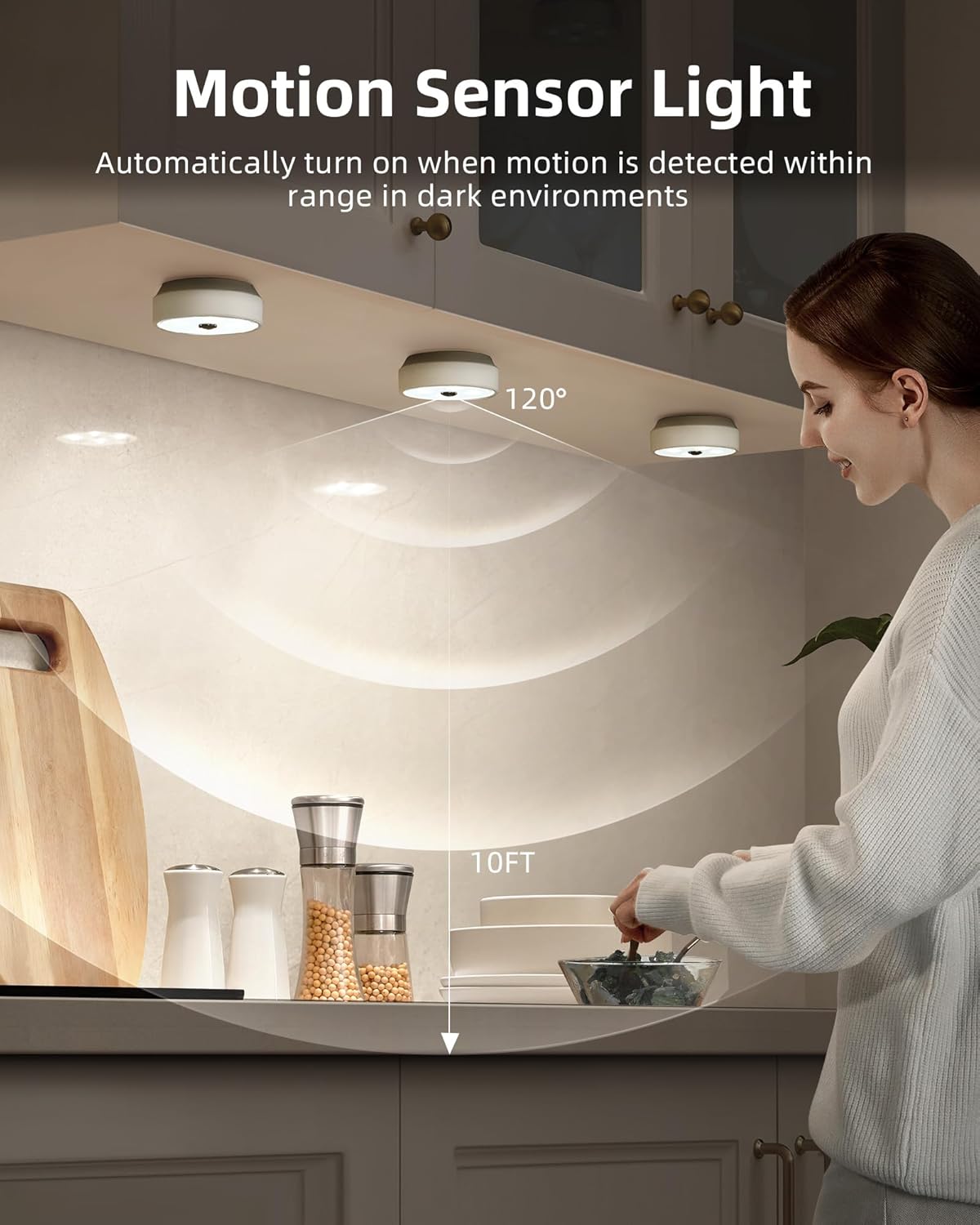
Опис слике: This image illustrates the motion sensor functionality of the EZVALO puck lights installed under kitchen cabinets. A person is reaching into a cabinet, and the lights are illuminated. A diagram shows a 120° detection angle and a 10ft detection range, indicating how the motion sensor operates.
- The motion sensor activates the light when movement is detected within a 10ft (3 meters) range.
- For puck lights, the detection angle is 120°.
- To conserve energy, the lights will only activate in dark environments. They will not turn on if there is sufficient ambient daylight.
- Puck lights automatically turn off approximately 25 seconds after the last detected movement.
3.3 Puck Light Group Control (with Remote)
The remote control for puck lights allows for grouping and synchronized control.
- Puck lights can be assigned into 2 groups for separate control.
- All puck lights within the same group can be dimmed and turned On/Off in unison using the remote, eliminating the need to adjust each light individually.
3.4 Adjusting Light Temperature (Puck Lights)
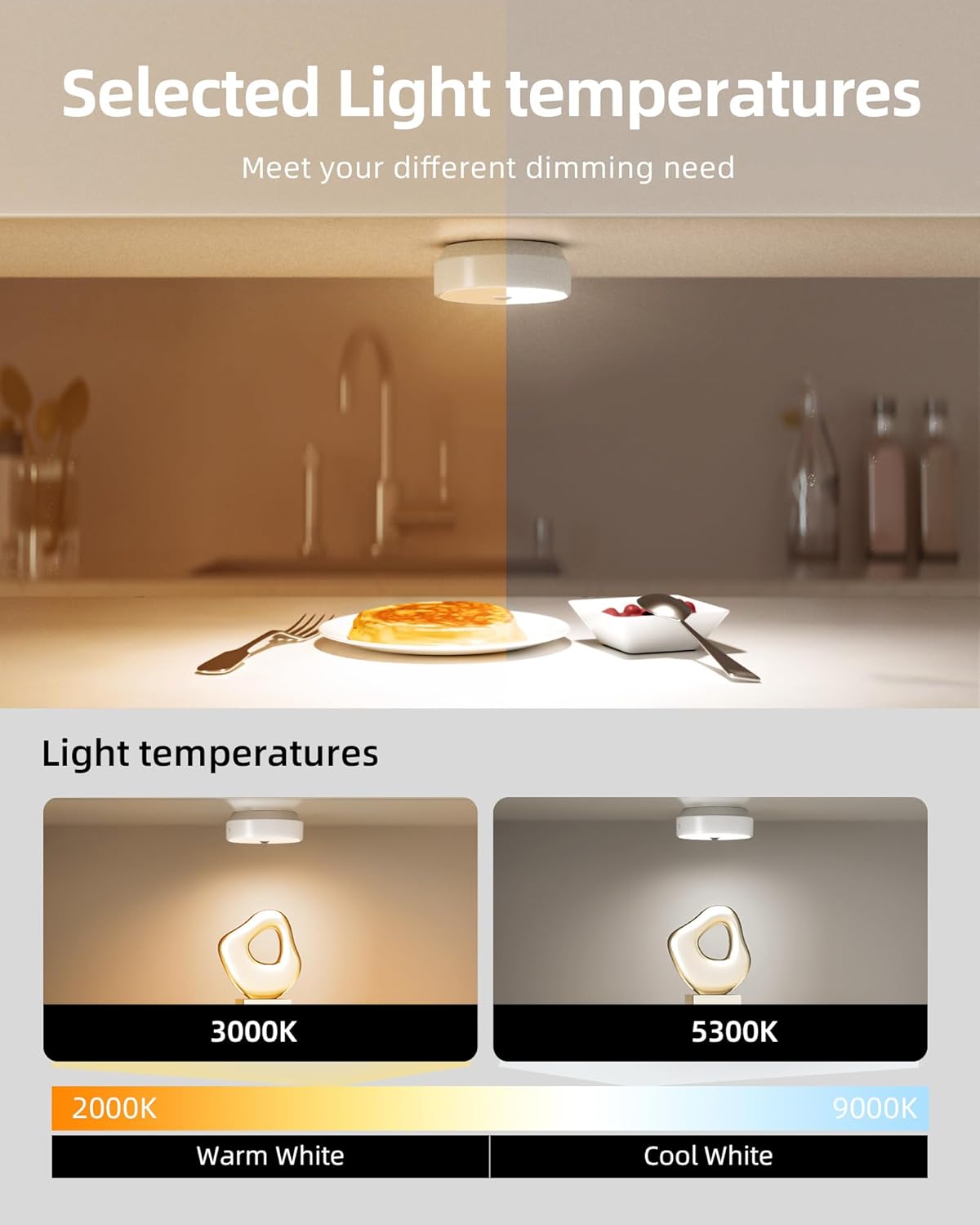
Опис слике: This image demonstrates the adjustable light temperatures of the EZVALO puck lights. The top half shows a kitchen counter with warm lighting, while the bottom half shows two puck lights illuminating a surface, one at 3000K (Warm White) and another at 5300K (Cool White). A color temperature scale from 2000K to 9000K is also depicted.
Puck lights offer adjustable light temperatures to suit different preferences and environments.
- Use the remote control to cycle through available color temperatures, typically ranging from warm white (e.g., 3000K) to cool white (e.g., 5300K).
4. Одржавање
4.1 Чишћење
To maintain the appearance and functionality of your lights:
- Ensure the lights are turned off before cleaning.
- Обришите површине меком, сувом крпом.
- За тврдокорне трагове, благо дamp Може се користити крпа, а затим сува крпа.
- Не користите абразивна средства за чишћење, раствараче или јаке хемикалије, јер могу оштетити завршну обраду или електронске компоненте.
4.2 Одржавање батерије
The lights are equipped with rechargeable lithium-polymer batteries. Follow these guidelines for optimal battery life:
- Напуните светла када се осветљеност приметно смањи.
- Избегавајте често потпуно пражњење батерије.
- If storing the lights for an extended period, charge them to about 50% every few months.
- Не излажите батерије екстремним температурама.
КСНУМКС. Решавање проблема
| Проблем | Могући узрок | Решење |
|---|---|---|
| Светлост се не пали. | Батерија је празна. Светло је у режиму ИСКЉУЧЕНО. Insufficient darkness (in AUTO mode). | Напуните светло. Check the toggle switch/remote to ensure it's in ON or AUTO mode. Ensure the environment is dark enough for the motion sensor to activate. |
| Сензор покрета не ради. | Светло није у АУТОМАТСКОМ режиму. Околина је превише светла. Сензор за блокирање препрека. | Set the light to AUTO mode using the toggle switch or remote. Сензор се активира само у мрачним условима. Уверите се да на сензору нема препрека. |
| Даљински управљач не реагује. | Remote battery is low/dead. Ван домета. Препрека између даљинског и светла. | Replace remote battery (if applicable) or ensure remote is charged. Move closer to the lights (max 16ft range). Ensure a clear line of sight. |
| Lights dim unexpectedly. | Батерија је празна. | Recharge the lights. |
6. Спецификације
| Феатуре | Детаљ |
|---|---|
| Бранд | ЕЗВАЛО |
| Број модела | 02.Л22.00007 |
| Извор светлости | ЛЕД |
| Осветљеност | 40 lumen (per light, typical) |
| Лигхт Цолор | White (Adjustable for Puck Lights) |
| Извор напајања | Battery Powered (Rechargeable Lithium-Polymer) |
| Bar Light Battery Capacity | 1100мАх |
| Puck Light Battery Capacity | 2000мАх |
| Контролни метод | Remote Control, Toggle Switch (Bar Lights) |
| Посебне карактеристике | Motion Sensor, Dimmable, Timer Function, Group Control (Puck Lights) |
| Опсег сензора покрета | КСНУМКС фт (КСНУМКС метара) |
| Puck Light Sensor Angle | 120° |
| Врста инсталације | Magnetic, Adhesive (Surface Mount) |
| Материјал | Iron, Metal, Plastic |
| Ниво отпорности на воду | Not Water Resistant (Indoor Use Only) |
| Тип собе | Indoor (Home, Kitchen, Bathroom, Bedroom, Office, Cabinet) |
7. Безбедносне информације
- Не растављајте или модификујте производ.
- Keep away from water and high humidity environments as the product is not water resistant.
- Не излагати директној сунчевој светлости или високим температурама.
- Чувати ван домашаја деце.
- Use only the specified charging cables.
8. Корисничка подршка
For any questions, technical support, or warranty inquiries, please contact EZVALO customer service through the retailer's platform or visit the official EZVALO webсајту.