
T10M Pro+
Упутство за употребу таблета Vortex T10M Pro+
Model: T10M Pro+
1. Увод
Thank you for choosing the Vortex T10M Pro+ Tablet. This manual will guide you through the features and functions of your new device, ensuring a smooth and enjoyable user experience. Please read this manual carefully before using your tablet.
Шта је у кутији
Upon unboxing your Vortex T10M Pro+ Tablet, please verify that all the following items are present:
- Vortex T10M Pro+ Tablet
- пуњач
- Сцреен Протецтор
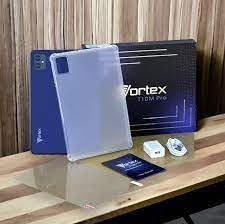
Image: Contents of the Vortex T10M Pro+ Tablet box. This includes the tablet, a clear protective case, the power adapter, and a screen protector, all neatly arranged on a wooden surface.
2. Производ је готовview
Familiarize yourself with the physical components and key features of your Vortex T10M Pro+ Tablet.
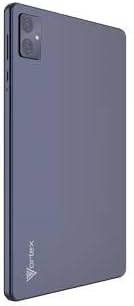
Слика: Позади view of the Vortex T10M Pro+ Tablet. The tablet has a sleek, dark finish with the 'Vortex' logo subtly placed at the bottom. The camera module is visible in the upper left corner.

Слика: Детаљна view of the back of the Vortex T10M Pro+ Tablet, highlighting its specifications. Printed details include '10.1-inch Brilliant Display', '5MP Front Camera', '8MP Rear Camera', 'MTK6766 Processor', 'Quad-Core, 4GB+64GB', '5000mAh Mega Battery', and 'Android 12'.
3. Подешавање
3.1. Пуњење уређаја
Before first use, fully charge your tablet. Connect the provided charger to the tablet's charging port and plug it into a power outlet. The battery indicator on the screen will show charging progress.
3.2. Inserting SIM/MicroSD Card
The Vortex T10M Pro+ supports 4G LTE connectivity and expandable storage. To insert a SIM card (for mobile data) or a microSD card (for additional storage):
- Пронађите лежиште за SIM/microSD картицу са стране таблета.
- Користите приложени алат за избацивање СИМ картице да бисте отворили лежиште.
- Carefully place the SIM card(s) and/or microSD card into the designated slots, ensuring correct orientation.
- Пажљиво гурните лежиште назад у таблет док не кликне на своје место.
3.3. Прво укључивање
Press and hold the Power button located on the side of the tablet until the Vortex logo appears. Follow the on-screen prompts to complete the initial setup, including language selection, Wi-Fi connection, and Google account setup.
4. Упутство за употребу
4.1. Основна навигација
Your tablet runs on Android 13.0. Use touch gestures for navigation:
- Додирните: Изаберите ставку или отворите апликацију.
- Превуците: Померајте се кроз екране или листе.
- Зумирање штипкањем прстију: Увећајте или умањите фотографије и web странице.
- Дуги притисак: Приступите контекстуалним менијима или померите иконе.
4.2. Повезивање на Ви-Фи
Да бисте се повезали на Ви-Фи мрежу:
- Иди на Подешавања > Мрежа и интернет > Интернет.
- Укључите Ви-Фи.
- Изаберите жељену мрежу са листе и унесите лозинку ако се то од вас затражи.
4.3. Using Mobile Data (4G LTE)
If you have inserted a valid SIM card with an active data plan:
- Иди на Подешавања > Мрежа и интернет > СИМ картице.
- Ensure Mobile data is enabled for your SIM.
4.4. Рад камере
Таблет има задњу камеру од 8 МП и предњу камеру од 5 МП.
- Отворите апликацију Камера.
- Додирните дугме затварача да бисте снимили фотографију.
- Пребацујте се између предње и задње камере помоћу иконе за пребацивање камере.
4.5. Управљање складиштем
Your tablet comes with 64GB of internal storage. You can expand this using a microSD card up to 128GB. To view коришћење меморије, идите на Подешавања > Складиштење.
5. Одржавање
5.1. Чишћење
Користите меку крпу која не оставља влакна да бисте очистили екран и кућиште таблета. Избегавајте употребу јаких хемикалија или абразивних материјала.
5.2. Ажурирања софтвера
Periodically check for software updates to ensure your tablet has the latest features and security patches. Go to Подешавања > Систем > Ажурирање система.
5.3. Брига о батерији
Да бисте продужили век трајања батерије:
- Избегавајте екстремне температуре.
- Не дозволите да се батерија често потпуно празни.
- Искључите пуњач када се батерија потпуно напуни.
КСНУМКС. Решавање проблема
Овај одељак се бави уобичајеним проблемима на које можете наићи са таблетом.
| Иссуе | Могуће решење |
|---|---|
| Таблет се не укључује | Уверите се да је батерија напуњена. Притисните и држите дугме за напајање најмање 10-15 секунди да бисте поново покренули уређај. |
| Проблеми са Ви-Фи везом | Рестартујте таблет и Wi-Fi рутер. Заборавите мрежу у подешавањима и поново се повежите. |
| Апликације су споре или се руше | Close background apps. Clear app cache (Settings > Apps > [App Name] > Storage > Clear cache). Restart the tablet. |
| Storage full message | Обришите непотребно files or apps. Move media to a microSD card. |
7. Спецификације
Detailed technical specifications for the Vortex T10M Pro+ Tablet.
| Феатуре | Спецификација |
|---|---|
| Назив модела | T10M Pro+ Tablet (Unlocked) Blue 10.1" 64GB 4GB GSM 4G LTE + Wifi 8MP |
| Величина екрана | 10.1 инча |
| Максимална резолуција екрана | 1280 к 800 пиксела |
| Рефресх Рате | 120 Хз |
| Процесор | MediaTek, 2 GHz |
| РАМ | 4 ГБ |
| Интерна меморија | 64 ГБ |
| Екпандабле Стораге | MicroSD (до 128GB) |
| Оперативни систем | Андроид 13.0 |
| Задња камера | 8 МП |
| Предња камера | 5 МП |
| Повезивање | 4G LTE, Wi-Fi, Bluetooth, GPS |
| Тип батерије | Литијум-јонски |
| Просечно трајање батерије | 18 сата |
| Димензије производа | 10.1 к 5 к 3 инча |
| Боја | Црно |
8. Информације о гаранцији
This product is covered by a manufacturer's warranty. Please refer to the warranty card included with your purchase or visit the manufacturer's official webсајт за детаљне услове и одредбе у вези са гаранцијом, трајањем и поступком подношења захтева.
9. Подршка
For further assistance, technical support, or service inquiries, please contact the manufacturer's customer support. Contact information can typically be found on the product packaging, the manufacturer's webсајт или документацију о гаранцији.
Ask a question about this manual
Ask about setup, troubleshooting, compatibility, parts, safety, or missing instructions. Manuals+ will review the question and use this page’s manual context to help answer it.