
Увод
Thank you for choosing the NEWWAY A8BK Wireless Vertical Mouse. This manual provides detailed instructions to help you set up, operate, and maintain your new ergonomic mouse. Designed for comfort and efficiency, the A8BK offers dual connectivity options (2.4 GHz wireless and Bluetooth), adjustable DPI settings, and silent clicks for a seamless user experience across various operating systems.
Производ је завршенview
Familiarize yourself with the components of your NEWWAY A8BK mouse.
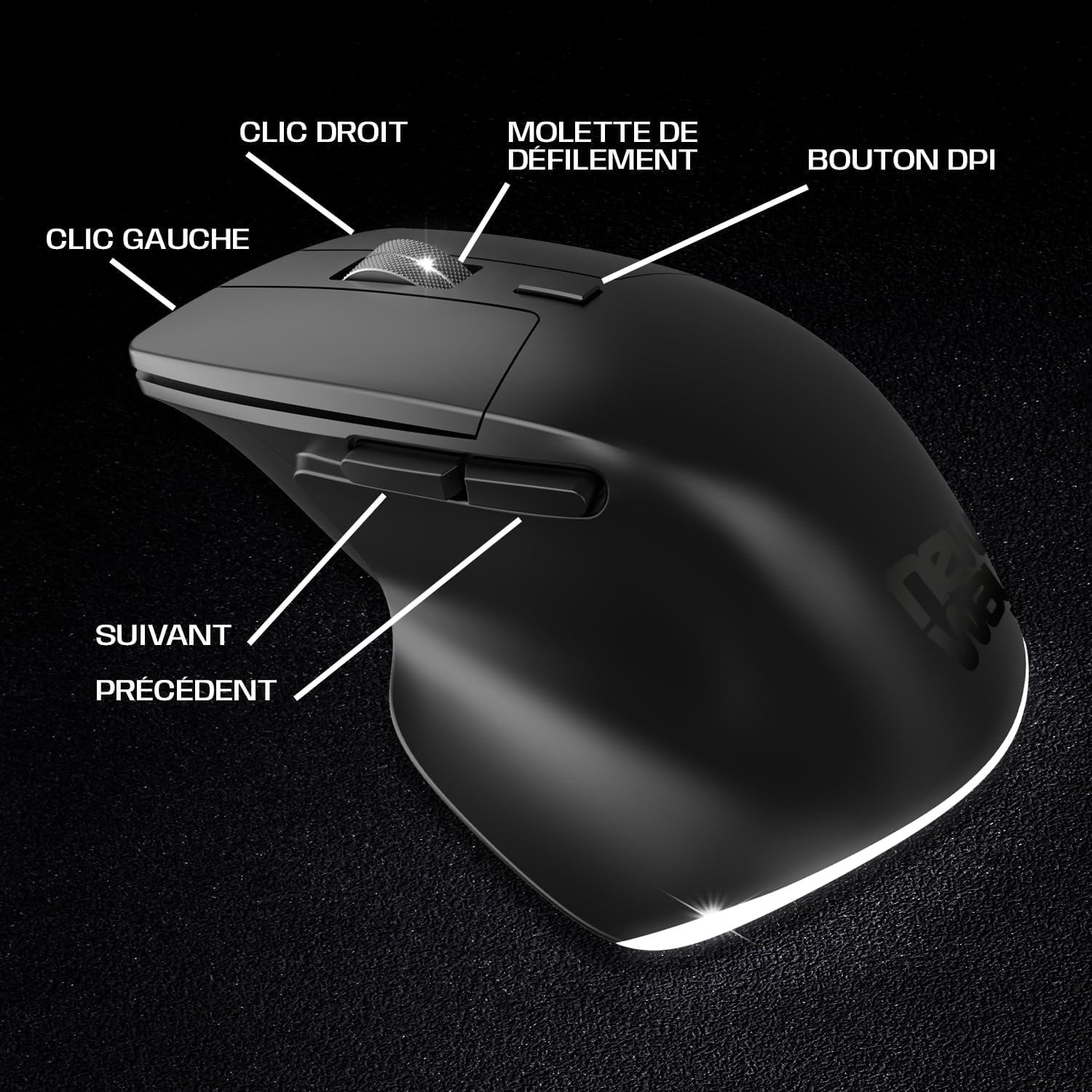
Image 1: Mouse Button Layout. This diagram illustrates the functions of each button on the NEWWAY A8BK vertical mouse, including left and right click, scroll wheel, DPI adjustment button, and side buttons for navigation.
- Леви клик: Стандардна функција примарног клика.
- Десни клик: Стандардна функција секундарног клика.
- Точак за померање: For vertical scrolling. Also functions as a middle click button.
- Дугме ДПИ: Подешава осетљивост миша (DPI).
- Дугме за напред: Навигација напред у web претраживачи или file истраживачи.
- Дугме за назад: Навигација уназад web претраживачи или file истраживачи.

Image 2: Underside of the Mouse. The bottom of the NEWWAY A8BK vertical mouse, displaying the power switch, connectivity mode switch (Bluetooth/2.4GHz), and the magnetic storage slot for the USB receiver.
- Прекидач за напајање (УКЉУЧЕНО/ИСКЉУЧЕНО): Укључује или искључује миш.
- Connectivity Mode Switch (2.4G/BT1/BT2): Selects between 2.4 GHz wireless mode and two Bluetooth channels.
- Меморија USB пријемника: A magnetic compartment to store the 2.4 GHz USB receiver when not in use.
- УСБ-Ц прикључак за пуњење: Located at the front of the mouse for charging.
Упутства за подешавање
1. Пуњење миша
Before first use, it is recommended to fully charge the mouse. The NEWWAY A8BK mouse features a built-in rechargeable lithium-polymer battery.
- Пронађите USB-C порт за пуњење на предњој страни миша.
- Connect the included USB-C cable to the mouse and the other end to a USB power source (e.g., computer USB port, USB wall adapter).
- The mouse's indicator light will show charging status (refer to LED indicator section for details).
- Када се потпуно напуни, искључите кабл.

Image 3: USB-C Charging Port. A close-up of the USB-C port on the front of the NEWWAY A8BK vertical mouse, used for charging the internal battery.
2. Connecting via 2.4 GHz Wireless
- Remove the USB receiver from its magnetic storage slot on the underside of the mouse.
- Укључите УСБ пријемник у слободан УСБ порт на рачунару.
- Slide the connectivity mode switch on the underside of the mouse to the "2.4G" position.
- Укључите миш помоћу прекидача за напајање.
- Ваш рачунар би требало аутоматски да детектује и инсталира потребне драјвере. Миш је спреман за употребу.

Image 4: 2.4 GHz Wireless Range. This diagram illustrates the wireless connection between the mouse and a computer via the 2.4 GHz USB receiver, indicating a range of up to 10 meters.
3. Повезивање преко Блуетоотх-а
The NEWWAY A8BK supports two Bluetooth channels (BT1 and BT2).
- Укључите миш помоћу прекидача за напајање.
- Slide the connectivity mode switch on the underside of the mouse to either "BT1" or "BT2" position.
- Press and hold the connectivity mode switch button (usually a small button next to the switch) for 3-5 seconds until the indicator light starts flashing rapidly, indicating pairing mode.
- На рачунару или уређају отворите подешавања за Bluetooth.
- Тражи new devices and select "NEWWAY A8BK" (or similar name) from the list.
- Once paired, the indicator light will stop flashing. The mouse is ready for use.
- To connect to a second device, repeat steps 2-6 using the other Bluetooth channel (BT2).
Упутство за употребу
1. Adjusting DPI Sensitivity
The DPI (Dots Per Inch) button allows you to adjust the mouse cursor speed and sensitivity. The NEWWAY A8BK offers three DPI settings: 1200, 2400, and 3200 DPI.
- Притисните тастер Дугме ДПИ (налази се иза точкића за скроловање) да бисте се кретали кроз доступна подешавања DPI-ја.
- Each press will change the sensitivity, allowing you to find the optimal speed for your tasks.
2. Ergonomic Design and Silent Clicks
The vertical design of the NEWWAY A8BK mouse promotes a natural handshake position, reducing wrist strain and discomfort during prolonged use. The mouse also features silent click buttons, minimizing noise in quiet environments.

Image 5: Ergonomic Grip. A hand demonstrating the natural, comfortable grip on the NEWWAY A8BK ergonomic vertical mouse, designed to reduce wrist strain.
3. Позадинско осветљење
The mouse features a subtle white LED backlight that enhances its aesthetic appeal. This backlighting is typically active when the mouse is in use and can be turned off via a switch on the underside if desired (refer to Image 2).

Image 6: White LED Backlighting. The NEWWAY A8BK vertical mouse illuminated by its subtle white LED backlighting, adding a stylish touch to the device.
Одржавање
1. Чишћење миша
- Искључите миш пре чишћења.
- Лагано користите меку крпу која не оставља длачице дampнатопљен водом или благим раствором за чишћење.
- Избегавајте употребу јаких хемикалија, абразива или растварача.
- Не дозволите да влага уђе у било који отвор.
2. Брига о батерији
- Да бисте продужили век трајања батерије, избегавајте често потпуно пражњење миша.
- Напуните миш када се појави индикатор ниске батерије.
- If storing the mouse for an extended period, charge it to about 50% and store in a cool, dry place.
Решавање проблема
| Проблем | Могући узрок | Решење |
|---|---|---|
| Миш не реагује | Low battery; Mouse is off; Incorrect connection mode; USB receiver not connected (2.4G); Bluetooth not paired. | Charge the mouse; Turn on the mouse; Ensure the connectivity switch is in the correct position (2.4G or BT); Re-insert USB receiver; Re-pair Bluetooth. |
| Покрет курсора је неправилан или спор | Low DPI setting; Dirty optical sensor; Uneven surface; Interference. | Press the DPI button to increase sensitivity; Clean the optical sensor; Use on a smooth, opaque surface; Move closer to the receiver/device or reduce interference sources. |
| Bluetooth веза често прекида | Distance from device; Interference; Low battery. | Move the mouse closer to the device; Reduce other wireless interference; Charge the mouse. |
| Миш се не пуни | Faulty cable; Faulty USB port; Mouse not properly connected. | Try a different USB-C cable; Use a different USB port; Ensure the cable is securely connected to both the mouse and the power source. |
Спецификације
| Феатуре | Детаљ |
|---|---|
| Бранд | NEWWAY |
| Број модела | ON-MO-A8BK |
| Технологија повезивања | 2.4 GHz Wireless, Bluetooth |
| Откривање покрета | Оптицал |
| ДПИ подешавања | 1200 / 2400 / 3200 ДПИ |
| Број дугмади | 6 (лево, десно, точкић за скроловање, DPI, напред, назад) |
| Оријентација руке | Десноруки |
| Посебне карактеристике | Ergonomic Design, Silent Clicks, Rechargeable, White LED Backlighting |
| Компатибилни оперативни системи | Виндовс, Мац, Линук |
| Тип батерије | Пуњиви литијум-полимер |
| Порт за пуњење | УСБ-Ц |
| Боја | Црно |
| УПЦ / ЕАН | 3701281111979 |
Гаранција и подршка
Информације о гаранцији
The NEWWAY A8BK Wireless Vertical Mouse comes with a Двогодишња гаранција произвођачаОва гаранција покрива недостатке у материјалу и изради при нормалној употреби. Не покрива штету насталу услед злоупотребе, незгода, неовлашћених модификација или нормалног хабања.
Сачувајте доказ о куповини за гаранцијске захтеве.
Корисничка подршка
For technical assistance, troubleshooting, or warranty inquiries, please contact NEWWAY customer support through the retailer where you purchased the product or visit the official NEWWAY webсајт за контакт детаље.
Note: Availability of spare parts is currently unavailable. Software updates are not guaranteed.