1. Увод
The mooas Visual Shower Clock is a multi-functional digital device designed for use in various environments, including kitchens and bathrooms. It features a clock, timer, and displays both temperature and humidity. Its waterproof design (IPX5) ensures safe operation in wet conditions. The large, clear LCD screen provides excellent visibility, and the intuitive touch buttons allow for easy operation. This manual provides detailed instructions for setup, operation, and maintenance of your device.
2. Садржај пакета
- Main body (mooas Visual Shower Clock)
- Кука за монтирање на зид
- Упутство за употребу
3. Карактеристике производа
- Multi-functional device: Timer, Clock, Temperature, and Humidity display.
- Large and clear LCD screen for optimal readability.
- Visual Timer Ring to intuitively show time progression.
- Fast and simple timer setting with dedicated 10min, 1min, and 10sec buttons.
- Backlight display for visibility in low-light conditions.
- Multiple placement options: Standing, Wall mount, and Magnet attachment.
- Silent Mode for use in quiet environments.
- 3-Level Alarm Volume Control (Silent/Minimum/Maximum).
- IPX5 waterproof rating for safe use in kitchen and bathroom.
4. Подешавање
4.1 Инсталација батерије
- Пронађите одељак за батерију на задњој страни уређаја.
- Отворите поклопац батерије.
- Уметните 2 ААА батерије (нису укључене), водећи рачуна о исправном поларитету (+/-).
- Добро затворите поклопац батерије.
Напомена: Ensure the battery compartment is sealed properly to maintain the device's waterproof integrity.

Слика 1: Инсталација батерије
4.2 Initial Settings (Time, Date, Temperature Unit)
Upon first power-on or after battery replacement, you may need to set the time, date, and preferred temperature unit.
- Подешавање времена и датума: Press and hold the '10min' button to enter time setting mode. Use the '1min' and '10sec' buttons to adjust the values. Press 'ST/SP' to confirm and move to the next setting (e.g., hour, minute, year, month, day).
- Подешавање јединице температуре: The device displays temperature in Celsius (°C) or Fahrenheit (°F). To switch between units, press and hold the '1min' and '10sec' buttons simultaneously until the unit changes.
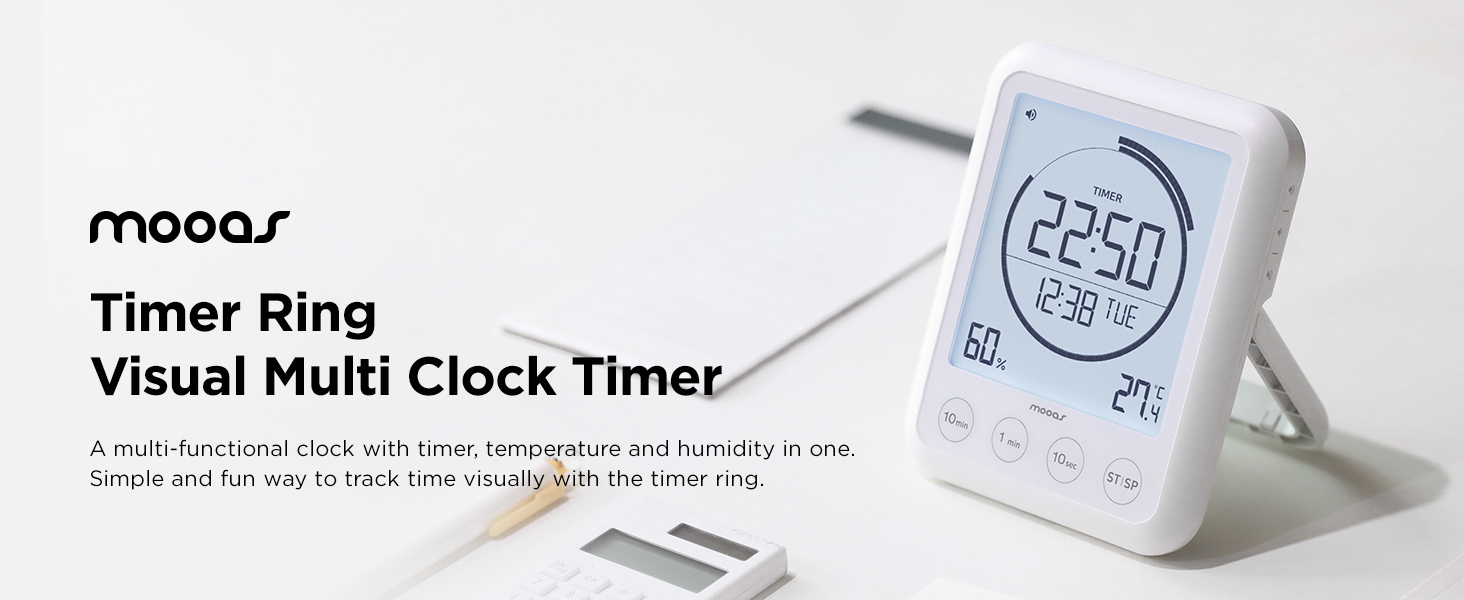
Figure 2: Display Overview (Time, Date, Humidity, Temperature)
5. Упутство за употребу
5.1 Функција тајмера
The device features a countdown timer with a visual ring indicator.
- Подешавање тајмера: Use the '10min', '1min', and '10sec' buttons to add time to the timer. Each press adds the corresponding duration.
- Starting/Pausing the Timer: Press the 'ST/SP' button to start the countdown. Press it again to pause the timer.
- Ресетовање тајмера: While the timer is paused or stopped, press and hold the 'ST/SP' button to reset the timer to zero.
- Функција одбројавања: If the timer is started from 00:00, it will function as a count-up timer.

Figure 3: Timer Control Buttons
5.2 Alarm Volume Control
Adjust the alarm volume to suit your environment.
- The device offers three alarm volume levels: Silent, Minimum, and Maximum.
- To change the volume, locate the volume control button on the side of the device. Press it repeatedly to cycle through the volume options.

Figure 4: Volume Control
5.3 Позадинско осветљење
The backlight activates automatically with any button press, providing temporary illumination for the display.

Figure 5: Backlight in Use
6. Опције монтаже
The mooas Visual Shower Clock offers versatile mounting options to suit various locations:
- стојећи: Use the integrated kickstand for tabletop placement.
- Zidni nosač: Utilize the wall mount hole on the back of the device with the provided wall mount hook.
- Магнет: The strong magnet on the back allows attachment to metallic surfaces like refrigerators or metal shower caddies.

Figure 6: Mounting Options (Stand, Wall Mount, Magnet)
7. Одржавање
- Чишћење: Обришите уређај меком, дamp тканина. Немојте користити абразивна средства за чишћење или раствараче.
- Замена батерије: Replace batteries when the low battery indicator appears on the display. Ensure the battery compartment is sealed tightly after replacement.
- Складиштење: Ако уређај складиштите дуже време, извадите батерије да бисте спречили цурење.
КСНУМКС. Решавање проблема
| Проблем | Могући узрок | Решење |
|---|---|---|
| Екран је празан или замагљен. | Low batteries or incorrect battery installation. | Замените батерије новим ААА батеријама, водећи рачуна о исправном поларитету. |
| Timer buttons are unresponsive. | Water droplets on the touch buttons. | Wipe the screen and buttons dry. Ensure hands are dry when operating. |
| Incorrect time/date displayed. | Time/date not set or reset after battery change. | Refer to Section 4.2 to set the correct time and date. |
| Alarm sound is too low or off. | Volume setting is on Minimum or Silent. | Adjust the alarm volume using the side button (refer to Section 5.2). |
9. Спецификације
| Феатуре | Детаљ |
|---|---|
| Материјал | акрилонитрил бутадиен стирен (АБС) |
| Тежина | 220 грама (приближно 7.8 унци) |
| Димензије производа | 4.92"W x 0.94"H (approx. 3.94 x 0.94 x 4.92 inches W x D x H) |
| Извор напајања | 2 ААА батерије (нису укључене) |
| Дисплаи Типе | Дигитални ЛЦД са позадинским осветљењем |
| Водоотпорна оцена | ИПКС5 |
| Радна температура | 32-104°Ф (0-40°Ц) |
| Температура складиштења | 15.8°Ф-122°Ф (-9-50°Ц) |
| Тип монтаже | Tabletop, Wall Mount, Magnet |
10. Видео о производу
Video: mooas Visual Timer Clock. This official product video demonstrates the features and usage of the mooas Visual Shower Clock, including its timer function, display, and various applications in different environments.
11. Гаранција и подршка
This product is covered by a standard manufacturer's warranty. For specific warranty details, please refer to the documentation included with your purchase or contact mooas customer support. If you encounter any issues or have questions not addressed in this manual, please reach out to our customer service team for assistance.
For further support, visit the official mooas webсајту или контактирајте свог продавца.