
Natec SH4F
Natec FURY SHOBO SH4F RGB MIDI TOWER кућиште за рачунар - упутство за употребу
Model: SH4F | Brand: Natec
1. Увод
Welcome to the user manual for your Natec FURY SHOBO SH4F RGB MIDI TOWER PC Case. This guide provides essential information for the proper assembly, installation, operation, and maintenance of your new computer chassis. Please read this manual thoroughly before beginning installation to ensure optimal performance and longevity of your components.
2. Безбедносне смернице
- Always disconnect the power supply from the wall outlet before installing or removing any components inside the PC case.
- Handle components with care to avoid damage from electrostatic discharge (ESD). Consider using an anti-static wrist strap.
- Држите мале делове, као што су шрафови, ван домашаја деце.
- Ensure proper ventilation around the PC case to prevent overheating.
- Do not expose the case to extreme temperatures, humidity, or direct sunlight.
- Avoid placing heavy objects on top of the case.
3. Садржај пакета
Молимо вас да проверите да ли су све ставке присутне у вашем пакету:
- Natec FURY SHOBO SH4F RGB MIDI TOWER PC Case
- Accessory box (containing screws, cable ties, and other small parts)
- Кориснички приручник (овај документ)
4. Производ је готовview
The Natec FURY SHOBO SH4F is a MIDI TOWER PC case designed for gaming and general-purpose computing, offering ample space for components and efficient cooling. It features a modern design with RGB lighting.
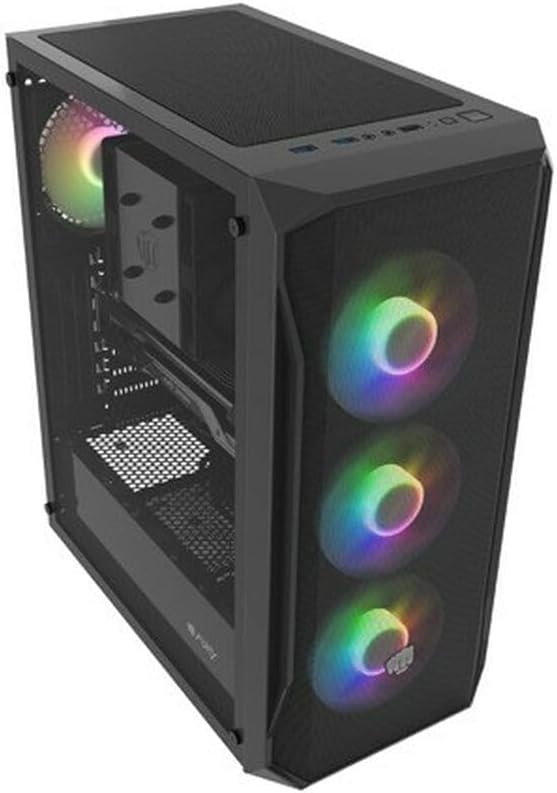
Слика 4.1: Угаони view of the Natec FURY SHOBO SH4F RGB MIDI TOWER PC Case, showcasing its black metal and tempered glass construction. The front panel features a mesh design with three illuminated RGB fans, and a single RGB fan is visible at the rear exhaust. The top panel includes I/O ports and a mesh filter.
4.1 Предња У/И плоча
- Дугме за напајање
- Дугме за ресетовање
- УСБ 2.0 порт (к1)
- Audio Jacks (Headphone/Microphone)
- RGB Control Button (if applicable)
4.2 Унутрашњи распоред
The case supports Micro ATX and Mini ATX motherboards and features a bottom-mounted power supply bay. It includes dedicated areas for storage drives and efficient cable management.
5. Подешавање и инсталација компоненти
Follow these steps to install your PC components into the FURY SHOBO SH4F case.
5.1 Припрема случаја
- Поставите кућиште на равну, стабилну површину.
- Remove the side panels. Typically, the tempered glass side panel is secured with thumbscrews.
5.2 Инсталација матичне плоче
- Инсталирајте И/О штит (ако није претходно инсталиран на матичној плочи) у задњи отвор кућишта.
- Ensure the motherboard standoffs are correctly aligned for your Micro ATX or Mini ATX motherboard. Adjust or install additional standoffs if necessary.
- Пажљиво поставите матичну плочу на одстојнике, поравнавајући рупе за вијке.
- Причврстите матичну плочу приложеним завртњима. Немојте превише затезати.
5.3 Инсталација напајања
- Locate the power supply bay at the bottom rear of the case.
- Slide your power supply unit (PSU) into the bay from the rear of the case, ensuring the fan faces downwards (if the case has a bottom vent) or upwards.
- Причврстите напајање завртњима са задње стране кућишта.
5.4 Инсталација уређаја за складиштење података
Refer to your case's specific drive bay design for 2.5" SSDs and 3.5" HDDs. Typically, these involve trays or direct screw mounting.
5.5 Expansion Card Installation (e.g., Graphics Card)
- Remove the necessary PCI-E slot covers from the rear of the case.
- Insert your expansion card into the corresponding PCI-E slot on the motherboard.
- Secure the card with a screw or the case's retention mechanism.
5.6 Управљање кабловима
Utilize the cutouts and tie-down points behind the motherboard tray to route and secure cables. This improves airflow and aesthetics.
5.7 Connecting RGB Fans
The pre-installed RGB fans typically connect to a central RGB controller or directly to your motherboard's RGB headers. Consult your motherboard manual for specific RGB header locations and software control. Ensure all fan power cables are connected to appropriate fan headers on the motherboard or a fan hub.
6. Руковање кућиштем рачунара
6.1 Укључивање/искључивање
After all components are installed and cables connected, plug your power supply into a wall outlet. Press the power button on the front I/O panel to turn on your system. To turn off, use the operating system's shutdown function or press and hold the power button for several seconds.
6.2 RGB контрола осветљења
If your case features an RGB control button on the front I/O panel, press it to cycle through various lighting modes and colors. For advanced customization, use your motherboard's RGB software (e.g., ASUS Aura Sync, MSI Mystic Light, Gigabyte RGB Fusion) if the fans are connected to compatible headers.
7. Одржавање
Редовно одржавање помаже у обезбеђивању оптималних перформанси и продужава век трајања компоненти вашег рачунара.
7.1 Чишћење филтера за прашину
The FURY SHOBO SH4F case includes dust filters (e.g., on the top and bottom). Periodically remove and clean these filters by rinsing them with water and allowing them to dry completely before re-installing. This prevents dust buildup and maintains airflow.
7.2 Спољашње чишћење
Обришите спољашњост кућишта меком,amp крпом. Избегавајте абразивна средства за чишћење или раствараче који би могли оштетити завршну обраду или каљено стакло.
КСНУМКС. Решавање проблема
Ако наиђете на проблеме, погледајте следеће уобичајене кораке за решавање проблема:
- Нема напајања: Ensure the power supply is properly connected to the wall outlet and the motherboard. Check all internal power cables (24-pin ATX, 8-pin CPU, GPU power). Verify the power button cable is correctly connected to the motherboard's front panel header.
- Вентилатори се не окрећу: Check if fan power cables are securely connected to the motherboard or fan hub. Ensure the power supply is functioning.
- РГБ осветљење не ради: Verify RGB cables are correctly connected to the RGB controller or motherboard header. If using a button, try cycling through modes. If using software, ensure it's installed and configured correctly.
- прегревање: Ensure all fans are spinning correctly and oriented for proper airflow (intake/exhaust). Clean dust filters and internal components. Verify CPU cooler and GPU cooler are properly installed.
9. Спецификације
| Бранд | Натек |
| Сериес | ШХ4Ф |
| Број модела | NFO-2154 |
| Тип случаја | Миди Товер |
| Компатибилност матичне плоче | Micro ATX, Mini ATX |
| Боја | Црно |
| Материјал | Метал |
| Димензије производа (ДкШкВ) | 19.69 к 16.93 к 9.84 инча (50 к 43 к 25 цм) |
| Тежина артикла | 9.46 фунте (4.3 килограма) |
| Тип монтаже напајања | Боттом Моунт |
| Метод хлађења | Ваздух |
| Број УСБ 2.0 портова | 1 |
10. Гаранција и подршка
Natec products are manufactured to high-quality standards. For information regarding warranty terms and conditions, please refer to the warranty card included with your product or visit the official Natec website. If you encounter any issues not covered in this manual or require further assistance, please contact Natec customer support through their official channels.
Произвођач: Натек
Ask a question about this manual
Ask about setup, troubleshooting, compatibility, parts, safety, or missing instructions. Manuals+ will review the question and use this page’s manual context to help answer it.