
Увод
Thank you for choosing the Thunderobot K87 Wired Mechanical Keyboard. This manual provides essential information for the proper setup, operation, maintenance, and troubleshooting of your new keyboard. Please read this manual thoroughly before using the product to ensure optimal performance and longevity.

Слика 1: Под углом view of the Thunderobot K87 Mechanical Keyboard.
Сетуп
Садржај пакета
Before proceeding, please verify that your package contains the following items:
- Thunderobot K87 Wired Mechanical Keyboard
- УСБ кабл
- Кориснички приручник (овај документ)
Повезивање тастатуре
- Unpack the Thunderobot K87 keyboard and the included USB cable.
- Connect the USB-C end of the cable to the port located on the keyboard.
- Повежите USB-A крај кабла са доступним USB портом на рачунару.
- Ваш оперативни систем ће аутоматски препознати тастатуру. За основне функционалности обично нису потребни додатни драјвери.

Слика 2: Дно view of the keyboard, illustrating adjustable feet and cable management options.
Упутство за употребу
Основне функције
The Thunderobot K87 is a standard 87-key (TKL) layout mechanical keyboard. Simply plug it into your computer, and it is ready for typing. The keyboard features Red mechanical switches, known for their linear feel and quiet operation, making them suitable for both typing and gaming.
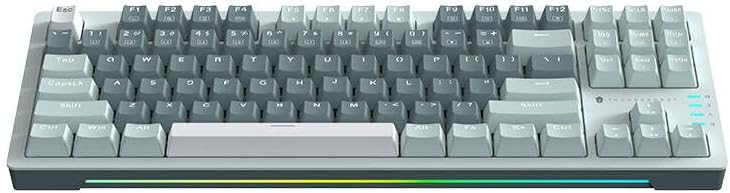
Слика 3: Одозго надоле view of the Thunderobot K87 keyboard layout.
Мултимедијални и функционални тастери
The keyboard includes a Function (Fn) key, typically located near the right Alt key. This key, when pressed in combination with the F1-F12 keys, activates various multimedia and system functions. Refer to the keycap legends for specific functions.
- Fn + F1-F12: Typically control media playback, volume, and other system shortcuts.
- Fn + Windows тастер: Locks/unlocks the Windows key to prevent accidental presses during gaming.
Контрола позадинског осветљења
The Thunderobot K87 keyboard features customizable RGB backlighting. Specific key combinations allow you to change lighting modes, brightness, and speed. Consult the keyboard's keycap legends or the manufacturer's website for detailed instructions on lighting customization.

Слика 4: Предња страна view showing the RGB lighting strip.

Слика 5: Бочни професионалацfile view demonstrating keycap height and keyboard angle.
Одржавање
Чишћење тастатуре
Редовно чишћење помаже у одржавању изгледа и функционалности тастатуре.
- Прекини везу: Увек искључите тастатуру из рачунара пре чишћења.
- Уклањање прашине: Користите лименку компримованог ваздуха да бисте одували прашину и остатке између тастера.
- Чишћење површине: Gently wipe the keycaps and keyboard surface with a soft, lint-free cloth lightly dampОпрати водом или благим, неабразивним средством за чишћење. Избегавати прекомерну влагу.
- Избегавајте: Do not use harsh chemicals, solvents, or abrasive materials, as these can damage the keyboard's finish or keycap legends.
Складиштење
When not in use for extended periods, store the keyboard in a dry, cool place away from direct sunlight and extreme temperatures. Consider covering it to prevent dust accumulation.
Решавање проблема
If you encounter issues with your Thunderobot K87 keyboard, please refer to the following common solutions:
| Проблем | Могући узрок | Решење |
|---|---|---|
| Тастатура не реагује | Лабава УСБ веза, неисправан УСБ порт, проблем са драјвером. | Ensure USB cable is securely connected. Try a different USB port on your computer. Restart your computer. |
| Одређени тастери не раде | Отпад испод капице тастера, квар прекидача. | Use compressed air to clear debris. If the issue persists, contact customer support. |
| Позадинско осветљење не ради или је неисправно | Lighting mode disabled, software conflict. | Check keyboard's lighting control key combinations (Fn + specific keys). Ensure no conflicting software is running. |
| Keyboard input lag | USB port issues, system performance. | Try a different USB port. Close unnecessary background applications. |
If the problem persists after trying these solutions, please contact Thunderobot customer support for further assistance.
Спецификације
| Феатуре | Детаљ |
|---|---|
| Број модела | JM03NQ002 |
| Бранд | Thunderobot |
| Повезивање | Жичани (УСБ) |
| Тип прекидача | Црвени механички прекидачи |
| Лаиоут | 87-key (Tenkeyless) |
| Позадинско осветљење | РГБ |
| Произвођач | Thunderobot |
| ASIN | B0CWS77B83 |
| Гаранција | 2 years manufacturer |
Информације о гаранцији
The Thunderobot K87 Wired Mechanical Keyboard (Model JM03NQ002) comes with a Двогодишња гаранција произвођача from the date of purchase. This warranty covers defects in materials and workmanship under normal use. It does not cover damage caused by accident, misuse, abuse, neglect, unauthorized modification, or improper installation.
To claim warranty service, please retain your proof of purchase. For detailed warranty terms and conditions, or to initiate a warranty claim, please contact Thunderobot customer support.
Подршка
For technical assistance, product inquiries, or warranty claims, please visit the official Thunderobot website or contact their customer support team. Please have your product model number (JM03NQ002) and proof of purchase ready when seeking support.
Official Thunderobot Webсајт: ввв.тхундеробот.цом (Напомена: Ово је резервисано место URL јер нема посебне подршке URL was provided in the product data. Refer to your product packaging or official Thunderobot documentation for the correct support contact information.)