
Увод
This manual provides detailed instructions for the setup, operation, and maintenance of your MageGee SKY 87 75% Mechanical Gaming Keyboard. Designed for both gaming and office use, this compact 87-key keyboard features tactile brown switches, ice blue LED backlighting, and broad compatibility.
1. Подешавање
1.1 Садржај пакета
- MageGee SKY 87 Mechanical Gaming Keyboard
- USB-A Cable (Wired Connection)
- Извлакач за тастере (за одржавање)
1.2 Повезивање тастатуре
The MageGee SKY 87 keyboard uses a wired USB-A connection. To connect:
- Plug the USB-A cable into the USB port on the keyboard.
- Connect the other end of the USB-A cable to an available USB port on your computer (PC, Mac, or laptop).
- Тастатура је „plug-and-play“ и ваш оперативни систем би требало да је аутоматски препозна.
2. Упутство за употребу
2.1 Контрола позадинског осветљења
The keyboard features ice blue LED backlighting with multiple modes and adjustable settings.
- Промена режима позадинског осветљења: Притисните Фн + ПртСц to cycle through 20 preset ice blue backlighting modes.
- Подесите осветљеност: Притисните Fn + ↑ (стрелица нагоре) да повећате осветљеност и Fn + ↓ (стрелица надоле) да смањи осветљеност.
- Подесите брзину протока: Притисните Fn + - to decrease flowing speed, and Фн + = to increase flowing speed (for dynamic modes).

Image: The MageGee SKY 87 keyboard showcasing its vibrant ice blue LED backlighting and customizable light effects.
2.2 Tactile Brown Switches
The keyboard is equipped with tactile brown switches, offering a balanced typing experience with a noticeable bump without a loud click, suitable for both typing and gaming.

Слика: Крупни план view of the keyboard demonstrating the tactile brown switches and a keycap puller for easy removal.
2.3 Ergonomic Design and Side Lighting
The keyboard features stepped keycaps and a two-stage adjustable stand for ergonomic comfort. Additionally, an ice blue LED light strip on the bottom provides enhanced visual effects.

Image: The keyboard highlighting its distinctive ice blue side lighting, which enhances the aesthetic in low-light conditions.

Image: An illustration detailing the two-step adjustable keyboard feet, allowing users to set the keyboard at high or low angles for personalized comfort.
2.4 Compact TKL Layout (87 Keys)
The 75% Tenkeyless (TKL) design provides a compact footprint with 87 keys, including independent arrow keys, saving desk space while retaining essential functionality.
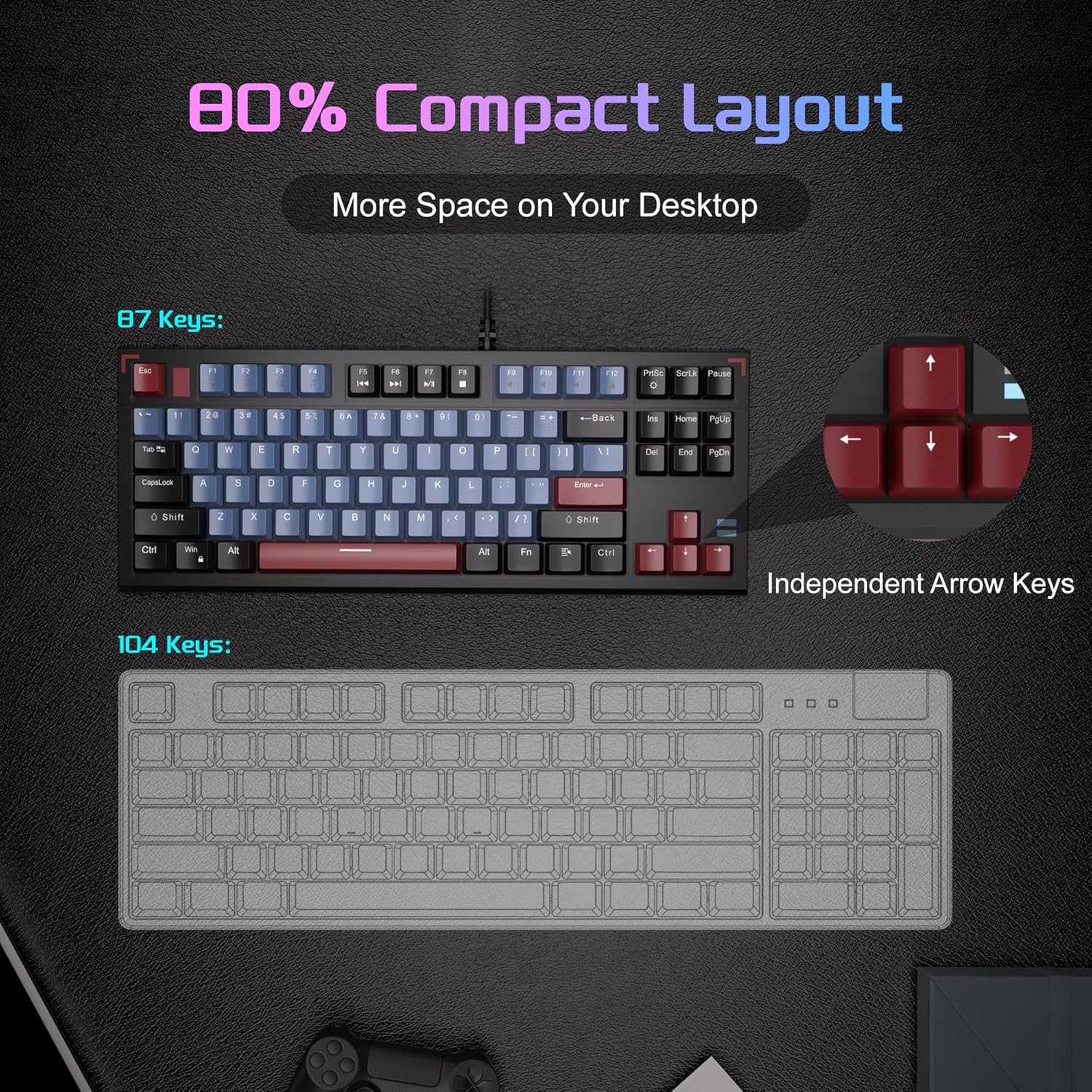
Image: A visual comparison illustrating the compact 87-key layout of the MageGee SKY 87 keyboard next to a standard 104-key keyboard, emphasizing space-saving benefits.
2.5 Прелазак преко N тастера (заштита од фантомског приказивања)
The keyboard supports 100% N-key rollover, meaning all keys can be pressed simultaneously without conflict, ensuring every keystroke is registered accurately during intense gaming or fast typing.

Image: A diagram showing how multiple key presses are registered simultaneously without ghosting, highlighting the N-key rollover feature.
2.6 Мултимедијалне пречице
Access various multimedia functions using the Fn key in combination with the F-keys.
| Function Key Combination | Опис |
|---|---|
| Фн + Ф1 | Мој рачунар |
| Фн + Ф2 | Pretraga |
| Фн + Ф3 | Калкулатор |
| Фн + Ф4 | Медиа Плаиер |
| Фн + Ф5 | Превиоус Трацк |
| Фн + Ф6 | Нект Трацк |
| Фн + Ф7 | Пусти/Паузирај |
| Фн + Ф8 | Стани |
| Фн + Ф9 | Муте |
| Фн + Ф10 | Утишавање звука |
| Фн + Ф11 | Волуме Уп |
| Фн + Ф12 | Закључавање екрана |

Image: The keyboard layout highlighting the F-keys and their corresponding multimedia functions when used with the Fn key.
3. Одржавање
3.1 Чишћење тастатуре
To ensure optimal performance and longevity, regular cleaning is recommended.
- Искључите тастатуру из рачунара пре чишћења.
- Користите меку четку или компримовани ваздух да бисте уклонили прашину и прљавштину између тастера.
- For stubborn dirt, gently wipe the keycaps and keyboard surface with a slightly damp, крпа која не оставља влакна. Избегавајте прекомерну влагу.
- Не користите јаке хемикалије или абразивна средства за чишћење.
3.2 Keycap Removal and Replacement
The included keycap puller can be used to remove and replace keycaps for cleaning or customization.
- Gently attach the keycap puller to the keycap you wish to remove.
- Pull straight up with even pressure until the keycap detaches from the switch.
- To replace, align the keycap with the switch stem and press down firmly until it clicks into place.

Image: The keyboard with some keycaps removed, illustrating the possibility of customization or deep cleaning.
КСНУМКС. Решавање проблема
If you encounter issues with your MageGee SKY 87 keyboard, refer to the following common solutions:
- Тастатура не реагује:
- Уверите се да је USB кабл безбедно повезан и са тастатуром и са рачунаром.
- Покушајте да прикључите тастатуру на други УСБ порт на рачунару.
- Поново покрените рачунар.
- Позадинско осветљење не ради или је неисправно:
- Check if the brightness is set too low (Fn + ↑/↓).
- Cycle through lighting modes using Fn + PrtSc.
- Одређени тастери не раде:
- Remove the keycap and check for any obstructions or debris around the switch.
- Ако проблем и даље постоји, контактирајте корисничку подршку.
5. Спецификације
| Феатуре | Детаљ |
|---|---|
| Бранд | MageGee |
| Број модела | СКИ 87 |
| Технологија повезивања | USB-A (жичани) |
| Опис тастатуре | Механички |
| Тип прекидача | Tactile Brown Switches |
| Број кључева | 87 |
| Распоред тастатуре | КВЕРТИ |
| Позадинско осветљење | Ледено плава ЛЕД диода (једна боја) |
| Посебне карактеристике | Backlit, Ergonomic, Multimedia Keys, Portable |
| Компатибилни уређаји | Лаптоп, рачунар (Windows, Mac) |
| Димензије производа (Д к Ш к В) | 14.37 cm x 5.51 cm x 1.69 cm |
| Материјал | акрилонитрил бутадиен стирен (АБС) |
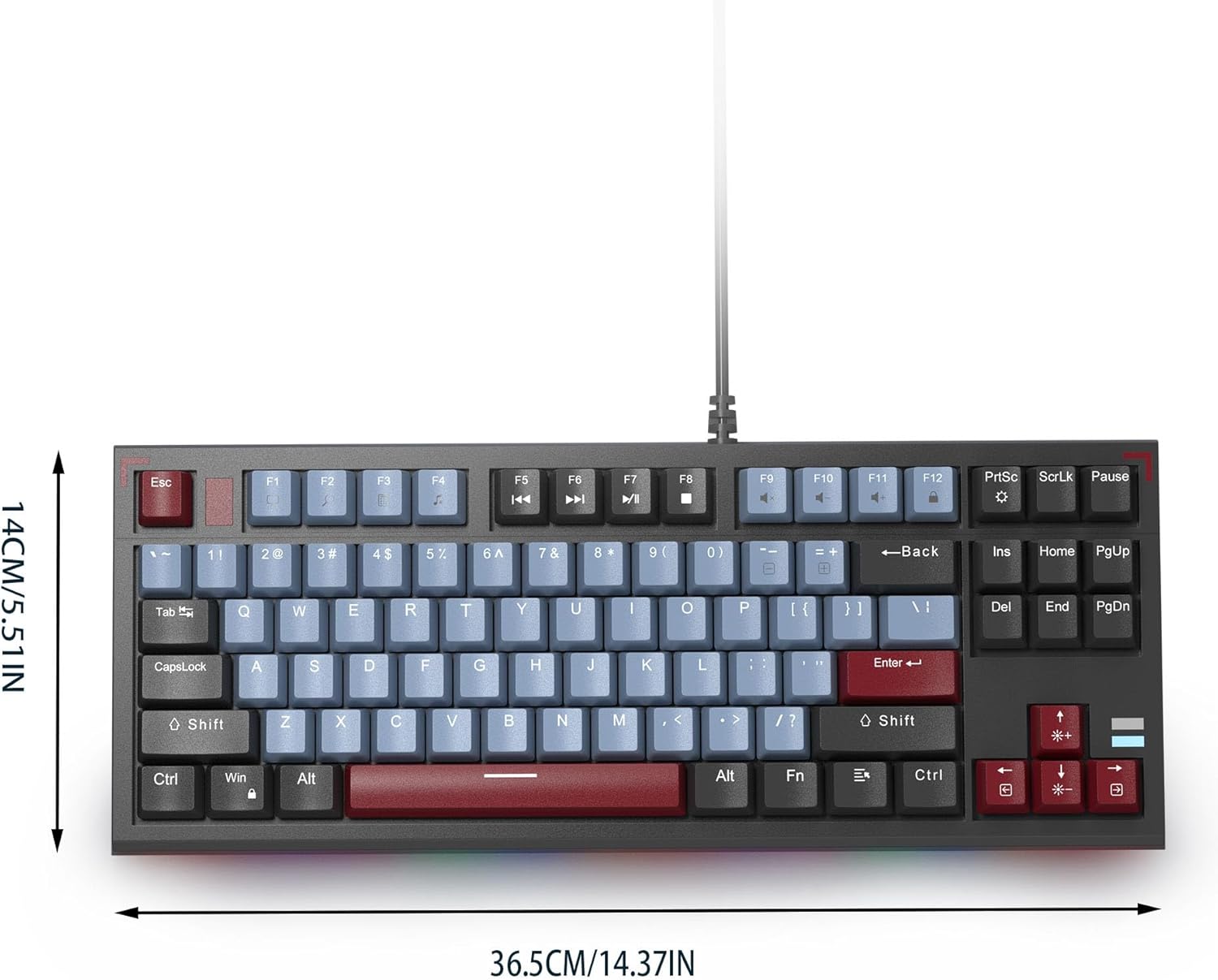
Image: The MageGee SKY 87 keyboard with its physical dimensions clearly indicated.
6. Гаранција и подршка
For warranty information and technical support, please refer to the official MageGee webсајт или директно контактирајте њихову корисничку службу. Сачувајте рачун за куповину за потребе гаранције.