
Womier M68 HE
Womier M68 HE Rapid Trigger Magnetic Switch 60% Gaming Keyboard User Manual
Марка: Вомијер
Model: M68 HE
1. Готовоview
The Womier M68 HE is a 60% compact gaming keyboard featuring rapid trigger magnetic switches. Designed for high-performance gaming, it offers hyper-fast response times, customizable actuation, and vibrant RGB lighting. Its durable construction includes a metal PCB plate and PBT topographic keycaps, providing a stable and responsive typing experience.

Figure 1: Womier M68 HE keyboard on a desk setup.

Figure 2: Close-up of the Womier M68 HE keyboard with RGB lighting.
2. Подешавање
2.1. Садржај пакета
Проверите да ли су све ставке присутне у пакету:
- Womier M68 HE Keyboard
- USB-A to USB-C Braided Cable
- Switch Puller and Keycap Puller
- 2x Spare Outemu Magnetic Switches
- Упутство за употребу

Figure 3: Womier M68 HE Package Contents.
2.2. Повезивање тастатуре
- Locate the USB-C port on the back of the keyboard.
- Connect the provided USB-A to USB-C cable to the keyboard and your computer.
- Ensure the operating system switch (Win/Mac) on the back of the keyboard is set to your desired system.
- The keyboard is plug-and-play; no additional drivers are typically required for basic functionality.
2.3. Инсталација софтвера
For advanced customization, including rapid trigger settings, key remapping, and RGB effects, download the official Womier M68 HE software from the manufacturer's webсајт. Пратите упутства на екрану за инсталацију.
3. Упутство за употребу
3.1. Basic Key Functions (FN Combinations)
The Womier M68 HE utilizes FN key combinations for various functions due to its compact 60% layout. Refer to the diagram below for common combinations:

Figure 4: FN Key Combinations for Womier M68 HE.
- ФН + ВИН: Turn on/off WIN function.
- ФН + стрелица нагоре: Осветљеност позадинског осветљења +
- ФН + стрелица надоле: Backlight brightness -
- FN + Backspace: Switch between 15 backlight modes.
- FN + стрелица улево: Backlight speed -
- ФН + стрелица удесно: Брзина позадинског осветљења +
- FN + Spacebar: Вратите фабричка подешавања.
- FN + Ctrl: Пребаците боје позадинског осветљења.
3.2. RGB контрола осветљења
The keyboard features 16.8 million RGB lighting colors with 15 pre-set lighting effects. Adjust brightness and speed using the knob or FN+key combinations. You can also select single color effects or turn off the backlight entirely.
3.3. Rapid Trigger and Adjustable Actuation
The Womier M68 HE's magnetic switches offer a rapid trigger feature and adjustable actuation distance from 0.3mm to 4mm. This allows for precise control, activating or deactivating keys based on travel distance rather than a fixed point. Each key can be personalized in 0.1mm increments via the software.
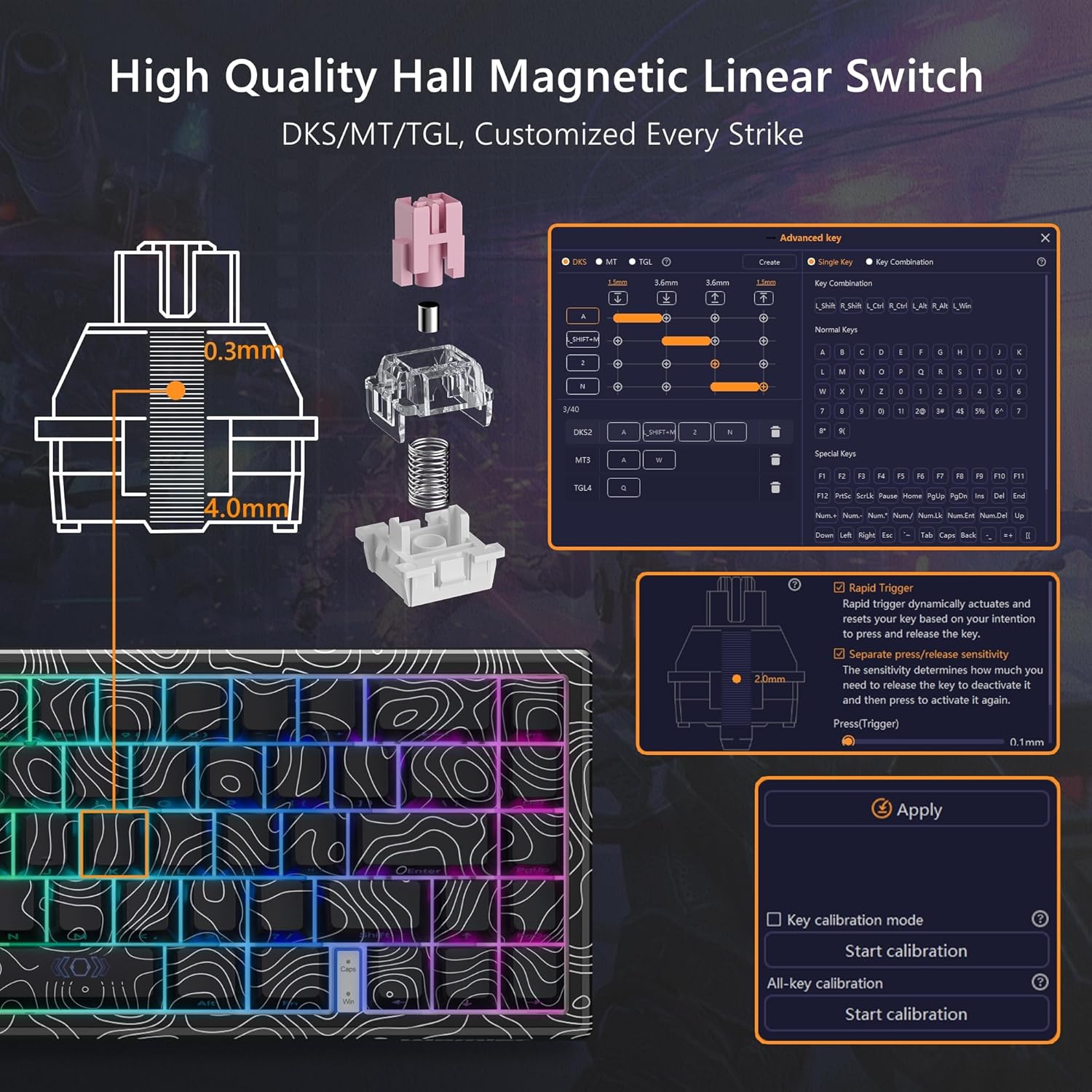
Figure 5: Hall Magnetic Linear Switch Actuation Diagram.

Figure 6: Adjustable Actuation Distance for Magnetic Switches.
Video 1: Demonstration of the Womier M68 HE Rapid Trigger Gaming Keyboard features.
3.4. Софтвер за прилагођавање
The dedicated software allows for comprehensive management of the keyboard. You can customize macros, key bindings, set DKS, MT, TGL features, and adjust lighting modes, brightness, and effects.

Figure 7: Womier M68 HE Customization Software Interface.
Видео 2: Крајview of the M68 HE 60% Gaming Keyboard's rapid trigger and mechanical features.
4. Одржавање
4.1. Чишћење
To maintain optimal performance and appearance, regularly clean your keyboard. Use a soft brush or compressed air to remove dust and debris from between the keycaps. For stubborn dirt, gently wipe the keycaps and keyboard surface with a slightly damp, крпа која не оставља влакна. Избегавајте употребу јаких хемикалија или абразивних материјала.
4.2. Замена тастера и прекидача
The Womier M68 HE uses Outemu magnetic switches. These switches are hot-swappable, allowing for easy replacement or customization. Use the provided switch puller to carefully remove switches. Note that only Outemu magnetic switches are compatible with this keyboard.

Figure 8: Internal Structure of the Womier M68 HE Keyboard.
КСНУМКС. Решавање проблема
5.1. Тастатура не реагује
- Уверите се да је USB-C кабл безбедно повезан и са тастатуром и са рачунаром.
- Покушајте да повежете тастатуру са другим УСБ портом на рачунару.
- Verify the Win/Mac switch on the back of the keyboard is set correctly for your operating system.
- Поново покрените рачунар.
5.2. Проблеми са RGB осветљењем
- Check FN key combinations for brightness and mode adjustments (refer to Section 3.1).
- Ensure the lighting is not turned off via the software.
- If using customization software, ensure the settings are applied correctly.
5.3. Accidental Keystrokes / Rapid Trigger Sensitivity
- Adjust the actuation distance for individual keys using the customization software (refer to Section 3.3). A higher actuation point (e.g., 3mm-4mm) requires a deeper press, reducing accidental triggers.
- Perform key calibration through the software to ensure accurate switch recognition.
5.4. Software Not Detecting Keyboard
- Ensure the keyboard is properly connected via USB.
- Reinstall the customization software.
- Check for any available software updates.
6. Спецификације
| Феатуре | Детаљ |
|---|---|
| Бранд | Вомиер |
| Модел | M68 HE |
| Технологија повезивања | USB-C (жичани) |
| Тип прекидача | Hall Effect Magnetic Switches (Outemu) |
| Ацтуатион Дистанце | Подесива од 0.3 мм до 4 мм |
| Поллинг Рате | До 8000 Хз |
| Распоред тастатуре | 60% Compact (67 keys) |
| Кеицапс | PBT Topographic, Side-Printed |
| Позадинско осветљење | 16.8 Million RGB (15 pre-set effects) |
| Компатибилни уређаји | PC (Mac/Windows) |
| Материјал | Metal, Polybutylene Terephthalate |
7. Гаранција и подршка
7.1. Информације о гаранцији
The Womier M68 HE keyboard comes with a 1-year warranty from the date of purchase. This warranty covers manufacturing defects and malfunctions under normal use. Please retain your proof of purchase for warranty claims.
7.2. Корисничка подршка
For technical assistance, warranty claims, or any other inquiries, please contact Womier customer support through their official webсајт или контакт информације које су наведене у паковању вашег производа.
Ask a question about this manual
Ask about setup, troubleshooting, compatibility, parts, safety, or missing instructions. Manuals+ will review the question and use this page’s manual context to help answer it.