
ANTHBOT Pion900
ANTHBOT Robot Lawn Mower User Manual
Model: Pion900
1. Увод
The ANTHBOT Robot Lawn Mower (Model Pion900) is designed to provide efficient and automated lawn care. This manual provides detailed instructions for setting up, operating, maintaining, and troubleshooting your robotic lawn mower to ensure optimal performance and a well-maintained lawn.
Key features include CABLE-TOF global positioning for precise mowing, automatic boundary wire break detection, adjustable blade deck, and app-controlled smart features.

Image: The ANTHBOT Robot Lawn Mower, showcasing its sleek design and the accompanying smartphone application for control.
2. Садржај пакета
Пре почетка инсталације, проверите да ли су све компоненте присутне у пакету:
- ANTHBOT Robot Lawn Mower
- Станица за пуњење
- Повер Адаптер
- Boundary Wire (Max 180m)
- Wire Pegs (240 pcs)
- Владар
- Waterproof Wire Connectors
- Резервне сечива и шрафови
- Хек кључ
- Упутство за употребу

Слика: Свеобухватни view of all items included in the ANTHBOT Robot Lawn Mower package, laid out for inspection.
3. Подешавање и инсталација
Proper setup of the boundary wire and charging station is crucial for the optimal performance of your ANTHBOT Robot Lawn Mower.
3.1. Постављање станице за пуњење
Select a flat, soft grass area for the charging station. Ensure good network coverage and no obstacles within 3 meters. The station should be near a power supply and allow for a ground nail to be fully driven. Reserve at least 1.5m/5ft of space before and after the charging station within the work area of the boundary wire.

Image: Illustration detailing the recommended placement for the charging station, emphasizing clear space requirements.
Video: ANTHBOT Robot Lawn Mower Automatic Remote. This video demonstrates the robotic lawn mower in action, highlighting its autonomous operation and remote control capabilities.
3.2. Инсталација граничне жице
The boundary wire defines the mowing area. It can be laid on the surface and secured with pegs or buried. Ensure the wire is tight and close to the ground. Maintain a distance of 35 cm (1.15 ft) from any raised boundary obstacles like walls or garden beds. For areas separated by a path, wire the entire area without going around the path.
- Use wire pegs every 75cm (2.5 ft). Increase pegs for curved sections.
- Maintain 20cm (8 inches) distance from lawn edges for obstacles like rocks.
- For pools, maintain at least 75cm (2.5 ft) distance from the edge.
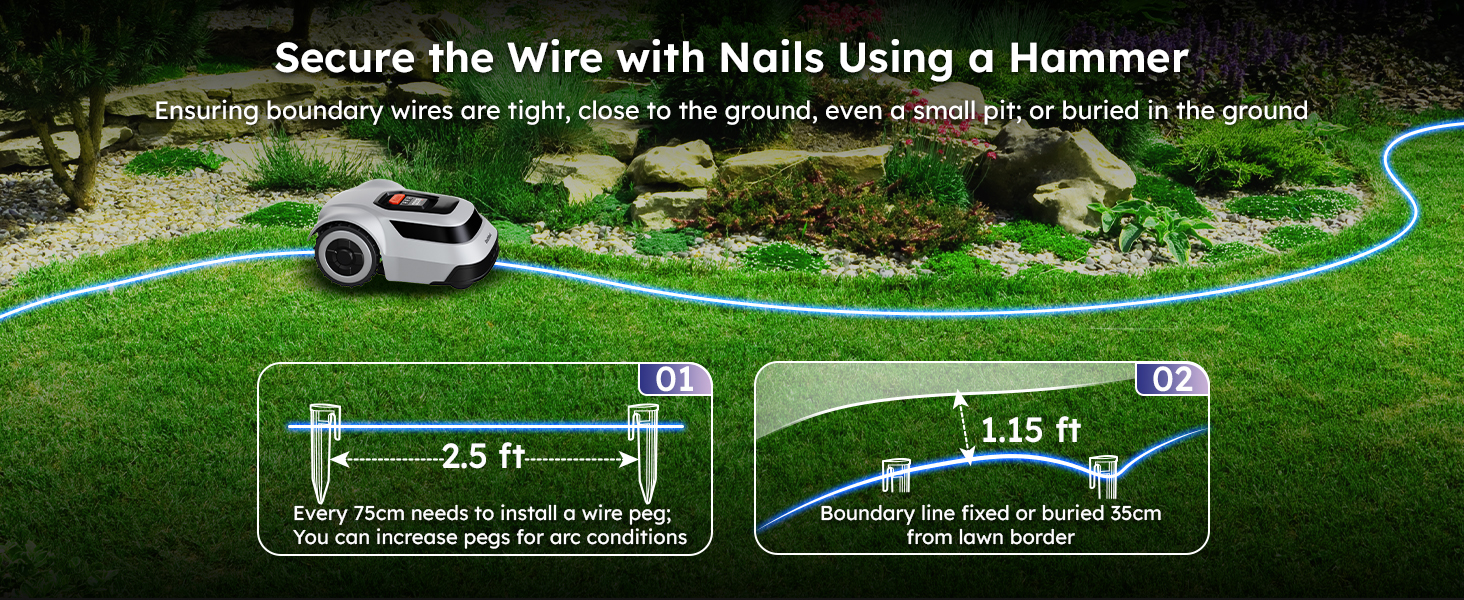
Image: A detailed diagram showing how to lay the boundary wire around a typical house and garden, including distances from various obstacles.

Image: Step-by-step visual guide on how to secure the boundary wire using pegs and maintain appropriate distances from obstacles for effective mowing.
3.3. Creating No-Go Zones
To protect specific areas like flower beds or trees, create "no-go zones" by routing the boundary wire around them. Maintain a distance of 35cm (14 inches) from the object, and ensure the wire returns to the main boundary line with a 20cm (8 inches) gap.

Image: A visual guide on how to establish no-go zones around obstacles like trees using the boundary wire, ensuring the mower avoids these areas.
4. Операција
The ANTHBOT Robot Lawn Mower is designed for intelligent and efficient operation.
4.1. Initial Mapping and Mowing
After boundary wire installation, the mower will perform an initial mapping of the area. It utilizes CABLE-TOF global positioning technology for precise positioning and intelligent route planning, resulting in a 300% increase in mowing efficiency compared to random mowing patterns.

Image: A visual representation of the mower's U-shaped mowing path and its ability to automatically return to the charging station when needed.

Image: A side-by-side comparison illustrating the ANTHBOT's precise, line-by-line mowing pattern versus the less efficient random patterns of other mowers.
4.2. Automatic Charging and Resumption
The mower is equipped with a large battery providing 70 minutes of cutting time. When the battery level drops below 15%, it automatically returns to the charging station. Once 90% charged, it resumes mowing from where it left off.

Image: The robotic lawn mower intelligently navigating back to its charging station when its battery is low.
4.3. APP Control and Monitoring
Utilize the user-friendly ANTHBOT APP to monitor mowing progress, schedule mowing times, receive alerts, and view the real-time position and coverage area of the mower. The app allows for flexible adjustment of cutting height (3-7 cm).

Image: A smartphone screen showing the ANTHBOT app, which provides real-time tracking and control over the robot lawn mower.

Слика: Детаљна view of the ANTHBOT app interface, specifically highlighting the options for adjusting the cutting height of the mower.
Video: Robotic Lawn Mower Test Experience. This video provides a comprehensive test and review of the robotic lawn mower's performance in various conditions.
Video: Robot Lawn Mower Robotic Lawnmower Self Drive Mapping. This video demonstrates the self-driving and mapping capabilities of the robotic lawn mower.
Video: Robot Lawn Mower. A general overview видео емисијаasing the robot lawn mower in operation.
4.4. Slope Handling and Waterproof Rating
The mower can handle slopes up to 45% (24°). It has collision sensors to adjust direction and an IPX6 waterproof rating, allowing use in light rain and easy cleaning with a garden hose.

Image: The robot lawn mower demonstrating its capability to ascend a 45% incline, highlighting its robust design for varied terrain.

Image: The robot lawn mower being cleaned with a water hose, illustrating its IPX6 waterproof rating and ease of maintenance.
5. Одржавање
Regular maintenance ensures the longevity and performance of your ANTHBOT Robot Lawn Mower.
5.1. Одржавање оштрице
The ANTHBOT mower features an automatic adjustable blade deck, allowing cutting heights from 1.18 inches to 2.76 inches (3-7 cm). When encountering tall or dense grass, the smart blades automatically adjust. Regularly inspect blades for sharpness and replace them when dull to ensure a clean cut.

Слика: Детаљна view of the mower's blade disc and internal motor mechanism, illustrating the cutting components.

Image: An illustration demonstrating the adjustable cutting height range of the mower's blades, from 1.18 inches to 2.76 inches.
5.2. Чишћење
Due to its IPX6 waterproof rating, the mower can be easily cleaned with a garden hose. Ensure the mower is turned off and disconnected from the charging station before cleaning. Remove any grass clippings or debris from the cutting deck and wheels.
КСНУМКС. Решавање проблема
This section addresses common issues you might encounter with your ANTHBOT Robot Lawn Mower.
6.1. Boundary Wire Break Detection
A unique feature of the ANTHBOT mower is its ability to automatically detect boundary wire breaks. If a break occurs, bring the mower back to the charging station, and the app will identify the exact location of the damage. Use the included cable connectors for repair.

Image: The ANTHBOT app displaying a detected boundary wire break, with the mower stopped near the affected area, indicating the precise location of the issue.
6.2. "Boundary wire length or working area are overlimit" Error
This error indicates that the boundary wire length or the defined working area exceeds the mower's capacity. The maximum supported boundary wire length is 180 meters. If your lawn area exceeds 550㎡, it is recommended to add an additional charging station and boundary wires to improve efficiency, as the included 180-meter wire covers the maximum allowed area for a single setup.

Image: An illustration demonstrating the use of two charging stations to cover larger lawn areas, addressing the "overlimit" error.
6.3. Mower Not Moving or Charging
- Check if the power adapter is securely connected to the charging station and a power outlet.
- Ensure the charging contacts on the mower and station are clean and free of debris.
- Verify that the boundary wire is intact and properly connected to the charging station.
- Check the app for any error messages or status updates.
7. Спецификације
| Феатуре | Спецификација |
|---|---|
| Бранд | АНТХБОТ |
| Број модела | Pion900 |
| Извор напајања | Баттери Поверед |
| Материјал | Пластика |
| Боја | Греи |
| Стиле | Boundary Wire Mower |
| Тежина артикла | 23.6 фунти |
| Ширина сечења | 7.87 инча |
| Оперативни режим | Аутоматски |
| Max Adjustable Cutting Height | 2.76 инча |
| Min Adjustable Cutting Height | 1.18 инча |
| Максимална област покривености | 900㎡ (Recommended 550㎡) |
| Max Slope Handling | 45% (24°) |
| Водоотпорна оцена | ИПКС6 |
| Трајање батерије (по пуњењу) | КСНУМКС минута |
8. Безбедносне информације
Always adhere to the following safety guidelines when operating or maintaining your robot lawn mower:
- Read the entire manual before first use.
- Држите руке и ноге даље од оштрица.
- Do not operate the mower if blades are damaged.
- Ensure children and pets are clear of the mowing area during operation.
- Turn off the mower and disconnect from power before performing any maintenance or cleaning.
- Користите само оригиналне резервне делове и прибор.
- Do not use the mower in heavy rain or extreme weather conditions.
9. Гаранција и подршка
For warranty information and technical support, please refer to the official ANTHBOT website or contact customer service directly. ANTHBOT is committed to providing assistance for any technical challenges you may face.
"ANTHBOT Vision: Always Green Spaces. We aim to create vibrant gardens through our advanced robotic lawn mowers. Mission: Smart Lawns, Happy Lives. Our technology transforms gardening into an efficient, enjoyable experience, making your garden a joy, not a chore. Why Choose US ? We offer cutting-edge, sustainable robotic mowers that lead the way in revolutionizing lawn care. Facing tech challenges? Don’t worry—we’re here to help you master it!"

Image: The official ANTHBOT company logo.
Video: Anthbot Packaging List. This video details the contents of the ANTHBOT product packaging, useful for verifying all components upon receipt.
Ask a question about this manual
Ask about setup, troubleshooting, compatibility, parts, safety, or missing instructions. Manuals+ will review the question and use this page’s manual context to help answer it.