
1. Увод
The XPG Hurricane 140 ARGB PWM fan is engineered to provide efficient cooling performance for your computer system while offering customizable Addressable RGB (ARGB) lighting. This fan features a patented dual-layer blade design, a durable fluid dynamic bearing, and Pulse Width Modulation (PWM) for precise speed control. It is designed for PC enthusiasts and modders seeking both aesthetic value and effective thermal management.

Фронт view of the XPG Hurricane 140 ARGB PWM fan, showcasing its illuminated blades and frame.
2. Карактеристике
- Patented Dual-Layer Blade Design: The main blade optimizes airflow while minimizing wind resistance, and the smaller, narrower booster blade enhances static pressure while reducing noise levels.
- Fluid Dynamic Bearing (FDB): Fluid lubrication between the bearings and shaft during rotation ensures improved cooling efficiency, lower power consumption, and extended fan lifespan.
- Efficient Pulse Width Modulation (PWM): PWM functionality allows the fan to automatically adjust its speed (RPM) based on component temperature, optimizing cooling performance and noise levels.
- Daisy Chain Capable: Multiple units can be connected directly to synchronize ARGB lighting effects, simplifying cable management and lighting control.
- Motherboard ARGB Software Compatibility: The fan syncs directly with most major motherboard manufacturers' ARGB software, including Asus, MSI, and others, for comprehensive lighting customization.

Детаљно view of the XPG Hurricane fan's patented dual-layer blade design, distinguishing the main blade for airflow and the booster blade for static pressure.
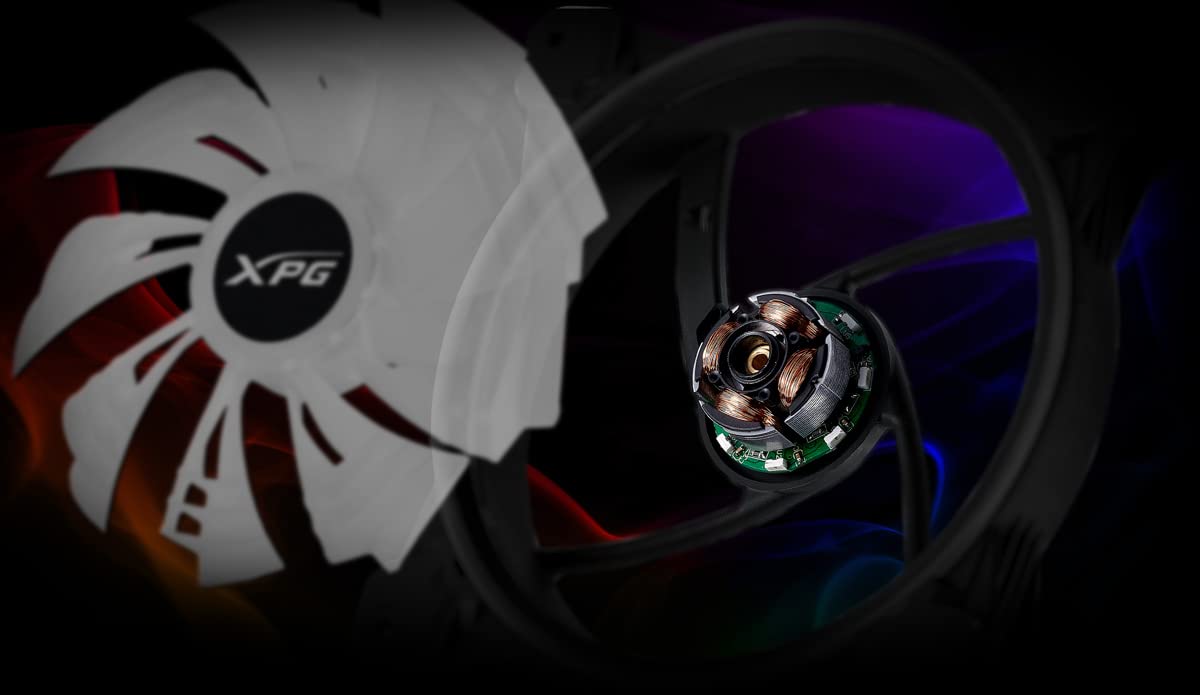
Diagram showing the internal components of the XPG Hurricane fan, specifically highlighting the fluid dynamic bearing (FDB) for enhanced durability and quiet operation.
3. Подешавање и инсталација
3.1 Физичка инсталација
- Identify the desired mounting location within your PC case (e.g., front, top, rear, or radiator).
- Align the fan with the screw holes on your case or radiator. Ensure the fan is oriented to push or pull air in the desired direction for optimal airflow.
- Secure the fan using the provided mounting screws. Tighten screws evenly to prevent warping and reduce potential vibration noise.

Close-up of a fan corner, illustrating the mounting screw hole and integrated anti-vibration padding for secure and quiet installation.
3.2 Електричне везе
- ПВМ веза: Connect the fan's 4-pin PWM cable to an available 4-pin fan header on your motherboard. This allows the motherboard to control the fan speed based on system temperatures.
- ARGB веза: Connect the fan's 3-pin ARGB cable to an available 3-pin 5V ARGB header on your motherboard. Ensure it is a 5V ARGB header and not a 12V RGB header to prevent damage.
- Daisy Chain (Optional): If installing multiple XPG Hurricane ARGB fans, you can connect them in a daisy chain using the provided ARGB pass-through connectors. Connect the ARGB output of one fan to the ARGB input of the next fan, and then connect the last fan's ARGB input to the motherboard header.

The XPG Hurricane fan displayed with its 4-pin PWM connector for fan speed control and 3-pin ARGB connectors, demonstrating its daisy-chain capability for lighting synchronization.
4. Упутство за употребу
4.1 Контрола брзине вентилатора (PWM)
The fan's speed is automatically regulated by your motherboard's PWM function. You can typically adjust the fan curve settings within your motherboard's BIOS/UEFI or through dedicated motherboard software (e.g., ASUS AI Suite, MSI Dragon Center, Gigabyte SIV) to customize fan behavior based on temperature thresholds.
4.2 ARGB контрола осветљења
To control the Addressable RGB lighting, use your motherboard's ARGB synchronization software. This software allows you to select various lighting effects, colors, and patterns. Ensure your motherboard's ARGB header is properly connected and recognized by the software.
5. Одржавање
Редовно одржавање помаже у обезбеђивању оптималних перформанси и дугог века трајања вашег вентилатора:
- Уклањање прашине: Периодично чистите накупљену прашину са лопатица вентилатора и оквира помоћу компримованог ваздуха или меке четке. Уверите се да је вентилатор искључен пре чишћења.
- инспекција: Проверите да ли има препрека око лопатица вентилатора или да ли се чују необични звуци током рада.
КСНУМКС. Решавање проблема
- Вентилатор се не окреће:
- Verify that the 4-pin PWM cable is securely connected to the motherboard fan header.
- Проверите подешавања BIOS/UEFI ваше матичне плоче да бисте се уверили да је конектор за вентилатор омогућен и правилно конфигурисан.
- ARGB Lighting Not Working:
- Confirm the 3-pin ARGB cable is correctly connected to a 5V ARGB header on your motherboard. Avoid connecting to 12V RGB headers.
- Ensure your motherboard's ARGB software is installed and updated. Check if the software detects the ARGB device.
- Ако је у питању ланчано повезивање, уверите се да су све везе између вентилатора безбедне.
- Прекомерна бука:
- Check if the fan is securely mounted and not vibrating against the case.
- Adjust the fan speed curve in your motherboard's BIOS/UEFI or software to reduce RPM at lower temperatures.
- Ensure no cables or obstructions are interfering with the fan blades.
7. Спецификације
| Спецификација | Валуе |
|---|---|
| Број модела | HURRICANE140ARGBPWM-BKCWW |
| Димензије производа | 250 x 36 x 250 mm |
| Максимална брзина ротације | 1800 РПМ |
| Тип конектора за напајање | 4-пински ПВМ |
| Волtage | 12 Волтс |
| Ватtage | 4 миллиamp_хоурс |
| Метод хлађења | Ваздух |
| Компатибилни уређаји | Десктоп |
| Ниво буке | 28.1 децибела |
| Материјал | Бакар |
| Произвођач | КСПГ |
| Датум првог доступног | 6. септембра 2022. године |

Image displaying the XPG Hurricane 140 ARGB PWM fan next to its P-Q curve, which details the relationship between static pressure and airflow performance.
8. Гаранција и подршка
The XPG Hurricane 140 ARGB PWM fan comes with a 2-year warranty from the date of purchase. For technical support, warranty claims, or further assistance, please visit the official XPG website or contact their customer service department. Please retain your proof of purchase for warranty validation.