
1. Увод
Thank you for choosing the ALONEFIRE H64 Mini LED Flashlight. This compact and powerful flashlight is designed for various lighting needs, featuring multiple modes, USB-C recharging, and a durable aluminum alloy construction. Please read this manual carefully to ensure proper use and maintenance of your device.
2. Производ је готовview
Familiarize yourself with the components of your ALONEFIRE H64 flashlight.
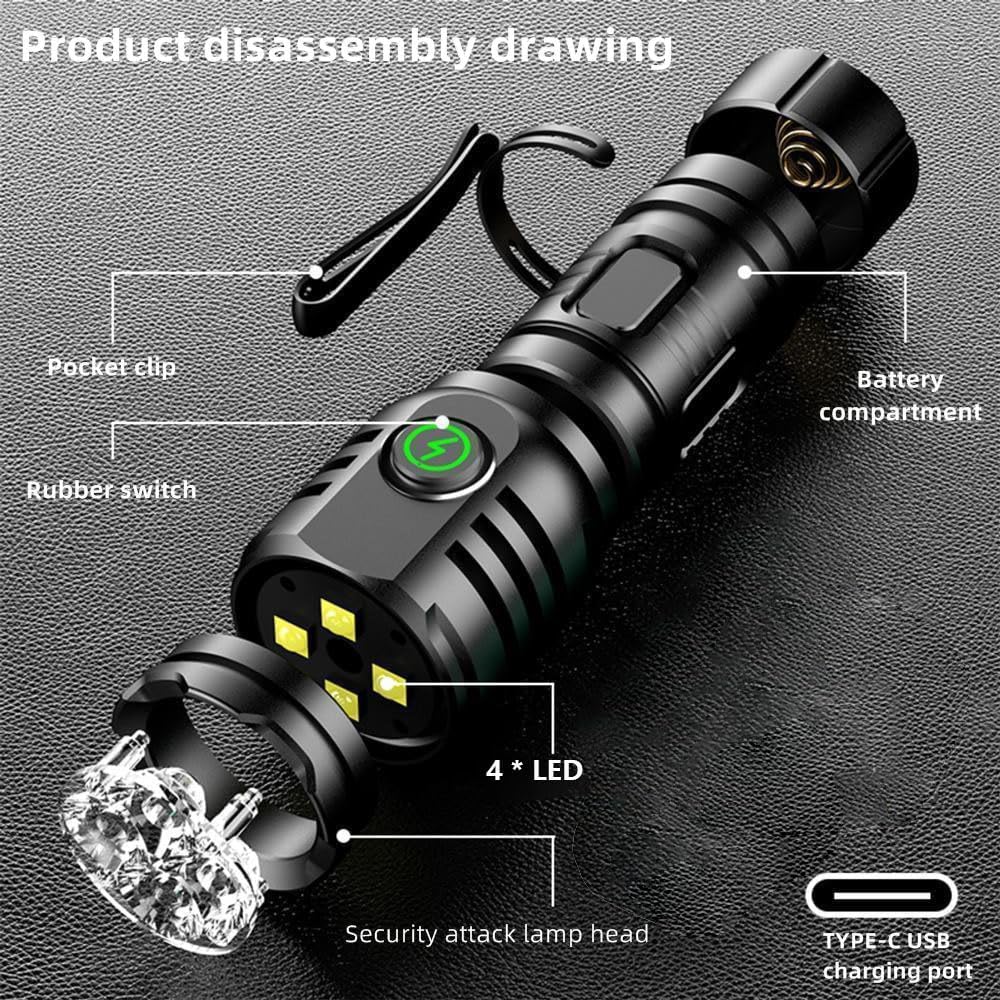
Слика 1: Product Disassembly Drawing. This image illustrates the key components of the ALONEFIRE H64 flashlight, including the pocket clip for attachment, the rubber switch for operation, the four LED light sources, the security attack lamp head, the Type-C USB charging port, and the internal battery compartment.
- Џепни клип: For attaching the flashlight to clothing, hats, or gear.
- Rubber Switch: Main control button for power and mode selection.
- 4 * LED: The primary light sources providing illumination.
- Security Attack Lamp глава: Designed for emergency or self-defense use.
- Type-C USB Charging Port: За практично и брзо пуњење.
- Одељак за батерије: Houses the internal rechargeable battery.
3. Подешавање
3.1 Почетно пуњење
Before first use, fully charge the ALONEFIRE H64 flashlight. Use the provided USB Type-C cable to connect the flashlight to a compatible USB power source (e.g., computer, wall adapter).
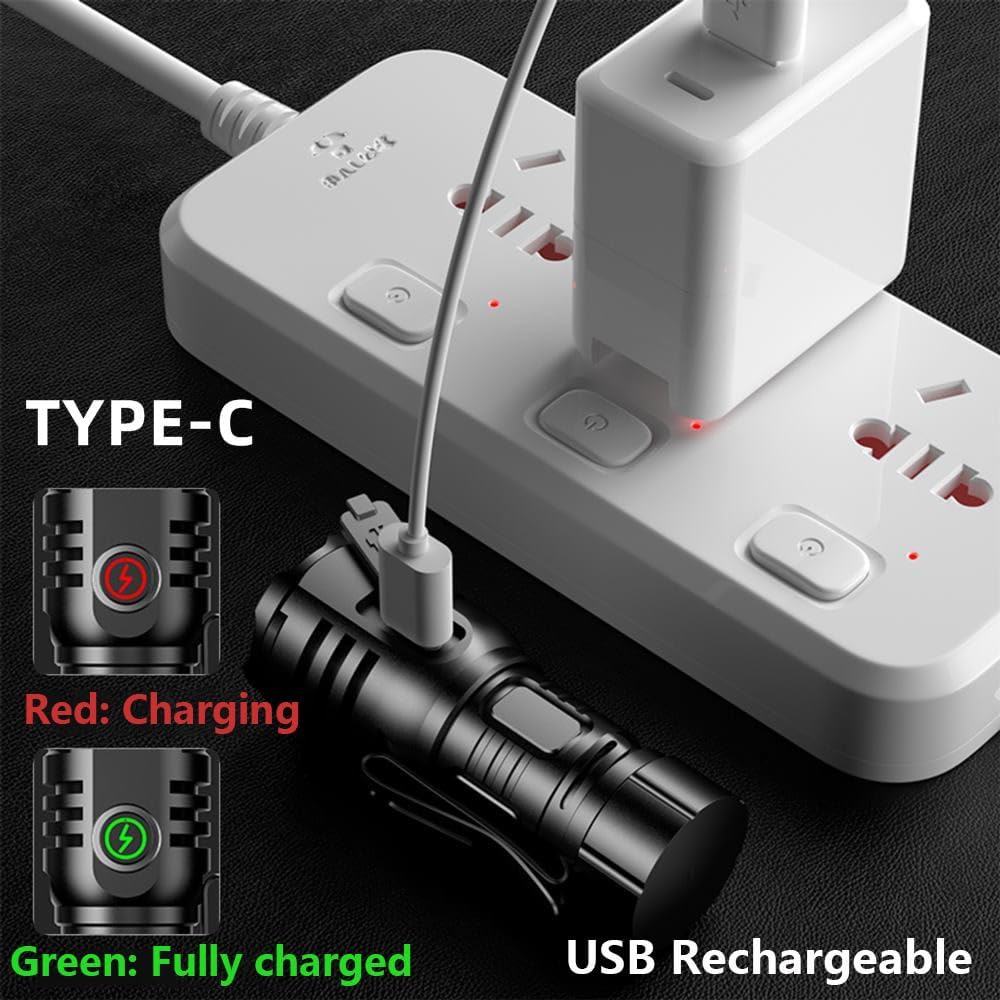
Слика 2: USB Type-C Charging. The image displays the flashlight being charged via its Type-C port. A red indicator light signifies that the device is currently charging, while a green light indicates a full charge.
- The indicator light on the flashlight will glow црвена током пуњења.
- Индикаторска лампица ће се упалити зелена када је батерија потпуно напуњена.
- Charging typically takes 2.5 to 5 hours for a full charge.
4. Упутство за употребу
4.1 Укључивање/искључивање и избор режима
The ALONEFIRE H64 features 8 distinct lighting modes for various situations.
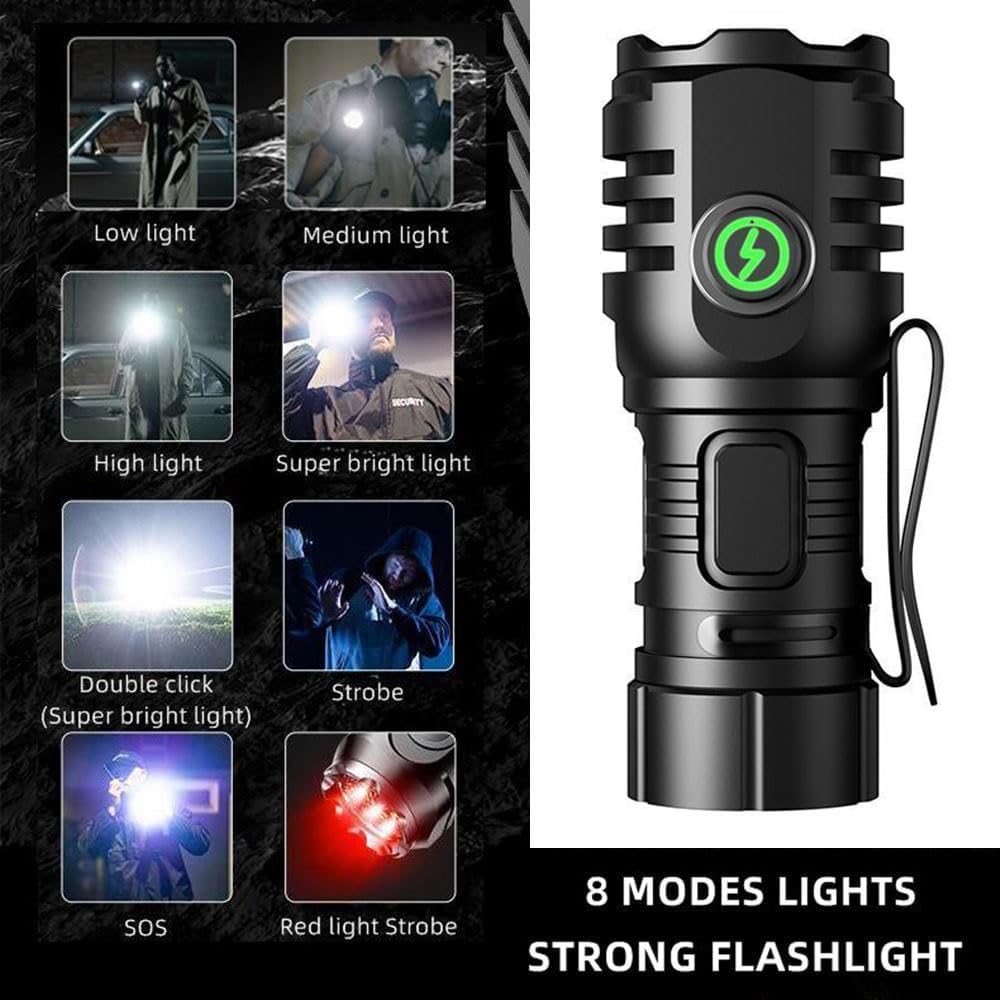
Слика 3: 8 Lighting Modes. This visual guide illustrates the different illumination levels and special modes available, including various brightness settings, a super bright mode activated by a double click, strobe, SOS, and a red light strobe.
- Да бисте укључили/искључили: Press the rubber switch once to turn the flashlight on. Press again to turn it off.
- Да бисте променили режиме: While the flashlight is on, press the rubber switch repeatedly to cycle through the following modes: Low light → Medium light → High light → Super bright light → Strobe → SOS → Red light Strobe.
- Double Click for Super Bright: From any mode, quickly double-click the rubber switch to activate the Super Bright light mode instantly.
4.2 Magnetic Tail Feature
The flashlight is equipped with a strong tail magnet, allowing it to be securely attached to metal surfaces for hands-free operation.

Слика 4: Strong Tail Magnet. This image demonstrates the powerful magnet located at the tail of the flashlight, which allows it to be adsorbed onto any iron surface, providing a secure hold and freeing your hands.
- Simply place the tail of the flashlight against any ferrous metal surface.
- The strong magnet ensures it stays in place, even with its small and lightweight body.
4.3 Џепна копча
The integrated pocket clip provides convenient carrying options.
- Attach the flashlight to your pocket, belt, hat brim, or other gear for easy access.
5. Одржавање
5.1 Чишћење
- Обришите кућиште батеријске лампе меком крпомamp тканина.
- Немојте користити абразивна средства за чишћење или раствараче.
5.2 Пуњење
- Recharge the flashlight when the light output becomes dim or the indicator light signals low battery.
- Always use the Type-C USB port for charging.
5.3 Отпорност на воду
The ALONEFIRE H64 has an IPX5 waterproof rating.
- It is resistant to splashing water and can be used in rainy weather.
- Do not immerse the flashlight in water.
КСНУМКС. Решавање проблема
- Батеријска лампа се не укључује:
- Ensure the battery is charged. Connect to a USB-C power source and check the charging indicator (red for charging, green for full).
- Press the rubber switch firmly. - Flashlight is dim or battery life is short:
- The battery may be low. Recharge the flashlight fully.
- Ensure the flashlight is not operating in an extremely cold environment, which can affect battery performance. - Flashlight is not charging:
- Ensure the USB-C cable is properly connected to both the flashlight and the power source.
- Try a different USB-C cable or power adapter.
- Важно: This flashlight may not charge with all fast-charging USB adapters. If charging fails, try connecting it to a standard (slower) USB charger or a computer's USB port. The indicator light should turn red when charging correctly. - Батеријска лампа се загрева током употребе:
- It is normal for the flashlight to generate some heat, especially in higher brightness modes. If it becomes excessively hot, turn it off and allow it to cool down.
7. Спецификације

Слика 5: Compact Design. This image emphasizes the mini size and lightweight nature of the ALONEFIRE H64, showing it comfortably fitting in the palm of a hand and stating its weight as only 39g.
| Феатуре | Спецификација |
|---|---|
| Број модела | Х64 |
| Бранд | АЛОНЕФИРЕ |
| Тип извора светлости | ЛЕД (4 ЛЕД диода) |
| Извор напајања | Напајање на батерије (пуњиво) |
| Порт за пуњење | УСБ Типе-Ц |
| Материјал | Алуминијумска легура |
| Водоотпорна оцена | IPX5 (Resistant to splashing water, not submersible) |
| Трајање батерије | Approximately 2.5 - 5 hours (depending on mode) |
| Димензије | 8.1 к 5.79 к 2.9 цм |
| Тежина | 18 g (product only), 39 g (as per image) |
| Посебне карактеристике | Rechargeable, Metal Holding Clip, Strong Tail Magnet |
8. Информације о гаранцији
ALONEFIRE products are manufactured to high-quality standards. Specific warranty details may vary by region and retailer. Please retain your proof of purchase for any warranty claims. For detailed warranty terms, refer to the documentation provided at the time of purchase or contact your retailer.
9. Подршка
For further assistance, technical support, or inquiries regarding your ALONEFIRE H64 Mini LED Flashlight, please contact the retailer where you purchased the product. You may also visit the official ALONEFIRE website for general information and support resources.