
1. Увод
Thank you for choosing the HiQuick Universal 4-Bay Battery Charger. This device is designed to efficiently charge a wide range of rechargeable batteries, including 1.2V Ni-MH/Ni-CD (AA, AAA, C, D) and 3.7V Lithium-ion (18650, 21700, 14500, 26650, 18350, 16340 (RCR123A), 10440, 17500, 18490, 18500, 22650, 25500) types. This manual provides essential information for safe and effective use of your charger and the included D batteries.
2. Карактеристике производа
- Универзална компатибилност: Supports a broad spectrum of rechargeable battery sizes and chemistries, including 1.2V Ni-MH/Ni-CD (AA, AAA, C, D) and 3.7V Lithium-ion (18650, 21700, 14500, 26650, 18350, 16340 (RCR123A), 10440, 17500, 18490, 18500, 22650, 25500). Note: Not compatible with flat-top batteries.
- Integrated USB Cable & Type-C Port: Features a built-in USB cable for convenient power connection and an additional Type-C charging port, allowing flexible charging via adapters, laptops, power banks, or car chargers.
- UL сертификат безбедности: Equipped with a smart chip for precise charging control, preventing overcharging and automatically stopping charging for non-rechargeable batteries.
- Вишеструке сигурносне заштите: Incorporates overheat protection, short-circuit protection, overcharge protection, overcurrent protection, overvoltage protection, and reverse polarity protection to safeguard your devices and batteries.
- ЛЦД екран: Provides intuitive real-time display of the charging status for each battery.
- Included D Batteries: Comes with 4 HiQuick 1.2V NiMH 10000mAh D rechargeable batteries, offering high capacity and up to 1200 charge cycles.

Image: The HiQuick 4-Bay Universal Battery Charger with different battery types (AAA, AA, C, D) inserted, demonstrating its broad compatibility.

Image: The charger's independent charging slots, allowing different battery types and charge levels to be managed simultaneously.
3. Садржај пакета
- HiQuick 4-Slot LCD Universal Battery Charger x 1
- D Rechargeable Batteries (10000mAh NiMH) x 4
- Упутство за употребу к 1

Image: Contents of the HiQuick battery charger package, including the charger, four D batteries, and the user manual.
4. Подешавање
- Повежите се са напајањем: Unfold the built-in USB cable from the bottom of the charger or use a Type-C cable. Connect the charger to a 5V/2A USB power adapter (not included), laptop, power bank, or car charger.
- Уметните батерије: Insert rechargeable batteries into the charging slots, ensuring correct polarity (+/-). The spring-loaded contacts accommodate various battery lengths.

Image: The charger connected to a laptop via its built-in USB cable, highlighting the dual power input options (USB-A and Type-C).
5. Упутство за употребу
5.1 Процес пуњења
- Once batteries are inserted and the charger is powered, the LCD screen will display the charging progress for each slot.
- The battery icon on the LCD screen will show segments filling up as the battery charges.
- When a battery is fully charged, its corresponding icon on the LCD screen will show a full battery symbol.
- Note: After power-on, all lights turn green for 1 second and then turn off. For abnormal charging, the corresponding icon will flash as an alarm.
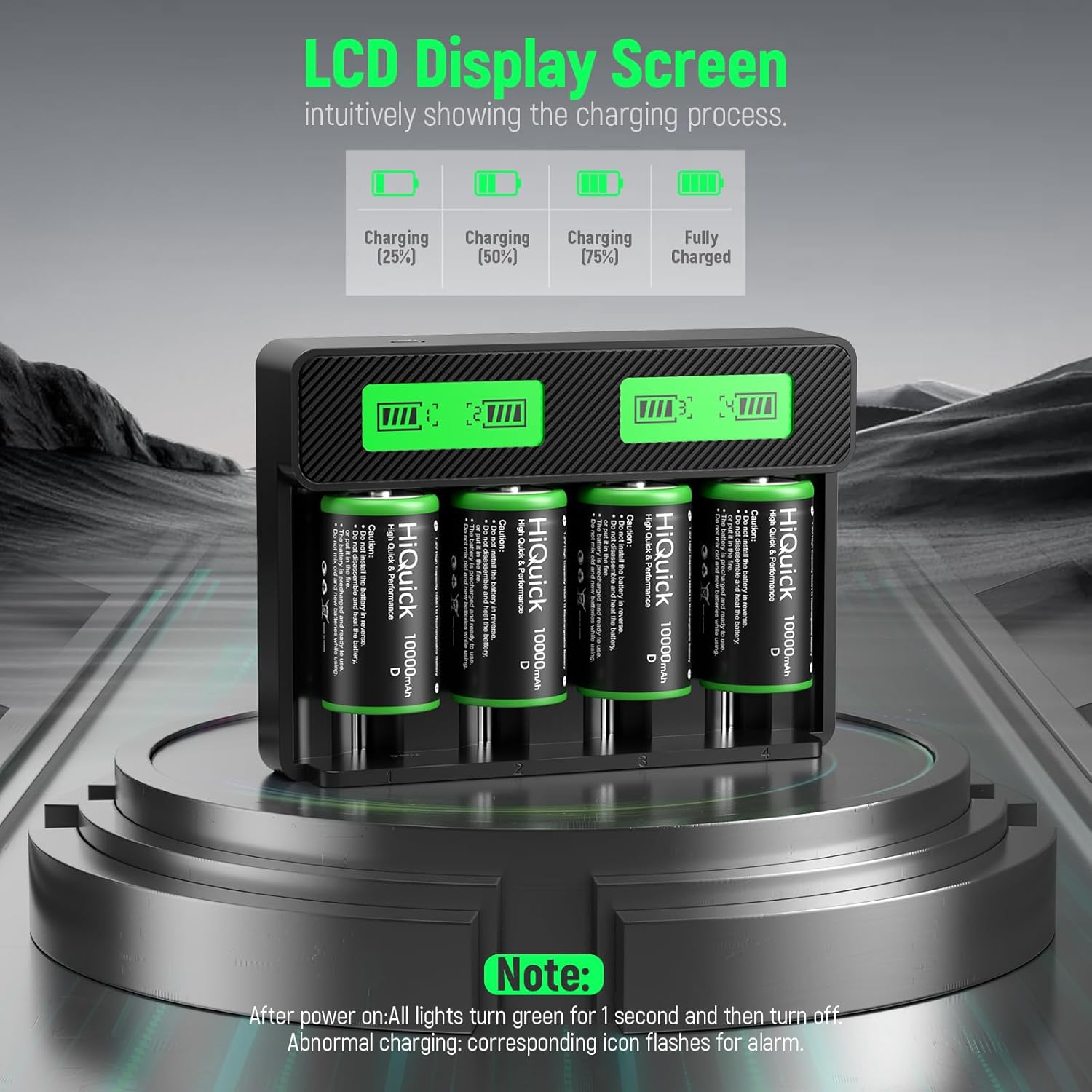
Image: The LCD display screen illustrating different stages of battery charging, from 25% to fully charged.

Image: A close-up of the LCD screen indicating charging progress and full charge status for batteries.
5.2 Battery Activation Tip (for included D batteries)
During transportation or extended idle periods, the included D batteries may enter a low-power sleep state. To restore normal charging performance, charge the battery 2-3 times continuously. After each full charge, unplug the charger for 10 minutes before re-inserting the battery for the next charge cycle. This is not a battery fault but a normal activation process.
5.3 Процењено време пуњења
The actual charging time depends on the battery's capacity and current charge level. Below are approximate charging times for a single battery (Ni-MH/Ni-CD) when using a 2.0A adapter:
- AAA Batteries: 1.2 - 1.5 hours
- AA Batteries: 2.8 - 3.3 hours
- C Batteries: 5.5 - 6 hours
- D Batteries: 11 - 12 hours

Image: Estimated charging durations for various battery types when using the HiQuick charger.
6. Безбедносне информације
- Always use a 5V/2A adapter for optimal performance. Adapter is not included.
- Do not attempt to charge non-rechargeable batteries. The charger is designed to detect and stop charging them, but it is best practice to avoid inserting them.
- Ensure correct battery polarity when inserting into the charger slots.
- Do not disassemble or modify the charger or batteries.
- Избегавајте излагање пуњача води или екстремним температурама.
- Чувати ван домашаја деце.
- The charger features multiple protections including overheating, short-circuit, overcharge, overcurrent, overvoltagе, и заштита од обрнутог поларитета.

Image: Visual representation of the comprehensive safety features built into the HiQuick charger.

Слика: Оверview of the various protection mechanisms integrated into the HiQuick battery charger for safe operation.
7. Одржавање
- Keep the charger and batteries clean and dry.
- If battery contacts in a device appear oxidized, clean them with a dry cloth before inserting batteries.
- Чувајте батерије на хладном и сувом месту када нису у употреби.
КСНУМКС. Решавање проблема
8.1 Battery Not Charging / Device Not Working with Battery
If a battery cannot be charged or a device does not function after battery insertion, check the following:
- Ensure the charger is properly connected to a 5V/2A power source.
- Verify correct battery polarity in the charger or device.
- Clean the battery contact plates of the device (wipe with a dry cloth) and then try installing the battery again. Oxidized contacts can prevent proper connection.
- For new D batteries, refer to the "Battery Activation Tip" in Section 5.2.
9. Спецификације
| Феатуре | Детаљ |
|---|---|
| Димензије производа | 1.4"Д к 6.5"Ш к 4.7"В |
| Тежина артикла | 1.72 фунти |
| Број модела ставке | ZHMYZ8019BHQ |
| Оутпут Волtage | 1.2 Волтс |
| Улазни волtage | 5 Волтс |
| Време пуњења (приближно) | 2.5 Hours (for some battery types, refer to Section 5.3 for details) |
| Укључене батерије | 4 D batteries (1.2V NiMH 10000mAh) |
10. Званични видео снимци производа
HiQuick Battery Charger With Rechargeable D Batteries (4Pack)
Video: An official product video from HiQuick demonstrating the battery charger and the included D batteries.
C D Battery Charger for 18650 AA AAA Rechargeable Batteries
Video: An official product video from HiQuick showcasing the charger's compatibility with C, D, 18650, AA, and AAA rechargeable batteries.
11. Гаранција и подршка
For warranty information or technical support, please refer to the contact details provided on the product packaging or visit the official HiQuick webсајту. Сачувајте рачун о куповини за гаранције.