
1. Производ је готовview
The TOZO USB-C to USB-A Charging and Data Cable is designed for efficient power delivery and high-speed data transfer between compatible devices. This cable features a durable construction and universal compatibility, making it suitable for a wide range of electronics.
Кључне карактеристике:
- Универзална компатибилност: Connects to various USB-C devices including smartphones, tablets, laptops, and TOZO audio products.
- Брзо пуњење: Supports up to 15W (5V/3A) power delivery for quick device charging.
- Пренос података велике брзине: Achieves data transfer speeds of up to 480Mbps (USB 2.0 standard).
- Издржљива конструкција: Made with soft silicone material and a thickened braided cable for enhanced resistance to wear, tear, and tangling.
- Дизајн без заплета: Features a round shape and includes adjustable silicone straps for easy storage and management.
2. Подешавање и повезивање
This section provides instructions for connecting your TOZO USB-C to USB-A cable to your devices for charging and data transfer.
Connecting for Charging:
- Identify the USB-A port on your power adapter, computer, or other charging source.
- Уметните УСБ-А конектор of the TOZO cable into the USB-A port of the charging source.
- Identify the USB-C port on your device (e.g., smartphone, tablet, laptop).
- Уметните УСБ-Ц конектор of the TOZO cable into the USB-C port of your device.
- Ensure both connections are secure. Your device should begin charging.

Image 2.1: Illustration of the USB-A (input) and USB-C (output) connectors of the cable.
Connecting for Data Transfer:
- Повежите УСБ-А конектор to a USB-A port on your computer or host device.
- Повежите УСБ-Ц конектор to the USB-C port on your target device (e.g., smartphone, external hard drive).
- Once connected, your computer should recognize the device, allowing you to transfer files. Follow your device's operating system prompts for data transfer options.
3. Упутство за употребу
The TOZO USB-C to USB-A cable facilitates both power delivery and data exchange. Understanding its capabilities ensures optimal performance.
Функционалност пуњења:
The cable supports fast charging up to 15W (5V/3A). For optimal fast charging, ensure your power adapter and connected device also support these specifications. The cable provides stable output, contributing to faster charging and lower heat generation.

Image 3.1: Visual representation of 15W fast charging (3A) and 480Mbps data transfer speed.
Data Transfer Functionality:
With a data transfer speed of up to 480Mbps, the cable allows for quick and efficient transfer of photos, videos, documents, and other files. This speed is consistent with the USB 2.0 standard. Ensure your devices are configured for data transfer when connected.
Универзална компатибилност:
The TOZO USB-C to USB-A cable is designed for broad compatibility with a variety of devices. This includes, but is not limited to:
- паметни телефони: iPhone 15, 16, 17 Pro Max; Samsung Galaxy S8/S8+/S9/S9+/S10/S10+/Note 8/Note 9; LG V20/V30/G5/G6/G7; Nexus 5X/6P; Google Pixel/Pixel XL/3XL, and other USB-C enabled phones.
- Таблете: Various USB-C enabled tablets.
- Лаптопови: USB-C enabled laptops and desktops.
- TOZO Devices: Compatible with all TOZO USB-C products such as earbuds, wireless chargers, and portable speakers.
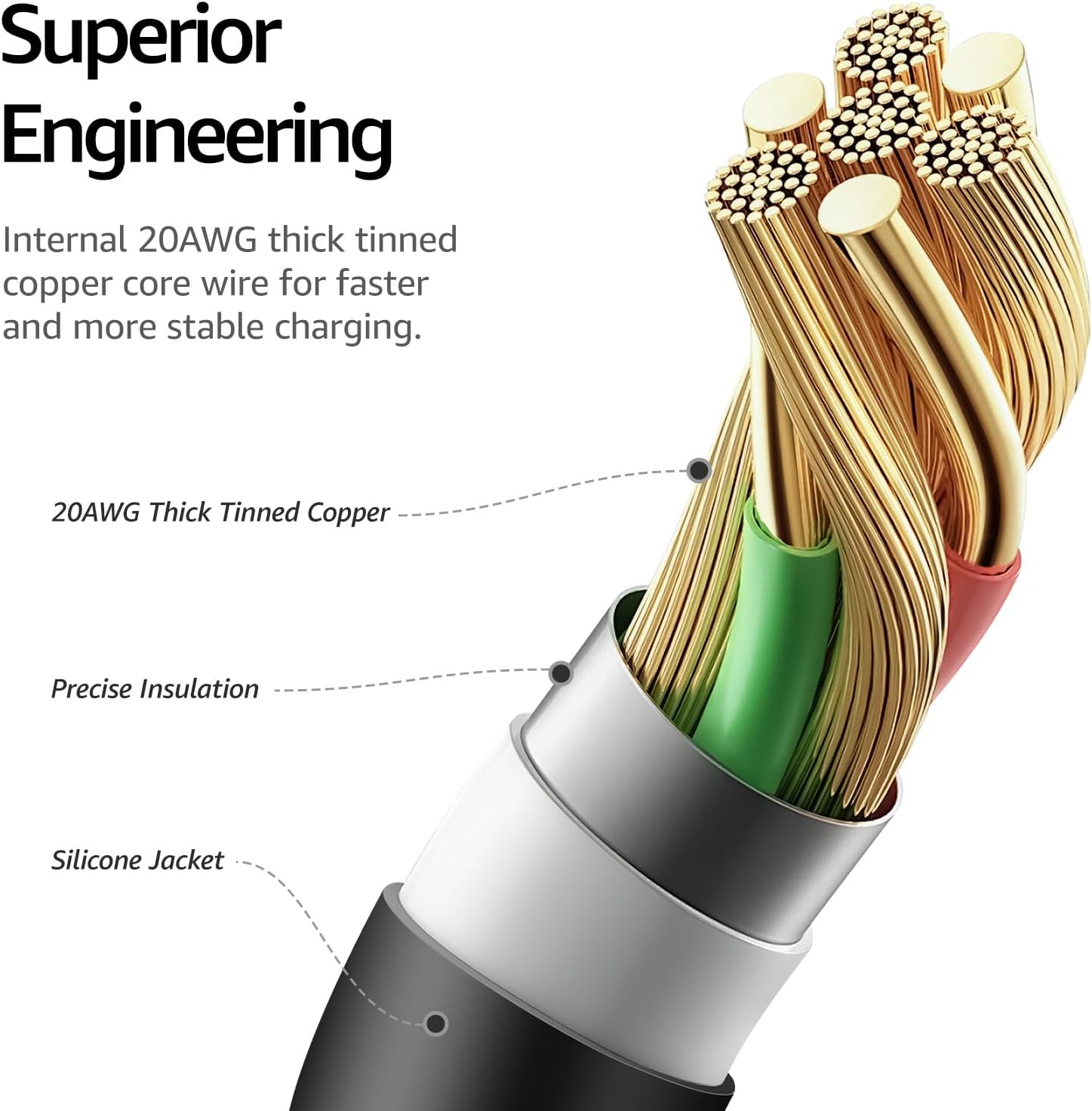
Image 3.2: Visual guide to the cable's universal compatibility with chargers, earbuds, speakers, wireless chargers, desktops, laptops, phones, and tablets.
Производ је завршенview видео:
Video 3.1: An official TOZO video demonstrating the universal compatibility, fast charging, and durable build of the USB-C cable.
4. Нега и одржавање
Proper care extends the lifespan of your TOZO USB-C to USB-A cable. Follow these guidelines for maintenance.
Карактеристике издржљивости:
- Thickened Weave: The high-density thickened braided cable resists pulling, bending, and tangling.
- Меки силиконски материјал: The silicone coating provides exceptional resistance to wear and tear from frequent use.
- Животни век савијања: Designed to withstand over 10,000 bends, ensuring long-term reliability.
- Чврста конструкција: Robust construction allows the cable to endure heavy usage.

Image 4.1: The cable's rugged and durable design, highlighting a bend lifespan exceeding 10,000 cycles.

Image 4.2: Demonstration of the cable's solid build, passing a lifting test with 39.5 Newtons of force.
Општа нега:
- Складиштење: Use the included adjustable silicone cable ties to secure the cable length and prevent tangling when not in use. This helps maintain its shape and prevents damage.
- Чишћење: Wipe the cable with a soft, dry cloth to remove dust or dirt. Avoid using harsh chemicals or abrasive materials.
- Руковање: Avoid excessive force when plugging or unplugging the cable. Always grip the connector head, not the cable itself, to prevent strain on the connection points.
- Окружење: Store the cable in a cool, dry place away from extreme temperatures and direct sunlight.
КСНУМКС. Решавање проблема
If you encounter issues with your TOZO USB-C to USB-A cable, refer to the following common troubleshooting steps:
- Уређај се не пуни:
- Ensure both ends of the cable are securely connected to the power source and your device.
- Проверите да ли адаптер за напајање исправно функционише и да ли је укључен у утичницу под напоном.
- Проверите да ли је порт за пуњење вашег уређаја чист и без прљавштине.
- Try using a different power adapter or a different USB-C device to isolate the issue.
- Споро пуњење:
- Confirm that your power adapter supports fast charging (e.g., 5V/3A or 15W). Lower wattagЕ адаптери ће резултирати споријим пуњењем.
- Ensure your device is not running power-intensive applications in the background while charging.
- Проблеми са преносом података:
- Ensure the cable is connected to a computer or host device that supports data transfer.
- Check your device's settings to ensure it is configured for data transfer (e.g., "File Transfer" mode on Android devices).
- Покушајте да се повежете на други УСБ порт на рачунару.
- Поново покрените и рачунар и повезани уређај.
- Оштећење кабла:
- Inspect the cable for any visible signs of damage, suchs as fraying, cuts, or bent connectors. A damaged cable should be replaced.
6. Спецификације
| Феатуре | Спецификација |
|---|---|
| Назив производа | TOZO USB-C to USB-A Charging and Data Cable |
| Модел | УСБ-Ц на УСБ-А кабл за пуњење |
| Тип конектора | УСБ-А на УСБ-Ц |
| Снага пуњења | До 15 В (5В/3А) |
| Брзина преноса података | До 480 Мбпс (УСБ 2.0) |
| Цабле Ленгтх | 1 Meter (approximately 3.3 feet) |
| Материјал | Soft Silicone, Thickened Braided Cable |
| Боја | Црно |
7. Гаранција и подршка
TOZO products are designed for reliability and performance. For specific warranty information and customer support, please refer to the official TOZO webсајт или директно контактирајте њихову корисничку службу.
- гаранција: Please check the product packaging or the official TOZO webсајт за најновију политику гаранције.
- Корисничка подршка: For technical assistance, troubleshooting, or other inquiries, visit the TOZO Store on Amazon or the official TOZO support channels.